1. Įvadas
Thank you for choosing the Spacekey QIG-D01 Dehumidifier. This manual provides essential information for the safe and efficient operation of your new appliance. Please read it thoroughly before use and retain it for future reference. This dehumidifier is designed to reduce excess moisture in areas up to 850 square feet, such as basements, bedrooms, bathrooms, RVs, and closets, improving air quality and comfort.

1 pav.: priekis view of the Spacekey QIG-D01 Dehumidifier, showing its white and black design with a digital display and visible water tank.

Figure 2: Visual representation of the dehumidifier's effectiveness in reducing room humidity.

Figure 3: Common issues resolved by maintaining optimal humidity levels with the dehumidifier.
2. Svarbios saugos instrukcijos
Kad sumažintumėte gaisro, elektros smūgio ar sužalojimo riziką, visada laikykitės šių pagrindinių atsargumo priemonių:
- Prieš naudodami prietaisą perskaitykite visas instrukcijas.
- Nenaudokite oro sausintuvo su pažeistu laidu ar kištuku.
- Įsitikinkite, kad maitinimo lizdas yra tinkamai įžemintas.
- Neužblokuokite oro įleidimo ir išleidimo angų.
- Laikykite prietaisą atokiau nuo vandens ir kitų skysčių.
- Prieš valydami ar atlikdami bet kokią techninę priežiūrą, atjunkite oro sausintuvą nuo elektros tinklo.
- Neleiskite vaikams naudotis prietaisu be priežiūros.
- This appliance is equipped with a 45° tip-over protection feature. If the unit is tilted beyond 45 degrees, it will automatically shut off to prevent damage or spills.

Figure 4: Illustration of the dehumidifier's 45° tip-over protection, demonstrating automatic shutdown for safety.
3. Produktas baigtasview
3.1 Components and Design Features
- Pagrindinis įrenginys su valdymo skydeliu
- Water Tank (3.0L / 106 oz capacity)
- Plaunamas oro filtras
- Maitinimo laidas
- Integrated Handles for portability
- Visual Water Tank for easy monitoring
- 45° Tip-over Protection
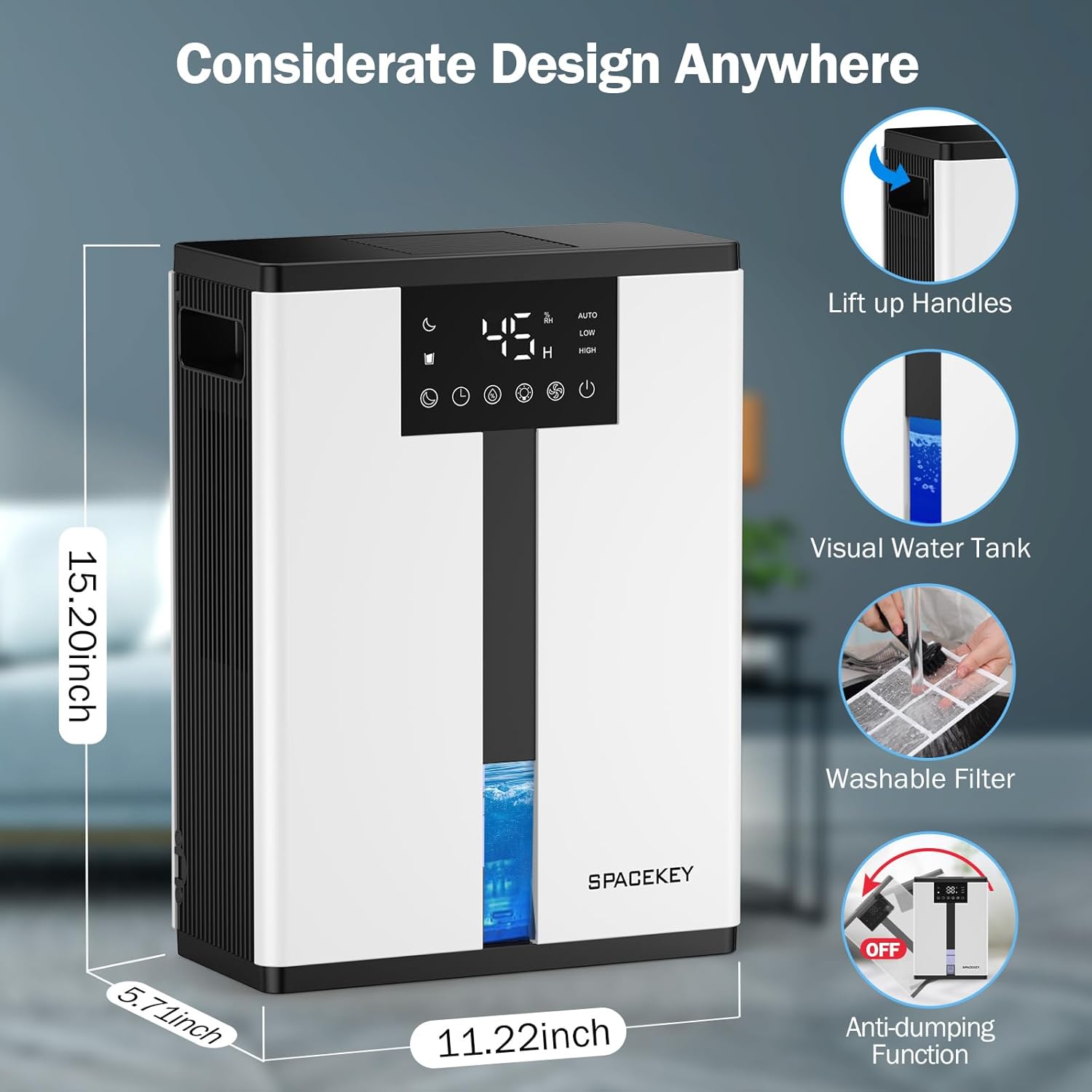
Figure 5: Key design elements and dimensions of the Spacekey QIG-D01 Dehumidifier.
3.2 Advanced Dehumidification Technology
The Spacekey QIG-D01 utilizes semiconductor condensation technology with dual fans and dual semiconductor condensers for enhanced efficiency in moisture removal.
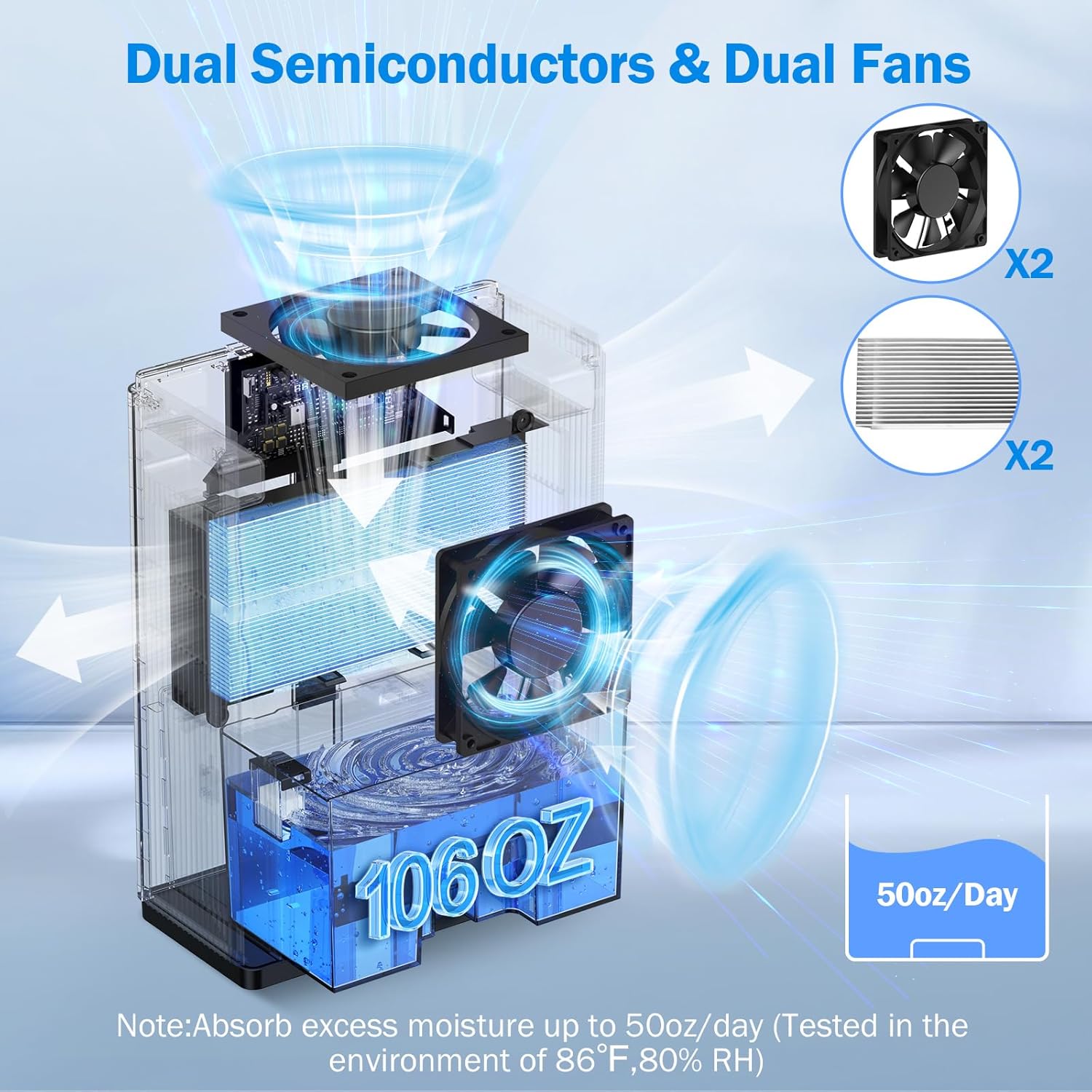
6 pav. Vidinis view of the dual semiconductor and dual fan system for efficient dehumidification.
3.3 Valdymo skydas
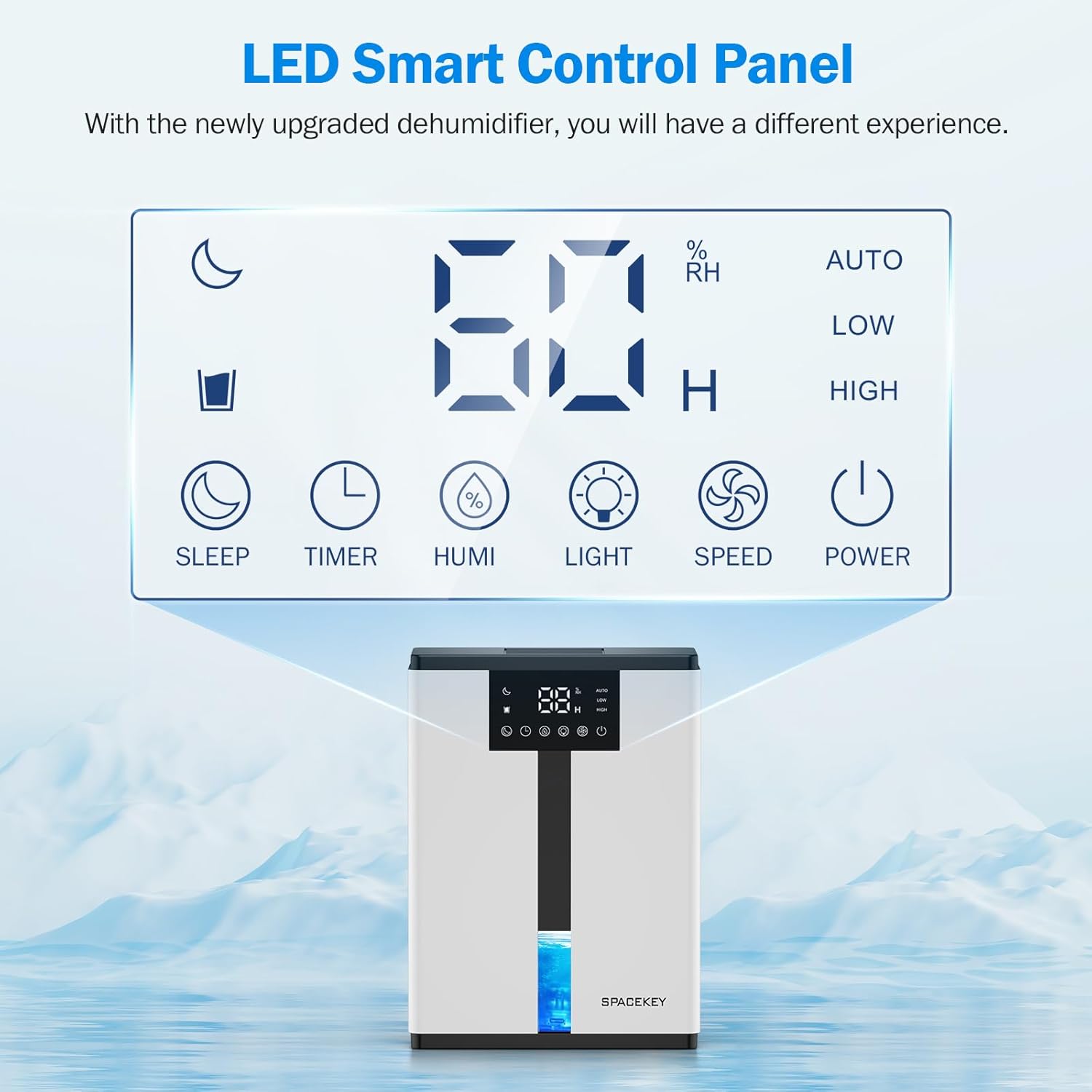
Figure 7: The LED Smart Control Panel, displaying current humidity and various function buttons.
The intuitive LED display shows real-time humidity. Buttons include:
- Miegojimo rezimas: Activates quiet operation and can be used with colorful lights.
- Laikmatis: Sets operating duration (2H, 4H, 6H, 8H, 12H).
- HUMI: Adjusts target humidity (45%, 55%, 65%, or continuous '00').
- ŠVIESA: Controls the 7-color ambient light.
- GREITIS: Selects fan speed (Auto, Low, High).
- GALIA: Įjungia/išjungia įrenginį.
4. Sąrankos instrukcijos
- Išpakuoti: Atsargiai išimkite oro sausintuvą iš pakuotės.
- Vieta: Place the unit on a flat, stable surface in the desired location. Ensure there is at least 8 inches (20 cm) of space around the air inlets and outlets for proper airflow.
- Maitinimo jungtis: Įjunkite maitinimo laidą į įžemintą elektros lizdą.
- Pradinis patikrinimas: Ensure the water tank is correctly inserted and empty before starting operation.

Figure 8: Recommended placement areas for the dehumidifier, highlighting its suitability for various indoor environments.
5. Naudojimo instrukcijos
5.1 Maitinimo įjungimas/išjungimas
Paspauskite GALIA mygtuką, kad įjungtumėte arba išjungtumėte oro drėkintuvą.
5.2 Drėgmės lygio nustatymas
Paspauskite HUMI button to cycle through desired humidity levels: 45%, 55%, 65%. The unit will operate until the set humidity is reached, then pause. If set to '00', the unit will operate continuously.

Figure 9: Setting the target humidity level using the HUMI button.
5.3 Ventiliatoriaus greičio reguliavimas
Paspauskite GREITIS button to select between Auto, Low, and High fan speeds. Auto mode adjusts fan speed based on current humidity.
5.4 Laikmačio funkcija
Paspauskite LAIKMATIS button to set an operating duration of 2, 4, 6, 8, or 12 hours. The unit will automatically turn off after the set time.

Figure 10: Using the Timer function to set the operating duration.
5.5 Sleep Mode & Colorful Lights
Paspauskite MIEGAS button to activate sleep mode for ultra-quiet operation (approx. 30dB). Press the ŠVIESA button to cycle through 7 colorful ambient lights or select a static color. This feature can be used independently or in conjunction with sleep mode.
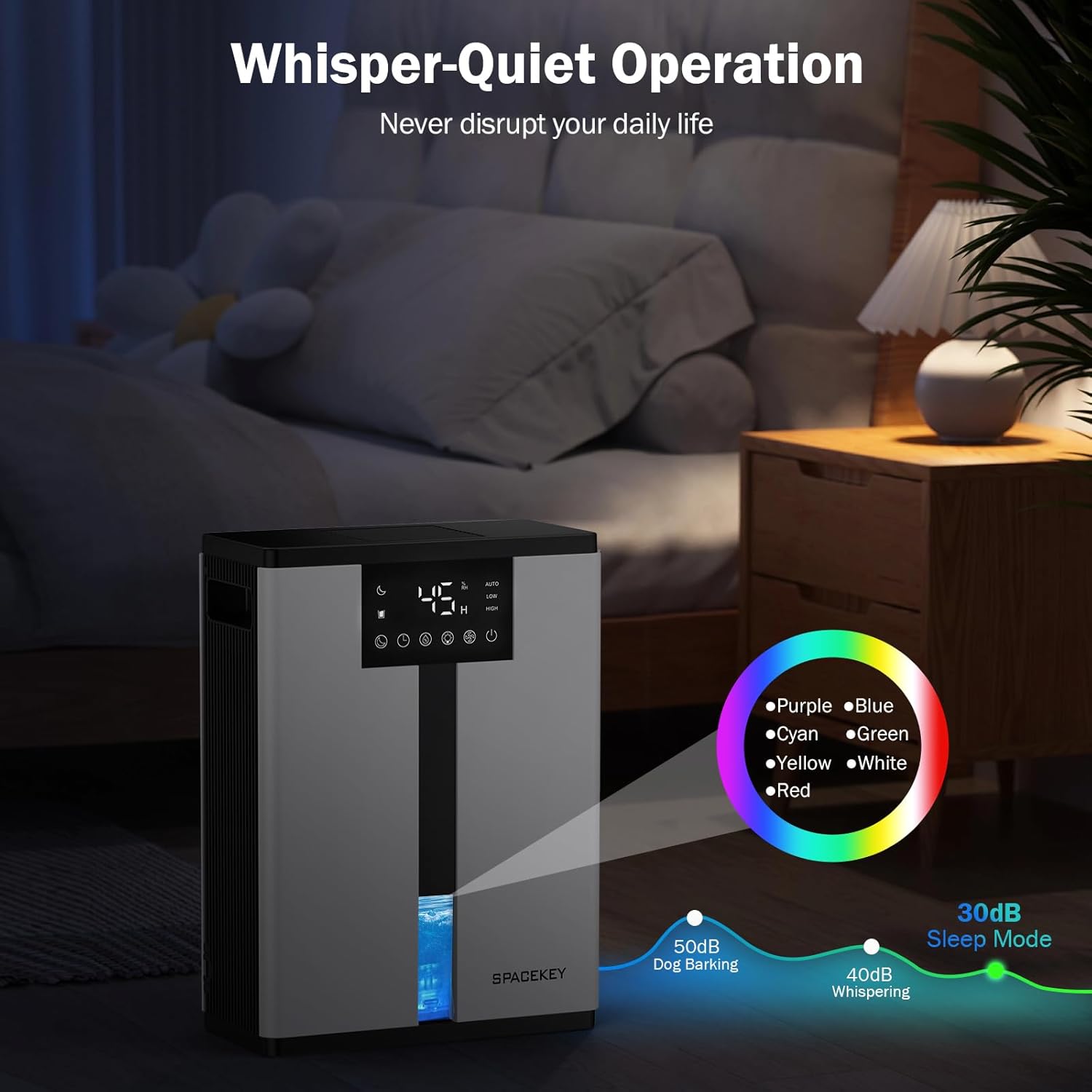
Figure 11: Dehumidifier in Sleep Mode with ambient lighting for a peaceful environment.
5.6 Automatinis išsijungimas
The dehumidifier will automatically shut off and flash a red light with an audible beep when the water tank is full. Empty the water tank to resume operation.
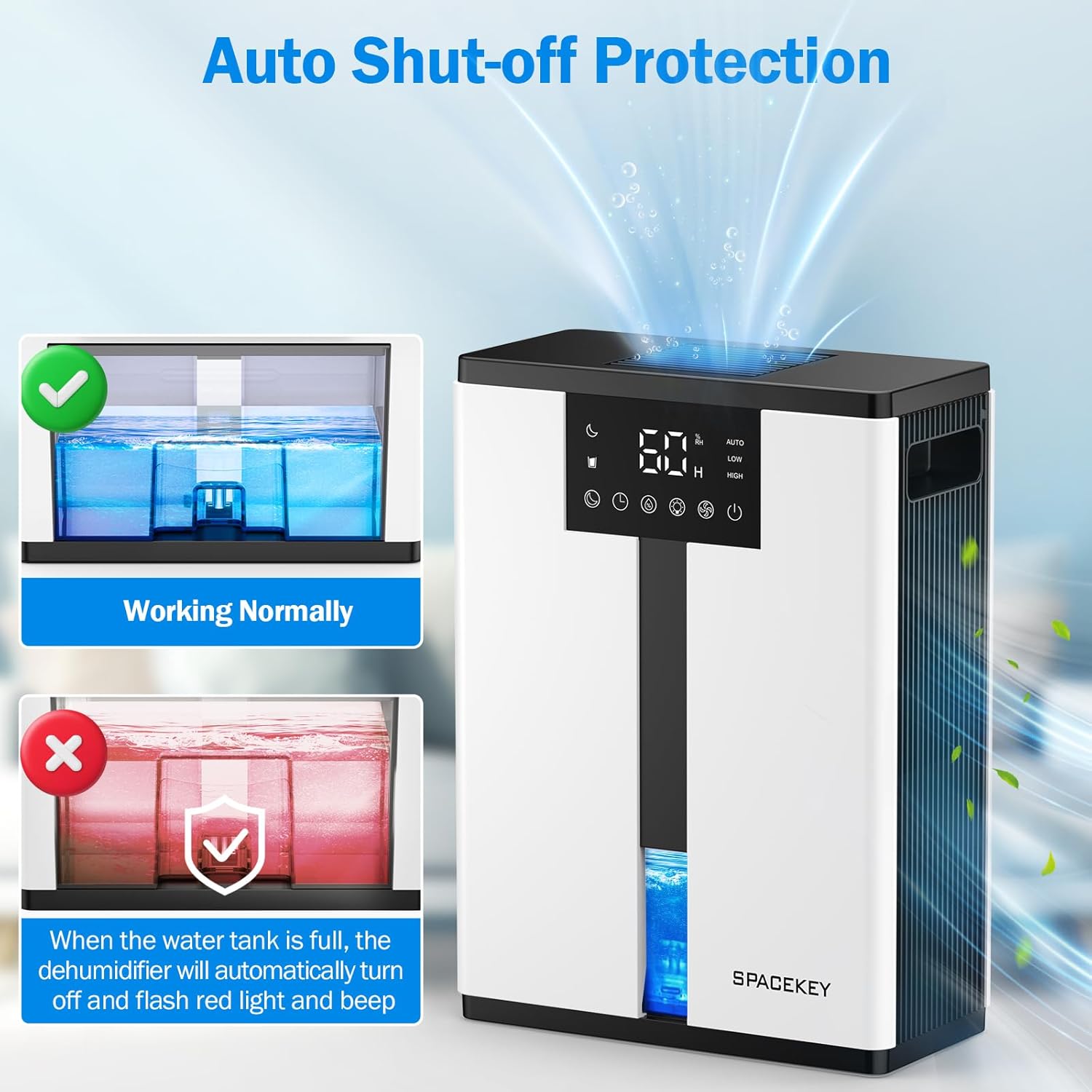
Figure 12: Automatic shut-off mechanism when the water tank is full.
6. Priežiūra
6.1 Vandens bako ištuštinimas
- Švelniai ištraukite vandens baką iš įrenginio priekio.
- Nuimkite bako dangtį.
- Surinktą vandenį išpilkite.
- Replace the lid and reinsert the water tank firmly into the dehumidifier.

Figure 13: Step-by-step guide to emptying the water tank.
6.2 Oro filtro valymas
The washable filter should be cleaned regularly (every 2-4 weeks, depending on usage) to maintain optimal performance.
- Atjunkite oro drėkintuvą.
- Nuimkite filtrą iš įrenginio galinės dalies.
- Nuplaukite filtrą po tekančiu vandeniu, kad pašalintumėte dulkes ir šiukšles.
- Prieš įdėdami filtrą atgal, leiskite jam visiškai išdžiūti ore.
- Nenaudokite oro sausintuvo be filtro.

Figure 14: Instructions for removing and washing the air filter.
6.3 Išorės valymas
Nuvalykite sausintuvo išorę minkšta, damp audinys. Nenaudokite abrazyvinių valiklių ar tirpiklių.
7. Problemų sprendimas
| Problema | Galima priežastis | Sprendimas |
|---|---|---|
| Oro sausintuvas neįsijungia. | No power; power cord not plugged in; water tank full or incorrectly inserted. | Check power connection; empty and reinsert water tank correctly. |
| Nesurenkamas vanduo arba žemas sausinimo lygis. | Room humidity is already low; air filter is clogged; ambient temperature is too low; unit size is too small for the space. | Ensure humidity is above target; clean air filter; operate in recommended temperature range; consider unit placement or additional units for larger spaces. |
| Įrenginys triukšmingas. | Fan speed is set to High; unit is not on a flat surface. | Switch to Low or Sleep mode; ensure unit is on a stable, flat surface. |
| Red light flashing and beeping. | Vandens bakas pilnas. | Ištuštinkite vandens bakelį ir vėl jį įstatykite. |
8. Specifikacijos
| Funkcija | Detalė |
|---|---|
| Modelio pavadinimas | QIG-D01 |
| Prekės ženklas | Erdvės klavišas |
| Sausinimo galimybė | Up to 50 oz (approx. 3 pints) per 24 hours (at 86°F, 80% RH) |
| Vandens rezervuaro talpa | 3.0 litro (106 skysčio uncijos) |
| Aprėpties sritis | Iki 850 kvadratinių pėdų |
| Energijos suvartojimas | 70 Watts (not more than 1.68 kWh/Day) |
| Triukšmo lygis | Approx. 30dB (in Sleep Mode) |
| Matmenys (G x P x A) | 5.71 "D x 11.22" P x 15.2" A |
| Prekės svoris | 8.91 svaro |
| Ypatingos savybės | Automatic Shutoff, Intelligent Humidity Control, 4 Fan Speeds, Timer, 7 Colorful Lights, 45° Tip-over Protection, Washable Filter |
9. Garantija ir klientų aptarnavimas
Spacekey offers the following support for your dehumidifier:
- 30 dienų grąžinimas: For any dissatisfaction.
- 2 metų pakeitimas: Dėl gaminio defektų ar gedimų.
- Klientų aptarnavimas visą gyvenimą: Dedicated support for any questions or issues.
If you have any questions or require assistance, please do not hesitate to contact Spacekey customer support. We aim to reply within 24 hours.


15 pav. Baigtaview of Spacekey's customer support and warranty policies.


