1. Produktas baigtasview
The ULTRAK 495 Professional 100-Lap Digital Stopwatch is designed for precise timekeeping in various sports and training activities. It features a large, easy-to-read display and multiple functions to support athletes, coaches, and referees.
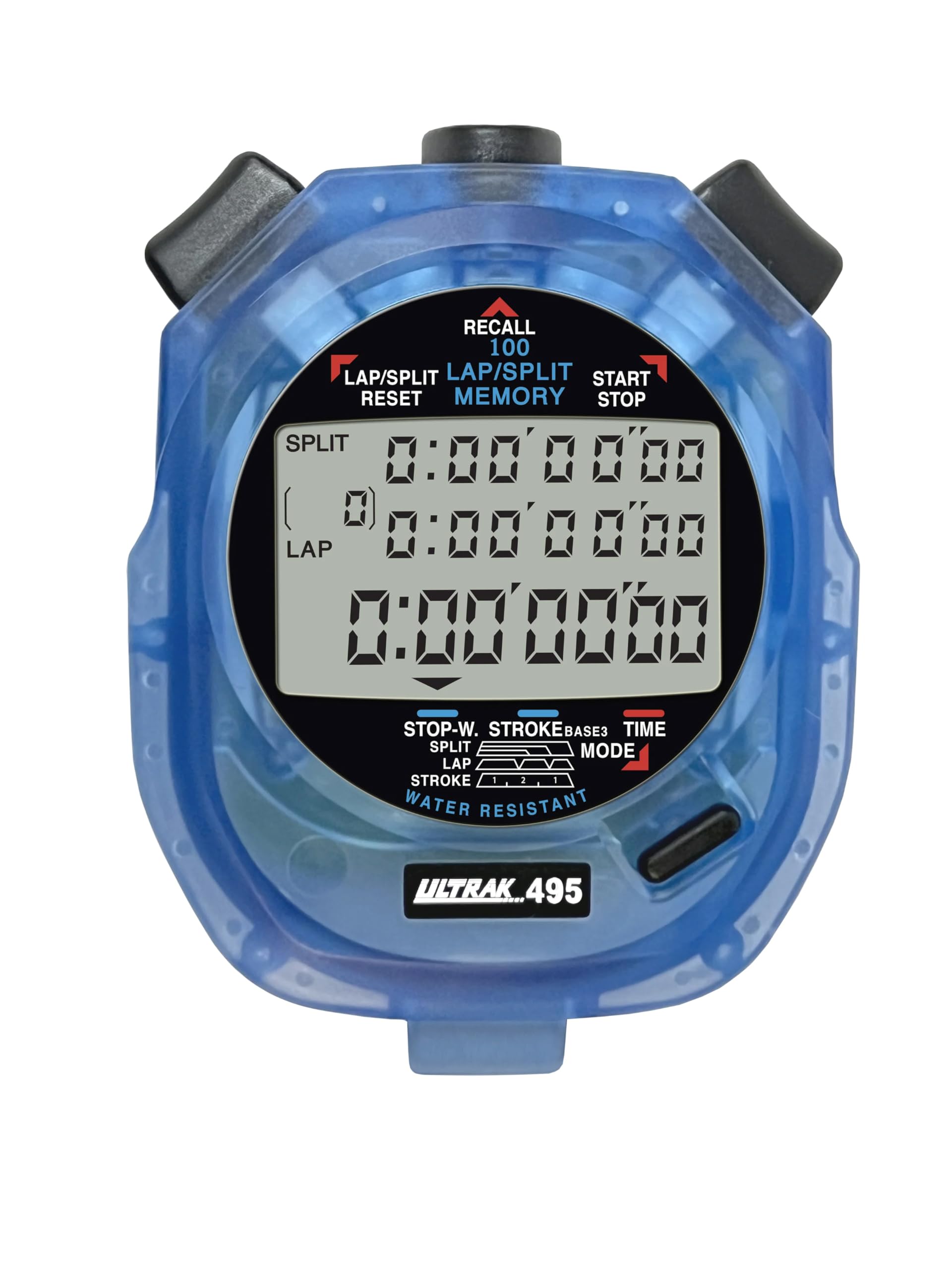
Figure 1: ULTRAK 495 Stopwatch in blue.
Pagrindinės funkcijos:
- 100 Dual Split Recallable Memory: Enhances accuracy for track and field events, ideal for athletes and coaches requiring precise timekeeping.
- Universalios funkcijos: Includes stroke/frequency, time, and calendar functions, suitable for diverse sports activities.
- Vandeniui atsparus dizainas: Allows for outdoor use in various weather conditions.
- Didelis 3 eilučių ekranas: Facilitates easy viewing of multiple lap times simultaneously.
- Durable Lithium Battery: Ensures reliability for extended use.
2. Sąranka
2.1. Akumuliatoriaus įdėjimas
The ULTRAK 495 Stopwatch comes with one Lithium Metal battery pre-installed. If battery replacement is needed, refer to the Maintenance section.
2.2. Pradinis laiko ir datos nustatymas
Norėdami nustatyti laiką ir datą:
- Paspauskite REŽIMAS button repeatedly until the time/calendar display mode is active.
- Paspauskite ir palaikykite NUSTATYTI button (usually located on the top right) until the digits begin to flash.
- Naudokite LAP/SPLIT/RESET button (top left) to adjust the flashing digit.
- Paspauskite NUSTATYTI button to move to the next digit or setting (e.g., hours, minutes, seconds, month, day, year).
- Kai visi nustatymai bus teisingi, paspauskite REŽIMAS mygtuką, norėdami išeiti iš nustatymo režimo.

Figure 2: Stopwatch displaying various modes, including Time/Calendar.
3. Operacija
3.1. Stopwatch Mode (Standard Timing)
This mode is used for basic timing of events.
- Ensure the stopwatch is in the standard stopwatch mode (usually indicated by "STOPWATCH" on the display). If not, press REŽIMAS kol pasirodys.
- Paspauskite START/STOP (top right button) to begin timing.
- Paspauskite START/STOP dar kartą, kad pristabdytumėte laikmatį.
- Paspauskite START/STOP atnaujinti laiko nustatymą.
- To reset the timer to zero, ensure it is stopped, then press LAP/SPLIT/RESET (top left button).
3.2. Lap/Split Timing with Memory Recall
The ULTRAK 495 can record up to 100 lap and split times.
- In stopwatch mode, press START/STOP pradėti laiko skaičiavimą.
- Paspauskite LAP/SPLIT/RESET to record a split time. The display will momentarily show the split time while the main timer continues running in the background. The bottom row displays the running event or lap time.
- Repeat step 2 for each lap or split you wish to record.
- Paspauskite START/STOP to end the timing session.
- To recall recorded times, press the PRISIMINTI button (top center). Use the LAP/SPLIT/RESET ir START/STOP buttons to navigate through the stored lap and split times.
- To exit recall mode, press REŽIMAS. To clear memory, ensure the stopwatch is stopped and not in recall mode, then press and hold LAP/SPLIT/RESET.

Figure 3: Display showing simultaneous split, lap, and total times.
3.3. Atgalinio skaičiavimo laikmačio režimas
The stopwatch includes a countdown timer function.
- Paspauskite REŽIMAS until the countdown timer display appears.
- Paspauskite ir palaikykite NUSTATYTI norėdami įjungti nustatymo režimą.
- Naudokite LAP/SPLIT/RESET koreguoti laiką ir NUSTATYTI , kad galėtumėte pereiti tarp valandų, minučių ir sekundžių.
- Nustačius norimą atgalinio skaičiavimo laiką, paspauskite REŽIMAS , kad išeitumėte iš nustatymo režimo.
- Paspauskite START/STOP , kad pradėtumėte atgalinį skaičiavimą. Kai laikmatis pasieks nulį, suskambės žadintuvas.
3.4. Stroke/Frequency Measuring Mode
This mode is useful for measuring stroke rates in swimming or other repetitive actions.
- Paspauskite REŽIMAS until the stroke/frequency mode is displayed.
- Paspauskite START/STOP to begin measuring.
- Paspauskite LAP/SPLIT/RESET at the start of each stroke or cycle. The stopwatch will calculate and display the frequency.
- Paspauskite START/STOP kad nustotų matuoti.
4. Priežiūra
4.1. Valymas
Wipe the stopwatch with a soft, dry cloth. For stubborn dirt, use a slightly damp šluoste ir švelniu muilu, tada kruopščiai nusausinkite. Venkite stiprių cheminių medžiagų ar abrazyvinių valiklių.
4.2. Atsparumas vandeniui
The ULTRAK 495 is water-resistant, making it suitable for use in various weather conditions. However, it is not designed for submersion. Avoid pressing buttons while the stopwatch is wet to prevent water ingress.
4.3. Baterijos keitimas
The stopwatch uses one Lithium Metal battery. When the display becomes dim or functions become erratic, it's time to replace the battery. Carefully open the battery compartment (usually on the back, secured by small screws) and replace with a new battery of the same type. Ensure proper polarity and securely close the compartment.
5. Problemų sprendimas
- Ekranas tuščias arba blankus: Patikrinkite bateriją. Jei reikia, pakeiskite.
- Stopwatch resets unexpectedly during timing: This can sometimes occur due to low battery or a temporary electrical glitch. Try replacing the battery. If the issue persists, ensure buttons are not being pressed inadvertently.
- Mygtukai nereaguoja: Ensure the stopwatch is not in a locked mode (if applicable, check manual for specific lock features). If wet, ensure it is completely dry. If still unresponsive, try replacing the battery.
- Neteisingas laikas arba data: Refer to section 2.2 to re-set the time and date.
6. Specifikacijos
| Funkcija | Detalė |
|---|---|
| Modelio numeris | 495 |
| Atmintis | 100 Dual Split Recallable Laps |
| Ekranas | Large 3-Row Display |
| Funkcijos | Stopwatch, Lap/Split, Countdown Timer, Stroke/Frequency, Time, Calendar |
| Atsparumas vandeniui | Taip (atsparus vandeniui) |
| Baterijos tipas | 1 ličio metalo baterija (pridedama) |
| Medžiaga | Plastikiniai |
| Gaminio matmenys | 0.2 "D x 2.5" P x 3.5" A |
| Prekės svoris | 3.2 uncijos |
7. Garantija ir palaikymas
For specific warranty information and customer support, please refer to the documentation included with your product or visit the official Ultrak websvetainėje. Išsaugokite pirkimo kvitą kaip pirkimo įrodymą bet kokiems garantiniams prašymams.