1. Įvadas
Thank you for choosing the Baseus 240W Smart Charging Station. This 5-in-1 desktop USB-C charger features a digital LED display and supports PD 3.1 for fast charging of multiple devices, including laptops and smartphones. This manual provides detailed instructions for setup, operation, and maintenance to ensure optimal performance and safety.
2. Kas įskaičiuota
Prašome patikrinti, ar pakuotėje yra visi reikalingi daiktai:
- 1 x Baseus 240W 5-Port Intelligent Fast Charger
- 1 x 240W USB-C Charging Cable
- 1 x Square Tip DC Adapter
- 2 x Round Tip DC Adaptors
- 1 x Vartotojo vadovas
Video: Unboxing and contents of the Baseus 240W Smart Charging Station.
3. Produktas baigtasview
The Baseus 240W Smart Charging Station is designed for efficiency and versatility, featuring multiple ports and smart functionalities.
3.1 Prievado konfigūracija

Vaizdas: priekis view of the Baseus 240W Smart Charging Station, highlighting its 1 DC port, 3 USB-C ports, and 1 USB-A port.
The charging station includes 1 DC port, 3 USB-C ports, and 1 USB-A port, allowing for simultaneous charging of up to 5 devices.
3.2 Intelligent Display and App Control
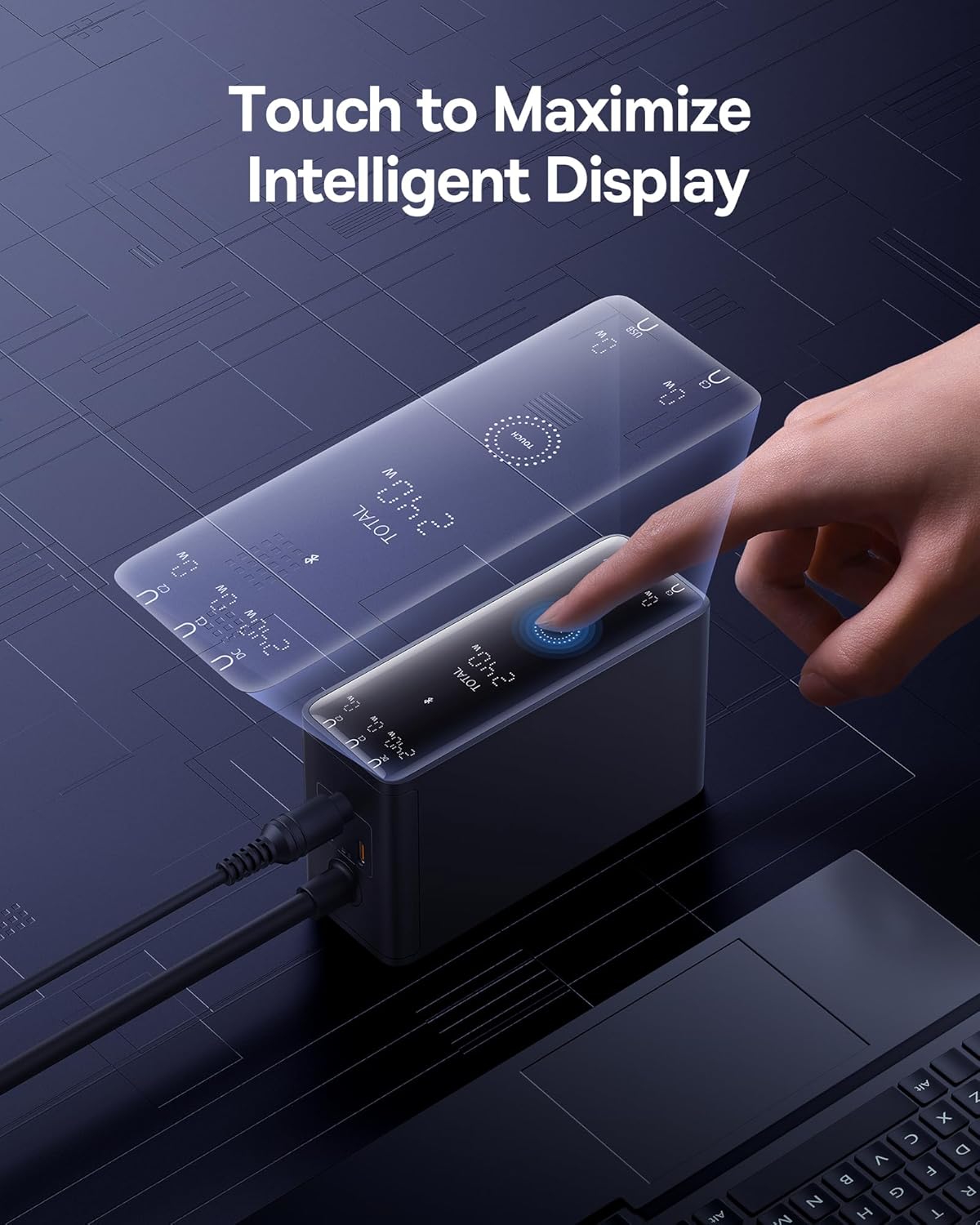
Image: A hand touching the intelligent display of the charging station, showing real-time charging information.
The integrated digital LED display provides real-time charging status. Additionally, the Baseus smart app allows for remote control and monitoring of charging options.

Image: A smartphone displaying the Baseus app interface, demonstrating features like temperature surveillance, maximum output power regulation, charging safety surveillance, and remote control.
3.3 Advanced Cooling Technology

Paveikslėlis: sprogęs view diagram showing the internal cooling technologies: Graphene Cooling Technology, Glue-Fill Technology, and Baseus Cooling Technology (BCT).
The charger incorporates Graphene Cooling Technology, Glue-Fill Technology, and Baseus Cooling Technology (BCT) to ensure efficient heat dissipation and stable performance.
4. Sąrankos instrukcijos
Follow these steps to set up your Baseus 240W Smart Charging Station:
- Prijunkite prie maitinimo: Plug the charging station into a wall outlet using the provided power cable. The digital display will illuminate.
- Prijunkite įrenginius:
- For USB-C devices (laptops, smartphones, tablets): Use the provided 240W USB-C charging cable or other compatible USB-C cables to connect your devices to the USB-C ports.
- For DC-powered laptops: Connect the DC power cord to the charging station. Attach the appropriate square tip or round tip DC adapter to the DC connector, then plug it into your laptop's DC port.
- For USB-A devices: Connect your device using a compatible USB-A cable to the USB-A port.
- Monitoriaus įkrovimas: The digital LED display will show the real-time power output for each port and the total power consumption.
Video: Demonstrates connecting a laptop via USB-C, connecting a laptop via DC port using an adapter, and connecting multiple devices simultaneously.
5. Naudojimo instrukcijos
5.1 Programėlės prijungimas ir valdymas
The Baseus Smart Charging Station can be controlled via the Baseus app for enhanced functionality.
- Įdiekite programą: Ieškokite and install the "Baseus" app from your device's App Store. Alternatively, scan the QR code provided in the physical user manual.
- Suporuokite įrenginį: Ensure Bluetooth is enabled on your phone. Open the Baseus app, click "Add Device," and select the "BS-GaN240" model. Once successfully added, navigate to "My Devices" on the homepage to access the device page.
- Programėlės funkcijos: Programėlė leidžia jums:
- View current total power and device temperature.
- Set countdown timers for power on/off (up to 11 hours and 59 minutes).
- Toggle individual port interfaces on/off. When an interface is turned off, the charger panel will display "OFF."
- Enable "Priority Output" for specific ports to prioritize charging.
- View power and temperature change curves for safety monitoring.
5.2 Device Settings (via App or Touch Button)
You can adjust various settings through the app or directly on the device:
- Maitinimo įjungimas/išjungimas: In the app, click the power switch button in the top right corner of "My Devices." Alternatively, long-press the Touch button on the charger for 1 second.
- Ekrano įjungimas/išjungimas: In the app, go to "My Devices" and click on the "Device Screen" button. Alternatively, double-click the Touch button on the charger.
- Užraktas nuo vaikų: In the app, access the settings page (via "My Devices"). Click the button to enable/disable child lock. Alternatively, long-press the Touch button for 5 seconds to disable it.
- Gamykliniai nustatymai: In the app, go to the settings page. Click "Factory Reset" and select "Confirm." Alternatively, long-press the Touch button for 5 seconds.
- Device Unbinding: In the app, go to the settings page. Click "Unbind Device" and select "Confirm."
Video: Demonstrates app connection, setting countdown tasks, enabling priority output, viewing power/temperature curves, toggling screen on/off, enabling/disabling child lock, performing a factory reset, and unbinding the device.
6. Įkrovimo scenarijai ir energijos paskirstymas
The Baseus 240W Smart Charging Station intelligently distributes power based on the number and type of connected devices. Below is a general guide to power distribution:

Image: A visual guide illustrating the maximum power output for various charging configurations (single, two, three, four, and five devices) across DC, USB-C, and USB-A ports.
| Scenarijus | Naudoti uostai | Maksimali išvestis |
|---|---|---|
| Vieno prievado įkrovimas | DC išėjimas | 240W maks |
| USB-C1/C2/C3 išvestis | 140W maks | |
| USB-A išvestis | 30W maks | |
| Dviejų prievadų įkrovimas | DC + USB-C1/C2/C3 | 140W + 100W Maks |
| DC + USB-A | 140W + 30W Maks | |
| USB-C1/C2 + USB-C2/C3 | 140W + 100W Maks | |
| USB-C1/C2/C3 + USB-A | 140W + 30W Maks | |
| Trijų prievadų įkrovimas | DC + USB-C1/C2 + USB-C2/C3 | 140W + 65W + 30W Max |
| DC + USB-C1/C2/C3 + USB-A | 140W + 65W + 30W Max | |
| USB-C1/C2/C3 + USB-C2/C3 + USB-A | 140W + 65W + 30W Max | |
| Keturių prievadų įkrovimas | DC + USB-C1 + USB-C2 + USB-C3 | 140W + 60W + 20W + 18W Max |
| DC + USB-C1 + USB-C2 + USB-A | 140W + 60W + 20W + 18W Max | |
| USB-C1 + USB-C2 + USB-C3 + USB-A | 140W + 60W + 20W + 18W Max | |
| Five-Port Charging | DC + USB-C1 + USB-C2 + USB-C3 + USB-A | 140W + 45W + 18W + 18W Max |
7. Saugos informacija
The Baseus 240W Smart Charging Station is equipped with 9 protective charging protocols to ensure the safety of your devices and the charger:
- Virš ttage Apsauga
- Apsauga nuo per didelės srovės
- Apsauga nuo galios
- Elektrostatinė apsauga
- Trumpojo jungimo apsauga
- Apsauga nuo temperatūros
- Under-Voltage Apsauga
- Anti-Interference Protection
- Flame-Retardant Housing
Always use the charger in a well-ventilated area and avoid exposing it to extreme temperatures or moisture. Do not attempt to disassemble or repair the device yourself.
8. Specifikacijos
| Funkcija | Detalė |
|---|---|
| Modelio numeris | CCGAN240CS |
| Iš viso USB prievadų | 5 (3x USB-C, 1x USB-A, 1x DC) |
| Vattage | 240 vatų |
| Jungties tipas | C tipo USB |
| Suderinami įrenginiai | Laptops, Smartphones (e.g., MacBook Pro, Dell XPS, Lenovo, iPhone 16, Galaxy S24) |
| Ypatingos savybės | 140W PD3.1 Fast Charging, Remote App Control, Smart LCD Display |
| Medžiaga | Plastikiniai |
| Prekės svoris | 2.2 svaro |
| Pakuotės matmenys | 7.4 x 7.13 x 2.13 colio |
9. Problemų sprendimas
If you encounter issues with your charging station, please refer to the following common solutions:
- Be maitinimo / ekranas išjungtas: Ensure the power cable is securely connected to both the charging station and the wall outlet. Check if the wall outlet is functional. If using the app, ensure the interface switch is not turned off.
- Lėtas įkrovimas: Verify that your device and cable support fast charging protocols (e.g., PD 3.1). Ensure the total power draw does not exceed the charger's maximum output. Use the app to check individual port outputs and enable "Priority Output" if needed.
- Įrenginys neatpažintas: Try reconnecting the cable. Ensure the cable is not damaged. Test with a different cable or port.
- Programos ryšio problemos: Ensure Bluetooth is enabled on your phone and the charger is within range. Try restarting the app or your phone. If issues persist, try unbinding and re-pairing the device in the app.
- Perkaitimas: The charger has advanced cooling. If it feels excessively hot, disconnect all devices and allow it to cool down. Ensure it is in a well-ventilated area.
Dėl papildomos pagalbos kreipkitės į „Baseus“ klientų aptarnavimo tarnybą.
10. Garantija ir palaikymas
The Baseus 240W Smart Charging Station comes with a standard manufacturer's warranty. Please refer to the warranty card included in your package for specific terms and conditions. For technical support, warranty claims, or general inquiries, please visit the official Baseus websvetainėje arba susisiekite su klientų aptarnavimo skyriumi.
Palaikymas internetu: www.baseus.com


