Įvadas
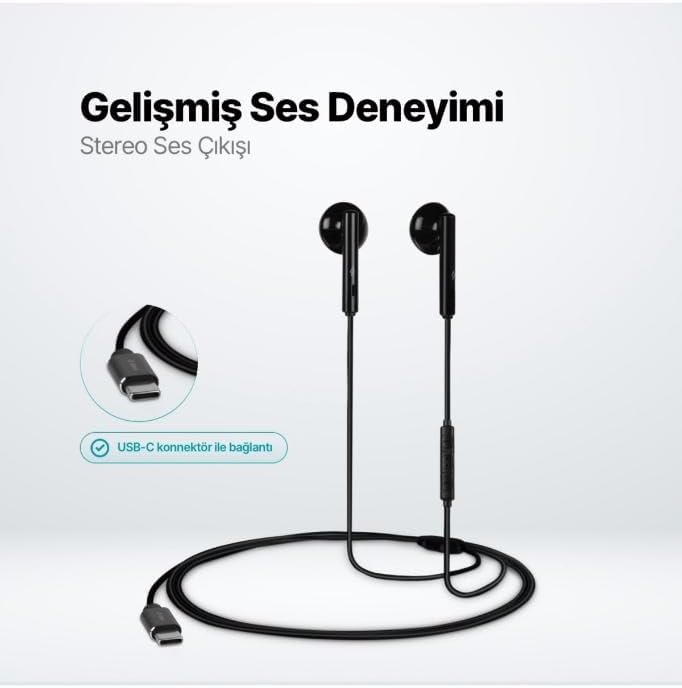
The TTEC Rio 2 Stereo USB-C Headset with Microphone is designed to provide a high-quality audio experience for music and calls. Its comfortable, lightweight design ensures a perfect fit and effective ambient noise isolation, allowing for hands-free communication and entertainment.
Pagrindinės funkcijos:
- Advanced stereo sound output for an immersive audio experience.
- Integrated microphone for clear phone calls.
- Smart inline controller for easy management of volume, calls, and music playback.
- Lightweight and ergonomic design for extended comfort.
- Universal USB-C connection.
Sąranka
To begin using your TTEC Rio 2 headset, follow these simple steps:
- Prijunkite ausines: Locate the USB-C port on your device (smartphone, tablet, laptop, etc.). Insert the USB-C connector of the TTEC Rio 2 headset firmly into the device's USB-C port.
- Įrenginio atpažinimas: Your device should automatically recognize the headset. If prompted, select the TTEC Rio 2 as the audio output and input device.
- Pritaikyti: Place the earbuds comfortably in your ears. The ergonomic design ensures a snug fit for optimal sound quality and noise isolation.
Naudojimo instrukcijos
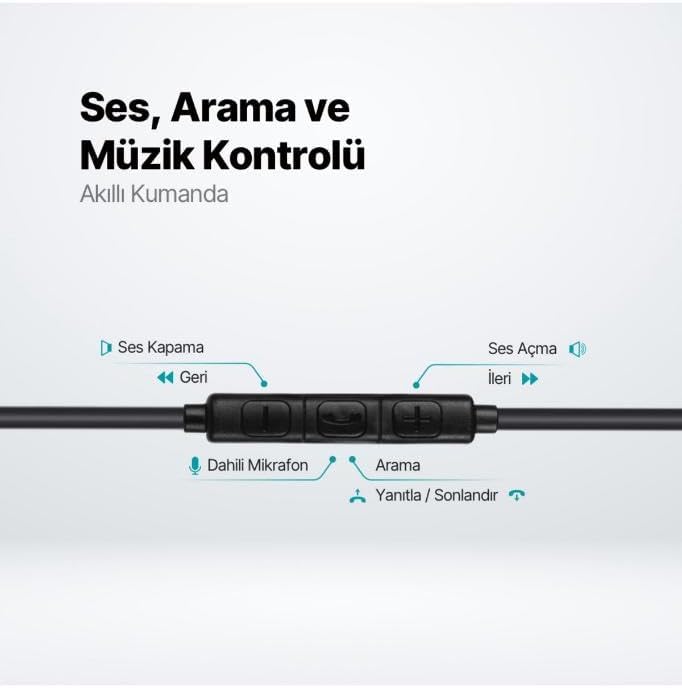
The TTEC Rio 2 headset features an inline smart controller for convenient management of your audio and calls.
Inline Controller Functions:
- Garsumo padidinimas (+): Press to increase audio volume.
- Sumažinti garsumą (-): Press to decrease audio volume.
- Play/Pause/Answer/End Call (Center Button):
- Vienas paspaudimas, norint paleisti arba pristabdyti muziką.
- Vieną kartą paspauskite, kad atsilieptumėte į skambutį.
- Vieną kartą paspauskite, kad užbaigtumėte aktyvų skambutį.
- Ilgai paspauskite norėdami atmesti įeinantį skambutį.
- Next Track (Forward Button): Paspauskite norėdami pereiti prie kitos dainos.
- Previous Track (Backward Button): Press to go back to the beginning of the current song or to the previous song.
- Integruotas mikrofonas: Located on the inline controller, it captures your voice for calls and voice commands.
Priežiūra
Proper care will extend the life and performance of your TTEC Rio 2 headset.
- Valymas: Švelniai nuvalykite ausines ir laidą minkštu, sausu skudurėliu. Nenaudokite stiprių cheminių medžiagų ar abrazyvinių medžiagų.
- Saugykla: When not in use, store the headset in a clean, dry place. Avoid extreme temperatures. The included cable organizer clip can help prevent tangling.
- Venkite drėgmės: Saugokite ausines nuo vandens ar per didelės drėgmės.
- Elkitės atsargiai: Avoid pulling on the cable or applying excessive force to the connectors.

Trikčių šalinimas
If you encounter issues with your TTEC Rio 2 headset, refer to the following common solutions:
| Problema | Galimas sprendimas |
|---|---|
| Nėra garso iš ausinių. |
|
| Mikrofonas neveikia. |
|
| Garso kokybė prasta arba iškraipyta. |
|
| Hissing or static noise. |
|
Specifikacijos
| Funkcija | Detalė |
|---|---|
| Prekės ženklas | TTEC |
| Modelio numeris | 2KMM14S |
| Ryšys | USB-C |
| Ausinių formos faktorius | Į ausis |
| Ausų išdėstymas | Į ausis |
| Mikrofonas | Įmontuotas |
| Pakuotės matmenys | 19.8 x 8.5 x 3.1 cm |
| Prekės svoris | 40 gramų |
| ASIN | B0D3XJ5SP7 |
Garantija ir palaikymas
For warranty information and customer support, please refer to the documentation included with your purchase or visit the official TTEC websvetainėje. Išsaugokite pirkimo įrodymą, jei prireiktų pateikti garantinį ieškinį.


