1. Įvadas
The KONNWEI KW450 is a comprehensive OBD2 diagnostic scanner designed for both VAG group vehicles (Volkswagen, Audi, Seat, Skoda) and universal OBDII/EOBD compliant cars. This advanced, user-friendly tool enables technicians and car owners to accurately diagnose and perform maintenance functions on various vehicle systems. It supports a wide range of special functions for VAG vehicles and standard OBDII diagnostic capabilities for all compatible cars.
The device is certified with CE, FCC, and RoHS, ensuring compliance with safety and environmental standards.
2. Sąranka ir pirmasis naudojimas
2.1 Pakuotės turinys
- KONNWEI KW450 Diagnostic Scanner
- OBD2 laidas
- USB laidas atnaujinimams
- Vartotojo vadovas
2.2 Prisijungimas prie transporto priemonės
- Raskite automobilio 16 kontaktų duomenų perdavimo jungtį (DLC). Paprastai ji yra po prietaisų skydeliu vairuotojo pusėje.
- Įsitikinkite, kad transporto priemonės uždegimo jungiklis yra IŠJUNGTOJE padėtyje.
- Firmly plug the OBD2 cable into the vehicle's DLC port.
- Įjunkite automobilio degimą į ON padėtį (variklis išjungtas). Skaitytuvas įsijungs automatiškai.
2.3 Kalbos nustatymai
Upon first use, or if you need to change the language, navigate to the 'Settings' menu on the device. Select 'Language' and choose your preferred language (English is the default).
3. Naudojimo instrukcijos
3.1 VAG Special Functions
The KW450 provides 9 special maintenance functions specifically for Volkswagen, Audi, Seat, and Skoda vehicles. Access these functions from the main menu by selecting the appropriate VAG vehicle brand.
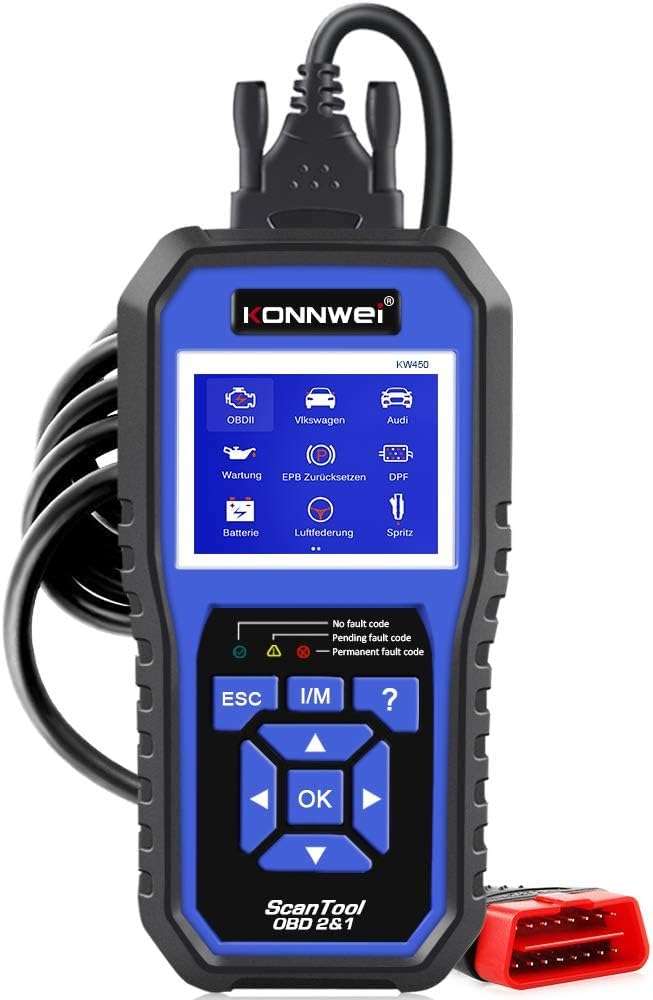
Figure 1: KONNWEI KW450 displaying its 9 special functions for VAG vehicles. These include Oil Service Reset, TPS Replacement Reset, Electronic Parking Brake (EPB) Reset, Battery Matching, Diesel Particulate Filter (DPF) Regeneration, Steering Angle Sensor (SAS) Calibration, Injector Coding, Suspension Adjustment, and Lamp Nustatymas.
- Alyvos pakeitimo atstatymas: Atstato alyvos keitimo lemputę.
- TPS pakeitimo atstatymas: Calibrates the throttle position sensor.
- EPB atstatymas: Resets the electronic parking brake system for pad replacement.
- Baterijų atitikimas: Registruoja naują akumuliatorių transporto priemonės sistemoje.
- DPF regeneracija: Pradeda dyzelino kietųjų dalelių filtro regeneracijos procesą.
- SAS kalibravimas: Kalibruoja vairavimo kampo jutiklį.
- Purkštuko kodavimas: Koduoja naujas purkštukų vertes į ECU.
- Pakabos reguliavimas: Reguliuoja automobilio pakabos nustatymus.
- Lamp Nustatymas: Configures vehicle lighting parameters.
3.2 Universal OBDII/EOBD Functions
For all other OBDII/EOBD compliant vehicles, the KW450 offers standard diagnostic capabilities. Select 'OBDII' from the main menu to access these functions.
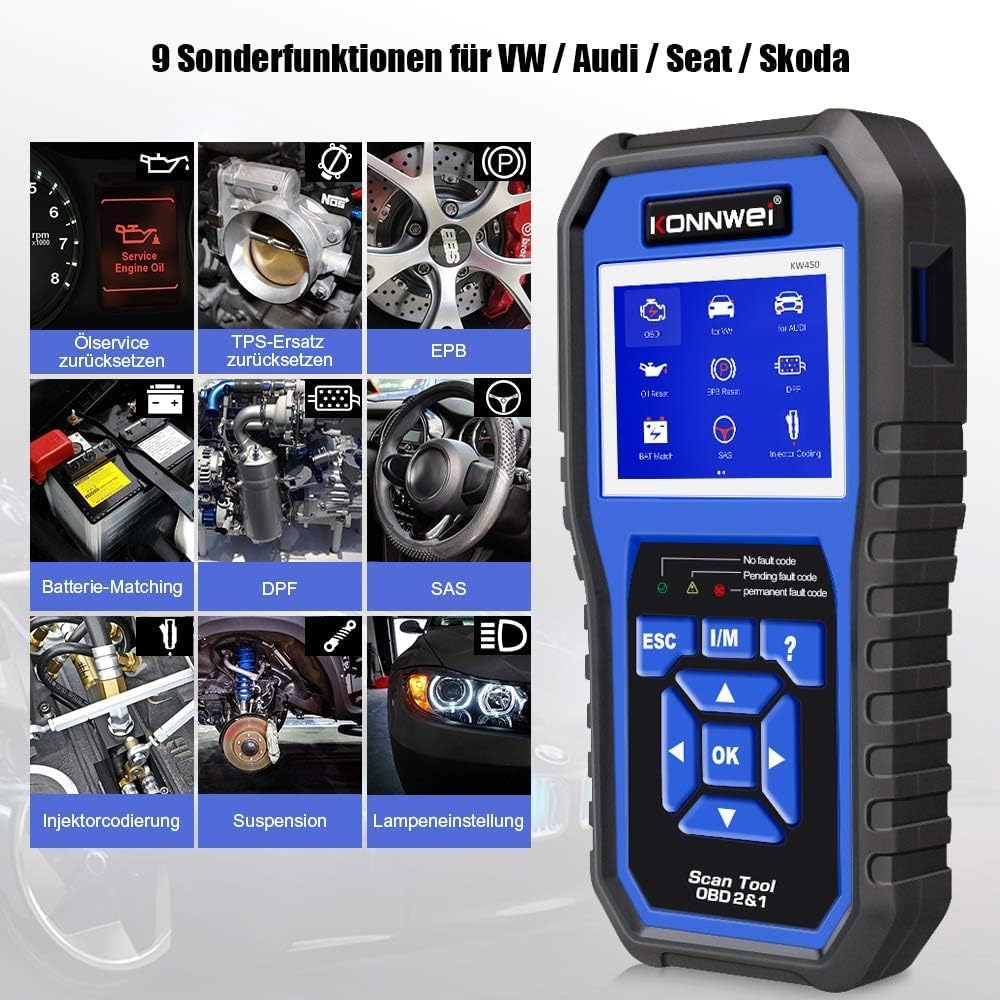
Figure 2: KONNWEI KW450 displaying universal OBD2 functions. These include Read Codes, Erase Codes, Live Data, Freeze Frame, O2 Sensor Test, I/M Readiness, On-Board Monitor Test, EVAP System Test, DTC Code Lookup, and VIN Information.
- Skaitykite kodus: Nuskaito diagnostinius gedimų kodus (DTC) iš transporto priemonės kompiuterio.
- Ištrinti kodus: Išvalo gedimų kodus iš automobilio kompiuterio ir išjungia gedimų indikatorių Lamp (MIL).
- Tiesioginiai duomenys: Rodo realaus laiko duomenų srautą iš transporto priemonės jutiklių.
- Sustabdyti kadrą: Rodo veikimo sąlygų momentinę nuotrauką gedimo metu.
- O2 jutiklio testas: Gauna O2 jutiklio monitoriaus bandymo rezultatus.
- I/M pasirengimas: Tikrina su emisija susijusių monitorių parengtį.
- Borto monitoriaus testas: Gauna borto diagnostikos stebėjimo bandymų rezultatus.
- EVAP sistemos bandymas: Pradeda garavimo išmetimo kontrolės sistemos bandymą.
- DTC kodo paieška: Pateikia išsamius gedimų kodų (DTC) aprašymus.
- VIN informacija: Displays Vehicle Identification Number and other vehicle information.
4. Priežiūra
4.1 Programinės įrangos naujiniai
The KONNWEI KW450 supports lifetime free software updates to ensure compatibility with new vehicle models and diagnostic protocols. To update the device:
- Download the 'Uplink' software from the official KONNWEI website onto a computer running Windows XP, 7, 8, or 10.
- Install the 'Uplink' software.
- Prijunkite KW450 skaitytuvą prie kompiuterio naudodami pridėtą USB laidą.
- On the scanner, press and hold the 'OK' button while plugging in the USB cable. The scanner screen should indicate 'Update Mode'.
- Open the 'Uplink' software on your computer and click 'Check Update'. Follow the on-screen instructions to complete the update process.

Figure 3: The KONNWEI KW450 connected to a computer for software updates. The 'Uplink' software facilitates the update process, ensuring the device has the latest diagnostic capabilities.
4.2 Valymas ir laikymas
- Prietaisą valykite minkšta, damp audinys. Nenaudokite abrazyvinių valiklių ar tirpiklių.
- Store the scanner in a dry, cool place, away from direct sunlight and extreme temperatures.
- Keep the cables free from kinks and damage.
5. Problemų sprendimas
| Problema | Galima priežastis | Sprendimas |
|---|---|---|
| Įrenginys neįsijungia. | Loose connection to DLC; vehicle ignition not ON; faulty OBD2 cable. | Ensure cable is securely connected. Turn ignition to ON. Try a different OBD2 port if available or check cable for damage. |
| Ryšio su transporto priemone klaida. | Incorrect protocol selected; vehicle not OBDII compliant; faulty vehicle DLC. | Verify vehicle is OBDII compliant. Check vehicle manual for DLC issues. Try on another compatible vehicle. |
| Nepavyksta išvalyti gedimų kodų. | Underlying issue not resolved; ignition not ON; specific codes cannot be cleared by generic OBD2. | Address the root cause of the fault. Ensure ignition is ON. Some manufacturer-specific codes require specialized tools. |
| Nepavyksta atnaujinti programinės įrangos. | Incorrect 'Uplink' software version; unstable USB connection; firewall/antivirus blocking. | Download the latest 'Uplink' software. Ensure a stable USB connection. Temporarily disable firewall/antivirus. |
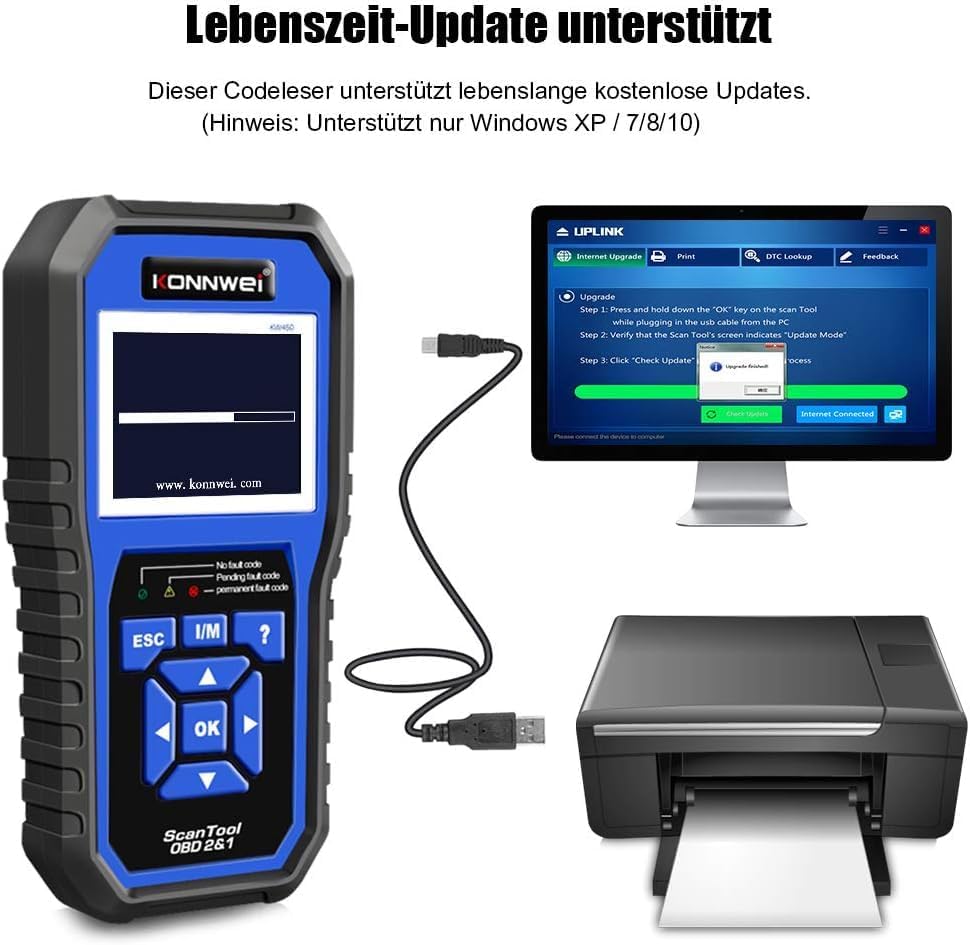
Figure 4: The KONNWEI KW450 main screen, showing indicators for 'No fault code', 'Pending fault code', and 'Permanent fault code' which are crucial for troubleshooting.
6. Specifikacijos
| Funkcija | Detalė |
|---|---|
| Prekės ženklas | KONNWEI |
| Modelis | KW450 |
| Ekrano dydis | 5 colių |
| Operating System (for updates) | „Windows XP“, 7, 8, 10 |
| Maitinimo šaltinis | Wired (via OBD2 port) |
| Gaminio matmenys (I x P x A) | 15.01 x 10 x 5 cm |
| Prekės svoris | 20 gramų |
| Sertifikatai | Atitinka CE, FCC, RoHS reikalavimus |
7. Informacija apie garantiją
Please refer to the warranty card included with your product or contact the retailer/manufacturer for specific warranty terms and conditions. Extended warranty options may be available from third-party providers.
8. Pagalba klientams
For technical assistance, troubleshooting, or general inquiries, please contact KONNWEI customer support through their official website or the contact information provided in your product packaging. Ensure you have your product model (KW450) and purchase details ready when contacting support.


