Įvadas
The Gustard N18 PRO is a high-fidelity audio network switch designed to optimize audio streaming performance. It features multiple Ethernet ports, an SFP optical fiber input, and support for an external 10MHz clock, all integrated with advanced power supply and isolation technologies to ensure a clean audio signal. This manual provides essential information for the proper setup, operation, and maintenance of your N18 PRO.
Saugos informacija
- Ensure the device is connected to a power source with the correct voltage, kaip nurodyta ant įrenginio.
- Saugokite įrenginį nuo drėgmės, lietaus ar ekstremalių temperatūrų.
- Nestatykite prietaiso šalia šilumos šaltinių arba tiesioginiuose saulės spinduliuose.
- Neatidarykite casing; visus techninės priežiūros darbus patikėkite kvalifikuotiems darbuotojams.
- Disconnect power before cleaning or making any connections.
Sąranka
Pakuotės turinys
Patikrinkite, ar pakuotėje yra visi reikalingi daiktai:
- Gustard N18 PRO Network Switch
- Maitinimo kabelis
Fiziniai ryšiai
Žr. toliau pateiktą diagramą, kurioje parodytas didesnisview galinio skydelio jungčių.
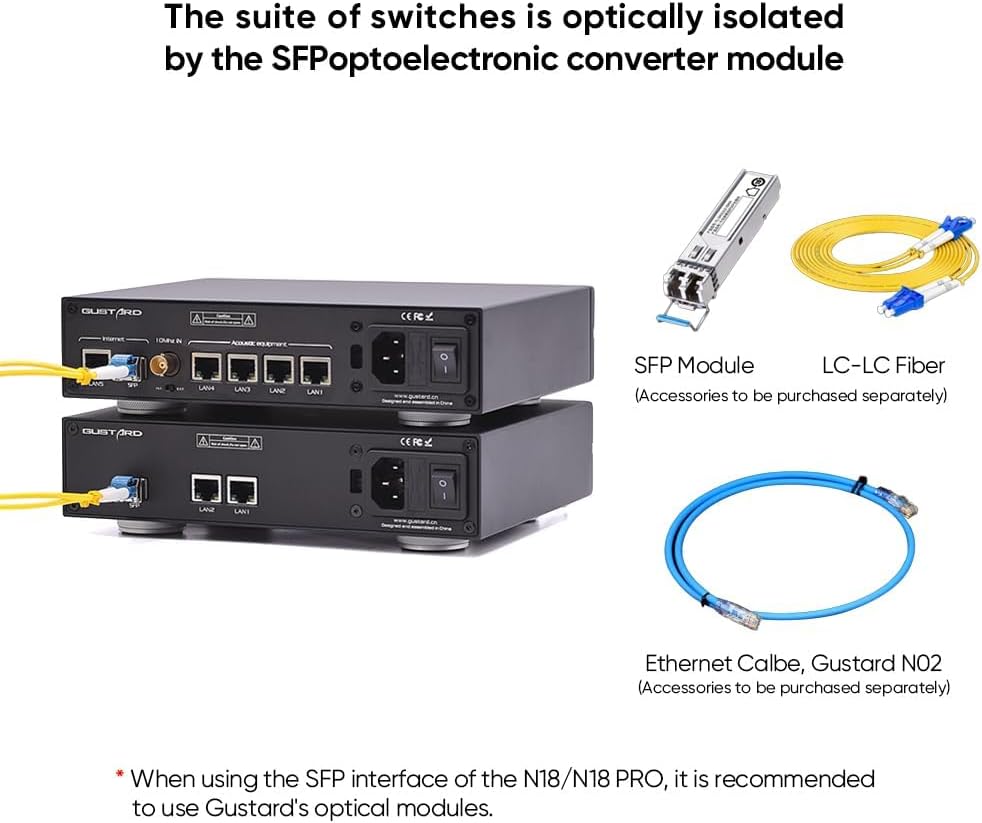
Figure 1: Rear panel of the Gustard N18 PRO, showing Ethernet ports, SFP port, Clock In, Clock selection, Voltage selection, AC power input, and Fuse.
- Maitinimo jungtis: Connect the provided power cable to the AC power input on the rear panel and then to a suitable wall outlet. Ensure the voltage selection switch is set correctly for your region (115V/230V).
- Ethernet jungtys: The N18 PRO features 5 Gigabit Ethernet ports (LAN1-LAN5) and 1 SFP port. Connect your network devices (e.g., router, NAS, PC, audio streamers) to these ports using standard Ethernet cables.
- SFP prievadas: For enhanced optical isolation, insert a compatible SFP fiber module into the SFP port. It is recommended to use Gustard's optical modules for optimal performance. Connect an LC-LC fiber cable from the SFP module to your network.
- 10 MHz takto įvestis: For improved audio clarity and analog warmth, connect an external 10MHz clock source to the BNC 10MHz Clock In port. Use the adjacent switch to select between internal (INT) and external (EXT) clock sources.
Ryšio parinktys
The N18 PRO offers flexible integration into your audio network. Below are examples of typical setups.

2 pav. Pvzample connectivity diagram for N18 PRO, showing connections to a router, NAS, PC, and various audio devices.

Figure 3: Illustration of optical isolation using an SFP module and LC-LC fiber cable with the N18 PRO.
Naudojimo instrukcijos
Maitinimo įjungimas/išjungimas
After all connections are made, flip the power switch on the rear panel to the 'ON' position. The device will power on and begin network operations.
Tinklo valdymas
The N18 PRO functions as a network switch, facilitating data transfer between connected devices. Its primary role is to provide a clean and stable network environment for audio streaming by minimizing interference and noise.
- Ethernet prievadai: The 10/100/1000M adaptive Ethernet interfaces automatically detect and adjust to the speed of the connected device.
- Optoelektroninė izoliacija: When using the SFP fiber module, the network ripple is effectively isolated, contributing to a cleaner audio signal.
- Išorinis laikrodis: If an external 10MHz clock is connected and selected, it will synchronize the device, enhancing audio clarity and reducing jitter.
Priežiūra
Valymas
To clean the exterior of the device, use a soft, dry cloth. Do not use liquid cleaners or abrasive materials, as they may damage the finish or internal components.
Programinės aparatinės įrangos naujiniai
Periodically check the official Gustard website for any available firmware updates. Follow the instructions provided with the update package carefully to ensure proper installation.
Trikčių šalinimas
| Problema | Galima priežastis | Sprendimas |
|---|---|---|
| Nėra galios | Power cable not connected; Power switch off; Blown fuse; Incorrect voltage pasirinkimas. | Ensure power cable is securely connected. Turn power switch ON. Check and replace fuse if necessary. Verify voltagPasirinkimo jungiklis nustatytas teisingai. |
| Nėra tinklo veiklos | Ethernet cables loose or faulty; Connected device is off or misconfigured. | Check all Ethernet cable connections. Ensure connected devices are powered on and configured correctly. Try different Ethernet cables. |
| Prasta garso kokybė | Network interference; External clock not properly connected or selected. | Ensure SFP module is used for optical isolation if possible. Verify external 10MHz clock is connected and the 'EXT' option is selected. Check for other sources of electrical interference. |
Specifikacijos
Figure 4: Gustard N18 PRO specifications and dimensions.
- Ethernet sąsaja: 1*SFP, 5*10/100/1000M adaptive Ethernet interfaces
- SFP: Supports GPON/EPON fiber modem, SFP RJ45 extension port, SFP fiber module
- Ethernet protokolas: 10Base-T, 100Base-T, 1000Base-T, 100Base-X, 1000Base-X
- 10M BNC Input: Input impedance 50 Ohm, 0dBm - 20dBm
- Kintamosios srovės maitinimas: 115V/230V 50/60Hz
- Energijos suvartojimas: <10W
- Dimensions (excluding protruding parts): W220mm*H50mm*D170mm
- Pakuotės dydis: W285mm*H85mm*D270mm
- Svoris su pakuote: 2.5 kg
Informacija apie garantiją
The Gustard N18 PRO comes with a warranty period of 1 year or more from the date of purchase, depending on the specific product and regional regulations. Please retain your proof of purchase for warranty claims. The warranty covers manufacturing defects and malfunctions under normal use. It does not cover damage caused by misuse, accidents, unauthorized modifications, or improper installation.
Palaikymas
For technical assistance, troubleshooting, or any inquiries regarding your Gustard N18 PRO, please contact our customer support. We offer 24-hour online service to assist you. Refer to the official Gustard websvetainėje, kurioje rasite kontaktinę informaciją ir papildomus išteklius.