1. Įvadas
Welcome to the user manual for your Nilox Sport Trailround Smartwatch. This guide provides essential information to help you set up, operate, and maintain your device, ensuring you get the most out of its features. The Nilox Sport Trailround is designed to be a versatile companion for your daily activities, offering health monitoring, fitness tracking, and smart notifications.
Please read this manual carefully before using your smartwatch and keep it for future reference.
2. Produktas baigtasview
The Nilox Sport Trailround Smartwatch features a robust design with a 1.43-inch full-touch display. It integrates various sensors for comprehensive health and fitness tracking, along with smart connectivity features.
2.1 Pagrindinės savybės
- 1.43-inch Full Touch Display: Clear and responsive interface for easy navigation.
- Sveikatos stebėjimas: Tracks heart rate, blood pressure, blood oxygen saturation (SpO2), and sleep patterns.
- Fitneso stebėjimas: Records steps, calories burned, distance, and workout duration.
- Išmanieji pranešimai: Receives alerts for calls, messages, and app notifications directly on your wrist.
- Nuotolinio valdymo pultas: Manage music playback and camera shutter on your connected smartphone.
- Patvarumas: IP67 water and dust resistance for various environments.
- Baterijos veikimo laikas: Iki 6 dienų įprastas naudojimas.
- Suderinamumas: Works with both Android and iOS smartphones.
2.2 Komponentai
Familiarize yourself with the main components of your Nilox Sport Trailround Smartwatch:
- Ekranas: 1.43-inch full-touch screen.
- Maitinimo mygtukas: Located on the side, used for powering on/off and screen activation.
- Atgal mygtukas: Located on the side, used for navigating back in menus.
- Jutikliai: Located on the back for heart rate, blood pressure, and SpO2 monitoring.
- Įkrovimo kontaktai: Magnetiniai kontaktai gale įkrovimui.
- Dirželis: Adjustable silicone strap for comfortable wear.

2.1 pav.: priekis view of the Nilox Sport Trailround Smartwatch displaying the time, step count, and heart rate.

2.2 pav.: Kampinis view of the smartwatch, showcasing a watch face with weather information, step count, and heart rate data.
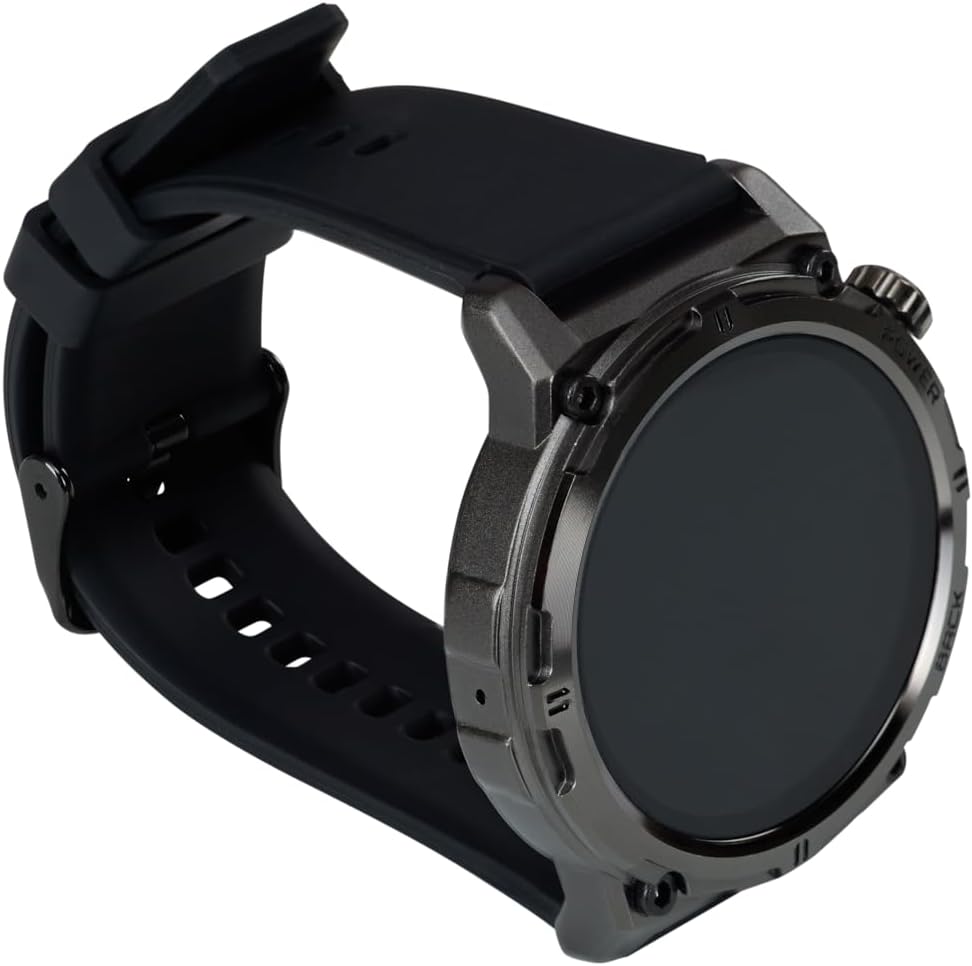
2.3 pav.: šonas view of the smartwatch, highlighting the power and back buttons and the comfortable silicone strap.

2.4 pav.: galinis view of the smartwatch, displaying the optical health sensors and magnetic charging contacts.
3. Sąranka
3.1 Išmaniojo laikrodžio įkrovimas
- Connect the magnetic charging cable to a USB power source (e.g., computer USB port, USB wall adapter).
- Align the magnetic end of the charging cable with the charging contacts on the back of your smartwatch. The cable will snap into place.
- The smartwatch display will show a charging indicator. A full charge typically takes approximately 2 hours.
Prieš įkrovimą įsitikinkite, kad įkrovimo kontaktai yra švarūs ir sausi, kad išvengtumėte korozijos.
3.2 Įjungimas / išjungimas
- Norėdami įjungti: Press and hold the Power button (top right button) for a few seconds until the Nilox logo appears.
- Norėdami išjungti: From the watch face, swipe down to access quick settings, or navigate to the 'Settings' menu. Select 'Power Off' and confirm. Alternatively, press and hold the Power button until the power-off option appears, then select it.
3.3 Programėlės diegimas ir susiejimas
To unlock the full potential of your Nilox Sport Trailround Smartwatch, you need to pair it with your smartphone using the companion app.
- Atsisiųskite programą: Ieškokite "Smart Time Pro" in the Apple App Store (for iOS) or Google Play Store (for Android) and install it on your smartphone.
- Įjungti Bluetooth: Įsitikinkite, kad jūsų išmaniajame telefone įjungtas „Bluetooth“.
- Atidarykite programą: Launch the "Smart Time Pro" app and follow the on-screen instructions to create an account or log in.
- Pridėti įrenginį: In the app, navigate to the device management section (usually indicated by a '+' icon or 'Add Device'). The app will search for nearby smartwatches.
- Pasirinkite savo išmanųjį laikrodį: From the list of found devices, select "Nilox Trailround" or a similar identifier.
- Patvirtinkite susiejimą: Išmaniajame telefone ir išmaniajame laikrodyje pasirodys susiejimo užklausa. Patvirtinkite susiejimą abiejuose įrenginiuose.
- Suteikti leidimus: The app will request various permissions (e.g., location, notifications, contacts). Grant the necessary permissions for full functionality.
Once paired, your smartwatch will synchronize data with the app, and you can customize settings, watch faces, and view išsamius sveikatos ir fizinio pasirengimo duomenis.
4. Naudojimo instrukcijos
4.1 Pagrindinė navigacija
- Jutiklinis ekranas: Swipe left/right to navigate through different functions (e.g., activity, heart rate, weather). Swipe up from the watch face to view notifications. Swipe down from the watch face to access quick settings. Tap to select an option or enter a menu.
- Maitinimo mygtukas: Press once to wake the screen or return to the watch face. Press and hold to power on/off.
- Atgal mygtukas: Press once to go back to the previous screen or exit a menu.
4.2 Sveikatos stebėjimas
The smartwatch provides various health tracking features:
- Širdies ritmas: Swipe to the heart rate interface and wait for the measurement to complete. For continuous monitoring, enable it in the app settings.
- Kraujo spaudimas: Swipe to the blood pressure interface to initiate a measurement. Ensure the watch is snug on your wrist.
- Kraujo deguonis (SpO2): Swipe to the SpO2 interface to measure your blood oxygen level. Remain still during measurement.
- Miego stebėjimas: The smartwatch automatically detects your sleep patterns when worn during sleep. View detailed sleep data (deep sleep, light sleep, awake time) in the "Smart Time Pro" app.
Pastaba: The health data provided by this device is for reference only and should not be used for medical diagnosis or treatment.
4.3 Fitneso stebėjimas
Track your daily activity and workouts:
- Steps, Calories, Distance: These metrics are automatically tracked throughout the day. View your progress on the watch face or in the activity summary.
- Treniruočių režimai: The smartwatch offers various sport modes (e.g., walking, running, cycling). Select a mode to start tracking specific workout data, including duration, heart rate, and calories burned.
- GPS per išmanųjį telefoną: For accurate distance and route tracking during outdoor activities, ensure your smartwatch is connected to your smartphone with GPS enabled. The app will use your phone's GPS data.

Figure 4.1: The smartwatch being worn on a wrist during a fitness activity, demonstrating its use for tracking workouts.

Figure 4.2: A close-up of the smartwatch display showing real-time workout statistics, including duration and progress.

Figure 4.3: The smartwatch on a user's wrist during strength training, illustrating its suitability for various exercise types.
4.4 Pranešimai
Once paired with your smartphone and app permissions are granted, your smartwatch can display notifications:
- Pranešimų gavimas: When your phone receives a call, message, or app alert, the smartwatch will vibrate and display the notification content.
- ViewPranešimai: Swipe up from the watch face to access your notification history.
- Pranešimų valdymas: You can enable or disable specific app notifications through the "Smart Time Pro" app settings.
4.5 Muzikos ir kameros valdymas
Control your smartphone's music player and camera remotely:
- Muzikos valdymas: Navigate to the music control interface on your smartwatch. You can play/pause, skip tracks, and adjust volume for music playing on your connected phone.
- Kameros valdymas: Open the camera control feature on your smartwatch. This will typically open your phone's camera app, allowing you to tap the watch screen to remotely trigger the shutter.
5. Priežiūra
5.1 Valymas
- Reguliariai valykite išmanųjį laikrodį ir dirželį minkštu,amp audinys.
- Venkite naudoti stiprias chemines medžiagas, abrazyvinius valiklius ar tirpiklius, nes jie gali pažeisti įrenginį.
- Ensure the charging contacts on the back of the watch are clean and free of debris to maintain proper charging.
5.2 Atsparumas vandeniui ir dulkėms (IP67)
The Nilox Sport Trailround Smartwatch is rated IP67, meaning it is resistant to dust and can withstand immersion in water up to 1 meter for 30 minutes. This makes it suitable for daily use, including:
- Rankų plovimas
- Rain and splashes
- Brief, shallow immersion
Svarbūs svarstymai:
- Do not use the smartwatch for swimming, diving, or high-pressure water activities.
- Avoid exposing the watch to hot water, steam, or detergents.
- Atsparumas vandeniui nėra nuolatinė būsena ir laikui bėgant gali mažėti dėl įprasto nusidėvėjimo.
- If the watch gets wet, dry it thoroughly before charging or using the buttons.
5.3 Akumuliatoriaus priežiūra
- Prieš pradėdami naudoti akumuliatorių, visiškai jį įkraukite.
- Venkite dažnai visiškai iškrauti akumuliatorių, nes tai gali sutrumpinti jo tarnavimo laiką.
- Kai ilgesnį laiką nenaudojate išmaniojo laikrodžio, laikykite jį vėsioje, sausoje vietoje.
6. Problemų sprendimas
If you encounter issues with your Nilox Sport Trailround Smartwatch, refer to the following common problems and solutions:
| Problema | Galimas sprendimas |
|---|---|
| Išmanusis laikrodis neįsijungia | Ensure the device is fully charged. Press and hold the Power button for at least 10 seconds. |
| Nepavyksta susieti su išmaniuoju telefonu | 1. Ensure Bluetooth is enabled on your phone and the smartwatch is powered on. 2. Make sure the smartwatch is within range of your phone. 3. Restart both your phone and the smartwatch. 4. Clear Bluetooth cache on your phone (Android) or forget the device and try pairing again. 5. Ensure the "Smart Time Pro" app has necessary permissions. |
| Pranešimai negaunami | 1. Check if the smartwatch is successfully paired with the app. 2. Ensure notification permissions are granted to the "Smart Time Pro" app on your phone. 3. Verify that app notifications are enabled within the "Smart Time Pro" app settings. 4. Make sure your phone's notification settings allow the app to display alerts. |
| Inaccurate health/fitness data | 1. Ensure the smartwatch is worn snugly on your wrist, not too loose or too tight. 2. Nuvalykite laikrodžio gale esančius jutiklius. 3. For GPS-dependent activities, ensure your phone's GPS is active and the watch is connected to the phone. |
| Trumpas baterijos veikimo laikas | 1. Sumažinkite ekrano ryškumą. 2. Jei nereikia, išjunkite nuolatinį širdies ritmo stebėjimą. 3. Limit the number of apps sending notifications to the watch. 4. Ensure the watch is fully charged. |
If the problem persists, please contact Nilox customer support for further assistance.
7. Specifikacijos
| Funkcija | Detalė |
|---|---|
| Prekės ženklas | Nilox |
| Modelis | Trailround |
| Ekrano dydis | 1.43 colių |
| Ekrano tipas | Visas prisilietimas |
| Operacinė sistema | Wear OS (as per specification, though app is 'Smart Time Pro') |
| Ryšys | Bluetooth |
| Atsparumas vandeniui | IP67 (atsparus dulkėms ir vandeniui) |
| Baterijos sudėtis | Ličio polimeras |
| Baterijos veikimo laikas | Iki 6 dienų (įprastas naudojimas) |
| Suderinami įrenginiai | Išmanieji telefonai („Android“, „iOS“) |
| Ypatingos savybės | Health monitoring (HR, BP, SpO2, Sleep), GPS via smartphone, Notifications, Music/Camera control |
| Spalva | Juoda |
| Modelio numeris | 177f34f6-2de0-4995-88fc-ff81e0b07a26 |
8. Garantija ir palaikymas
Information regarding the specific warranty period and detailed support procedures for the Nilox Sport Trailround Smartwatch is not available in this manual. For warranty claims, technical support, or service inquiries, please refer to the official Nilox website or contact your local retailer where the product was purchased.
Prašome išsaugoti pirkimo įrodymą, jei prireiktų pateikti su garantija susijusius prašymus.


