1. Įvadas
Welcome to the GOBOULT x Mustang Derby Truly Wireless Earbuds user manual. This guide provides essential information for setting up, operating, maintaining, and troubleshooting your new earbuds. Please read this manual thoroughly to ensure optimal performance and longevity of your device.
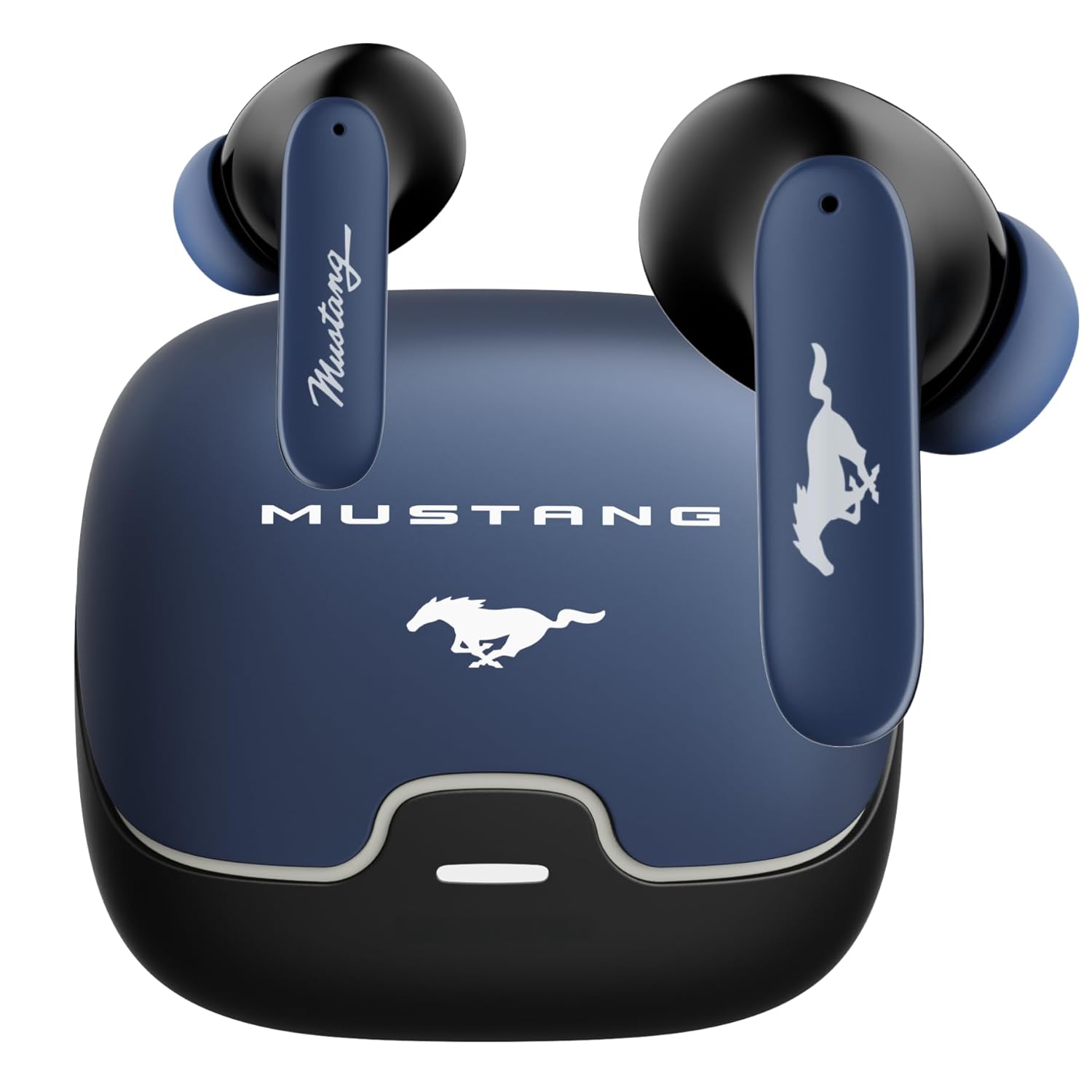
Image: The GOBOULT x Mustang Derby Truly Wireless Earbuds in their charging case.
2. Kas yra dėžutėje
Patikrinkite, ar jūsų gaminio pakuotėje yra visi šie elementai:
- GOBOULT x Mustang Derby Truly Wireless Earbuds
- Mustang Derby Charging Case
- C tipo greito įkrovimo laidas
- Extra Pair of Eartips (various sizes)
- Vartotojo vadovas (šis dokumentas)
- Garantijos kortelė

Image: All components included in the GOBOULT x Mustang Derby Earbuds package.
3. Produktas baigtasview
The GOBOULT x Mustang Derby Earbuds are designed for a premium audio experience, featuring 13mm bass drivers for rich sound and Bluetooth 5.4 for stable connectivity. The earbuds are IPX5 water-resistant, making them suitable for various activities. The charging case and earbuds feature a distinctive Mustang Derby design.

Vaizdas: Išsamus view of the earbud's 13mm massive drivers for enhanced audio.
4. Sąranka
4.1 Ausinių ir dėklo įkrovimas
Before first use, fully charge the earbuds and the charging case. Connect the provided Type-C charging cable to the charging port on the case and a compatible USB power source. The charging time for a full charge is approximately 90 minutes. A fully charged case provides up to 100 hours of total playtime with the earbuds.
4.2 Pradinis susiejimas
- Atidarykite įkrovimo dėklą. Ausinės automatiškai įsijungs susiejimo režimu.
- Savo įrenginyje (išmaniajame telefone, planšetiniame kompiuteryje, nešiojamajame kompiuteryje) įjunkite „Bluetooth“.
- Ieškokite available Bluetooth devices and select "GOBOULT Mustang Derby" from the list.
- Prisijungus, išgirsite patvirtinimo toną.

Image: The earbuds and charging case, illustrating Bluetooth 5.4 connectivity for fast pairing.
4.3 Dviejų įrenginių susiejimas
The earbuds support simultaneous connection to two devices. This allows for seamless switching between audio sources without manual re-pairing.
- Pair the earbuds with your first device as described in section 4.2.
- Atjunkite ausines nuo pirmojo įrenginio „Bluetooth“ nustatymų.
- Susiekite ausines su antruoju įrenginiu.
- Reconnect the earbuds to the first device. The earbuds will now be connected to both devices.
- Audio will automatically switch to the device currently playing sound.

Image: The earbuds and charging case, illustrating the dual-device pairing feature.
4.4 Programėlių palaikymas
Enhance your experience by downloading the dedicated GOBOULT app. The app allows you to:
- Individualiai derinkite garsą naudodami kelis ekvalaizerio režimus.
- Priskirkite ausinėms pasirinktinius gestus.
- Utilize the Quick Cleanup feature for optimal performance.
- Rename your earbuds and personalize audio settings.

Image: A smartphone displaying the GOBOULT app, highlighting features like EQ modes and custom gestures.
5. Ausinių naudojimas
5.1 Jutikliniai valdikliai
The earbuds feature intuitive touch controls for managing various functions. Specific gestures can be customized via the GOBOULT app.
| Veiksmas | Funkcija |
|---|---|
| Vienu paspaudimu | Groti / pristabdyti muziką, atsiliepti / baigti skambutį |
| Double Tap (kairioji ausinė) | Ankstesnis takelis |
| Dukart bakstelėjimas (dešinė ausinė) | Kitas takelis |
| Trigubas palietimas (kairioji ausinė) | Sumažinti garsumą |
| Trigubas bakstelėjimas (dešinė ausinė) | Padidinti garsumą |
| Ilgas paspaudimas (2 sekundės) | Įjungti balso asistentą / atmesti skambutį |
5.2 Skambučių valdymas
The earbuds are equipped with 4 Environmental Noise Cancellation (ENC) microphones to ensure clear calls even in noisy environments.
- Atsiliepimas / skambučių užbaigimas: Vienu bakstelėjimu palieskite bet kurią ausinę.
- Skambučių atmetimas: Ilgai paspauskite bet kurią ausinę ir palaikykite 2 sekundes.

Image: Close-up of an earbud showing the Zen™ Quad Mic ENC technology for crystal clear calling.
5.3 Žaidimų režimas
Activate the 45ms Low Latency Gaming Mode for a synchronized audio-visual experience during gaming. This mode minimizes audio delay, providing a competitive edge.
- Aktyvinimas: Refer to the GOBOULT app for specific gesture customization or check the user manual for default activation.

Image: The earbuds and charging case, illustrating the Combat™ Gaming Mode with 45ms low latency.
5.4 Balso padėjėjas
Access your device's voice assistant (Amazon Alexa, Google Assistant, Siri) by long-pressing either earbud for 2 seconds.
6. Priežiūra
6.1 Valymas
Regular cleaning helps maintain optimal sound quality and hygiene.
- Švelniai nuvalykite ausines ir įkrovimo dėklą minkštu, sausu, nepūkuotu skudurėliu.
- Įsisenėjusiam purvui šiek tiek pamirkykiteampNuvalykite šluostę vandeniu. Venkite naudoti stiprias chemines medžiagas ar abrazyvines medžiagas.
- Clean the ear tips regularly. They can be removed and rinsed with water, then dried completely before reattaching.
- Įsitikinkite, kad abiejų ausinių ir dėklo įkrovimo kontaktai yra švarūs ir sausi.
The earbuds have an IPX5 water resistance rating, meaning they are protected against low-pressure water jets from any direction. However, the charging case is not water-resistant. Do not submerge the earbuds or expose them to strong water streams.

Image: The earbuds and charging case, illustrating IPX5 water resistance.
6.2 Saugykla
Kai nenaudojate, laikykite ausines įkrovimo dėkle, kad apsaugotumėte jas nuo dulkių, pažeidimų ir kad jos būtų įkrautos. Dėklą laikykite vėsioje, sausoje vietoje, toliau nuo tiesioginių saulės spindulių ir ekstremalių temperatūrų.
7. Problemų sprendimas
If you encounter any issues with your GOBOULT x Mustang Derby Earbuds, refer to the following common solutions:
| Problema | Sprendimas |
|---|---|
| Ausinės nesusiejamos | Įsitikinkite, kad ausinės įkrautos. Išjunkite ir įjunkite įrenginio „Bluetooth“. Įdėkite ausines atgal į dėklą, uždarykite ir vėl atidarykite, kad vėl įjungtumėte susiejimo režimą. |
| Veikia tik viena ausinė | Place both earbuds back in the charging case, close the lid, wait a few seconds, then open again. Ensure both earbuds are charged. |
| Mažas garsumas arba prasta garso kokybė | Clean the ear tips and speaker mesh. Adjust volume on both your device and the earbuds. Ensure ear tips provide a good seal in your ear canal. |
| Ausinės neįkraunamos | Įsitikinkite, kad įkrovimo laidas yra tvirtai prijungtas. Patikrinkite, ar įkrovimo dėklas maitinamas. Nuvalykite įkrovimo kontaktus ant abiejų ausinių ir dėklo. |
| „Bluetooth“ ryšys nestabilus | Ensure you are within the 10-meter Bluetooth range. Avoid obstacles between your device and earbuds. Disconnect and reconnect the earbuds. |
Jei problema išlieka, daugiau pagalbos ieškokite skyriuje „Garantija ir palaikymas“.
8. Specifikacijos
| Funkcija | Detalė |
|---|---|
| Modelio pavadinimas | „Airbass“ ausinės |
| Ryšio technologija | „Bluetooth 5.4“, belaidis ryšys |
| Bluetooth diapazonas | 10 metrų |
| Garso tvarkyklės dydis | 13 milimetrų |
| Garso tvarkyklės tipas | Dinaminis vairuotojas |
| Varža | 32 omų |
| Dažnio atsakas | 20 Hz |
| Jautrumas | 115 dB |
| Garso vėlavimas | 45 milisekundės (žaidimo režimas) |
| Triukšmo valdymas | Passive Noise Cancellation, Environmental Noise Cancellation (ENC) Mics |
| Mikrofono formatas | Built-In (4 Mics) |
| Baterijos veikimo laikas (bendras) | Iki 100 valandų (su įkrovimo dėklu) |
| Įkrovimo laikas | Apytiksliai 90 minučių |
| Įkrovimo prievadas | C tipo greito įkrovimo lizdas |
| Atsparumo vandeniui lygis | IPX5 (tik ausinėms) |
| Valdymo tipas | Jutiklinis valdymas, balso valdymas |
| Suderinami įrenginiai | Android, Cellphones, Desktops, Gaming Consoles, Laptops, Tablets, iPhone |
| Prekės svoris | 50 gramų |
| Gaminio matmenys | 4.7 x 8.9 x 9.6 cm |
| Medžiaga | Guma |
| Kilmės šalis | Indija |
9. Garantija ir palaikymas
9.1 Gamintojo garantija
Your GOBOULT x Mustang Derby Truly Wireless Earbuds come with a 1 metų gamintojo garantija nuo įsigijimo datos. Ši garantija taikoma gamybos defektams ir užtikrina, kad jūsų gaminys įprasto naudojimo metu neturi medžiagų ir gamybos defektų.
Please retain your proof of purchase for warranty claims. The warranty does not cover damage caused by misuse, accidents, unauthorized modifications, or normal wear and tear.
9.2 Pagalba klientams
For technical assistance, warranty claims, or any other inquiries, please contact GOBOULT customer support through their official websvetainėje arba kontaktinę informaciją, pateiktą jūsų garantijos kortelėje.
Taip pat galite apsilankyti GOBOULT Store on Amazon jei reikia papildomos informacijos apie produktą ir pagalbos išteklių.


