1. Įvadas
The AiXun PF26 Intelligent Multi-Channel Fast Charger is a versatile charging station designed to efficiently power multiple devices simultaneously. Featuring 4 channels and 8 ports, it delivers a total power output of 260W, with each single port capable of up to 65W. This device supports various fast charging protocols and includes an intuitive 3.5-inch IPS display for monitoring charging status. Its intelligent design incorporates an automatic standby function for energy saving and a 1/4-inch standard screw hole for flexible installation.
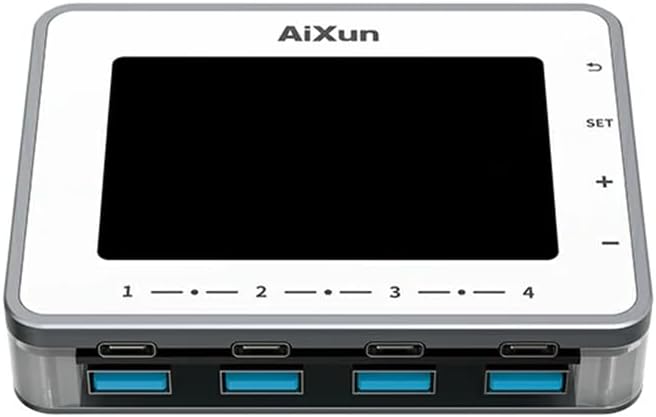
1.1 vaizdas: priekis view of the AiXun PF26 Intelligent Multi-Channel Fast Charger, showing the display screen and the eight USB ports (four USB-C and four USB-A).
2. Saugos informacija
Prieš naudodami šį gaminį, perskaitykite visas saugos instrukcijas, kad išvengtumėte sužalojimų ar žalos.
- Saugokite įrenginį nuo vandens, drėgmės ar ekstremalių temperatūrų.
- Use only compatible power adapters. An external 24V power adapter is required and sold separately.
- Venkite numesti įrenginį ir stipriai jį sutrenkti.
- Do not attempt to disassemble or modify the charger. This will void the warranty and may cause damage.
- Laikyti vaikams nepasiekiamoje vietoje.
- Darbo metu užtikrinkite tinkamą vėdinimą, kad išvengtumėte perkaitimo.
3. Pakuotės turinys
Patikrinkite, ar pakuotėje yra visi reikalingi daiktai:
- 1x AiXun PF26 Intelligent Multi-Channel Fast Charger (Base Unit)
Note: The power adapter is not included and must be purchased separately. Refer to the specifications for compatible adapter requirements.
4. Produkto ypatybės
The AiXun PF26 charger offers advanced features for efficient and intelligent charging:
- Didelė galia: Total 260W strong power across 4 channels and 8 ports. Each single port can achieve a peak power of 65W.
- Wide Protocol Compatibility: Supports various fast charging protocols including PPS, PD, QC, AFC, FCP, SCP, PE, and SFCP.
- Išmanusis aptikimas: Automatically detects and recognizes connected devices for optimal charging.
- Automatic Standby: Built-in function to reduce energy consumption and prolong device lifespan. Standby time is adjustable from 1 to 60 minutes.
- 3.5 colių IPS ekranas: Suteikia aiškų view of charging status, voltage, current, and power parameters.
- Lankstus montavimas: Features a standard 1/4-inch BSP Thread Hole on the bottom, allowing adaptation to various brackets (brackets sold separately).
- Remote Upgrades: Supports firmware upgrades via PC connection.

Image 4.1: The AiXun PF26 charger in use, illustrating its 260W total power and 65W per port capability. An external power adapter is shown connected.
5. Specifikacijos
| Parametras | Vertė |
|---|---|
| Produkto pavadinimas | Intelligent Multi-channel Fast Charger |
| Prekės ženklas | AiXun |
| Modelis | 26 PF |
| Įvesties tomastage | 24V DC |
| Bendra galia | 260W |
| Max Single Port Power | 65W |
| Max Dual Port Output (per channel) | 30W |
| Prievadų skaičius | 8 (4 x USB-C, 4 x USB-A) |
| Ekrano tipas | 3.5 colio IPS |
| Ryšio sąsaja | C tipo kabelis |
| Palaikomi greito įkrovimo protokolai | PPS/PD/QC/AFC/FCP/SCP/PE/SFCP |
| Gaminio matmenys | 102 x 78 x 7 mm (4.02 x 3.07 x 0.28 colio) |
| Prekės svoris | 4.4 svaro |
| Montavimo funkcija | 1/4-inch BSP Thread Hole |
Recommended Power Adapter Specifications:
The AiXun PF26 requires an external 24V DC power adapter with a 5.5*2.5mm DC port. The required current depends on the desired total power output:
| Galia | ttage | Dabartinė |
|---|---|---|
| 144W | 24 V | 6A |
| 192W | 24 V | 8A |
| 260W | 24 V | 12A |

Image 5.1: Reference table for selecting a compatible charging power adapter, detailing DC port specifications and power output options.
6. Sąranka
- Prijunkite maitinimo adapterį: Connect a compatible 24V DC power adapter (purchased separately) to the DC input port on the AiXun PF26 charger. Ensure the adapter meets the power requirements listed in Section 5.
- Maitinimas: Once the power adapter is connected, the device will automatically power on, and the 3.5-inch IPS display will illuminate.
- Papildomas montavimas: If desired, use the 1/4-inch BSP Thread Hole on the bottom of the unit to attach it to a compatible bracket or stand (sold separately).

Image 6.1: Bottom design of the AiXun PF26 charger, highlighting the 1/4-inch BSP Thread Hole for easy adaptation to various mounting brackets.
7. Naudojimo instrukcijos
7.1 Įkrovimo įrenginiai
- Connect your devices (smartphones, tablets, laptops, etc.) to the available USB-C or USB-A ports using appropriate charging cables.
- The charger will automatically detect the connected device and initiate charging, utilizing compatible fast charging protocols.
- Monitor the charging status, voltage, current, and power for each port on the 3.5-inch IPS display.
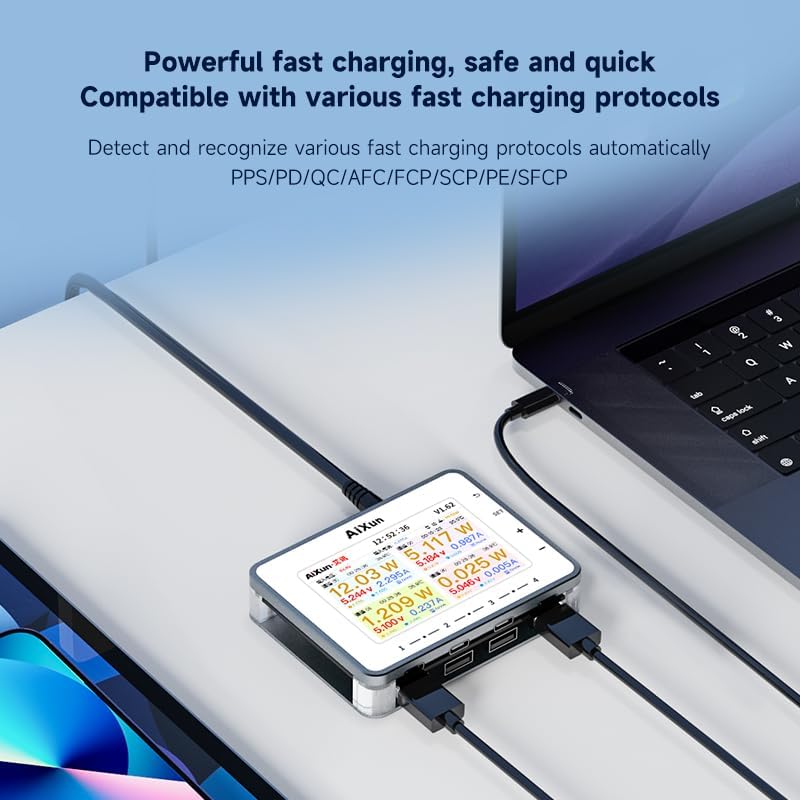
Image 7.1: The AiXun PF26 charger actively charging multiple devices, with its display showing detailed charging parameters for each port.
7.2 Ekrano navigacija ir nustatymai
The charger features a 3.5-inch IPS display and control buttons for navigation:
- SET mygtukas: Pasiekite nustatymų meniu.
- + / - Mygtukai: Naršykite meniu parinktis arba koreguokite vertes.
- Grįžimo mygtukas: Grįžti į ankstesnį ekraną arba išeiti iš meniu.
Within the settings, you can customize parameters such as standby time (1-60 minutes) and view sistemos informacija.

Image 7.2: The AiXun PF26 charger's display showing intelligent features and a connected smartphone indicating 36% charge, demonstrating the energy-saving standby function.
7.3 Connecting to AiXun Platform (PC)
The device can be connected to a PC via a Type-C cable to the AiXun platform software. This allows for:
- Real-time monitoring of current and voltage curves.
- Performing remote firmware upgrades to ensure the device has the latest features and improvements.
8. Priežiūra
- Valymas: Įkroviklio išorę valykite minkštu, sausu skudurėliu. Nenaudokite skystų valiklių ar aerozolių.
- Saugykla: Kai nenaudojate, laikykite prietaisą vėsioje, sausoje vietoje, toliau nuo tiesioginių saulės spindulių ir ekstremalių temperatūrų.
- Kabelių valdymas: Ensure charging cables are not excessively bent or tangled to prevent damage.
9. Problemų sprendimas
- Įrenginys neįsijungia: Ensure the 24V DC power adapter is correctly connected and functioning. Verify the adapter meets the specified voltage ir dabartinius reikalavimus.
- Įrenginys neįkraunamas: Check if the charging cable is securely connected to both the charger and the device. Ensure the device supports the fast charging protocols offered by the AiXun PF26. Try a different port or cable.
- Ekranas neveikia: If the display is blank or unresponsive, try disconnecting and reconnecting the power adapter. If the issue persists, contact customer support.
- Lėtas įkrovimas: Įsitikinkite, kad jūsų maitinimo adapteris tiekia pakankamai srovėstage for the number of devices being charged. Some devices may not support the highest fast charging speeds.
10. Garantija ir palaikymas
For warranty information and technical support, please refer to the documentation provided with your purchase or visit the official AiXun website. You may also contact AiXun customer service directly for assistance with product operation, troubleshooting, or warranty claims.