Įvadas
The AsperX AX2410 Laptop Power Bank is a high-capacity portable charger designed to keep your electronic devices powered on the go. Featuring a 25,000mAh (92.5Wh) battery, 140W Power Delivery (PD 3.1) fast charging, and a TFT Smart Display, this power bank offers efficient and intelligent power management for laptops, smartphones, tablets, and other USB-powered devices. It is also flight-approved for convenient travel.
Pakuotės turinys
- 1 x AsperX 25000mAh Portable Laptop Power Bank (Model: AX2410)
- 1 x 140 W USB-C–USB-C laidas
- 2 x Vartotojo vadovai
- 1 x nešiojamasis krepšys

Image: AsperX Power Bank, USB-C cable, user manual, and carrying pouch, illustrating the items included in the product package.
Produktas baigtasview
The AsperX AX2410 features a sleek, deep grey design with a compact form factor. It is equipped with multiple ports and a smart display for optimal user experience.
Fizinės savybės
- Matmenys: 6.56 x 3.21 x 1.08 colio
- Svoris: 1.37 svaro
- Spalva: Giliai pilka
Paveikslėlis: Iš viršaus į apačią view of the AsperX Laptop Power Bank in Deep Grey, highlighting its compact and modern design.
Uostai
- USB-C1 (IN/OUT): Up to 140W Max (for fast charging laptops and recharging the power bank).
- USB-A (OUTPUT): Up to 22.5W Max (for standard USB devices).
- USB-C2 (IN/OUT): Up to 45W Max (for fast charging phones/tablets and recharging the power bank).
Paveikslėlis: detalus view of the input and output ports on the AsperX Power Bank, clearly labeled with their respective wattage galimybes.
TFT išmanusis ekranas
The integrated TFT Smart Display provides real-time information about the power bank's status:
- Baterijos lygis: Proctage likusio mokesčio.
- Remaining Usage/Recharge Time: Estimated time until empty or fully charged.
- Input/Output Power: Real-time wattage for each connected port.

Image: A close-up of the TFT Smart Display on the power bank, detailing the battery status, time remaining, and individual port power output/input.
Vidinis dizainas
The power bank utilizes high-density automotive-grade power cells, designed to retain over 80% capacity after 5 years. It incorporates a smart chip for efficient power distribution and 14-layer safety protection.

Paveikslėlis: Rentgeno stilius view of the AsperX Power Bank, revealing the internal arrangement of its high-density battery cells and electronic components.
Specifikacijos
| Funkcija | Detalė |
|---|---|
| Gaminio matmenys | 6.56 x 3.21 x 1.08 colio |
| Prekės svoris | 1.37 svaro |
| Modelio numeris | AX2410-DG |
| Baterijos talpa | 25,000 92.5 mAh (XNUMX Wh) |
| Maksimali išėjimo galia | 145W Iš viso |
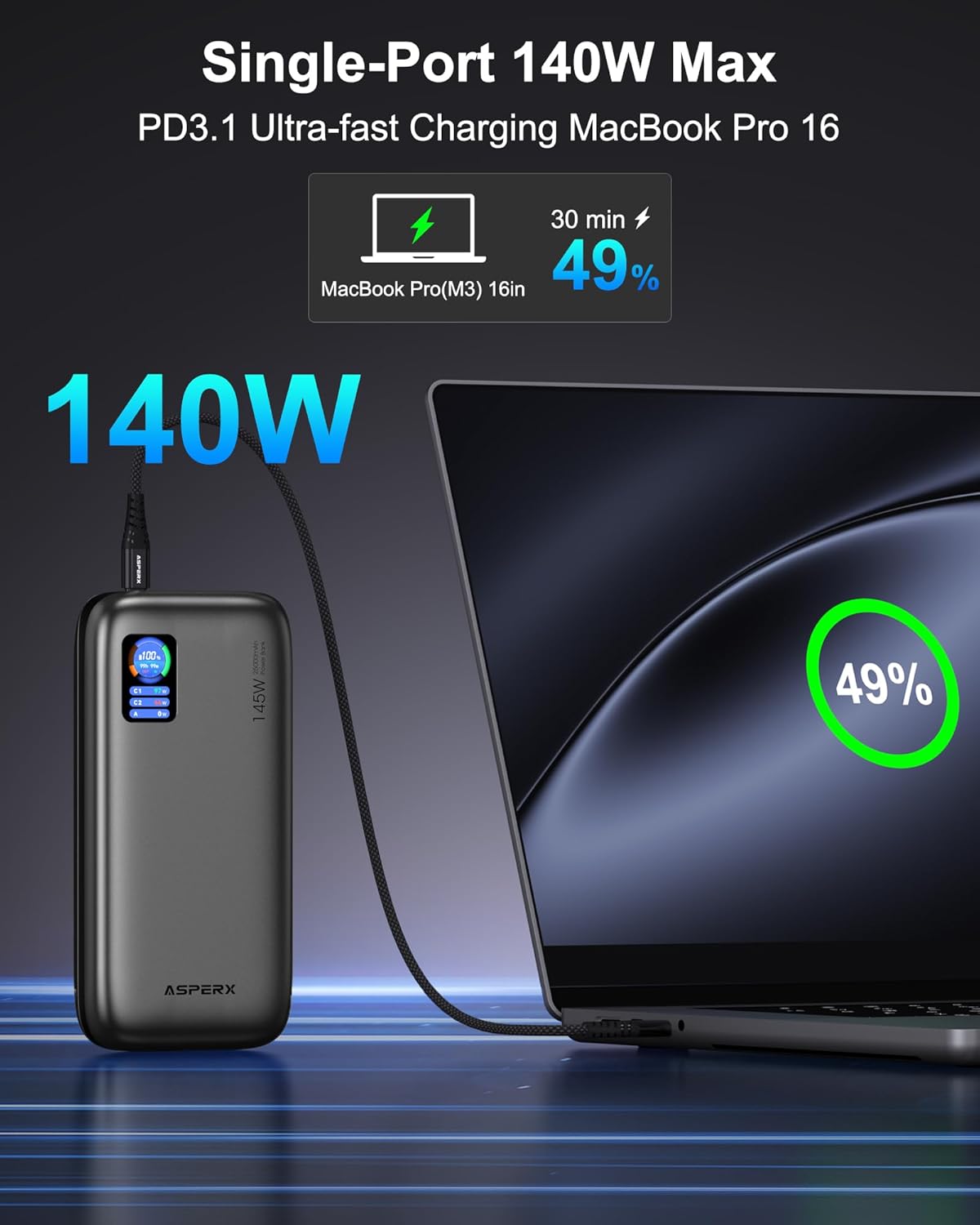
| USB-C1 (įėjimas/išėjimas) | 140W maks |
| USB-C2 (įėjimas/išėjimas) | 45W maks |
| USB-A (OUTPUT) | 22.5W maks |
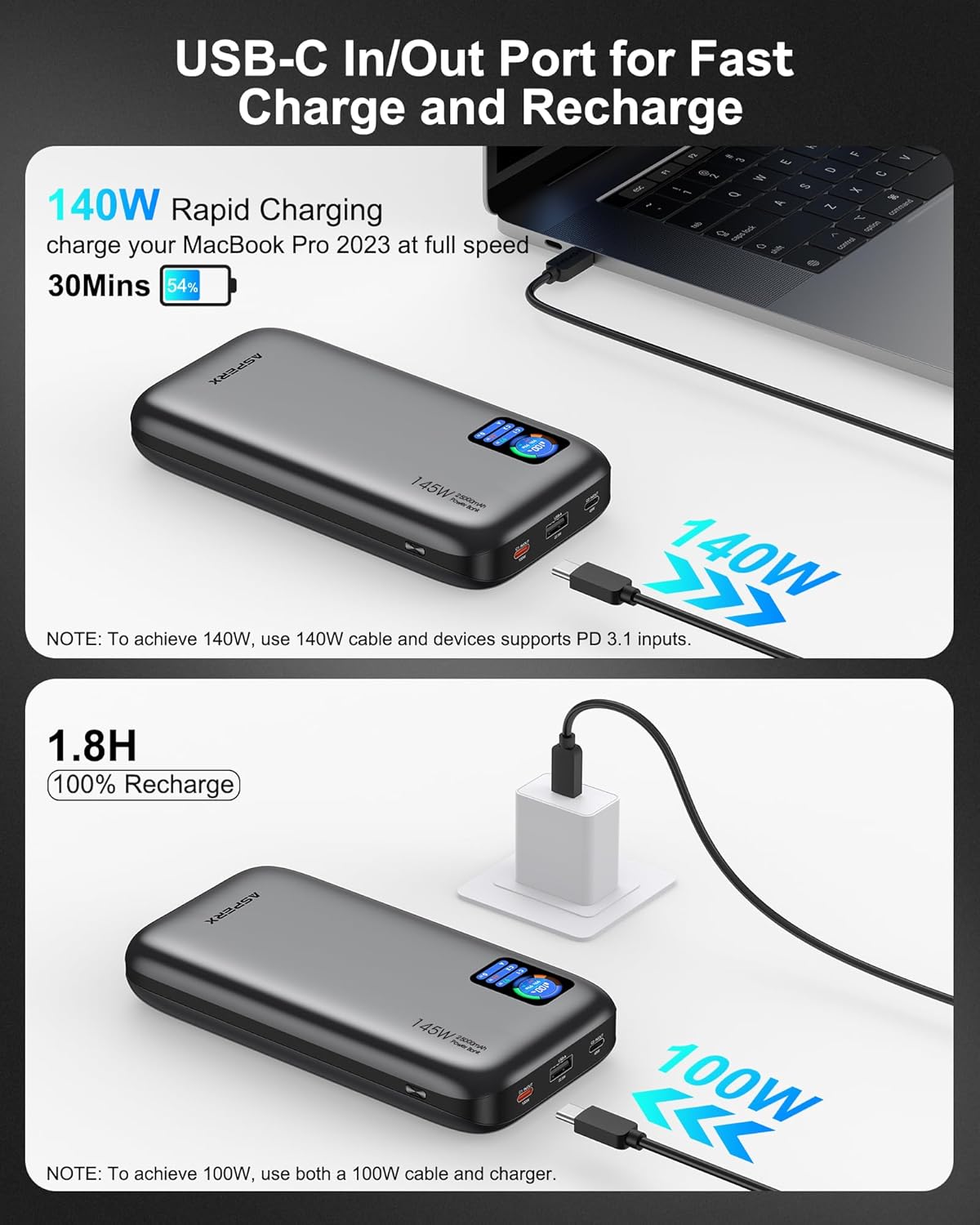
| Įkrovimo laikas | Approx. 1.8 hours (with 100W or higher charging adapter) |
| Ypatingos savybės | Skaitmeninis ekranas, greitas įkrovimas, apsauga nuo perkrovimo, apsauga nuo trumpojo jungimo |
| Suderinamumas | PD3.0, QC3.0, PPS, AFC, UFCS protocols (MacBook, iPhone, Dell XPS, Galaxy, Steam Deck, iPad, etc.) |
Sąranka
Pradinis išorinės baterijos įkrovimas
- Before first use, fully charge your AsperX Power Bank.
- Connect the included 140W USB-C to USB-C cable to either the USB-C1 or USB-C2 port on the power bank.
- Connect the other end of the cable to a compatible USB-C wall adapter (100W or higher recommended for fastest charging).
- The TFT Smart Display will show the input wattage and estimated time until full charge. A full recharge takes approximately 1.8 hours with a 100W+ adapter.

Image: The AsperX Power Bank connected to a wall adapter for recharging, with the display indicating a fast recharge time of 1.8 hours.
Ekrano apsauga
The TFT Smart Display comes with a transparent protective film. You may remove this film before use for optimal clarity.
Naudojimo instrukcijos
Ekrano įjungimas/išjungimas
Press the power button located on the side of the power bank to activate the TFT Smart Display. The display will automatically turn off after a few seconds of inactivity to conserve power. Double-click the power button to turn the display off manually.
Įrenginių įkrovimas
Connect your device to the appropriate port on the power bank using a compatible cable. The power bank will automatically detect the device and begin charging.
- Vieno įrenginio įkrovimas: For ultra-fast charging of laptops, use the USB-C1 port (up to 140W).

Image: The AsperX Power Bank connected to a laptop, illustrating its capability to provide 140W ultra-fast charging to a single device.
- Kelių įrenginių įkrovimas: The power bank can charge up to 3 devices simultaneously with a total output of 145W. The smart chip will distribute power optimally.

Image: The AsperX Power Bank connected to and charging three different devices concurrently, showcasing jo kelių įrenginių įkrovimo galimybę.
Mažos galios režimas
For low-power devices such as fans, headphones, or smartwatches, press and hold the power button to enter low-power mode. The 'A' on the screen will change from white to red, indicating activation of this mode.
Understanding the TFT Smart Display
The display provides crucial information at a glance:
- Battery Circle: Rodo esamą baterijos procentątage.
- Likęs laikas: Indicates estimated hours and minutes of remaining power (OUT) or time to full charge (IN).
- Uosto būsena: Rodo vatątage for USB-C1, USB-C2, and USB-A ports.

Image: A graphic illustrating the various indicators on the TFT Smart Display, including battery percentage, time remaining, and individual port power readings.
Flight Approval
With a 92.5Wh capacity, this power bank meets TSA requirements (<100Wh) for safe carry-on use. It is not permitted in checked luggage.

Image: A person using the AsperX Power Bank to charge a laptop on an airplane, emphasizing its flight-approved status and portability for travel.
Naudojimo scenarijai
The AsperX Power Bank is versatile for various situations:
- Work & Meetings: Keep your laptop and phone charged during long work sessions.
- Kelionės: Essential for business trips, long flights, and commutes.
- Užsiėmimai lauke: Idealiai tinka žygiams, camping, and as an emergency power source.

Image: The AsperX Power Bank in an outdoor camping setting, charging a laptop, phone, and camera, highlighting its utility for outdoor activities.
Video: A demonstration of the AsperX 145W Laptop Power Bank, showcasing its features and charging capabilities for various devices.
Priežiūra
To ensure the longevity and optimal performance of your AsperX Power Bank, follow these maintenance guidelines:
- Saugykla: Laikykite išorinę bateriją vėsioje, sausoje vietoje, toliau nuo tiesioginių saulės spindulių ir ekstremalių temperatūrų.
- Valymas: Išorę valykite minkšta, sausa šluoste. Venkite naudoti stiprias chemines medžiagas ar abrazyvines medžiagas.
- Akumuliatoriaus priežiūra: For best battery health, avoid completely draining the power bank regularly. Recharge it when the battery level is low.
- Tvarkymas: Do not drop, puncture, or disassemble the device. Avoid exposing it to water or excessive moisture.
Trikčių šalinimas
If you encounter any issues with your AsperX Power Bank, refer to the following common solutions:
- Įrenginys neįkraunamas:
- Įsitikinkite, kad išorinė baterija yra pakankamai įkrauta.
- Check that the charging cable is securely connected to both the power bank and your device.
- Patikrinkite, ar laidas nepažeistas ir suderinamas su jūsų įrenginiu.
- If charging a low-power device, ensure low-power mode is activated.
- Lėtas įkrovimas:
- Confirm that your device and cable support fast charging protocols (PD, QC, etc.).
- Use the USB-C1 port for the highest output (up to 140W).
- When charging multiple devices, the total output is shared, which may reduce individual port speeds.
- Ekranas neveikia:
- Norėdami suaktyvinti ekraną, paspauskite maitinimo mygtuką.
- Ensure the transparent protective film has been removed for clear visibility.
Saugos informacija
Kad išvengtumėte sužalojimų ar įrenginio pažeidimo, perskaitykite ir laikykitės visų saugos nurodymų:
- Nelaikykite išorinės baterijos ugnies, vandens ar ekstremalių temperatūrų veikiamos.
- Venkite numesti, pradurti ar išardyti įrenginį.
- Laikyti vaikams nepasiekiamoje vietoje.
- Naudokite tik originalius arba sertifikuotus suderinamus įkrovimo laidus.
- The power bank features 14-layer safety protection, including over-charge, over-discharge, short-circuit, and temperature protection.

Image: A visual representation of the 14-layer safety protection mechanisms integrated into the AsperX Power Bank, ensuring safe operation.
Garantija ir palaikymas
AsperX offers an industry-leading 18-month technical support warranty covering defects in materials and workmanship. For any questions or assistance, please contact our 24/7 customer service team.
Contact information can typically be found in the included user manuals or on the official AsperX websvetainę.
Vaizdo įrašas: Pakartotinaiview of the AsperX 140W 25,000mAh Laptop Power Bank, highlighting its features and performance.