Įvadas
Welcome to the user manual for your new boAt Stone 352 Pro Bluetooth Speaker. This guide provides detailed instructions on how to set up, operate, and maintain your speaker, ensuring you get the best audio experience. Please read this manual thoroughly before using the product.
Kas yra dėžutėje
Upon unboxing your boAt Stone 352 Pro, you should find the following items:
- 1 x boAt Stone 352 Pro Bluetooth Speaker
- 1 x įkrovimo laidas (C tipo)
- 1 x Naudotojo vadovas (šis dokumentas)
- 1x garantinis talonas
- 1 x Katalogas

Image: The boAt Stone 352 Pro speaker, a USB Type-C charging cable, and the warranty card/user manual are shown, representing the contents of the product box.
Video: An unboxing demonstration of the boAt Stone 352 Pro Bluetooth Speaker, showing the speaker, charging cable, and documentation included in the package.
Produktas baigtasview
The boAt Stone 352 Pro is a portable Bluetooth speaker designed to deliver powerful audio with enhanced features. Key highlights include:
- 14W boAt Signature Sound: Experience clear and powerful audio output.
- Dynamic RGB LEDs: Enhance your listening experience with vibrant lighting effects.
- Up to 12 Hours Playback: Enjoy extended music playback on a single charge.
- TWS funkcija: Connect two Stone 352 Pro speakers for a stereo sound experience.
- Integruotas mikrofonas: Facilitates hands-free calling.
- Bluetooth v5.3: Užtikrina stabilų ir efektyvų belaidį ryšį.
- IPX5 atsparumas vandeniui: Apsaugo nuo prakaito ir vandens purslų.
- Multiple Connectivity Modes: Supports Bluetooth, AUX, and TF Card playback.
- C tipo įkrovimas: Moderni ir patogi įkrovimo sąsaja.

Image: A black boAt Stone 352 Pro speaker, showcasing its cylindrical design and the illuminated RGB LED strip on the front.
Valdikliai ir indikatoriai
Familiarize yourself with the speaker's controls and indicators for optimal use.

Image: The side panel of the boAt Stone 352 Pro speaker, highlighting the power button, volume up/down buttons, and mode selection button.
- Maitinimo mygtukas: Paspauskite ir palaikykite, kad įjungtumėte / išjungtumėte. Trumpai paspauskite, kad paleistumėte / pristabdytumėte muziką.
- Garsumo padidinimas (+): Trumpas paspaudimas, norint padidinti garsumą. Ilgas paspaudimas, norint pereiti į kitą takelį.
- Sumažinti garsumą (-): Trumpas paspaudimas, jei norite sumažinti garsumą. Ilgas paspaudimas, jei norite pereiti į ankstesnį takelį.
- Režimo (M) mygtukas: Trumpai paspauskite, kad perjungtumėte „Bluetooth“, AUX ir TF kortelės režimus.
- RGB LED juostelė: Indicates power status, charging, and provides dynamic lighting effects.
Darbo pradžia
Garsiakalbio įkrovimas
Before first use, fully charge your speaker. The boAt Stone 352 Pro features a Type-C charging port.
- Prijunkite įkrovimo laido C tipo galą prie garsiakalbio įkrovimo prievado.
- Connect the USB-A end of the cable to a compatible USB power adapter (5V/1A recommended).
- The RGB LED strip will indicate charging status. It typically takes approximately 2 hours for a full charge.
- Visiškai įkrovę atjunkite įkrovimo kabelį.

Paveikslėlis: detalus view of the boAt Stone 352 Pro's side panel, illustrating the Type-C charging interface and the various connectivity ports (Bluetooth, AUX, TF Card).
Maitinimo įjungimas/išjungimas
- To power on, press and hold the Power button until you hear an audible prompt and the RGB LEDs illuminate.
- To power off, press and hold the Power button again until you hear an audible prompt and the RGB LEDs turn off.
Naudojimo instrukcijos
Bluetooth ryšys
- Ensure the speaker is powered on and in Bluetooth mode (indicated by a specific LED pattern or audible prompt).
- Išmaniajame telefone arba garso įrenginyje įjunkite „Bluetooth“ ir ieškokite galimų įrenginių.
- Select "boAt Stone 352 Pro" from the list of devices.
- Once paired, you will hear a confirmation tone, and the speaker's LED will indicate a successful connection.
- Įjungus garsiakalbį, jis automatiškai prisijungs prie paskutinio suporuoto įrenginio, jei šis yra diapazone.
AUX režimas
For wired connections, use the AUX port.
- Connect one end of a 3.5mm AUX cable (not included) to the speaker's AUX port.
- Connect the other end to your audio device's 3.5mm audio output.
- Norėdami perjungti į AUX režimą, paspauskite garsiakalbio mygtuką „M“ (režimas).
- Dabar garsas bus grojamas per prijungto įrenginio garsiakalbį.
TF kortelės atkūrimas
Leiskite muziką tiesiai iš TF (microSD) kortelės.
- Įdėkite TF kortelę su MP3 garsu files into the speaker's TF card slot.
- Press the 'M' (Mode) button to switch to TF Card mode.
- The speaker will automatically begin playing music from the card.
TWS („True Wireless Stereo“) funkcija
Connect two boAt Stone 352 Pro speakers wirelessly for a true stereo sound experience.
- Įsitikinkite, kad abu garsiakalbiai įjungti ir neprijungti prie jokio kito „Bluetooth“ įrenginio.
- On one speaker (this will be the primary speaker), long press the 'M' (Mode) button until you hear a TWS pairing prompt.
- The two speakers will automatically search and pair with each other. A confirmation tone will indicate successful TWS pairing.
- Now, connect your audio device to the primary speaker via Bluetooth as described above.
- Both speakers will play audio in stereo.

Image: Two boAt Stone 352 Pro speakers, one black and one blue, operating in TWS mode, demonstrating synchronized audio playback from a connected smartphone.
Skambinimas laisvų rankų įranga
The built-in microphone allows for convenient hands-free calls when connected via Bluetooth.
- When an incoming call is received, press the Power button once to answer.
- To end a call, press the Power button once again.
- To reject an incoming call, long press the Power button.
RGB LED Functionality
The boAt Stone 352 Pro features dynamic RGB LEDs that add a visual element to your audio experience.

Vaizdas: Stambus planas view of the boAt Stone 352 Pro's RGB LED strip, displaying a gradient of colors from blue to green to orange, highlighting its dynamic lighting feature.
- The RGB LEDs automatically cycle through various colors, synchronizing with the music or providing ambient lighting.
- Specific button presses may allow for changing LED modes or turning them off (refer to product-specific quick start guide for advanced controls if available).
Priežiūra ir priežiūra
- Valymas: Garsiakalbį valykite minkšta, sausa šluoste. Nenaudokite abrazyvinių valiklių ar tirpiklių.
- Atsparumas vandeniui (IPX5): The speaker is IPX5 rated, meaning it is protected against low-pressure water jets from any direction. It is not designed for submersion in water. Ensure the charging port cover is securely closed to maintain water resistance.
- Saugykla: Garsiakalbį laikykite vėsioje, sausoje vietoje, toliau nuo tiesioginių saulės spindulių ir ekstremalių temperatūrų.
- Akumuliatoriaus priežiūra: Norėdami pailginti baterijos veikimo laiką, venkite dažnai visiškai iškrauti garsiakalbį. Reguliariai jį įkraukite, net jei ilgą laiką nenaudojate.

Image: The boAt Stone 352 Pro speaker with water droplets on its surface, emphasizing its IPX5 splash and sweat resistance feature.
Trikčių šalinimas
| Problema | Galimas sprendimas |
|---|---|
| Garsiakalbis neįsijungia. | Įsitikinkite, kad garsiakalbis įkrautas. Prijunkite jį prie maitinimo šaltinio ir bandykite dar kartą. |
| Nepavyksta susieti per „Bluetooth“. |
|
| Nėra garso arba garsas per mažas. |
|
| Nepavyko susieti TWS. |
|
| Skambučių kokybė prasta. |
|
Specifikacijos
| Funkcija | Detalė |
|---|---|
| Modelio pavadinimas | Stone 352 Pro |
| Garsiakalbio tipas | Nešiojamasis garsiakalbis |
| Garsiakalbio išėjimo galia | 14 vatų |
| Bluetooth versija | v5.3 |
| Bluetooth diapazonas | 10 metrų |
| Vidutinis akumuliatoriaus veikimo laikas | 12 valandų |
| Įkrovimo laikas | 2 valandų |
| Baterijos talpa | 3600 milijonųamp Valandos |
| Atsparumas vandeniui | IPX5 |
| Ryšio technologija | Bluetooth, USB, Wi-Fi (Note: While Wi-Fi is listed, primary connectivity is Bluetooth, AUX, and TF Card as per product features.) |
| Kontrolės metodas | Mygtukas |
| Gaminio matmenys | 15.8 gylio x 9.4 pločio x 9.4 aukščio centimetrų |
| Prekės svoris | 20 gramų |
| Įtraukti komponentai | Speaker, Cable, User Manual, Warranty Card, Catalogue |
Garantija ir palaikymas
Your boAt Stone 352 Pro Bluetooth Speaker comes with a standard brand warranty. Please refer to the included Warranty Card for specific terms and conditions.
- Garantinis laikotarpis: Paprastai 1 metai nuo įsigijimo datos.
- Pretenzijos procesas: For warranty claims or technical support, please contact boAt customer service or visit their official website. Keep your purchase receipt and warranty card handy.
- Pratęsta garantija: An optional 1 Year Extended Warranty by OneAssist is available for purchase.
Dėl papildomos pagalbos taip pat galite kreiptis į „boAt Hearables“ programėlė for additional user help guides and support resources.
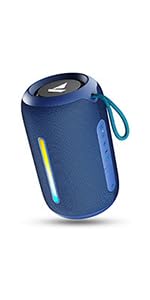
Image: A QR code for the boAt Hearables App, which provides additional support and features for the speaker.


