Įvadas
Welcome to your new Studebaker SB3720 Portable Stereo Bluetooth CD Player. This manual provides detailed instructions for setup, operation, and maintenance to ensure optimal performance and longevity of your device. Please read this manual thoroughly before using the product.
Pakuotės turinys
- SB3720 CD Player
- Vartotojo vadovas
- Type-C Charging Cable & USB-C Adaptor
The Type-C charging cable and USB-C power adapter that come with the Studebaker SB3720, used for charging the built-in battery and powering the device.
Pagrindinės savybės
- Bluetooth Connectivity for Streaming Music
- MP3 CD and CD-R/RW Compatible CD Player
- FM stereofoninis radijas
- USB MP3 grotuvas
- Integruota įkraunama baterija
- LCD ekranas
- 2.0 Garsiakalbių sistema
- Aux-In & Headphone Jacks
- Type-C Charging Cable & USB-C Adaptor (Included)
- Autoplay & Autostop upon CD Door Close and Open
Produktas baigtasview

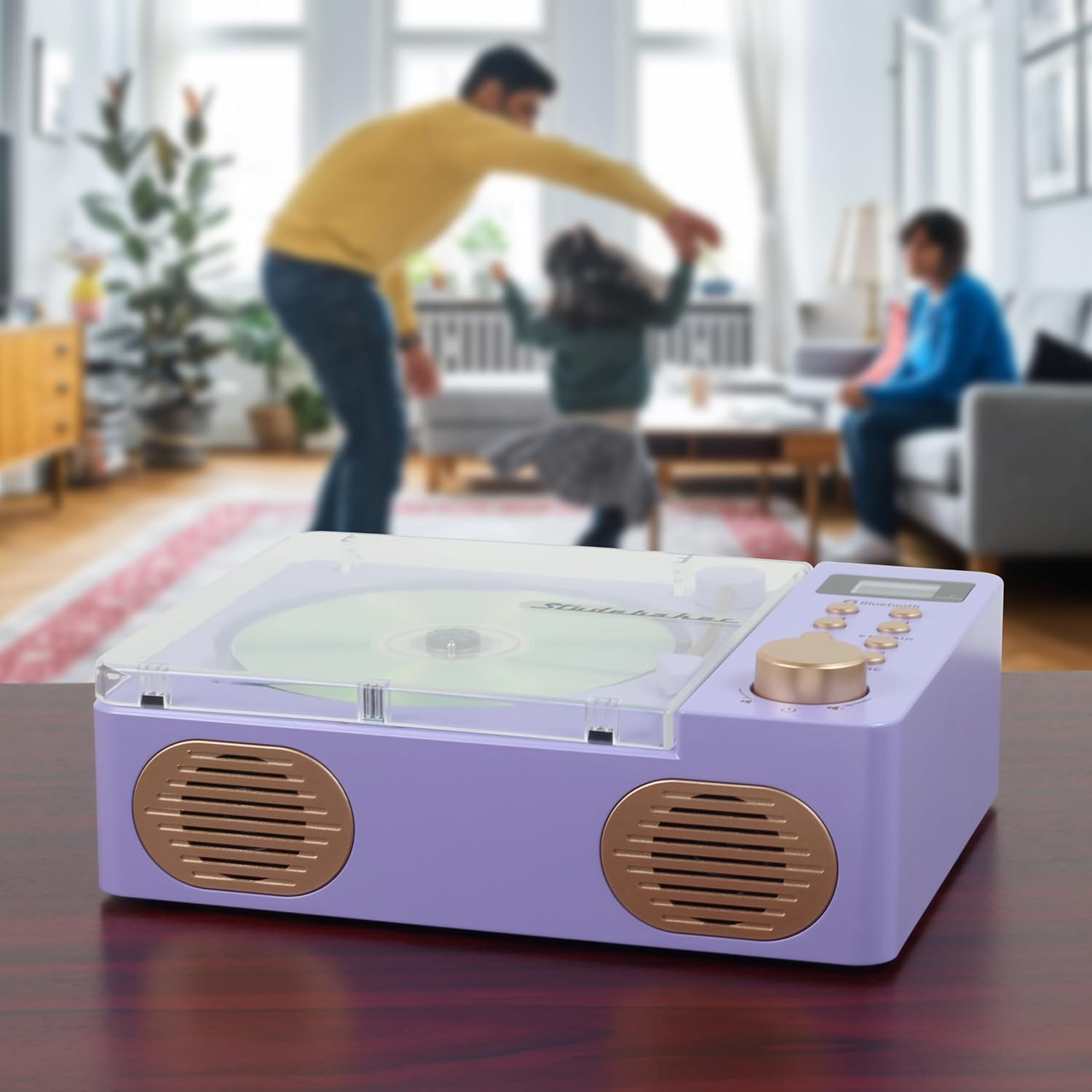
This image displays the Studebaker SB3720 Portable Stereo Bluetooth CD Player in its lilac color. The top-loading CD compartment is visible with a compact disc inserted, alongside the control panel featuring buttons for playback, mode selection, and a volume knob. The front-facing speakers are also visible.

A view of the Studebaker SB3720 CD Player with its transparent lid open, revealing the CD tray and the decorative tonearm. This illustrates how to insert or remove a CD.

The back panel of the Studebaker SB3720, showing the connectivity options: a USB-MP3 port for playing music from a USB drive, an AUX IN port for connecting external audio devices, and a DC IN 5V==1A port for power and charging. A small reset button is also visible.
Sąranka ir pirmasis naudojimas
Akumuliatoriaus įkrovimas
Connect the provided Type-C charging cable to the DC IN port on the back of the unit and the USB-C adaptor to a standard power outlet. The unit has a built-in rechargeable battery. The charging indicator (if available) will show the charging status.
Maitinimo įjungimas/išjungimas
Press and hold the Power button (often integrated with the volume knob) to turn the unit on or off. The LCD display will illuminate when the unit is powered on.
Naudojimo instrukcijos
CD atkūrimas
- Gently open the transparent lid of the CD compartment.
- Place a CD (standard audio CD, MP3 CD, or CD-R/RW) onto the spindle with the label side facing up.
- Tvirtai uždarykite CD skyriaus dangtelį.
- Press the 'MODE' button repeatedly until 'CD' mode is selected on the LCD display.
- Press the 'PLAY/PAUSE' button to begin playback.
- Norėdami naršyti tarp takelių, naudokite mygtukus „PRALEISTI/PAIEŠKA“.
- Press the 'REPEAT' button to cycle through repeat options (e.g., repeat one, repeat all).
Bluetooth ryšys
- Press the 'MODE' button repeatedly until 'Bluetooth' mode is selected. The unit will enter pairing mode, indicated by a flashing Bluetooth icon on the LCD display.
- On your Bluetooth-enabled device (e.g., smartphone, tablet), go to its Bluetooth settings and search for available devices.
- Select 'SB3720' from the list of devices to pair.
- Once paired, the Bluetooth icon on the SB3720's display will stop flashing, and you can stream audio from your device.
FM radijas
- Press the 'MODE' button repeatedly until 'FM' mode is selected.
- Use the 'SKIP/SEARCH' buttons to manually tune to a desired radio station.
- Press and hold the 'SKIP/SEARCH' buttons to automatically scan for the next available station.
USB MP3 grotuvas
- Įdėkite USB atmintinę, kurioje yra MP3 garso įrašų files into the USB-MP3 port on the back of the unit.
- Press the 'MODE' button repeatedly until 'USB' mode is selected.
- Įrenginys automatiškai pradės groti MP3 files iš USB atmintinės.
- Use the 'PLAY/PAUSE' and 'SKIP/SEARCH' buttons to control playback.
Pagalbinė įvestis (AUX-In)
- Connect an external audio device (e.g., smartphone, MP3 player) to the 'AUX IN' port on the back of the unit using a 3.5mm audio cable (not included).
- Press the 'MODE' button repeatedly until 'AUX' mode is selected.
- Audio from your external device will now play through the SB3720 speakers. Control playback from your external device.
Valdikliai ir ekranas
- Maitinimo / garsumo rankenėlė: Turns the unit on/off and adjusts the volume level.
- PLAY/PAUSE mygtukas: Starts or pauses playback in CD, Bluetooth, or USB modes.
- PRALEIDIMO / PAIEŠKOS mygtukai: Skips to the next/previous track or station; press and hold to fast forward/rewind or auto-scan.
- Mygtukas REPEAT: Cycles through repeat playback options for CDs or USB.
- MODE mygtukas: Perjungia CD, „Bluetooth“, FM, USB ir AUX režimus.
- LCD ekranas: Shows current mode, track number, time, and other relevant information.
Priežiūra ir priežiūra
To maintain the appearance and functionality of your SB3720, follow these guidelines:
- Nuvalykite įrenginį minkštu, sausu skudurėliu. Nenaudokite abrazyvinių valiklių, vaško ar tirpiklių.
- Venkite įrenginio tiesioginių saulės spindulių, ekstremalių temperatūrų ar didelės drėgmės.
- Keep the CD compartment clean and free of dust. If necessary, use a CD lens cleaner disc.
- Do not attempt to disassemble or modify the unit, as this will void the warranty.
Trikčių šalinimas
| Problema | Galima priežastis | Sprendimas |
|---|---|---|
| Įrenginys neįsijungia | Baterija išsikrovusi; Maitinimo laidas neprijungtas | Charge the unit using the provided cable and adapter; Ensure power cable is securely connected. |
| CD negroja | CD inserted incorrectly; CD is dirty or scratched; Incorrect mode selected | Ensure CD is inserted label-side up; Clean or replace CD; Select 'CD' mode. |
| Bluetooth neprisijungia | Unit not in pairing mode; Device Bluetooth off; Already connected to another device | Ensure 'Bluetooth' mode is selected and flashing; Turn on Bluetooth on your device; Disconnect from other devices and try pairing again. |
| Iš garsiakalbių nėra garso | Volume too low; Mute activated; Headphone jack in use | Increase volume; Check if unit is muted; Disconnect headphones. |
Techninės specifikacijos
| Funkcija | Specifikacija |
|---|---|
| Gaminio matmenys | 8.27 x 6.3 x 2.75 colio |
| Prekės svoris | 2.12 svaro |
| Prekės ženklas | Studebakeris |
| Modelio pavadinimas | Retro CD grotuvas su Bluetooth |
| Spalva | Alyva |
| Ryšio technologija | Bluetooth |
| Ypatinga funkcija | Auto Power-Off, Bluetooth, Lightweight, Portable, Rechargeable |
| Gamintojas | „Spectra Merchandising Intl.“ |
Garantija ir klientų aptarnavimas
For warranty information, technical assistance, or to inquire about replacement parts, please refer to the contact details provided with your purchase documentation or visit the official Studebaker websvetainėje. Išsaugokite pirkimo įrodymą garantiniams reikalavimams.