Įvadas
This manual provides comprehensive instructions for the Veqotya Vecb001 MP3 Player. Please read this manual carefully before using the device to ensure proper operation and to maximize its features.
The Veqotya Vecb001 is a versatile MP3 player equipped with Bluetooth 5.2, a built-in speaker, FM radio, voice recorder, and e-book reader functionalities. It offers 144GB of storage (16GB internal + 128GB TF card) for your music, audiobooks, and other files.
Pakuotės turinys
Atidarius pakuotę, patikrinkite, ar yra visos prekės ir ar jos yra geros būklės:
- Veqotya Vecb001 MP3 Player
- Ausinės
- USB įkrovimo laidas
- Vartotojo vadovas (šis dokumentas)
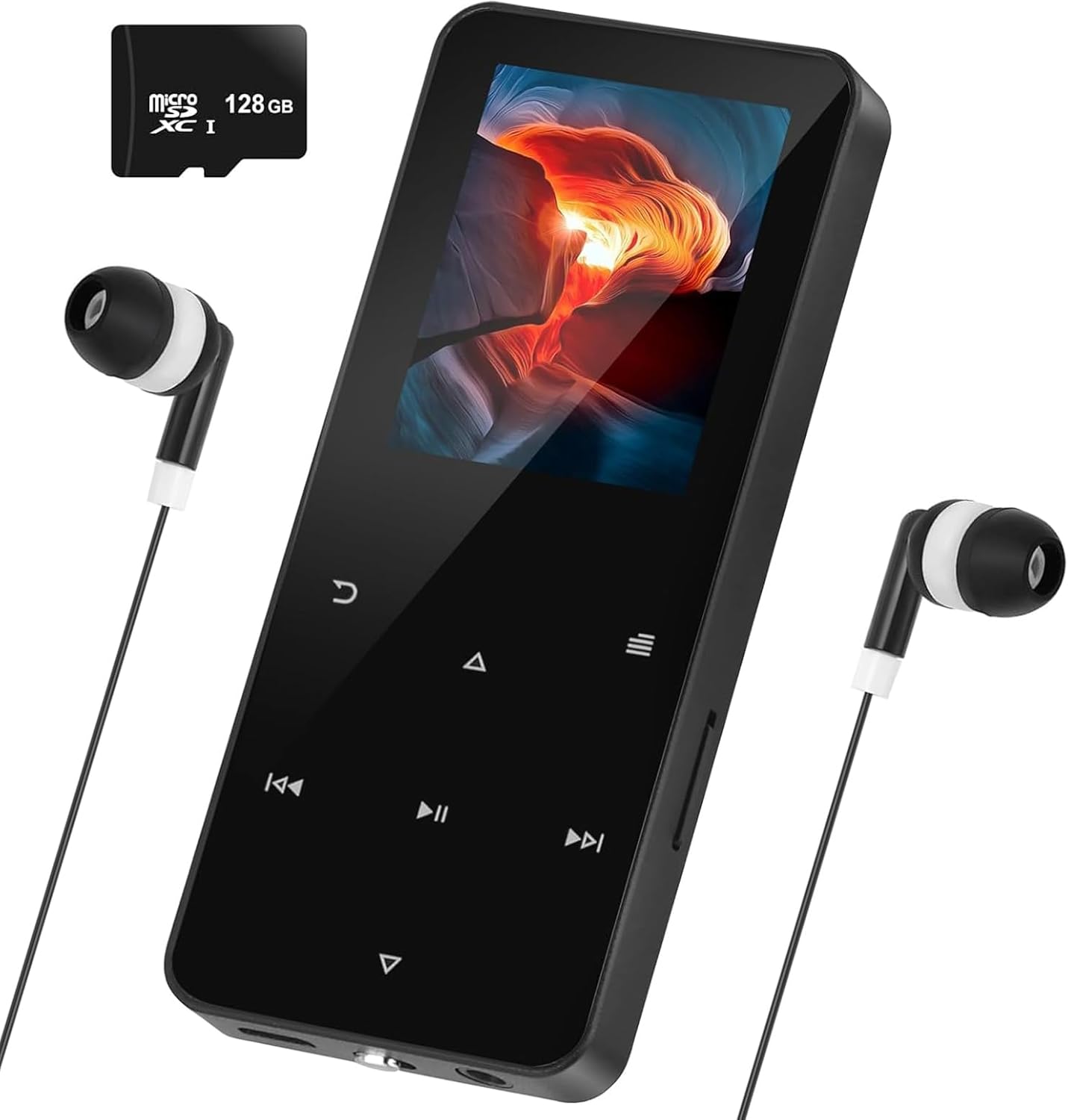
Image: The Veqotya Vecb001 MP3 Player, showing its sleek black design, screen, control buttons, and the included wired earphones and a 128GB Micro SD card.
Produktas baigtasview
Familiarize yourself with the various components and controls of your MP3 player.

Image: A detailed diagram illustrating the front and side views of the Veqotya Vecb001 MP3 Player, with labels for the screen, control buttons (menu, volume up/down, next/previous song, play/pause, return/undo), headphone plug, USB port, ON/OFF switch, TF card socket, and REC button. Dimensions are also indicated: 40cm width and 95cm height.
Valdikliai ir prievadai:
- Ekranas: Displays menus, music information, and e-book content.
- Menu Button (U-turn icon): Accesses the main menu or returns to the previous screen.
- Volume Up / Menu Up (Triangle pointing up): Increases volume or navigates up in menus.
- Volume Down / Menu Down (Triangle pointing down): Decreases volume or navigates down in menus.
- Next Song / Forward (Double arrow pointing right): Peršoka į kitą takelį arba peršoka į priekį.
- Previous Song / Retire (Double arrow pointing left): Peršoka į ankstesnį takelį arba atsuka atgal.
- Play/Pause Button (Vertical bars/triangle): Plays or pauses audio/video.
- Headphone Plug: 3.5 mm lizdas ausinėms prijungti.
- USB prievadas: Įkrovimui ir duomenų perdavimui.
- ĮJUNGIMO/IŠJUNGIMO jungiklis: Įjungia arba išjungia įrenginį.
- TF kortelės lizdas: Slot for inserting a Micro SD (TF) card for expanded storage.
- REC mygtukas: Pradeda balso įrašymą.
Sąranka
1. Įrenginio įkrovimas
Before first use, fully charge the MP3 player. Connect the USB charging cable to the device's USB port and the other end to a computer's USB port or a compatible USB wall adapter (not included).
Ekrane esantis akumuliatoriaus indikatorius rodys įkrovimo būseną. Visiškas įkrovimas paprastai trunka 2–3 valandas.
2. TF kortelės įdėjimas (neprivaloma)
The device comes with 16GB internal memory and supports up to 128GB via a TF (Micro SD) card. To expand storage:
- Locate the TF card socket on the side of the player.
- Švelniai įkiškite TF kortelę į lizdą, kol ji spragtelės į vietą. Įsitikinkite, kad kortelė yra tinkamai orientuota.
- To remove, gently push the card inward until it clicks, then release. The card will spring out.
3. Transferring Music and Files
Connect the MP3 player to your computer using the USB cable. The device will appear as a removable disk drive.
- Muzikai: Drag and drop your MP3, WAV, WMA, FLAC, APE audio files into the "Music" folder on the device or TF card.
- For E-books: Place TXT format files into the "E-book" folder.
- For Videos: Place compatible video files into the "Video" folder.
Note: Ensure audio files are in a supported format (MP3, WAV, WMA, FLAC, APE). Some users have reported issues with certain MP3 encoding settings; if files do not play, try re-encoding them to a standard MP3 format (e.g., 44.1 kHz, 128-320 kbps CBR).
Naudojimo instrukcijos
Maitinimo įjungimas/išjungimas
Norėdami įjungti įrenginį, pastumkite įjungimo/išjungimo jungiklį į padėtį „Įjungta“. Norėdami išjungti, pastumkite jį į padėtį „Išjungta“.
Navigacija
Use the directional buttons (up/down triangles, left/right double arrows) to navigate through menus and lists. The Play/Pause button often acts as a selection button, and the Menu button (U-turn icon) acts as a back/return button.
Muzikos atkūrimas
- Pagrindiniame meniu pasirinkite „Muzika“.
- Browse by Artist, Album, Song, or Folder.
- Select a song and press the Play/Pause button to begin playback.
- Use the Volume Up/Down buttons to adjust volume.
- Use the Next/Previous Song buttons to skip tracks.

Image: A person smiling and listening to music through wired earphones connected to the Veqotya MP3 player, demonstrating the device's use for enjoying audio.
Bluetooth ryšys
The MP3 player supports Bluetooth 5.2 for wireless audio streaming to compatible headphones or speakers.
- From the main menu, navigate to "Settings" then "Bluetooth".
- Įjunkite „Bluetooth“.
- The player will scan for available devices. Select your Bluetooth headphones/speaker from the list to pair.
- Once paired, audio will be routed through the Bluetooth device.
FM radijas
To use the FM radio, ensure earphones are plugged in as they act as the antenna.
- Pagrindiniame meniu pasirinkite „FM radijas“.
- Norėdami ieškoti stočių arba rankiniu būdu jas derinti, naudokite naršymo mygtukus.

Image: The Veqotya MP3 player screen showing the FM radio interface, tuned to 87.50 MHz, with a signal strength indicator. This illustrates the device's radio functionality.
Diktofonas
The device features a built-in voice recorder.
- Press the dedicated "REC" button on the side of the device, or navigate to "Recorder" from the main menu.
- Press the Play/Pause button to start recording. Press again to pause/stop.
- Recordings are saved in WAV format.

Image: A group of people in a meeting setting, with the Veqotya MP3 player prominently displayed in the foreground, showing its screen with a recording interface (REC0008.WAV, 1:16:22:32). This image highlights the device's voice recording capability for personal or classroom use.
E-book reader
View TXT format e-books on the device.
- From the main menu, select "E-book".
- Select the desired TXT file atidaryti.
- Use navigation buttons to scroll through pages.
Kitos Funkcijos
The Veqotya Vecb001 also includes features such as Alarm, Video playback, Folder browsing, and A-B Repeat for audio. Explore these options through the main menu.

Image: A graphic showing the Veqotya MP3 player and a user, with icons representing its various functions: Alarm, Record, Video, Music, Folder, E-book, FM Radio, and A-B Repeat. This visually summarizes the device's multifunctional capabilities.
Priežiūra
- Valymas: Įrenginiui valyti naudokite minkštą, sausą šluostę. Nenaudokite skystų valiklių ar aerozolių.
- Saugykla: Grotuvą laikykite vėsioje, sausoje vietoje, toliau nuo tiesioginių saulės spindulių ir ekstremalių temperatūrų.
- Akumuliatoriaus priežiūra: Norėdami pailginti akumuliatoriaus veikimo laiką, venkite dažnai visiškai jį iškrauti. Reguliariai įkraukite įrenginį, net jei jis ilgą laiką nenaudojamas.
- Venkite lašų: Saugokite įrenginį nuo kritimų ir smūgių, kurie gali pažeisti vidinius komponentus arba ekraną.
Trikčių šalinimas
| Problema | Galima priežastis | Sprendimas |
|---|---|---|
| Įrenginys neįsijungia. | Baterija išsikrovusi. | Įkraukite įrenginį mažiausiai 30 minučių. |
| "File not supported" error for music. | Garsas file format is not compatible or encoding issue. | Užtikrinti files are MP3, WAV, WMA, FLAC, or APE. Try re-encoding problematic MP3s to a standard bitrate (e.g., 128-320 kbps CBR) and sample rate (44.1 kHz). |
| Bluetooth ryšio problemos. | Device is out of range, target device not in pairing mode, or interference. | Ensure both devices are within 10 meters. Put the receiving device into pairing mode. Turn off and on Bluetooth on the MP3 player. |
| FM radijas neveikia. | Earphones not plugged in (acting as antenna). | Plug in the wired earphones firmly into the headphone jack. |
| Įrenginys užstringa arba nereaguoja. | Programinės įrangos triktis arba laikina klaida. | Slide the ON/OFF switch to "OFF" for 10 seconds, then slide back to "ON" to restart. |
Specifikacijos
- Modelis: Vecb001
- Prekinis ženklas: Veqotya
- Saugojimo talpa: 16GB Internal, expandable up to 128GB via TF card (144GB total with included card)
- Ryšys: Bluetooth 5.2, USB
- Ekrano dydis: 1.54 colių
- Ekrano technologija: LCD
- Palaikomi garso formatai: MP3, WAV, WMA, FLAC, APE
- Supported E-book Format: TXT
- Supported Video Format: (Specific format not provided, assume common small screen formats like AMV/AVI)
- Funkcijos: Music Player, FM Radio, Voice Recorder, E-book Reader, Alarm, Video Player
- Matmenys: Maždaug 95 mm x 40 mm (3.74 x 1.57 colio)
- Svoris: Maždaug 2.99 uncijos (85 gramai)
- Įtraukti komponentai: MP3 Player, Earphones, USB Cable
Garantija ir palaikymas
For warranty information and technical support, please refer to the contact details provided by Veqotya at the point of purchase or visit the official Veqotya websvetainę.
Išsaugokite pirkimo kvitą kaip pirkimo įrodymą garantiniams reikalavimams.