Įvadas
Šiame vadove pateikiama esminė informacija, kaip saugiai ir efektyviai naudoti jūsų ViewSonic VX2428A 24-inch Full HD IPS Gaming Monitor. Please read these instructions thoroughly before installation and operation.
Pagrindinės funkcijos:
- 24-inch Full HD (1920x1080p) IPS display
- 180Hz atnaujinimo dažnis
- 0.5ms (MPRT) response time
- AMD FreeSync technology
- Flicker-Free technology and Blue Light Filter
- HDR10 content support
- HDMI 1.4 and DisplayPort inputs
Sąranka
1. Kas yra dėžutėje
Patikrinkite, ar yra visi komponentai:
- LCD Display (VX2428A Monitor)
- Maitinimo kabelis
- AC/DC adapteris
- HDMI kabelis
- Greitos pradžios vadovas

Vaizdas: Vaizde rodomas ViewSonic VX2428A monitor along with its included accessories: a power cable, AC/DC adapter, HDMI cable, and a Quick Start Guide.
2. Monitoriaus surinkimas
Norėdami surinkti monitoriaus stovą ir pritvirtinti jį prie ekrano skydelio, atlikite šiuos veiksmus.

Paveikslėlis: Priekinė dalis view iš ViewSonic VX2428A 24-inch gaming monitor, showcasing its thin bezels and sleek design.

Paveikslėlis: The ViewSonic VX2428A monitor positioned on a desk with a keyboard and mouse, highlighting its narrow stand designed for compact setups.
3. Įrenginių prijungimas
The VX2428A monitor offers multiple connectivity options:
- HDMI (x2): Connect to devices such as PCs, gaming consoles, or media players using an HDMI cable.
- DisplayPort (x1): Connect to a computer or graphics card for high-resolution and high-refresh-rate output using a DisplayPort cable.
- 3.5 mm garso išvestis (x1): Prijunkite išorinius garsiakalbius arba ausines.
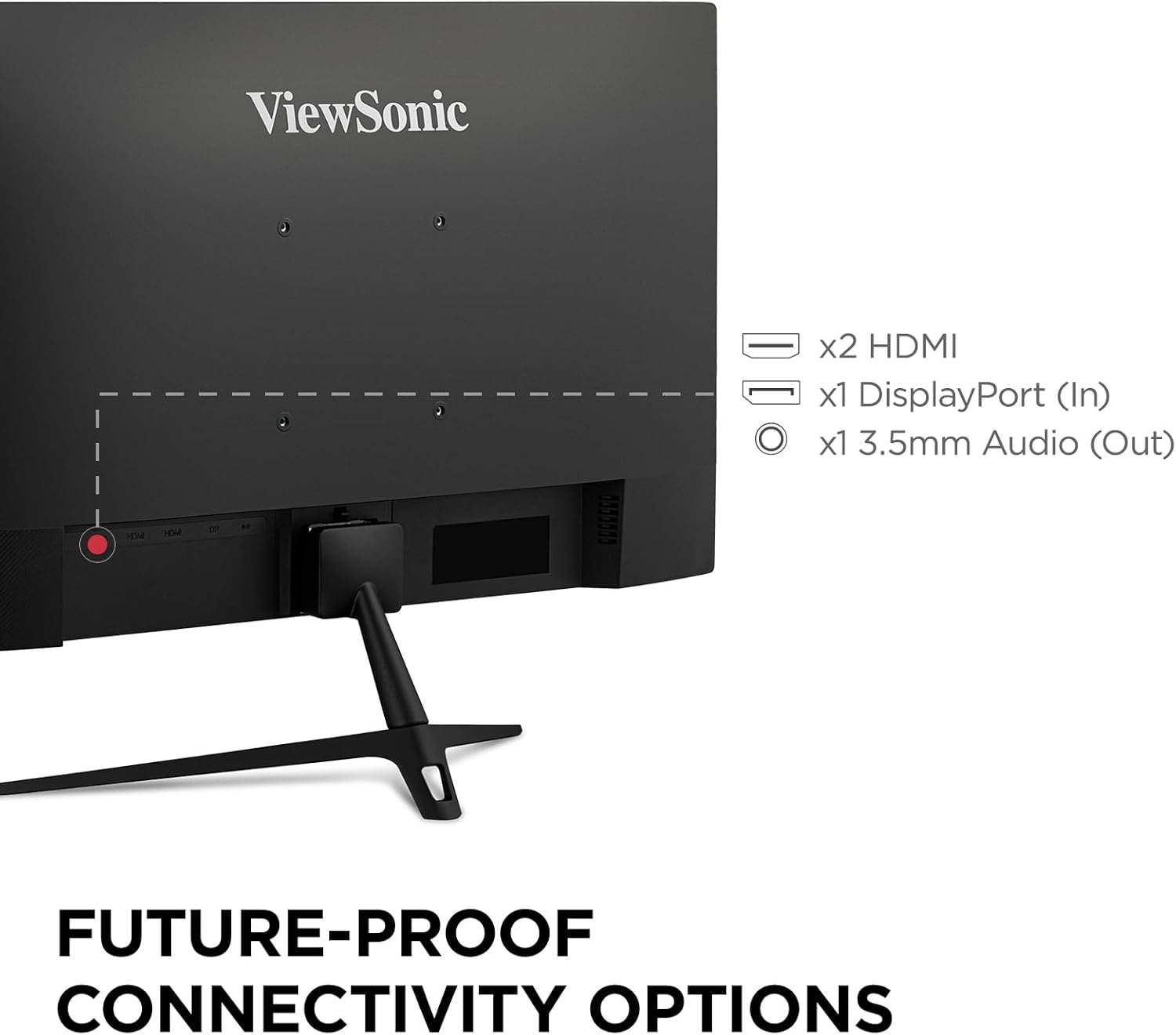
Paveikslėlis: Galinis skydelis ViewSonic VX2428A monitor, clearly showing the two HDMI ports, one DisplayPort input, and a 3.5mm audio output jack.

Image: Graphic illustrating the available connectivity options: HDMI, DisplayPort, and Audio Out, with corresponding icons.
4. Maitinimo prijungimas
Prijunkite kintamosios / nuolatinės srovės adapterį prie monitoriaus maitinimo įvesties, tada įjunkite maitinimo laidą į sieninį lizdą.
5. VESA Mount Compatibility
The monitor supports VESA mounting standard 100 x 100 mm for alternative mounting solutions (e.g., wall mounts, monitor arms).

Image: A monitor mounted on an adjustable arm, indicating its 100 x 100 mm VESA mount compatibility for flexible setup options.
Naudojimo instrukcijos
1. Maitinimo įjungimas/išjungimas
Press the power button located on the monitor's bottom right bezel to turn the monitor on or off.
2. Ekrano ekrano (OSD) meniu
The OSD menu allows you to adjust various monitor settings. Use the buttons on the monitor's bezel to navigate the menu.
Recommended Settings (from user feedback):
- View Režimas: Standartinis
- Kontrastas: 77
- Ryškumas: 100
- Spalvos temperatūra: User Color (for unbiased temperature)
- Spalvų diapazonas: Full Range (ensure this matches your graphics card settings)
- Mėlynos šviesos filtras: 25 to 35 (adjust for comfort; higher values may affect white balance)
- Juodos spalvos stabilizavimas: 70
- Atsakymo laikas: Advanced (Ultra Fast may introduce artifacts)
- Adaptive Sync (AMD FreeSync): On
- HDR: Set to On when using HDR content; otherwise, keep Off. If HDR is enabled on your device and Off on the monitor, colors may appear washed out. Note that some OSD settings may be greyed out when HDR is active.
3. Žaidimų našumo funkcijos
The VX2428A is designed for an enhanced gaming experience:
- 180Hz atnaujinimo dažnis: Provides smoother motion and reduced input lag.
- 0.5 ms (MPRT) atsako laikas: Sumažina judesio suliejimą ir šešėliavimą, kad būtų aiškūs, greito tempo veiksmo vaizdai.
- AMD FreeSync: Sinchronizuoja monitoriaus atnaujinimo dažnį su GPU kadrų dažniu, kad būtų išvengta ekrano plyšinėjimo ir mirgėjimo.

Vaizdas: A ViewSonic monitor displaying a gaming scene, emphasizing its 180Hz refresh rate, 0.5ms response time, and AMD FreeSync technology for improved gameplay.

Image: A visual comparison demonstrating the reduction in motion blur and improved clarity when using the monitor's 0.5ms response time and 180Hz refresh rate compared to standard settings.

Image: A split image illustrating the difference between FreeSync OFF (showing screen tearing) and FreeSync ON (showing smooth, tear-free visuals) during gameplay.
4. Akių priežiūros technologija
The monitor incorporates Flicker-Free technology and a Blue Light Filter to reduce eye strain during extended use.
Image: A simulated image demonstrating the benefits of eye-care technology, comparing standard flicker and blue light emission with the monitor's reduced output.
Priežiūra
Monitoriaus valymas
Norėdami išvalyti monitoriaus ekraną irasing:
- Išjunkite monitorių ir atjunkite maitinimo laidą.
- Švelniai nuvalykite ekraną minkštu, nepūkuotu skudurėliu. Jei dėmės sunkiai įveikiamos, švelniai nuvalykiteampNuvalykite šluostę vandeniu arba švelniu, neabrazyviniu ekrano valikliu.
- Nuvalykite casing minkštu, sausu skudurėliu.
- Avoid using harsh chemicals, abrasive cleaners, or spraying liquids directly onto the screen or casing.
Trikčių šalinimas
Jei kyla problemų dėl monitoriaus, žr. šias dažniausiai pasitaikančias problemas ir sprendimus:
- Nėra galios: Ensure the power cable and AC/DC adapter are securely connected to both the monitor and a working power outlet.
- Nėra signalo: Verify that the video cable (HDMI or DisplayPort) is correctly connected to both the monitor and your source device. Ensure the correct input source is selected in the OSD menu.
- Washed Out Colors (with HDR): If HDR is enabled on your connected device but set to Off in the monitor's OSD, colors may appear dull. Enable HDR in the monitor's OSD settings. Note that some OSD settings may be inaccessible when HDR is active.
- Image Flickering/Tearing: Ensure AMD FreeSync is enabled on both your monitor (via OSD) and your graphics card settings.
- Motion Artifacts: If you observe ghosting or artifacts during fast motion, check the "Response Time" setting in the OSD. Setting it to "Ultra Fast" may sometimes introduce artifacts; try "Advanced" instead.
- No Sound from Monitor Speakers: Check the audio output settings on your connected device and the monitor's OSD. Ensure external speakers/headphones are properly connected to the 3.5mm audio out port if used.
- Missing HDMI Cable: Please note that while a DisplayPort cable is often included, an HDMI cable may not always be part of the standard package.
Specifikacijos
| Funkcija | Detalė |
|---|---|
| Prekės ženklas | ViewSonic |
| Modelio numeris | VX2428A (VS19276) |
| Ekrano dydis | 24 colių (23.8 colio) Viewgali) |
| Rezoliucija | 1920 x 1080 (Full HD) |
| Skydelio tipas | IPS |
| Atnaujinimo dažnis | 180 Hz |
| Reagavimo laikas | 0.5 ms (MPRT) |
| Adaptyvusis sinchronizavimas | AMD FreeSync |
| Krašto santykis | 16:9 |
| Ryšys | 2x HDMI 1.4, 1x DisplayPort 1.2, 1x 3.5mm Audio Out |
| HDR palaikymas | HDR10 |
| Akių priežiūros funkcijos | Nemirgantis, mėlynos šviesos filtras |
| VESA kalnas | 100 x 100 mm |
| Matmenys (IxPxH) | 7.2 x 21.3 x 16.6 colio (18.3 x 54.1 x 42.2 cm) |
| Svoris | 6.8 svaro (3.08 kg) |
| Spalva | Juoda |

Paveikslėlis: The ViewSonic VX2428A monitor shown with its physical dimensions, including screen size (23.8 inches / 60.96 cm), width (21.3 inches / 54.1 cm), and depth (7.2 inches / 18.3 cm).
Garantija ir palaikymas
Informacija apie garantiją
Jūsų ViewSonic VX2428A monitor is covered by a 3 metų ribota garantija. Ši garantija apima medžiagų ir gamybos defektus normaliai naudojant.
Pagalba klientams
For technical assistance, warranty claims, or product inquiries, please contact ViewSonic's US-based customer support. Refer to the Quick Start Guide or the official ViewSonic websvetainė, kurioje rasite kontaktinius duomenis.

Image: A graphic highlighting key customer benefits: a 3-Year Warranty, access to US-based Customer Support, environmentally friendly packaging, and integrated eye care features.


