1. Įvadas
This manual provides detailed instructions for the safe and effective use of your PARD Night Stalker 4K NS4K Pro-70/850/LRF digital night vision scope. Please read this manual thoroughly before operating the device to ensure optimal performance and longevity. The PARD Night Stalker 4K is an advanced digital night vision scope designed for observation, featuring a 4K Ultra-HD sensor, an integrated 1000m laser rangefinder (LRF), and an 850nm infrared (IR) illuminator.
2. Saugos informacija
- Akių sauga: Never look directly at the sun or any bright light source through the device, as this can cause permanent eye damage.
- IR apšvietimas: The integrated IR illuminator emits invisible infrared light. Avoid direct, prolonged exposure to the IR beam at close range.
- Baterijos valdymas: Use only recommended rechargeable batteries. Do not expose batteries to extreme temperatures, disassemble, or short-circuit them. Dispose of batteries according to local regulations.
- Vandens ekspozicija: While the device is IP67 waterproof, ensure all covers and ports are securely closed before exposure to water. Do not submerge the device beyond its rated depth or duration.
- Temperatūra: Operate and store the device within specified temperature ranges to prevent damage.
3. Produkto ypatybės
The PARD Night Stalker 4K NS4K Pro-70/850/LRF incorporates several advanced features for enhanced performance:
- 4K Ultra-HD CMOS Sensor: Provides superior resolution and an extended matrix for significantly improved image clarity and detailed observation.
- Detachable LRF and IR Module: Allows for customization of equipment based on operational needs, enabling weight reduction when certain functions are not required.
- Lateral Focus Wheel: Offers clear visibility and easy access for smooth, precise adjustments, ensuring an instant sharp image. Ergonomic design facilitates use even with gloves.
- 1000m Laser Rangefinder: An advanced laser measurement system provides real-time distance readings of observed objects up to 1000 meters. Includes an integrated calculation tool for distance evaluation.
- Vaizdas vaizde (PIP) režimas: Displays a 2x magnified area at the top of the screen for more detailed subject identification.
- Integruotas „Wi-Fi“: Enables connection to a smartphone for shared viewing and remote control.
- IP67 atsparumo vandeniui įvertinimas: Designed to withstand extreme weather conditions, ensuring reliable performance in various outdoor environments.
4. Sąranka
4.1 Išpakavimas ir pirminė apžiūra
Carefully remove all components from the packaging. Verify that all items are present: the Night Stalker 4K scope, mounting rings, charging cable, and user manual. Inspect the device for any signs of damage.
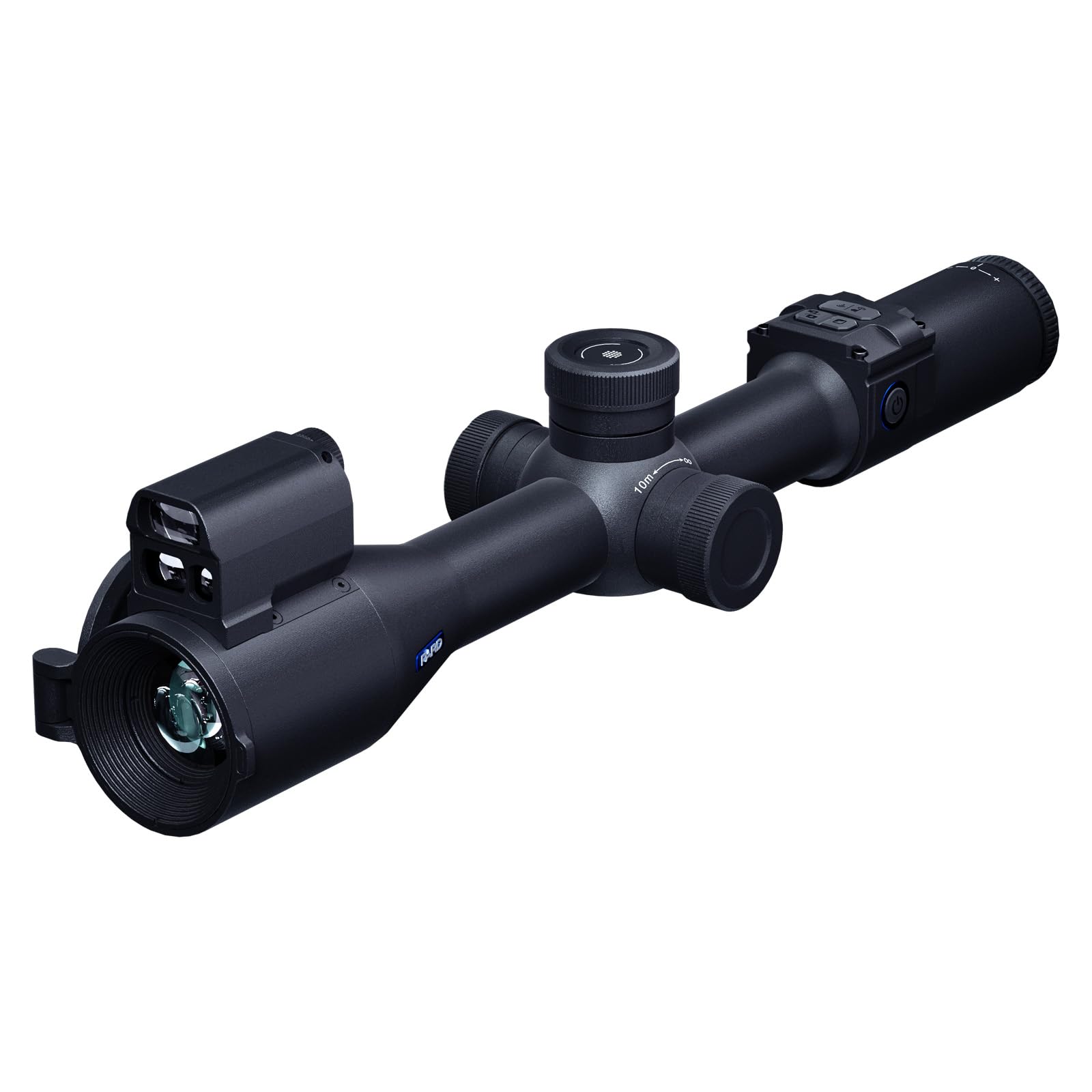
Image 4.1: PARD Night Stalker 4K NS4K Pro-70/850/LRF Digital Night Vision Scope. This image shows the overall design and included accessories.
4.2 Baterijos įdėjimas ir įkrovimas
The device uses a rechargeable battery. Locate the battery compartment, typically on the side or bottom of the main body. Insert the battery according to the polarity indicators. To charge, connect the provided charging cable to the device's charging port and a suitable USB power source. An indicator light will show charging status.
4.3 Taikiklio montavimas
Attach the included mounting rings to your preferred rail system. Secure the Night Stalker 4K scope into the rings, ensuring it is level and positioned for comfortable eye relief. Tighten the mounting screws firmly but do not overtighten.
4.4 Initial Power On and Diopter Adjustment
Press and hold the power button to turn on the device. Once the display is active, adjust the diopter ring, usually located near the eyepiece, until the on-screen display (OSD) text and icons appear sharp and clear to your eye. This adjustment is personal and crucial for comfortable viewing.
5. Naudojimo instrukcijos
5.1 Įjungimas / išjungimas ir budėjimo režimas
- Maitinimas: Paspauskite ir palaikykite maitinimo mygtuką maždaug 3 sekundes.
- Išjungti: Press and hold the power button for approximately 3 seconds until the device shuts down.
- Budėjimo režimas: A short press of the power button typically puts the device into standby mode, conserving battery while allowing quick reactivation.
5.2 Day and Night Mode Selection
The Night Stalker 4K automatically adjusts to ambient light conditions. For optimal daylight use, keep the objective lens cap closed with the small central aperture open. For night use, remove the objective lens cap completely to allow maximum light intake. The device will switch to night vision mode automatically or can be manually toggled via the menu.
5.3 Fokusavimas
Use the large lateral focus wheel to adjust the image clarity for different distances. Rotate the wheel until the observed object appears sharp on the display. This is separate from the diopter adjustment, which focuses the display for your eye.
5.4 Skaitmeninis mastelis
The device features digital zoom. Locate the zoom control, typically a knob or dedicated button. Rotate or press to increase or decrease magnification. Note that digital zoom may reduce image quality at higher levels.
5.5 Laser Rangefinder (LRF) Operation
To activate the LRF, press the dedicated LRF button. Aim the reticle at the target, and the distance will be displayed on the screen. The LRF can measure distances up to 1000 meters. Ensure there are no obstructions between the device and the target.
5.6 IR Illuminator Control
The integrated 850nm IR illuminator enhances visibility in low-light or complete darkness. Activate the IR illuminator via its dedicated button or through the menu. Adjust the IR intensity level as needed for optimal illumination without overexposure.
5.7 Picture-in-Picture (PIP) Mode
Activate PIP mode via its dedicated button or menu option. A magnified 2x window will appear on the display, allowing for detailed observation of a specific area while maintaining a wider field of view in the main display.
5.8 Vaizdo įrašymas ir nuotraukų darymas
The Night Stalker 4K can record videos and capture photos. Insert a compatible microSD card (not included) into the designated slot. Use the record/capture button to start/stop video recording or take a photo. Files are saved to the microSD card.
5.9 „Wi-Fi“ ryšys
Download the official PARD Vision app on your smartphone. Enable Wi-Fi on the Night Stalker 4K via the menu. Connect your smartphone to the device's Wi-Fi network. This allows for live view, nuotolinio valdymo pultas ir file perkėlimas.
5.10 Meniu naršymas
Access the main menu by pressing the menu button. Use the directional buttons or scroll wheel to navigate through options such as brightness, contrast, reticle settings, system settings, and more. Press the menu button again to exit.
6. Priežiūra
6.1 Prietaiso valymas
- Objektyvai: Use a soft, lint-free cloth specifically designed for optical lenses. For stubborn smudges, use a small amount of lens cleaning fluid. Avoid abrasive materials.
- Korpusas: Nuvalykite įrenginio korpusą minkšta,amp audinys. Nenaudokite stiprių cheminių medžiagų ar tirpiklių.
6.2 Baterijos priežiūra ir laikymas
- Prieš ilgalaikį sandėliavimą visiškai įkraukite baterijas.
- Store the device and batteries in a cool, dry place, away from direct sunlight and extreme temperatures.
- If storing for long periods, remove the battery from the device.
6.3 Hidroizoliacija
The IP67 rating indicates protection against dust ingress and immersion in water up to 1 meter for 30 minutes. Always ensure all port covers and battery compartment seals are intact and properly closed before exposing the device to moisture or dust.
7. Problemų sprendimas
Jei kyla problemų, vadovaukitės toliau pateiktais įprastais trikčių šalinimo veiksmais.
- Įrenginys neįsijungia: Ensure the battery is correctly installed and fully charged. Try a different charged battery if available.
- Vaizdas neryškus arba neaiškus: Adjust the diopter for your eye and the lateral focus wheel for the object distance. Clean the objective and eyepiece lenses.
- Laser Rangefinder not working: Ensure the LRF is activated. Check for any obstructions in the laser path. The target may be outside the 1000m range or too small/non-reflective.
- „Wi-Fi“ ryšio problemos: Ensure Wi-Fi is enabled on the device and your smartphone. Restart both devices. Verify you have the correct PARD Vision app installed.
- No video recording/photo capture: Ensure a compatible microSD card is inserted and has sufficient free space. Check if the card is properly formatted (refer to menu settings).
Jei išbandžius šiuos veiksmus problemos išlieka, susisiekite su klientų aptarnavimo tarnyba.
8. Specifikacijos
| Funkcija | Specifikacija |
|---|---|
| Modelis | NS4K Pro-70/850/LRF |
| Jutiklio skyra | 3840 x 2160 (4K Ultra-HD CMOS) |
| Laser Rangefinder (LRF) Range | Iki 1000m |
| IR apšvietiklio bangos ilgis | 850 nm |
| Atsparumo vandeniui įvertinimas | IP67 |
| Ryšys | Wi-Fi |
| Svoris | 730 gramų |
| Vaizdo įrašymas | Taip |
| Vaizdas vaizde (PIP) | Taip |
9. Garantija ir palaikymas
For detailed warranty information, please refer to the official documentation included with your product or visit the PARD official websvetainėje. Garantijos sąlygos gali skirtis priklausomai nuo regiono ir mažmenininko.
For technical support, service, or inquiries regarding your PARD Night Stalker 4K NS4K Pro-70/850/LRF, please contact the PARD Official Store or your authorized dealer. Keep your purchase receipt and product serial number readily available when seeking support.


