1. Įvadas
This manual provides detailed instructions for the safe and effective operation of your VAR TECH V92S Smart Digital Multimeter. The V92S is a True RMS, fully auto-ranging digital multimeter designed for precise measurements across various electrical parameters. Please read this manual thoroughly before use and retain it for future reference.
2. Saugos informacija
Always adhere to basic safety precautions when using this multimeter to prevent personal injury or damage to the instrument. Improper use can result in electric shock or fire.
- Neviršykite kiekvienai funkcijai nurodytų didžiausių įvesties verčių.
- Prieš atlikdami matavimus, įsitikinkite, kad bandymo laidai yra tinkamai prijungti ir geros būklės.
- Do not use the multimeter if it appears damaged or if the battery cover is not securely closed.
- Būkite ypač atsargūs dirbdami su ttagaukštesnėje nei 60 V nuolatinės srovės arba 30 V kintamosios srovės RMS įtampoje, nes kyla elektros smūgio pavojus.
- Prieš matuodami varžą, talpą ar laidumą, visada atjunkite bandomosios grandinės maitinimą.
- Kad rodmenys būtų tikslūs, nedelsdami pakeiskite baterijas, kai pasirodys išsikrovusių baterijų indikatorius.
- Do not operate the multimeter in explosive atmospheres or near flammable materials.
3. Pagrindinės savybės
The VAR TECH V92S Smart Digital Multimeter offers a range of advanced features for comprehensive electrical testing:
- Smart Digital Multimeter with Auto Detection TRMS (True Root Mean Square)
- 600 V AC/DC & 10 A AC/DC measurement capabilities
- 6000 Counts HD Display with Primary & Secondary display and Analog bar graph
- Capacitance Test: 6 nF to 60 mF
- Frequency Test: 6 Hz to 10 MHz
- Temperature Test: -40 ºC to 1000 ºC
- Diode & Continuity Test
- NCV (Non-Contact Voltage) test for live wire detection
- Integrated Torch for illumination in dark environments
- Auto Power Off function to conserve battery life
- Duomenų laikymo funkcija rodmenims ekrane užfiksuoti
- Baterijos išsikrovimo indikatorius
- Jack Prompt for correct test lead insertion
- Burnt Fuse Prompt for safety and easy maintenance
- Resistance measurement: 600 Ω to 60 MΩ

3.1 pav.: priekis view of the VAR TECH V92S Smart Digital Multimeter, showcasing jo ekraną ir valdymo mygtukus.

Figure 3.2: The VAR TECH V92S Multimeter held in hand, illustrating its compact and ergonomic design.
4. Gaminio komponentai
The VAR TECH V92S Smart Digital Multimeter package includes the following items:
- VAR TECH V92S Digital Multimeter
- Bandymo laidai (raudoni ir juodi)
- Instrukcijų vadovas (šis dokumentas)
- Nešiojimo maišelis
- 4 AAA baterijos (iš anksto įdėtos arba pridedamos atskirai)

Figure 4.1: Contents of the VAR TECH V92S package, including the multimeter, test leads, manual, and carrying pouch.
5. Sąranka
5.1. Akumuliatoriaus įdėjimas
The VAR TECH V92S requires 4 AAA batteries for operation. If batteries are not pre-installed, or if replacement is needed:
- Įsitikinkite, kad multimetras yra išjungtas.
- Suraskite akumuliatoriaus skyrių įrenginio gale.
- Baterijų skyriaus dangteliui atidaryti naudokite atsuktuvą.
- Įdėkite 4 AAA baterijas, laikydamiesi teisingo poliškumo (+/-), kaip nurodyta skyrelio viduje.
- Saugiai uždarykite akumuliatoriaus skyriaus dangtelį.
5.2. Bandymo laidų prijungimas
Tinkamas bandymo laidų prijungimas yra labai svarbus norint atlikti tikslius ir saugius matavimus.
- Insert the black test lead into the “COM” (Common) jack.
- Daugumai tūriųtage, resistance, continuity, capacitance, frequency, and temperature measurements, insert the red test lead into the “INPUT” jack.
- For current measurements (mA/A), insert the red test lead into the “mA/A” jack.

Figure 5.1: The input jack prompt light feature. When turning on or changing ranges, the corresponding input socket light flashes to indicate where to insert the probe.
6. Naudojimo instrukcijos
6.1. Maitinimo įjungimas/išjungimas
Paspauskite Galia button (red circle with line) to turn the multimeter on or off.
6.2. Funkcijos pasirinkimas
The V92S features an auto-ranging function, automatically detecting the measurement type in “SMART” mode. For specific functions, use the SEL ir FUNKCIJA mygtukai:
- SEL (Select) Button: Used to switch between different measurement types within a primary mode (e.g., AC Voltage ir DC Voltage, or Diode and Continuity).
- FUNC (Function) Buttons: Used to directly select specific measurement functions like Capacitance, Frequency, or Temperature.
6.3. Matavimo režimai
Ensure test leads are correctly inserted for the desired measurement.
6.3.1. ttagMatavimas (AC/DC)
- Insert the red lead into the “INPUT” jack and the black lead into the “COM” jack.
- Turn on the multimeter. It will typically default to auto-ranging voltage matavimas.
- Jei reikia, paspauskite SEL to switch between AC and DC voltage.
- Prijunkite bandymo zondus lygiagrečiai prie matuojamos grandinės arba komponento.
6.3.2. Srovės matavimas (AC/DC)
- Insert the red lead into the “mA/A” jack and the black lead into the “COM” jack.
- Turn on the multimeter. The device automatically enters the current measurement function when the probe is inserted into the mA/A socket.
- Jei reikia, paspauskite SEL to switch between AC and DC current.
- Connect the test probes in series with the circuit to be measured.
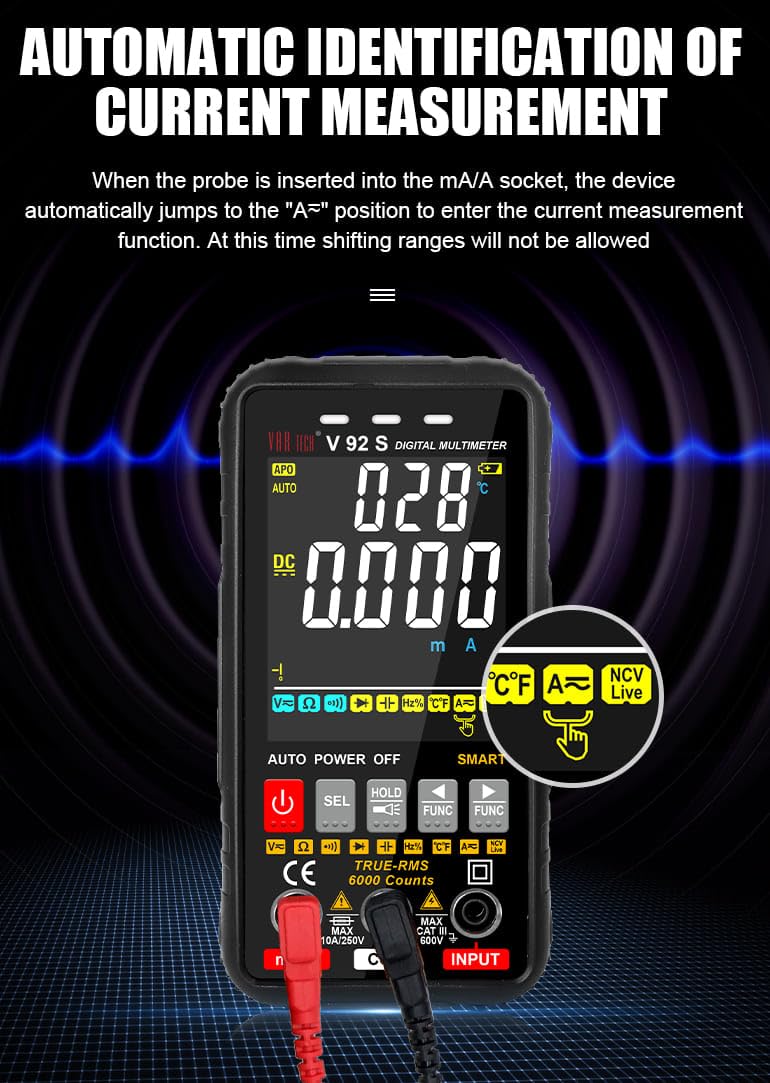
Figure 6.1: Automatic identification of current measurement. The multimeter automatically adjusts to the current measurement function when the probe is inserted into the mA/A socket.
6.3.3. Resistance, Capacitance, Frequency, Temperature, Diode, Continuity
For these measurements, ensure the red lead is in the “INPUT” jack and the black lead in the “COM” jack. Use the SEL or FUNKCIJA buttons to select the desired mode. Connect probes to the component or circuit as appropriate for each measurement type.
6.3.4. NCV (Non-Contact Voltage) Testas
NCV funkcija leidžia aptikti kintamosios srovės tūrįtage be tiesioginio kontakto su laidininkais.
- Select the NCV function using the appropriate button.
- Bring the top of the multimeter near the conductor or outlet.
- The instrument will emit an audible beep and the alarm indicator light will illuminate when AC signals are detected. A “-H” display indicates a strong signal, while “-L” indicates a weak signal.

Figure 6.2: Auditory and visual alarm during NCV (Non-Contact Voltage) testing, indicating the presence of AC voltage.
6.4. Duomenų laikymo funkcija
Paspauskite LAIKYTI mygtuką, kad sustabdytumėte dabartinį rodmenį ekrane. Paspauskite jį dar kartą, kad atšauktumėte laikymo funkciją.
6.5. Žibintuvėlio funkcija
The multimeter includes a built-in flashlight for illuminating work areas. Activate the flashlight using the designated button (often integrated with the HOLD button or a separate light icon). Press again to turn it off.

Figure 6.3: The integrated flashlight function, useful for working in dimly lit environments.
7. Priežiūra
7.1. Valymas
Nuvalykite dėklą su skelbimuamp cloth and mild detergent. Do not use abrasives or solvents. Ensure the multimeter is powered off and disconnected from all circuits before cleaning.
7.2. Baterijos keitimas
Kai ekrane pasirodo išsikrovusio baterijų indikatorius, pakeiskite baterijas, kaip aprašyta 5.1 skyriuje.
7.3. Saugiklio keitimas
The V92S features an intelligent anti-burn function with a built-in safety fuse to protect the circuit. If the safety fuse burns out, the display screen will show a “FUSE” symbol to prompt replacement.
- Įsitikinkite, kad multimetras yra išjungtas ir visi bandymo laidai atjungti.
- Atidarykite akumuliatoriaus skyriaus dangtelį, esantį prietaiso gale.
- Atsargiai suraskite ir išimkite perdegusį saugiklį.
- Replace it with a fuse of the same type and rating (refer to specifications for fuse type).
- Saugiai uždarykite akumuliatoriaus skyriaus dangtelį.

Figure 7.1: The intelligent anti-burn function prompt, indicating the location of the fuse for replacement.
8. Problemų sprendimas
If you encounter issues with your VAR TECH V92S, refer to the following common problems and solutions:
- Nėra ekrano: Patikrinkite baterijų įdėjimą ir įsitikinkite, kad jos nėra išsikrovusios. Jei reikia, pakeiskite.
- Neteisingi skaitymai: Verify test lead connections. Ensure the correct measurement function is selected. Check if the fuse is intact for current measurements.
- “OL” or Overload Indication: The measured value exceeds the range of the selected function. Select a higher range if available, or ensure the input is within the multimeter’s capabilities.
- “FUSE” Display: The fuse has blown. Refer to Section 7.3 for fuse replacement.
If the problem persists, contact VAR TECH customer support for assistance.
9. Techninės specifikacijos
| Parametras | Specifikacija |
|---|---|
| Modelis | V92S |
| Ekranas | 6000 Counts HD Display |
| Tikras RMS | Taip |
| DC ttage | Iki 600 V |
| AC ttage | Iki 600 V |
| DC srovė | Iki 10 A |
| Kintamosios srovės srovė | Iki 10 A |
| Atsparumas | nuo 600 Ω iki 60 MΩ |
| Talpa | nuo 6 nF iki 60 mF |
| Dažnis | 6 Hz iki 10 MHz |
| Temperatūra | -40 ºC iki 1000 ºC |
| Tęstinumo testas | Taip |
| Diodo testas | Taip |
| NCV (Non-Contact Voltage) | Taip |
| Maitinimo šaltinis | 4 AAA baterijos (pridedamos) |
| Prekės svoris | 300 g |
| Gaminio matmenys (I x P x A) | 14 x 7 x 5 cm |
| Saugos įvertinimas | CAT III 600V |
| Sertifikatai | CE, ISO 9001 |

Figure 9.1: A comparison table illustrating the features of various VAR TECH multimeter models, including the V92S.
10. Garantija ir palaikymas
The VAR TECH V92S Smart Digital Multimeter comes with a 1-year warranty against manufacturing defects. For warranty claims or technical support, please contact VAR TECH directly.
Manufacturer: V A R TECH, www.var-tech.com


