1. Įvadas
The ZYWELL ZM04 is a versatile Bluetooth thermal label and receipt printer designed for various business and personal applications. This two-in-one device supports both 58mm and 80mm paper widths, offering efficient printing for logistics, retail, and other commercial needs. This manual provides comprehensive instructions for setting up, operating, maintaining, and troubleshooting your ZM04 printer.

Figure 1: ZYWELL ZM04 Label Maker and Receipt Printer
2. Pakuotės turinys
Patikrinkite, ar jūsų siuntinyje yra visi toliau išvardyti daiktai:
- ZM04 Printer
- USB kabelis
- Maitinimo kištukas
- Baterija
- Vartotojo vadovas
- U-DISK (USB Drive with drivers and software)
- Labels (Sample roll)
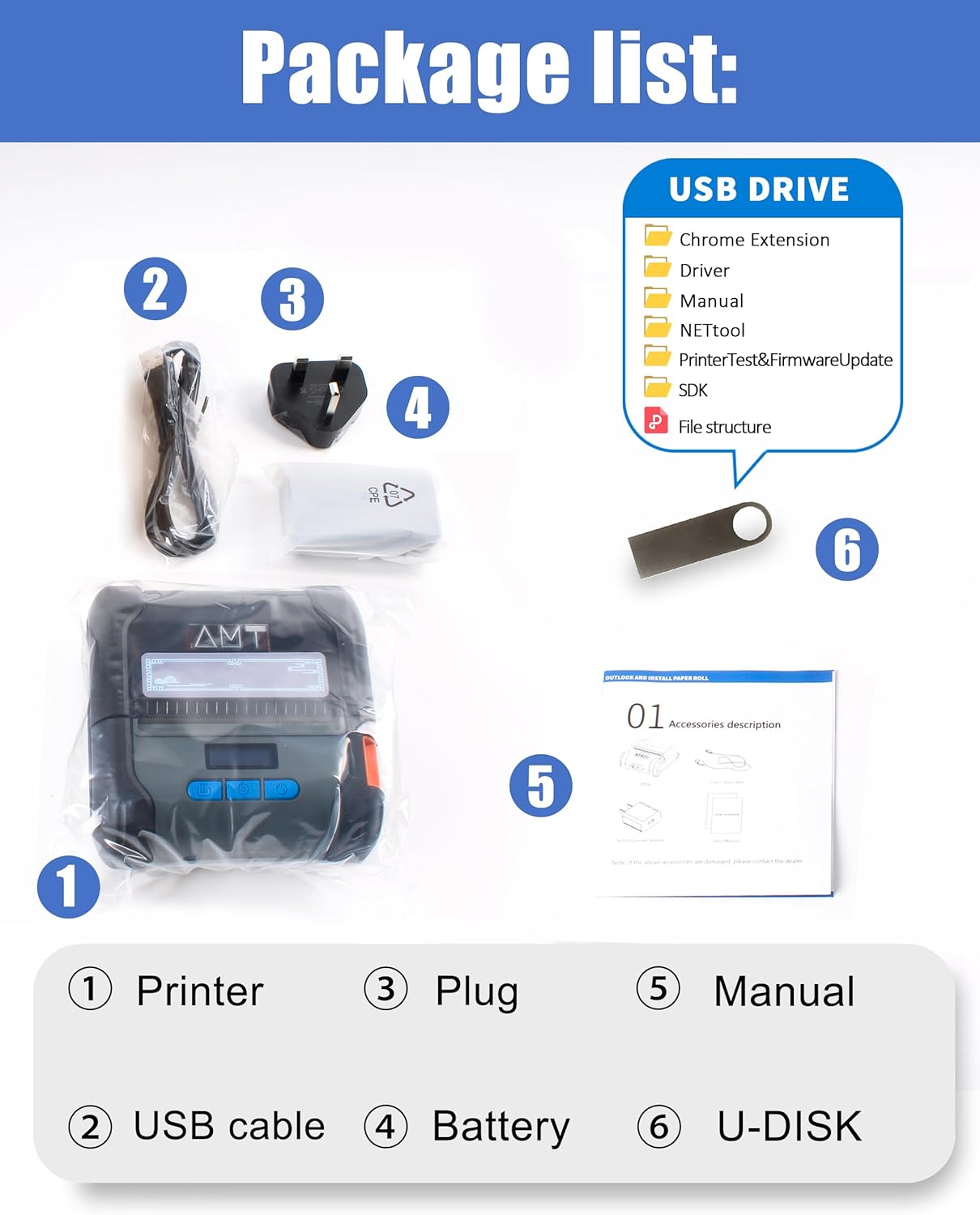
Figure 2: Contents included in the ZM04 printer package.
3. Produktas baigtasview
Familiarize yourself with the main components and controls of your ZM04 printer:
- Ekranas: Displays current mode, battery status, and settings.
- Atidarymo raktas: Naudojamas popieriaus skyriui atidaryti.
- Maitinimo mygtukas: Įjungia / išjungia spausdintuvą.
- Nustatyti raktą: Navigates through settings and confirms selections.
- Feed Button/OK Key: Feeds paper or confirms actions.

Figure 3: Key operational components of the ZM04 printer.
Dimensions and Specifications Overview:
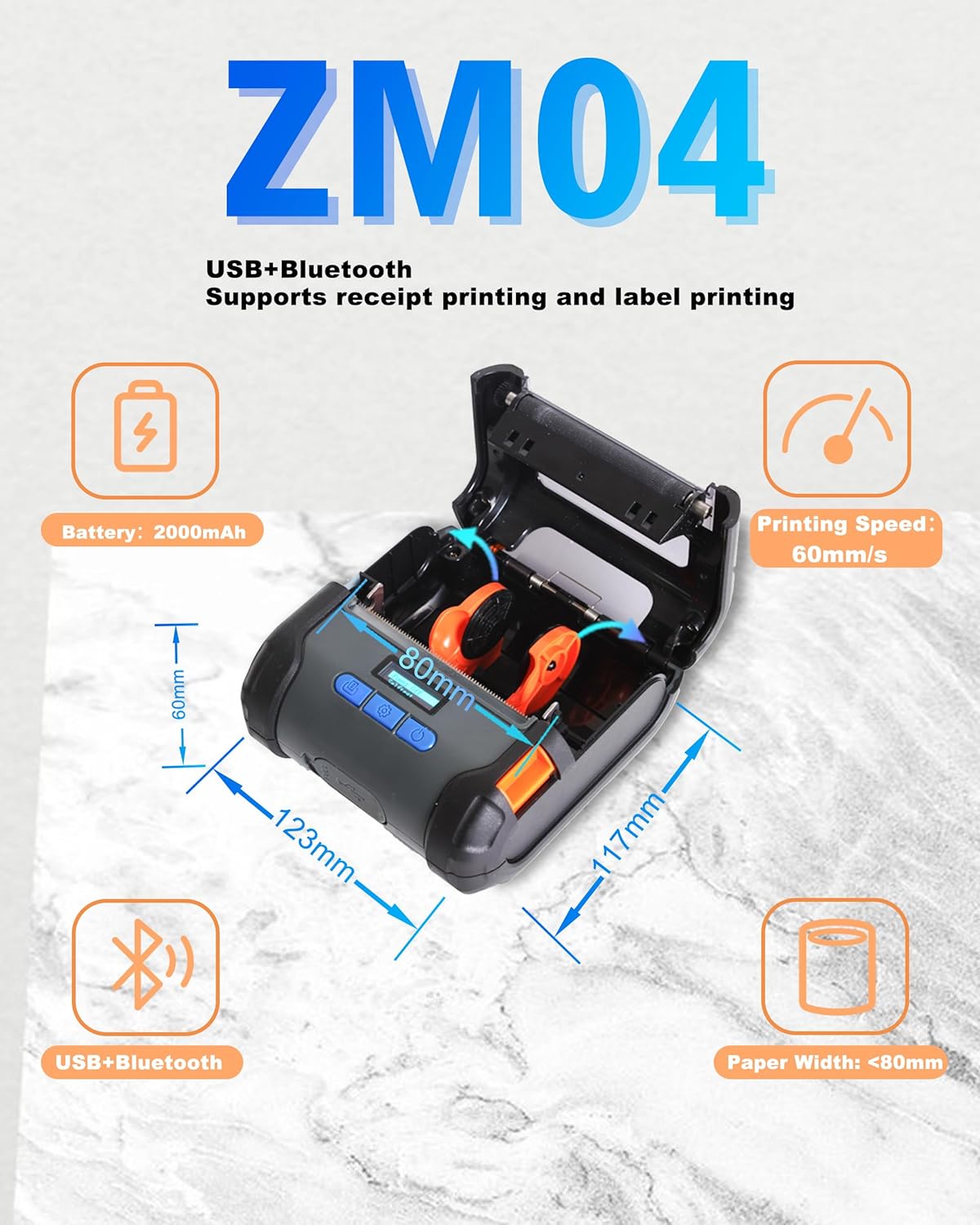
Figure 4: Physical dimensions and core specifications of the ZM04 printer.
4. Sąranka
4.1 Spausdintuvo įkrovimas
Before first use, ensure the printer is fully charged. Connect the provided USB cable to the printer and a power adapter. The battery indicator on the screen will show charging status. A full charge provides long hours of use.
4.2 Popieriaus įdėjimas
The ZM04 supports both label and receipt paper rolls (58mm to 80mm width).
- Press the "Open Key" to open the paper compartment cover.
- Insert the paper roll with the printing side facing up, ensuring it feeds smoothly into the print head.
- Ištraukite nedidelį popieriaus gabalėlį pro spausdinimo galvutę.
- Tvirtai uždarykite popieriaus skyriaus dangtelį, kol jis spragtelėdamas užsifiksuos.
Video 1: Demonstrates the process of loading paper into the ZM04 printer and switching between label and receipt printing modes.
5. Naudojimo instrukcijos
5.1 Ryšys
The ZM04 printer supports both Bluetooth and USB connectivity.
- Bluetooth: Ideal for wireless printing from Android smartphones and tablets. iOS devices require specific apps (EMlabel, POSprinter) for connection.
- USB: Connects to Windows, ChromeOS, Linux, and Mac computers. Note: USB connection does not support iOS devices (iPhone, iPad).

5 pav. Baigtaview of Bluetooth and USB connectivity for the ZM04 printer.
5.2 Mode Switching (Label vs. Receipt)
The ZM04 is a two-in-one printer. It is crucial to select the correct command mode for your printing task. The screen displays the current mode.
- Receipt Mode: Set to "ESC" (ESC/POS command mode).
- Label Mode: Set to "TCPL" (TSPL command mode).
- Face Sheet Mode: Set to "CPCL" (CPCL command mode).
To switch modes, use the "Set Key" to navigate through the options on the electronic display until the desired command mode is selected. Selecting the wrong command mode will prevent printing.

Figure 6: The ZM04 printer supports both receipt and label printing modes, indicated by the display.
5.3 Printing Steps (via App)
For mobile printing, use the "EMlabel" or "POSprinter" software.
- Open the "EMlabel" app and select your desired print mode (Label or Receipt).
- Go to "Settings" within the app, then "Printer connection," and select "BT" for Bluetooth.
- Choose the printer address (e.g., "printer001"), click "Connect," and enter the password "0000" if prompted.
- After successful connection, the status will change to "disconnect" (indicating it's ready to print).

Figure 7: Step-by-step guide for connecting and printing using the mobile application.
6. Suderinamumas
The ZM04 printer offers broad compatibility with various operating systems and applications, though some limitations apply.
- Operacinės sistemos: Android, Windows, ChromeOS, Linux, Mac.
- iOS suderinamumas: While USB and direct Bluetooth connection are not supported for iOS, the "EMlabel" and "POSprinter" software allows iOS devices to connect and print labels/receipts.
- Receipt Applications: Loyverse and W&O POS APP are supported for receipt printing.
- Nesuderinamas su: Square, DoorDash, Shopify.

Figure 8: Detailed compatibility matrix for the ZM04 printer across various platforms and applications.
7. Priežiūra
To ensure optimal performance and longevity of your ZM04 printer, follow these maintenance guidelines:
- Reguliariai valykite spausdinimo galvutę minkštu, nepūkuotu audiniu, sudrėkintu izopropilo alkoholiu. Prieš valydami įsitikinkite, kad spausdintuvas yra išjungtas ir atvėsęs.
- Keep the paper compartment free of dust and paper debris.
- Spausdintuvą laikykite vėsioje, sausoje vietoje, apsaugotoje nuo tiesioginių saulės spindulių ir ekstremalių temperatūrų.
- Use only high-quality thermal paper to prevent damage to the print head.
8. Problemų sprendimas
This section addresses common issues you might encounter with your ZM04 printer.
Q1: Why cannot connect with iOS?
A1: The USB and direct Bluetooth connections of the ZM04 do not natively support iOS. To connect to iOS for printing, you must download and use our dedicated software, "EMlabel" or "POSprinter," which facilitates the connection and printing process.
Q2: Why cannot Print?
A2: Please check that the mode displayed at the top right of the printer's screen matches the one you need for printing.
- For receipt printing, the mode should be "ESC".
- For label printing, the mode should be "TCPL".
- For face sheet printing, the mode should be "CPCL".
9. Specifikacijos
| Funkcija | Detalė |
|---|---|
| Prekės ženklas | ZYWELL |
| Modelio pavadinimas | ZM04-UB-BK |
| Prekės modelio numeris | ZM04 |
| Ryšio technologija | Bluetooth, USB |
| Spausdinimo technologija | Šiluminis |
| Spausdintuvo išvestis | Vienspalvis |
| Maksimalus spausdinimo greitis (vienspalvis) | 30 ppm (60 mm/s) |
| Rezoliucija | 203 x 203 dpi |
| Maksimalus laikmenos dydis | A9 (Supports 58mm/80mm paper width) |
| Spausdinimo laikmena | Labels, Receipt Paper |
| Suderinami įrenginiai | Smartphones, Tablets (Android, iOS via app), Computers (Windows, ChromeOS, Linux, Mac) |
| Baterija | 2000 mAh ličio jonų akumuliatorius (pridedamas) |
| Gaminio matmenys | 4.6 colio gylis x 4.8 colio plotis x 2.3 colio aukštis (117 mm x 123 mm x 60 mm) |
| Prekės svoris | 1.37 svaro |
| UPC | 765133353996 |
10. Garantija ir palaikymas
The ZYWELL ZM04 printer comes with a limited warranty. For specific warranty terms and conditions, please refer to the warranty card included in your package or contact ZYWELL customer support. For technical assistance or further inquiries, please visit the official ZYWELL websvetainėje arba susisiekite su klientų aptarnavimo komanda.


