1. Įvadas
Thank you for choosing the ErGear EGESD8 Electric Standing Desk. This manual provides essential information for the safe and efficient assembly, operation, and maintenance of your new desk. Please read these instructions carefully before use and retain them for future reference. This electric standing desk is designed to offer ergonomic flexibility, allowing you to easily switch between sitting and standing positions, promoting a healthier work environment.

„ErGear“ elektrinis stovimas stalas, demonstracinisasing its sleek design and spacious desktop in a contemporary workspace.
2. Saugos instrukcijos
Norėdami užtikrinti saugų darbą ir išvengti žalos, laikykitės šių nurodymų:
- Prieš naudodami stalą, įsitikinkite, kad visos jungtys yra tvirtos.
- Darbo metu laikykite vaikus ir naminius gyvūnus atokiau nuo stalo.
- Do not place hands or other body parts near moving parts to avoid injury.
- Do not overload the desk. The maximum weight capacity is 80 kg.
- Venkite pilti skysčius tiesiai ant valdymo skydelio arba šalia elektrinių komponentų.
- If the desk makes unusual noises or movements, discontinue use and consult the troubleshooting section or contact support.
- Naudokite tik pateiktą maitinimo adapterį ir laidus.

This image highlights the robust construction of the ErGear Electric Standing Desk, capable of supporting up to 80 kg, ensuring stability even under significant load.
3. Pakuotės turinys
Patikrinkite, ar yra visi komponentai ir ar jie nepažeisti:
- Desktop Panels (assembled)
- Stalo kojos (2)
- Pėdų pagalvėlės (2)
- Šoniniai laikikliai (2)
- Crossbar
- Transmisijos strypas
- Valdymo skydelis
- Maitinimo adapteris ir kabelis
- Cable Grommets (2)
- Ausinių kabliukai (2)
- Surinkimo detalės (varžtai, šešiakampis raktas)
- Vartotojo vadovas
4. Surinkimo instrukcijos
Follow these steps to assemble your ErGear Electric Standing Desk. It is recommended to have two people for assembly.
Official assembly video for the ErGear Electric Standing Desk, demonstrating step-by-step installation.
1 veiksmas: surinkite rėmą
- Attach the side brackets to the desk legs using the provided screws and Allen wrench.
- Secure the foot pads to the bottom of each leg.
- Connect the two leg assemblies with the crossbar, ensuring all screws are tightened.
Step 2: Fix the Transmission Rod
- Insert the transmission rod into the designated openings on both desk legs.
- Ensure the rod is properly seated and secured with the retaining clips or screws.
Step 3: Assemble the Desktop Panel
- Lay the desktop panels face down on a soft, clean surface.
- Align the panels and secure them together using the provided connectors and screws.
Step 4: Attach the Frame to the Desktop
- Carefully place the assembled desk frame onto the underside of the desktop.
- Align the pre-drilled holes and secure the frame to the desktop using the appropriate screws.
- Attach the control panel to the underside of the desktop in a convenient location using the provided screws.
- Install the headphone hooks to the underside of the desktop as desired.
5 veiksmas: prijunkite laidus
- Connect the motor cables from the legs to the control box.
- Connect the control panel cable to the control box.
- Connect the power adapter to the control box and then to a power outlet.
Step 6: Fix the Cable Grommets
- Insert the cable grommets into the pre-cut holes on the desktop to manage cables.
5. Naudojimo instrukcijos
Your ErGear Electric Standing Desk features an intuitive control panel for easy height adjustment.
Short video showcasing key features of the ErGear Electric Standing Desk, including height adjustment and stability.
Valdymo skydas baigtasview

The desk's intelligent control panel features an LED display showing current height in centimeters, along with up/down arrows and four memory preset buttons for quick adjustments.
- Up/Down Arrows (▲ / ▼): Press and hold to adjust the desk height manually.
- LED ekranas: Shows the current height of the desk in centimeters.
- Memory Presets (1, 2, 3, 4): Store and recall preferred height settings.
Reguliuojamas aukštis
The desk can be adjusted between 72 cm ir 118 cm.
- Rankinis reguliavimas: Press and hold the up (▲) or down (▼) arrow button until the desk reaches your desired height.
- Atminties išankstinių nustatymų naudojimas: Press the corresponding memory button (1, 2, 3, or 4) to automatically move the desk to the saved height.
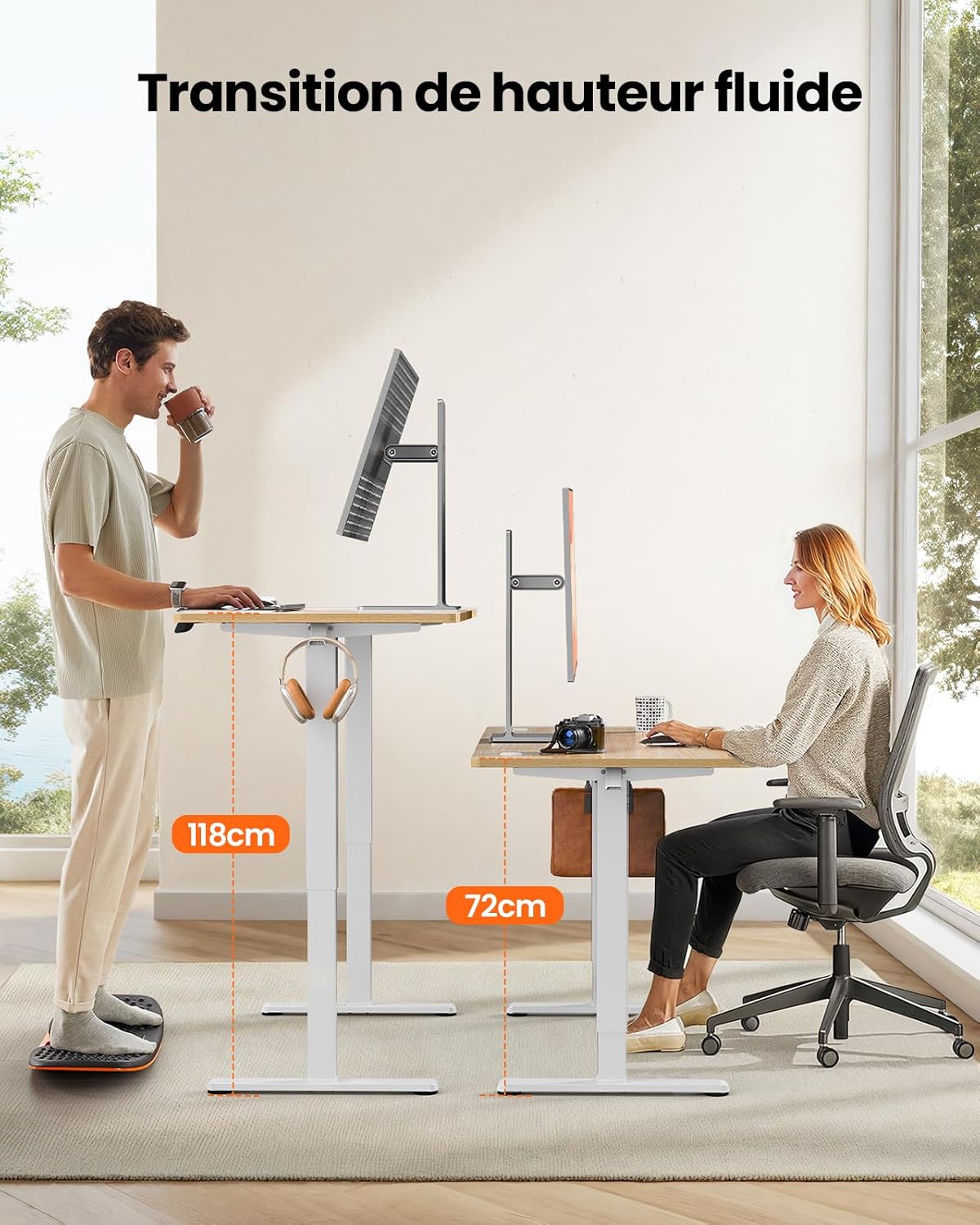
This image demonstrates the adjustable height range of the ErGear Electric Standing Desk, showing a user sitting at 72cm and standing at 118cm, emphasizing ergonomic flexibility.
Atminties išankstinių nustatymų nustatymas
- Reguliuokite stalo aukštį iki norimo aukščio naudodami rodykles aukštyn / žemyn.
- Press the 'M' button (if available, or a 'Set' button) followed by the desired memory button (1, 2, 3, or 4). The display will typically flash or beep to confirm the setting is saved.
Tylus veikimas
The desk operates with a quiet motor, producing a noise level of ≤ 55 dB, ensuring a peaceful work environment.

Illustrates the ultra-quiet operation of the ErGear Electric Standing Desk, with a noise level of 55dB, ensuring a peaceful and undisturbed work environment.
6. Priežiūra
Regular maintenance helps prolong the life of your desk:
- Valymas: Wipe the desk surface and legs with a soft, damp skudurėliu. Venkite stiprių cheminių medžiagų ar abrazyvinių valiklių.
- Kabelių valdymas: Periodically check that all cables are neatly organized and not pinched or tangled. Utilize the integrated cable grommets and hooks.
- Screw Tightness: Occasionally check and tighten any loose screws on the frame or desktop connections.
- Apžiūra: Inspect the desk for any signs of wear or damage. If any issues are found, contact customer support.

Detalė view of the desk's integrated cable grommets and convenient hooks, designed to help maintain a tidy and organized workspace by managing cables and accessories.
7. Problemų sprendimas
Jei kyla problemų dėl stalo, žr. šias dažniausiai pasitaikančias problemas ir sprendimus:
| Problema | Galima priežastis | Sprendimas |
|---|---|---|
| Stalas nejuda. | Atjungtas maitinimo kabelis, atsilaisvinęs variklio kabelis, perkrova. | Check all power and motor connections. Reduce weight on the desk. |
| Stalas juda netolygiai. | Uneven load, loose screws, obstruction. | Distribute weight evenly. Check and tighten all assembly screws. Ensure no obstructions. |
| Stalas sustoja reguliavimo metu. | Overload protection activated, obstruction. | Remove some weight. Check for obstructions. Wait a few minutes before trying again. |
| Control panel not responding. | Control panel cable loose, power issue. | Check control panel cable connection. Verify power supply. |
If the problem persists after trying these solutions, please contact ErGear customer support.
8. Specifikacijos
| Funkcija | Detalė |
|---|---|
| Prekės ženklas | ErGear |
| Modelio numeris | EGESD8 |
| Spalva | Beige and Natural |
| Stalinio kompiuterio matmenys (I x P) | 120 cm x 60 cm |
| Aukščio reguliavimo diapazonas | 72 cm–118 cm |
| Medžiaga | Wood (Desktop), Metal (Base) |
| Svorio talpa | 80 kg |
| Variklio triukšmo lygis | ≤ 55 dB |
| Ypatingos savybės | Ergonomic, Electric, 4 Memory Presets, Cable Grommets, Headphone Hooks |
| Produkto svoris | 19.05 kg |

A clear diagram illustrating the overall dimensions of the ErGear Electric Standing Desk, including its 120cm x 60cm desktop and adjustable height range of 72cm to 118cm.
9. Garantija ir palaikymas
ErGear products are designed for durability and performance. This product comes with a standard manufacturer's warranty. For specific warranty details, please refer to the warranty card included in your package or visit the official ErGear websvetainę.
If you have any questions, require technical assistance, or need to report a missing or damaged part, please contact ErGear customer support through the retailer where you purchased the product or via the contact information provided on the official ErGear websvetainę.
Please have your model number (EGESD8) and purchase information ready when contacting support.


