1. Įvadas
This manual provides detailed instructions for the operation and maintenance of your Docooler Digital Voice Recorder. Please read this manual thoroughly before using the device to ensure proper function and to maximize its capabilities. This device is designed for recording audio in various settings, including lectures, meetings, and interviews, featuring noise reduction and voice-activated recording.
2. Produktas baigtasview
The Docooler Digital Voice Recorder is a compact and portable audio recording device. It features a clear digital display, intuitive controls, and a robust design for reliable performance. Key features include intelligent noise cancellation, voice-activated recording, and a choice of 8GB or 32GB storage capacity.

2.1 pav.: priekis view of the Docooler Digital Voice Recorder, showing the display and control buttons.

Figure 2.2: The compact size of the Docooler Digital Voice Recorder, shown held in a hand.

Figure 2.3: Illustration of the voice-activated recording feature, automatically starting when sound reaches a detectable level.
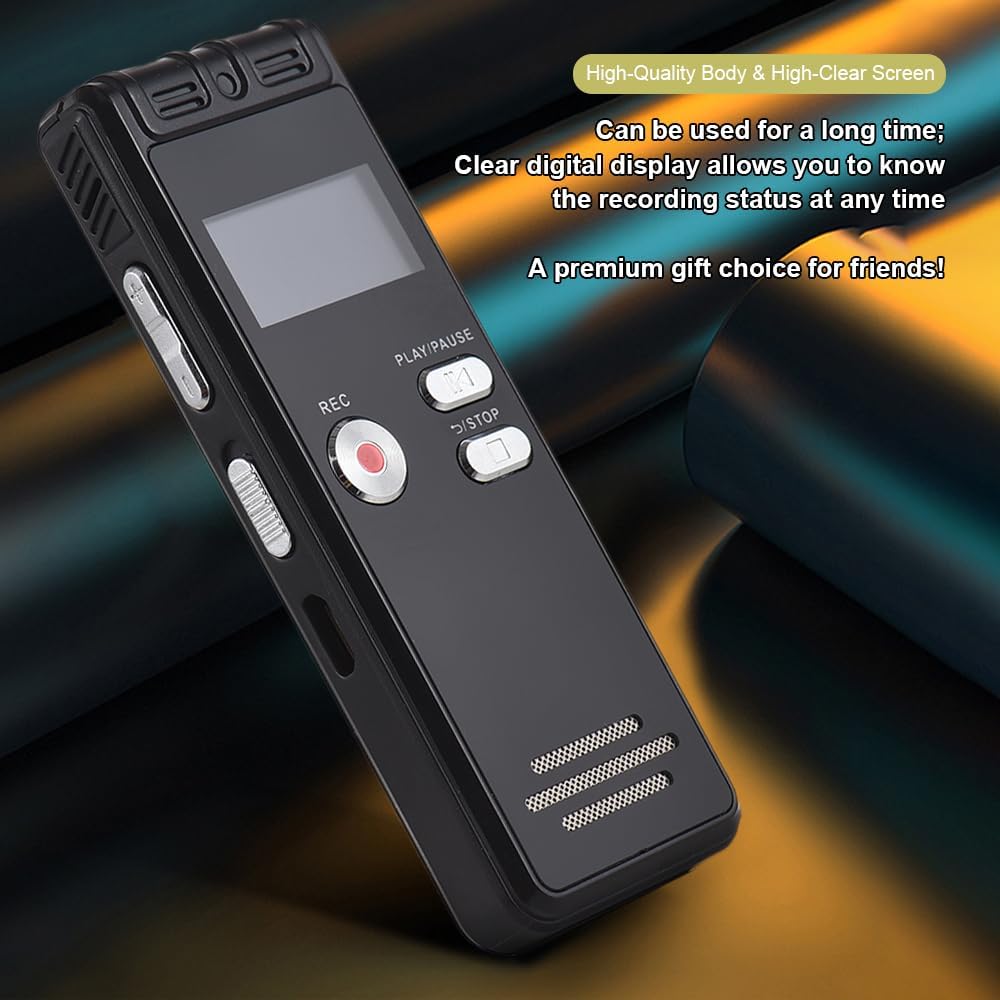
Figure 2.4: The durable construction and clear digital display of the recorder, providing real-time recording status.

Figure 2.5: The device features a built-in high-quality omnidirectional microphone for 360-degree panoramic sound capture.

Figure 2.6: The recorder's compact dimensions allow it to be easily carried in a pocket or bag.

Figure 2.7: The device supports one-click recording and saving, simplifying the recording process.

2.8 pav. Pvzamples of various environments where the recorder can be effectively used, such as meetings, lectures, training sessions, and teaching.
3. Pakuotės turinys
Patikrinkite, ar jūsų siuntinyje yra visi toliau išvardyti daiktai:
- 1x Voice Recorder
- 1x USB laidas
- 1x ausinės
- 1x Adapters (likely phone line adapter)
- 1x Connect Cable (likely for phone recording)
- 1x Vadovas (šis dokumentas)

Figure 3.1: The Docooler Digital Voice Recorder shown with its complete set of accessories, including USB cable, headphones, and connection cables.
4. Sąranka
4.1 Įrenginio įkrovimas
- Connect the included USB cable to the recorder's USB port.
- Plug the other end of the USB cable into a computer's USB port or a compatible USB wall adapter (not included).
- The device's screen will indicate charging status. A full charge typically takes approximately 2-3 hours.
4.2 Įjungimas / išjungimas
- Norėdami įjungti: paspauskite ir palaikykite maitinimo mygtuką, kol ekranas įsijungs.
- To power off: Press and hold the Power button until the screen turns off.
4.3 Ausinių prijungimas
Insert the included headphones into the 3.5mm headphone jack on the device for private playback of recordings.
5. Naudojimo instrukcijos
5.1 Pagrindinis įrašymas
- Įsitikinkite, kad įrenginys įjungtas.
- Paspauskite REC button to start recording. The recording indicator will illuminate.
- Norėdami pristabdyti įrašymą, paspauskite PALEISTI / PAUZĖ mygtuką. Norėdami tęsti, paspauskite dar kartą.
- Norėdami sustabdyti įrašymą ir išsaugoti file, paspauskite STOP mygtuką. Įrašas bus išsaugotas automatiškai.
5.2 Voice-Activated Recording (VOR)
This feature allows the recorder to automatically start recording when sound is detected and pause when silence occurs, conserving memory and battery life.
- Navigate to the VOR settings in the device menu.
- Enable the VOR function and adjust the sensitivity level as needed.
- Paspauskite REC mygtuką. Dabar įrenginys įrašys tik tada, kai bus garsas.
- Paspauskite STOP button to end the voice-activated recording session.
5.3 Atkūrimas
- From the main menu, select the 'Recordings' or 'Files' option.
- Use the navigation buttons to select the desired audio file.
- Paspauskite PALEISTI / PAUZĖ mygtuką, norėdami pradėti atkūrimą.
- Use the volume controls on the side of the device to adjust the playback volume.
- Paspauskite STOP mygtuką, kad užbaigtumėte atkūrimą.
5.4 Triukšmo mažinimas
The device is equipped with an intelligent noise reduction feature. This function is typically active by default to enhance audio clarity. Refer to the device's settings menu for options to adjust or disable noise reduction if available.
6. Priežiūra
- Laikykite prietaisą sausą. Venkite drėgmės ar skysčių.
- Prietaisą valykite minkštu, sausu skudurėliu. Nenaudokite abrazyvinių valiklių ar tirpiklių.
- Saugokitės, kad prietaisas nenukristų ir nepatirtų stipraus smūgio.
- Laikykite prietaisą vėsioje, sausoje vietoje, apsaugotoje nuo tiesioginių saulės spindulių ir ekstremalių temperatūrų.
- Regularly back up important recordings to a computer to prevent data loss.
7. Problemų sprendimas
7.1 Įrenginys neįsijungia
- Įsitikinkite, kad akumuliatorius įkrautas. Prijunkite įrenginį prie maitinimo šaltinio naudodami USB laidą ir leiskite jam krautis bent 30 minučių.
- Press and hold the Power button for several seconds.
7.2 Poor Recording Quality
- Įsitikinkite, kad mikrofonas nėra uždengtas.
- Record in a quieter environment to minimize background noise.
- Check the microphone sensitivity settings in the device menu.
- Ensure the device is placed close enough to the sound source.
7.3 Cannot Play Back Recordings
- Verify that recordings exist in the device's memory.
- Check the volume level during playback.
- Ensure headphones are properly connected if using them.
7.4 Kompiuteris neatpažįsta įrenginio
- Įsitikinkite, kad USB kabelis yra tvirtai prijungtas tiek prie įrenginio, tiek prie kompiuterio.
- Pabandykite prijungti prie kito kompiuterio USB prievado.
- Iš naujo paleiskite kompiuterį ir bandykite dar kartą.
8. Specifikacijos
| Prekės ženklas | Docooler |
| Modelis | Skaitmeninis balso įrašymo įrenginys |
| Talpos parinktys | 8 GB, 32 GB |
| Spalva | Juoda |
| Medžiaga | ABS |
| Baterija | 300 mAh |
| Prekės svoris | 2.38 uncijos (apie 67.5 g) |
| Pakuotės matmenys | 4.65 x 3.23 x 0.59 colio (11.8 x 8.2 x 1.5 cm) |
| Gamintojas | Docooler |
| ASIN | B0D9WB349S (for 8GB variant) |
9. Garantija ir palaikymas
For warranty information and customer support, please refer to the documentation provided at the time of purchase or contact your retailer. Keep your purchase receipt as proof of purchase for any warranty claims.


