1. Įvadas
The Triplett WS230 Wall Scanner is a versatile and compact tool designed for accurately detecting hidden objects behind walls. It features advanced capabilities to locate wood studs, metal objects (ferrous and non-ferrous), and live AC wiring, providing essential information for construction, home improvement, and maintenance tasks. This manual provides detailed instructions for safe and effective use of your WS230 Wall Scanner.
2. Saugos informacija
Prieš naudodami įrenginį, atidžiai perskaitykite visus saugos įspėjimus ir instrukcijas. Nesilaikant šių instrukcijų, gali kilti elektros smūgis, gaisras arba sunkūs sužalojimai.
- Always assume that live electrical wires are present behind walls. Exercise extreme caution.
- Do not rely solely on the detection results. Always verify findings through other means if possible.
- Laikykite prietaisą sausą ir švarų. Nelaikykite jo drėgmės ar ekstremalių temperatūrų veikiamo.
- Nebandykite atidaryti ar modifikuoti įrenginio. Visus techninės priežiūros darbus patikėkite kvalifikuotiems darbuotojams.
3. Pakuotės turinys
Patikrinkite, ar pakuotėje yra visi reikalingi daiktai:
- Triplett WS230 Wall Scanner
- 3.7V/300mAh Lithium Ion Battery (pre-installed)
- Soft Protective Pouch Case
- Vartotojo vadovas (šis dokumentas)
- C tipo USB įkrovimo kabelis

Figure 3.1: WS230 Wall Scanner with Pouch and USB-C Cable
4. Produktas baigtasview
Familiarize yourself with the components of your Triplett WS230 Wall Scanner.

4.1 pav.: priekis View of WS230 Wall Scanner

4.2 pav.: Nugara View of WS230 Wall Scanner (QR Code: C242594011)
4.1 Pagrindiniai komponentai
- Spalvotas LCD ekranas: Displays detection mode, depth, battery status, and object location.
- Maitinimo mygtukas: Įjungia/išjungia įrenginį.
- Režimo pasirinkimo mygtukai: Allows switching between Stud, Metal, and AC Voltage detection modes.
- Jutiklio plotas: Located on the back of the device, this area must be in contact with the wall for accurate scanning.
- USB-C įkrovimo prievadas: For recharging the internal Lithium-ion battery.
5. Sąranka ir įkrovimas
5.1 Akumuliatoriaus įkrovimas
The WS230 is equipped with a rechargeable 3.7V/300mAh Lithium-ion battery. Before first use, ensure the device is fully charged.
- Connect the provided USB Type C charging cable to the charging port on the device.
- Kitą USB kabelio galą prijunkite prie standartinio USB maitinimo adapterio (nepridedamas) arba kompiuterio USB prievado.
- LCD ekrane esantis akumuliatoriaus indikatorius rodys įkrovimo būseną. Visiškas įkrovimas paprastai trunka kelias valandas.
5.2 Įjungimas / išjungimas
- Norėdami įjungti, paspauskite ir palaikykite Maitinimo mygtukas (red button) until the screen illuminates.
- Norėdami išjungti, paspauskite ir palaikykite Maitinimo mygtukas dar kartą, kol ekranas išsijungs.
6. Operacija
6.1 Bendrosios naudojimo gairės
- Įsitikinkite, kad sienos paviršius yra švarus ir sausas.
- Avoid scanning over freshly painted or wallpapered surfaces until they are completely dry, as moisture can affect accuracy.
- Hold the scanner flat against the wall, ensuring the sensor area is in full contact.
- Lėtai ir tolygiai judinkite skaitytuvą per paviršių.
6.2 Automatinis kalibravimas
The WS230 features automatic calibration for accurate results. Calibration occurs automatically upon power-on or when switching detection modes.
- Place the scanner flat against the wall in an area where you are certain there are no studs, metal, or live wires.
- Paspauskite Maitinimo mygtukas or select your desired mode. The screen will display "Calibrating, please wait."
- Keep the device still against the wall until calibration is complete.

Figure 6.1: Calibration in Progress
6.3 Aptikimo režimai
The WS230 offers three primary detection modes:

Figure 6.2: Multiple Detection Mode Displays
6.3.1 Stud Detection
This mode locates the center and edges of wood or metal studs behind walls.
- Select the Stud Detection mode using the appropriate button.
- Place the scanner flat against the wall and slowly move it horizontally.
- The display will indicate the presence of a stud, its center, and depth (up to 1.5 inches / 38mm). Audio alerts will also sound.

Figure 6.3: Wood Stud Detection
6.3.2 Metalo aptikimas
This mode identifies ferrous and non-ferrous metals, such as pipes and electrical wiring (even if not live).
- Select the Metal Detection mode.
- Scan the wall slowly. The display will show "Detect metal" and indicate the object's location and type (magnetic/non-magnetic).
- Maximum detection depth is 4.0 inches (100mm).

Figure 6.4: Metal Detection

Figure 6.5: Non-Magnetic Metal Detection
6.3.3 AC ttage Aptikimas
This mode specifically detects live AC wires behind walls, providing an essential safety feature.
- Select the AC Voltage Detection mode.
- Scan the wall slowly. The display will show a lightning bolt icon and indicate the presence of live AC wiring.
- Maximum detection depth is 2 inches (50mm).
7. Priežiūra
- Prietaisą valykite minkštu, sausu skudurėliu. Nenaudokite abrazyvinių valiklių ar tirpiklių.
- Store the device in its protective pouch in a cool, dry place when not in use.
- Regularly charge the battery to maintain its health, even if the device is not used frequently.
8. Problemų sprendimas
If you encounter issues with your WS230 Wall Scanner, try the following:
- Netikslūs rodmenys: Ensure the device is properly calibrated on a clear section of the wall. Check for moisture on the wall surface.
- Nėra galios: Verify the battery is charged. Connect the USB-C cable and allow it to charge for at least 30 minutes before attempting to power on again.
- Pertraukiamas aptikimas: Ensure the sensor area is in full contact with the wall and you are moving the device slowly and steadily.
If problems persist, contact Triplett customer support.
9. Specifikacijos
| Funkcija | Specifikacija |
|---|---|
| Gaminio matmenys | 4.8 x 1 x 2.4 colio |
| Prekės svoris | 4 uncijos |
| Modelio numeris | WS230 |
| Baterijos | 1 ličio jonų baterija (pridedama) |
| Maitinimo šaltinis | Maitinamas baterijomis |
| Stud Detection Depth | Iki 1.5 colio (38 mm) |
| Metalo aptikimo gylis | Iki 4.0 colio (100 mm) |
| AC ttage Detection Depth | Iki 2 colio (50 mm) |
| Optimali darbinė temperatūra | nuo 0 iki 40°C |
| Laikymo temperatūra | -20 iki 60°C |
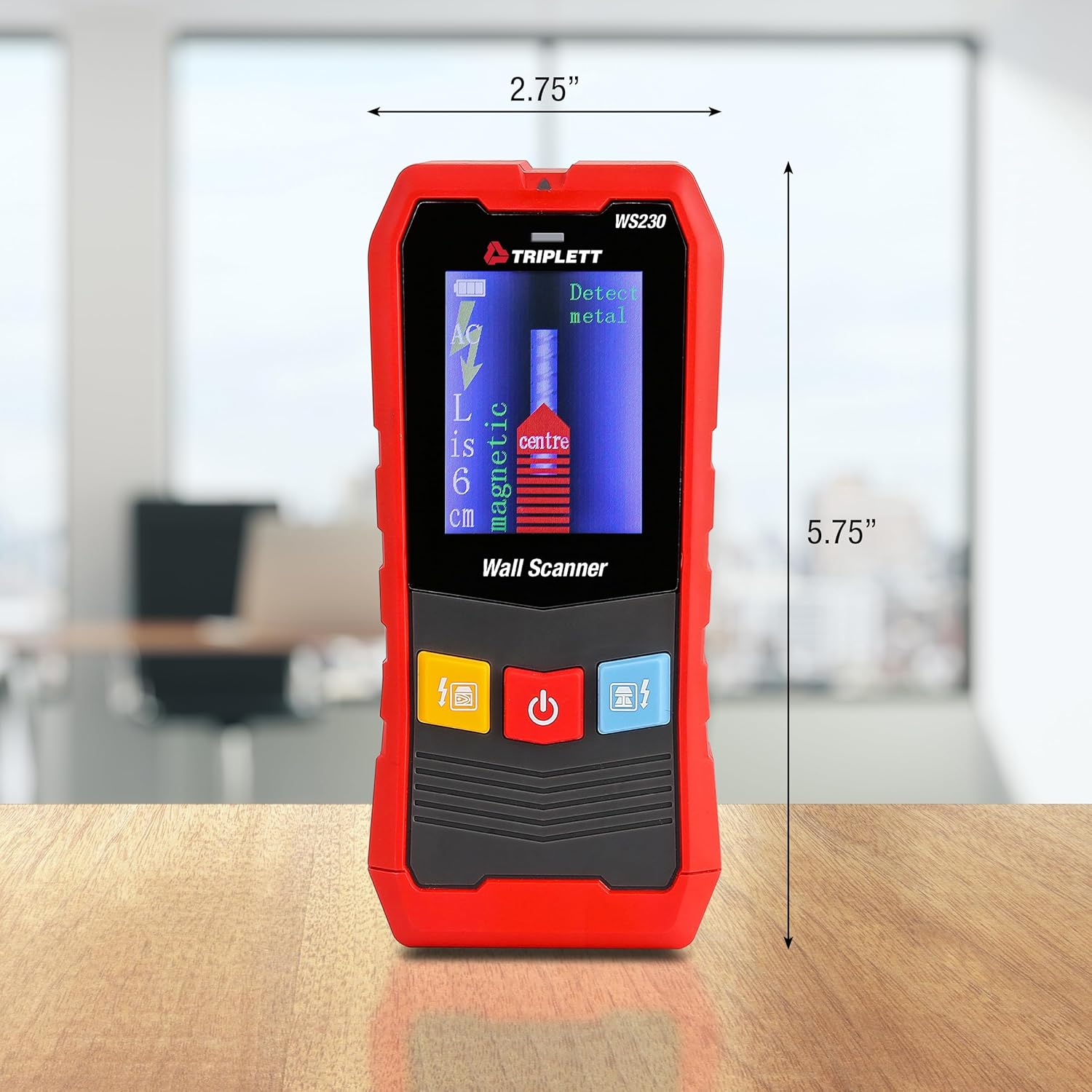
Figure 9.1: WS230 Dimensions
10. Garantija ir palaikymas
For warranty information or technical support, please refer to the official Triplett websvetainėje arba susisiekite su jų klientų aptarnavimo skyriumi. Išsaugokite pirkimo kvitą kaip pirkimo įrodymą.
Visit the official Triplett Store: „Triplett“ parduotuvė „Amazon“ platformoje