Įvadas
This manual provides comprehensive instructions for the setup, operation, maintenance, and troubleshooting of your Logitech G915 X Lightspeed Wireless Mechanical Gaming Keyboard. Designed for high-performance gaming and versatile connectivity, this keyboard features LIGHTSPEED wireless technology, GL mechanical switches, customizable G-keys, and LIGHTSYNC RGB lighting. Please read this manual thoroughly to ensure optimal use and longevity of your device.

Vaizdas: Iš viršaus į apačią view of the Logitech G915 X Lightspeed Wireless Mechanical Gaming Keyboard, showcasing its full layout and RGB backlighting.
Kas yra dėžutėje
Upon unboxing your Logitech G915 X Lightspeed keyboard, verify that all the following components are present:
- Logitech G915 X Lightspeed Wireless Mechanical Gaming Keyboard
- LIGHTSPEED USB Receiver
- USB prailgintuvas
- USB-C Data/Charging Cable
- Naudotojo dokumentacija (šis vadovas)

Image: All components included in the Logitech G915 X keyboard packaging, including the keyboard, USB-A to USB-C cable, USB extender, and USB wireless receiver.
Sąranka
Pradinis įkrovimas
Before first use, it is recommended to fully charge the keyboard.
- Connect the supplied USB-C data/charging cable to the USB-C port on the keyboard (located on the top edge).
- Connect the other end of the cable (USB-A) to a powered USB port on your computer or a USB wall adapter.
- The battery indicator light on the keyboard will show charging status. A full charge typically takes approximately 4 hours.
Klaviatūros prijungimas
The G915 X offers three connectivity options: LIGHTSPEED Wireless, Bluetooth, and Wired USB.

Image: Close-up of the Logitech G915 X keyboard's connectivity buttons (LIGHTSPEED, Bluetooth, Wired) located above the F5-F8 keys.
LIGHTSPEED Wireless (Recommended for Gaming)
- Locate the LIGHTSPEED USB receiver. For optimal signal, use the USB extender to position the receiver closer to the keyboard.
- Plug the LIGHTSPEED USB receiver into an available USB-A port on your computer.
- On the keyboard, slide the power switch to the ON position (located on the top right).
- Press the LIGHTSPEED button (indicated by a wireless signal icon) on the keyboard. The indicator light above the button will turn solid cyan when connected.
Bluetooth ryšys
- Įsitikinkite, kad klaviatūra įjungta.
- Press and hold the Bluetooth button (indicated by a Bluetooth icon) on the keyboard until the indicator light above it starts blinking blue rapidly. This indicates pairing mode.
- On your computer or device, navigate to Bluetooth settings and select "G915 X" from the list of available devices.
- Sėkmingai susiejus, indikatoriaus lemputė ims šviesti mėlynai.
Laidinis USB režimas
- Connect the USB-C data/charging cable to the keyboard and the USB-A end to your computer.
- Klaviatūra automatiškai persijungs į laidinį režimą ir pradės krautis.
Naudojimo instrukcijos
Pagrindinės funkcijos baigtosview
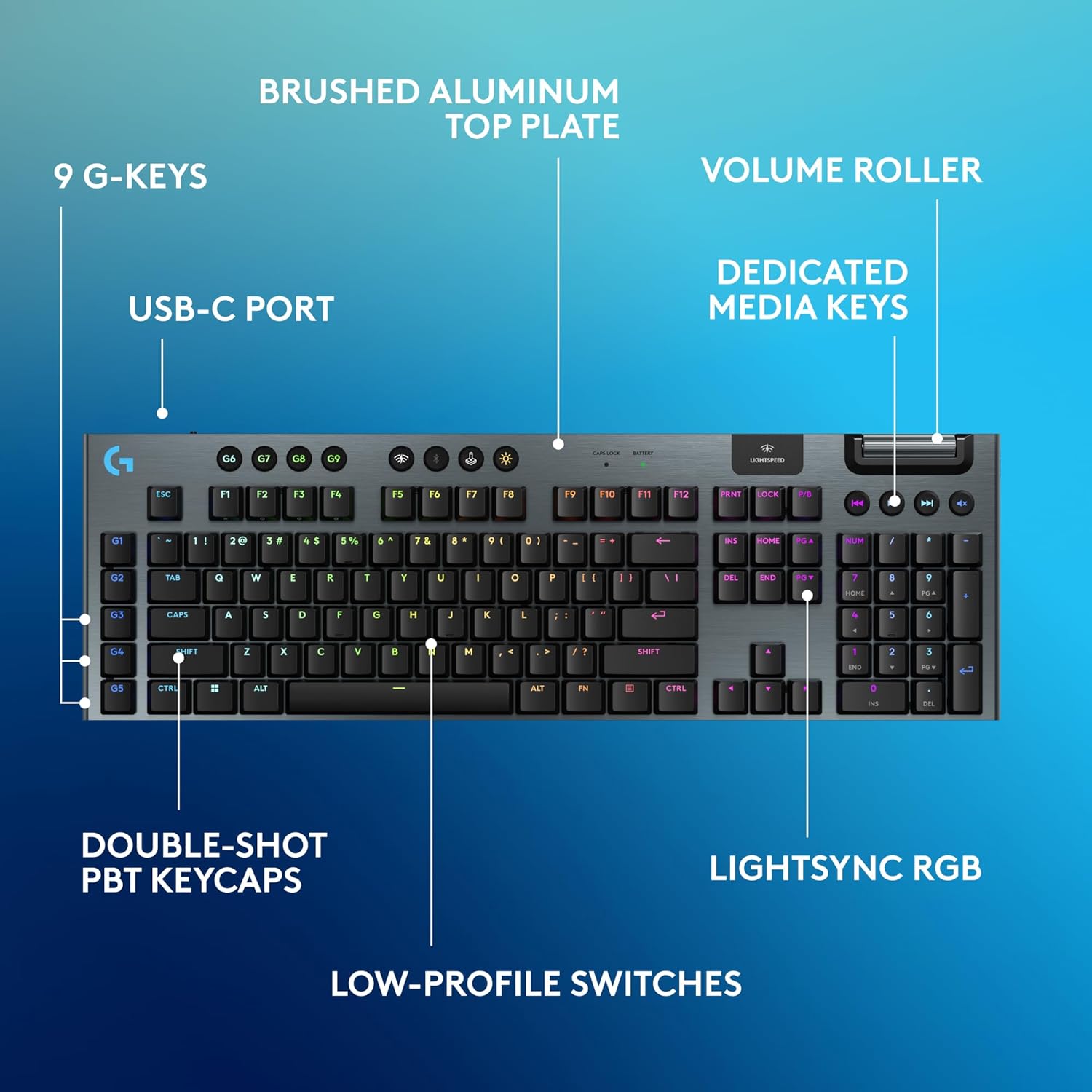
Image: Diagram highlighting key features of the Logitech G915 X keyboard, including G-keys, USB-C port, double-shot PBT keycaps, low-profile switches, brushed aluminum top plate, volume roller, dedicated media keys, and LIGHTSYNC RGB.
- GL Mechanical Switches: Žemas profasfile switches designed for speed, precision, and comfort with a 1.3mm actuation point.
- LIGHTSPEED Wireless: Pro-grade wireless technology for ultra-fast and reliable connection.
- Bluetooth: For connecting to other devices that support Bluetooth.
- Specialūs medijos klavišai: Control audio and video playback with ease.
- Volume Roller: Smoothly adjust audio volume.
- LIGHTSYNC RGB: Customizable per-key RGB lighting with approximately 16.8 million colors.
- G-Keys (G1-G5): Five dedicated programmable macro keys on the left side of the keyboard.
- Dvigubo smūgio PBT klavišų dangteliai: Durable keycaps resistant to wear and shine.
Customizing with G HUB Software
To unlock the full potential of your G915 X keyboard, download and install the Logitech G HUB software from the official Logitech website. G HUB allows for extensive customization.
- G-Key Programming: Assign custom macros, commands, or system functions to the G1-G5 keys. You can create multiple profiles skirtingiems žaidimams ar programoms.
- LIGHTSYNC RGB Customization: Personalize lighting effects, colors, and animations. Sync lighting with other Logitech G devices.
- Žaidimo režimas: Disable specific keys (e.g., Windows key) during gaming to prevent accidental interruptions.
- KEYCONTROL: Set up to 15 functions per key for advanced control.

Image: Screenshot of the Logitech G HUB software interface showing options for customizing commands and assigning functions to G-keys on the G915 X keyboard.
Media Controls and Volume
Dedicated media controls and a volume roller are located on the top right of the keyboard for quick access.
- Volume Roller: Roll up to increase volume, roll down to decrease.
- Media Buttons:
- Ankstesnis takelis
- Leisti / pristabdyti
- Kitas takelis
- Nutildyti
Akumuliatoriaus valdymas
The Logitech G915 X keyboard provides up to 36 hours of continuous battery life with lighting enabled. Battery life may vary based on usage and lighting intensity.
- Baterijos indikatorius: A dedicated battery indicator light is located near the LIGHTSPEED logo on the top right. It changes color to indicate battery level.
- Įkrovimas: Connect the USB-C cable to the keyboard and a powered USB port. You can continue to use the keyboard in wired mode while it charges.
- Energijos taupymas: The keyboard will enter a low-power state after a period of inactivity to conserve battery.
Priežiūra
Tinkama klaviatūros priežiūra užtikrina jos ilgaamžiškumą ir našumą.
- Klaviatūros dangtelių valymas: Šiek tiek naudokite minkštą, be pūkelių šluostę dampnuplaukite vandeniu arba švelniu valymo tirpalu. Venkite stiprių cheminių medžiagų.
- Removing Dust/Debris: Use compressed air to clear dust and debris from between the keycaps and switches.
- Paviršiaus valymas: Wipe the aluminum top plate with a soft, dry cloth.
- Saugykla: Kai klaviatūra ilgesnį laiką nenaudojama, ją laikykite sausoje, vėsioje vietoje, apsaugotoje nuo tiesioginių saulės spindulių.
Trikčių šalinimas
If you encounter issues with your Logitech G915 X keyboard, refer to the following common troubleshooting steps.
| Problema | Galimas sprendimas |
|---|---|
| Klaviatūra nereaguoja (belaidė) |
|
| Bluetooth ryšio problemos |
|
| Raktai neregistruojami arba įvedami du kartus |
|
| RGB apšvietimas neveikia arba yra netinkamas |
|
| G-keys or macros not working |
|
Specifikacijos
| Funkcija | Detalė |
|---|---|
| Modelio numeris | 920-012670 |
| Ryšys | LIGHTSPEED Wireless (2.4 GHz RF), Bluetooth, Wired USB-C |
| Jungiklio tipas | GL Tactile Mechanical Switches (Low-Profile) |
| Įjungimo taškas | 1.3 mm |
| Bendras kelionės atstumas | 3.2 mm |
| Klaviatūros | Dvigubo šūvio PBT |
| Apšvietimas | LIGHTSYNC RGB (Per-key customizable) |
| Programuojami klavišai | 5 dedicated G-keys, up to 15 functions per key via KEYCONTROL |
| Baterijos veikimo laikas | Up to 36 hours (with lighting) |
| Įkrovimo laikas | apytiksliai 4 valandas |
| Matmenys (IxPxH) | 18.7 x 5.91 x 0.87 colio (47.5 x 15 x 2.2 cm) |
| Svoris | 2.38 svaro (1.08 kg) |
| Medžiaga | Aluminum top plate |
| Operacinės sistemos suderinamumas | PC, Mac OS |
Garantija ir palaikymas
Logitech products are designed for durability and performance. For information regarding warranty coverage, technical support, and frequently asked questions, please visit the official Logitech support websvetainę.
„Logitech“ palaikymas Websvetainė: https://support.logi.com/
Dėl papildomos apsaugos apsvarstykite galimybę įsigytiasing an extended protection plan available at the time of purchase.


