1. Įvadas
The Unitek USB C to SATA 6Gbps IDE Adapter is designed to connect various storage devices, including 2.5-inch/3.5-inch SATA HDDs/SSDs and 2.5-inch/3.5-inch IDE HDDs, as well as optical drives (DVD-ROM, CD-ROM, CD-RW, DVD-RW), to your computer via a USB-C port. This adapter facilitates data transfer, backup, and recovery from older or external drives.
2. Pakuotės turinys
- 1 x Unitek SATA/IDE Adapter
- 1 x USB C laidas
- 1 x 12V/2A maitinimo adapteris
- 1 x 4Pin Power Cable
- 1 x SATA kabelis
3. Produktas baigtasview
The adapter features multiple interfaces to support a wide range of storage devices. It includes a power switch for HDD protection and an LED indicator for power and activity status.
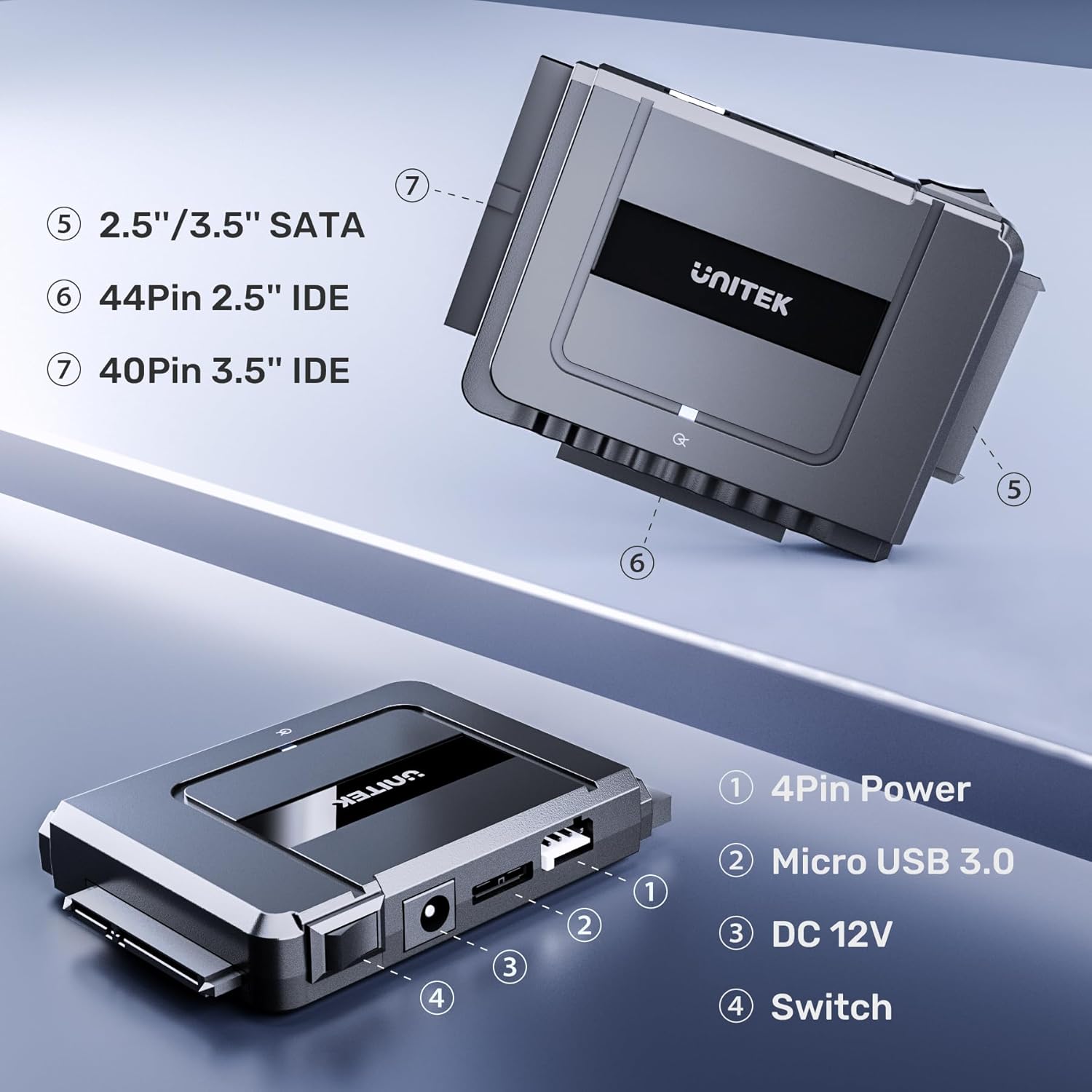
This image highlights the different connection interfaces available on the Unitek adapter, including ports for 2.5-inch/3.5-inch SATA drives, a 44-pin connector for 2.5-inch IDE drives, and a 40-pin connector for 3.5-inch IDE drives.
Pagrindinės funkcijos:
- Didelės spartos duomenų perdavimas: Up to 6 Gbps for SATA 3.1 and 5 Gbps for IDE hard drives. Backward compatible with USB 3.0/2.0/1.1.
- Platus suderinamumas: Supports 2.5-inch/3.5-inch SATA HDDs/SSDs, 2.5-inch/3.5-inch IDE HDDs, DVD-ROM, CD-ROM, CD-RW, DVD-RW, and DVD-RW optical drives.
- Dual-Head IDE Connector: Includes 40-pin and 44-pin IDE connectors.
- Simultaneous Drive Operation: Connect and operate one SATA drive and one IDE drive concurrently. Note: Cannot read two IDE drives simultaneously.
- Stabilus maitinimo šaltinis: Includes a 12V/2A power adapter and a 4-pin power cable for 3.5-inch IDE drives.
- Patogus vartotojui dizainas: Plug and play, supports hot-swapping, features an on/off switch, and an LED indicator.
4. Sąrankos instrukcijos
Follow these steps to connect your storage device to your computer using the Unitek adapter:
- Connect the Adapter to the Drive:
- Už SATA drives (2.5-inch/3.5-inch HDD/SSD): Connect the SATA data and power connectors from the adapter to your SATA drive.
- Už 2.5-inch IDE drives: Connect the 44-pin IDE connector from the adapter directly to your 2.5-inch IDE drive.
- Už 3.5-inch IDE drives: Connect the 40-pin IDE connector from the adapter to your 3.5-inch IDE drive. Then, connect the included 4-pin power cable to the adapter and the drive for additional power.
- Provide External Power (if necessary):
- Plug the 12V/2A power adapter into the adapter's DC 12V port and then into a power outlet. This is essential for 3.5-inch drives and recommended for stable operation of all drives.
- Note: The 4-pin power cable is only required for 3.5-inch IDE HDDs. It is not needed for 3.5-inch SATA HDDs, even if they have 4 large power pins.
- Prisijunkite prie kompiuterio:
- Connect the USB-C cable from the adapter to an available USB-C port on your computer.
- If your computer only has USB-A ports, use a USB-C to USB-A adapter (not included unless specified in package contents) or a compatible USB-A cable.
- Maitinimas: Flip the on/off switch on the adapter to the 'On' position. The LED indicator will light up, signaling power and activity.

This image illustrates the Unitek adapter's ability to connect and read data from multiple drive types concurrently, including 2.5-inch SATA SSDs, 2.5-inch IDE HDDs, and 3.5-inch IDE HDDs. Note that only one IDE drive can be connected at a time alongside a SATA drive.

The adapter connects to a computer using a USB-C cable, providing broad compatibility with modern laptops and devices. A SATA SSD is shown connected to the adapter.
5. Naudojimo instrukcijos
Once connected and powered on, your computer should automatically detect the connected drive(s). The adapter supports plug-and-play functionality, requiring no additional drivers for most operating systems.
- Accessing Drives: The connected drive(s) will appear as external storage devices in your computer's file explorer (Windows) or Finder (Mac OS). You can then access, transfer, or manage filekaip ir su bet kuriuo kitu išoriniu disku.
- Karštas keitimas: The adapter supports hot-swapping, allowing you to connect or disconnect drives without restarting your computer. Ensure all data transfer operations are complete before disconnecting a drive.
- Vienalaikis veikimas: The adapter allows for simultaneous operation of one SATA drive and one IDE drive. This is useful for transferring data between different drive types.
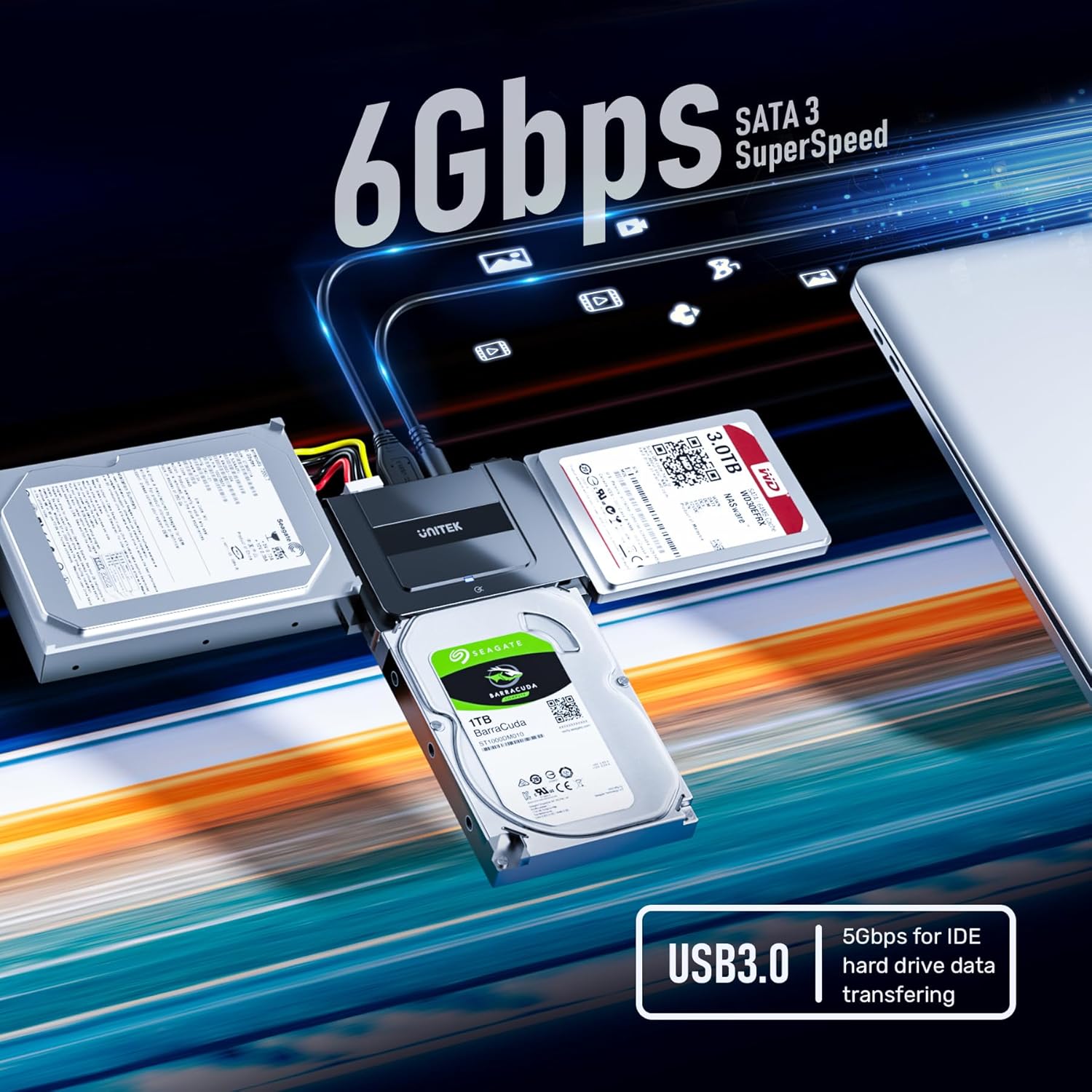
This image emphasizes the high-speed data transfer capabilities of the adapter, supporting up to 6Gbps for SATA 3.1 drives and 5Gbps for IDE hard drives. It shows various drives connected to the adapter, illustrating its versatility.
6. Suderinamumas
The Unitek USB C to SATA 6Gbps IDE Adapter offers broad compatibility:
- Operacinės sistemos: Windows, Mac OS, Chrome OS, Linux.
- Pavarų tipai: 2.5-inch/3.5-inch SATA I/II/III HDDs and SSDs, 2.5-inch/3.5-inch IDE HDDs, DVD-ROM, CD-ROM, CD-RW, DVD-RW, and DVD-RW optical drives.
- Sąsaja: USB Type C (backward compatible with USB 3.0/2.0/1.1).

The adapter is compatible with a wide range of operating systems, including Windows, Mac OS, Chrome OS, and Linux, ensuring plug-and-play functionality across different platforms.
7. Specifikacijos
| Modelio numeris | S1113A |
| Data Transfer Rate (SATA) | Up to 6 Gbps (SATA 3.1) |
| Data Transfer Rate (IDE) | Iki 5 Gbps |
| Jungties tipas | C tipo USB |
| Suderinami įrenginiai | 2.5"/3.5" SATA HDD/SSD, 2.5"/3.5" IDE HDD, DVD-ROM/CD-ROM/CD-RW, DVD-RW |
| Maitinimo adapteris | 12V/2A |
| Prekės svoris | 9.6 uncijos (0.27 kilogramo) |
| Pakuotės matmenys | 5.08 x 3.94 x 3.31 colio |
8. Problemų sprendimas
- Diskas neaptiktas:
- Ensure all cables (USB, power, drive connectors) are securely attached.
- Verify the adapter's power switch is in the 'On' position and the LED indicator is active.
- For 3.5-inch IDE drives, confirm the 4-pin power cable is correctly connected.
- Pabandykite prijungti prie kito kompiuterio USB prievado.
- Check your computer's Disk Management (Windows) or Disk Utility (Mac OS) to see if the drive is recognized but unformatted or unallocated.
- Mažas perdavimo greitis:
- Ensure you are using a USB 3.0 or USB-C port on your computer for optimal speeds.
- Verify the drive itself is capable of high speeds (e.g., SATA 3.1).
- Venkite perkelti daug mažų files vienu metu, nes tai gali sumažinti bendrą greitį.
- Adapterio perkaitimas:
- Ensure adequate ventilation around the adapter and connected drives.
- Disconnect the adapter and allow it to cool down if it feels excessively hot.
9. Priežiūra
- Keep the adapter and its components clean and free from dust. Use a soft, dry cloth for cleaning.
- Kai nenaudojate, laikykite adapterį vėsioje, sausoje vietoje.
- Saugokite adapterį nuo ekstremalių temperatūrų, drėgmės ar tiesioginių saulės spindulių.
- Nebandykite ardyti ar modifikuoti adapterio, nes tai panaikins garantiją ir galite jį sugadinti.
10. Garantija ir palaikymas
Unitek provides customer support for this product. If you have any questions or concerns, please contact our dedicated customer email support team, available 24/7 to assist you.
For warranty information and further assistance, please refer to the official Unitek websvetainėje arba susisiekite tiesiogiai su jų klientų aptarnavimo tarnyba.


