1. Įvadas
This manual provides detailed instructions for the installation, operation, and maintenance of your PNI House WiFi800 NVR and PNI IP840 Outdoor Camera Wireless Surveillance Kit. Please read this manual thoroughly before using the product to ensure proper setup and functionality. Keep this manual for future reference.
2. Saugos informacija
- Ensure all power connections are secure and meet the specified voltage (12V DC).
- Do not expose the NVR to moisture or extreme temperatures.
- The PNI IP840 cameras are IP65 rated for outdoor use; however, avoid submerging them in water.
- Installation should be performed by qualified personnel if you are unsure about electrical connections or mounting procedures.
- Saugokite gaminį nuo stiprių magnetinių laukų.
- Use only original or certified replacement parts and accessories.
3. Pakuotės turinys
Patikrinkite, ar jūsų pakuotėje yra visi toliau išvardyti daiktai:
- PNI House WiFi800 NVR (1 unit)
- PNI IP840 Outdoor Cameras (2 units)
- Power Adapters (for NVR and cameras)
- USB Mouse (for NVR)
- Fixing Screws and Wall Plugs (for cameras)
- User Manuals (for NVR and cameras)

Image: PNI House WiFi800 NVR with included USB mouse and power adapter.

Image: PNI IP840 Outdoor Camera with its power adapter and mounting hardware.
4. Produktas baigtasview
4.1 PNI IP840 Outdoor Camera
The PNI IP840 camera is a high-resolution wireless outdoor surveillance camera featuring 8MP 4K video, pan/tilt functionality, and advanced night vision. It is designed for robust performance in various weather conditions.
- Jutiklis: 1/2.7" CMOS, 8MP
- Rezoliucija: 3840 x 2160 (4 tūkst.)
- Objektyvas: 3.6mm, 90° viewing kampas
- Stumti / pakreipti: Horizontaliai 355°, vertikaliai 90°
- Naktinis matymas: 4 IR LEDs and 4 White LEDs, up to 15m
- Saugykla: „MicroSD“ kortelės lizdas (iki 256 GB, kortelė nepridedama)
- Ryšys: WiFi 2.4GHz, ONVIF support
- Savybės: Motion Detection, Human Shape Detection, Rotation after movement, ICSee app support
- Atsparumas oro sąlygoms: IP65 reitingas

Vaizdas: priekis view of the PNI IP840 outdoor camera, showing the lens, LEDs, and antennas.

Image: Close-up of the PNI IP840 camera's connection cables for power and wired network.
4.2 PNI House WiFi800 NVR
The PNI House WiFi800 NVR (Network Video Recorder) is the central unit for managing and recording video from your surveillance cameras. It supports up to 8 channels at 5MP or 4 channels at 4K (8MP) resolution.
- Vaizdo įrašų kanalai: 8 channels (5MP) / 4 channels (4K/8MP)
- Vaizdo įrašo suspaudimas: H.265AI / H.265+
- Atkūrimo raiška: 1080P (HDMI output)
- Saugykla: Supports 1x 2.5" HDD (up to 14TB) or 1x MicroSD card (up to 128GB)
- Tinklo sąsaja: RJ45 10/100/1000 Mbit/s
- Belaidžio ryšio dažnis: 2.4 GHz (for NVR-camera communication)
- Išėjimai: 1x HDMI, 1x USB 2.0
- Savybės: Mobile/PC viewing (Android, iOS, Windows), ICSee/XMEye app support, Integrated voice prompt speaker

Image: Rear panel of the PNI House WiFi800 NVR, displaying its various ports including power, HDMI, Ethernet, USB, and reset button.

Vaizdas: Šoninė view of the PNI House WiFi800 NVR, showing its antennas and port layout.
5. Sąranka
5.1 Pradinė NVR sąranka
- Prijunkite maitinimą: Connect the NVR to its power adapter and plug it into an electrical outlet.
- Prijungti ekraną: Connect the NVR to a monitor or TV using an HDMI cable.
- Prijungti pelę: Prijunkite USB pelę prie NVR USB prievado, kad galėtumėte naršyti.
- Tinklo ryšys (neprivaloma): For remote access and firmware updates, connect the NVR to your router using an Ethernet cable.
- Storage Installation (Optional): If using an HDD, open the NVR casing and install a 2.5" SATA HDD. Alternatively, insert a MicroSD card into the designated slot.
5.2 Fotoaparato diegimas
- Pasirinkite vietą: Select a suitable outdoor location for each camera, ensuring good Wi-Fi signal strength and an unobstructed view. The IP65 rating allows for outdoor exposure.
- Pritvirtinkite kamerą: Use the provided screws and wall plugs to securely mount the camera to a wall or ceiling.
- Prijunkite maitinimą: Connect the camera to its power adapter and plug it into an electrical outlet. Ensure the power cable is protected from the elements.
5.3 Pairing Cameras with NVR
The cameras are typically pre-paired with the NVR in the kit. If not, or if adding new cameras:
- Ensure both the NVR and cameras are powered on.
- On the NVR interface (connected to a monitor), navigate to the camera management or channel settings.
- Select the option to add or search for wireless cameras. The NVR will scan for available PNI IP840 cameras.
- Vykdykite ekrane pateikiamus nurodymus, kad užbaigtumėte susiejimo procesą.
5.4 Mobile App Configuration (ICSee / XMEye)
- Atsisiųsti programą: Download the ICSee or XMEye app from your smartphone's app store (Android or iOS).
- Registruoti paskyrą: Sukurkite naują vartotojo paskyrą arba prisijunkite, jei jau turite.
- Pridėti įrenginį: In the app, select "Add Device" or scan the QR code displayed on the NVR's monitor (if available) or the NVR itself.
- Vykdykite raginimus: Follow the in-app instructions to connect your NVR and cameras to your mobile device for remote viewvaldymas.
6. Naudojimo instrukcijos
6.1 Tiesiogiai View
Access live video feeds from your cameras via the NVR's connected monitor or through the ICSee/XMEye mobile application. The NVR interface allows for multi-channel display.
6.2 Įrašymas
- Nepertraukiamas įrašymas: Configure the NVR to record continuously to the installed HDD or MicroSD card.
- Judesio aktyvuojamas įrašymas: Set up recording to trigger only when motion is detected by the cameras.
- Suplanuotas įrašymas: Define specific time periods for recording.
6.3 Atkūrimas
Norėdami iš naujoview įrašytas footage:
- On the NVR interface, select the "Playback" option.
- Choose the desired camera, date, and time range.
- Use the controls to play, pause, fast forward, or rewind footage.
- Mobile app playback functions similarly, allowing remote access to recorded video.
6.4 Motion Detection and AI Functions
The PNI IP840 cameras feature advanced detection capabilities:
- Judesio aptikimas: Configurable sensitivity to detect movement within the camera's field of view.
- Žmogaus formos atpažinimas: Intelligent analysis to differentiate human figures from other moving objects, reducing false alarms.
- Rotation After Movement: The camera can be set to automatically track detected movement within its pan/tilt range.
- Aliarmo pranešimai: Enable push notifications to your mobile phone when an alarm event (e.g., motion detection) occurs.
Access these settings through the NVR menu or the mobile application to customize detection zones, sensitivity, and notification preferences.
6.5 Pasukimo / pakreipimo / priartinimo (PTZ) valdymas
For PNI IP840 cameras, you can remotely control the camera's orientation:
- Use the PTZ controls available in the NVR interface or the ICSee/XMEye mobile app.
- Drag your finger on the live view screen in the app to pan (horizontal 355°) and tilt (vertical 90°) the camera.
- Digital zoom functionality may be available through the app.
7. Priežiūra
- Valymas: Reguliariai valykite kameros objektyvus minkštu, sausu skudurėliu, kad užtikrintumėte ryškią vaizdo kokybę. Nenaudokite stiprių cheminių medžiagų.
- Firmware atnaujinimai: Periodically check for firmware updates for both the NVR and cameras through the mobile app or NVR interface. Updates can improve performance and add new features.
- Patikrinkite jungtis: Įsitikinkite, kad visi maitinimo ir tinklo kabeliai yra tvirtai prijungti ir nepažeisti.
- Saugyklos valdymas: Regularly back up important recordings and manage storage space on your HDD or MicroSD card.
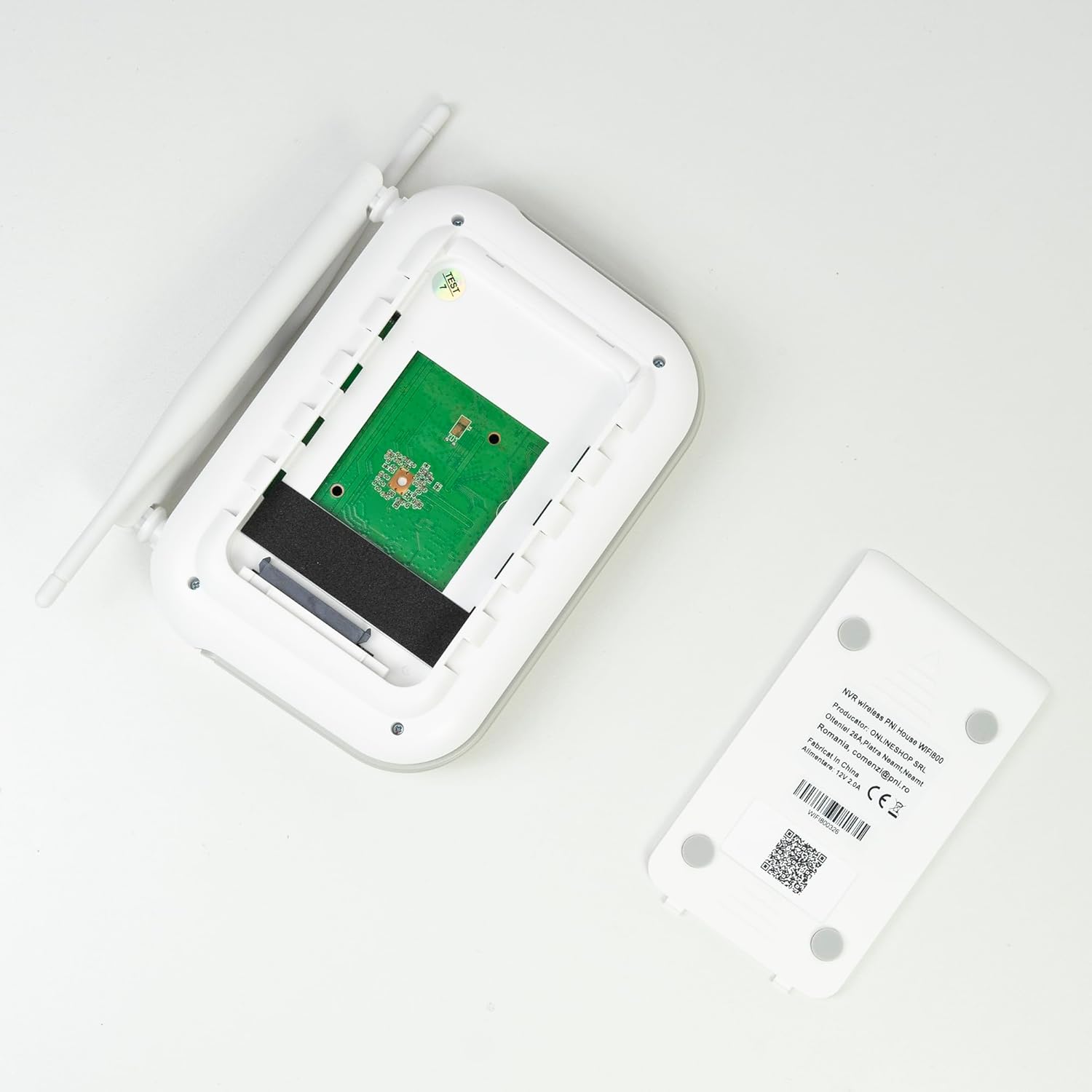
Vaizdas: vidinis view of the PNI House WiFi800 NVR, illustrating the circuit board and the bay for HDD installation.
8. Problemų sprendimas
- Monitoriuje nėra vaizdo:
- Check NVR power supply and HDMI cable connection to the monitor.
- Įsitikinkite, kad monitorius nustatytas į tinkamą įvesties šaltinį.
- Kameros neprisijungia:
- Verify cameras are powered on.
- Check Wi-Fi signal strength at camera locations.
- Re-pair cameras with the NVR if necessary (refer to Section 5.3).
- Nėra nuotolinės prieigos per programėlę:
- Ensure the NVR is connected to the internet via Ethernet.
- Patikrinkite savo išmaniojo telefono interneto ryšį.
- Verify NVR is correctly added to the ICSee/XMEye app.
- Prasta vaizdo kokybė:
- Išvalykite fotoaparato objektyvus.
- Patikrinkite, ar kameros matymo lauke nėra kliūčių view.
- Užtikrinkite tinkamą apšvietimą naktiniam matymui.
- Įrašymo problemos:
- Check if an HDD or MicroSD card is properly installed and formatted.
- Patikrinkite įrašymo tvarkaraščius ir judesio aptikimo nustatymus.
- Įsitikinkite, kad yra pakankamai vietos daiktams laikyti.
9. Specifikacijos
9.1 PNI IP840 Outdoor Camera Specifications
| Funkcija | Detalė |
|---|---|
| Vaizdo jutiklis | 1/2.7 colio CMOS |
| Jutiklio skyra | 8 MP |
| Vaizdo raiška | 3840 x 2160 (4 tūkst.) |
| Objektyvo tipas | 3.6 mm |
| Viewing kampas | 90° |
| Stumti / pakreipti | Horizontaliai: 355°, vertikaliai: 90° |
| Infraraudonųjų spindulių apšvietimas | 4x IR LEDs, 4x White LEDs |
| IR atstumas | Iki 15m |
| Vaizdo įrašų suspaudimas | H.265X (compatible with H.264+/H.264) |
| Garsas | Integrated Microphone and Speaker |
| Belaidis dažnis | 2.4 GHz |
| Palaikomi protokolai | ONVIF |
| Sandėliavimas | „MicroSD“ kortelės lizdas (maks. 256 GB) |
| Maitinimo šaltinis | 12V/1A |
| Apsaugos klasė | IP65 |
| Darbinė temperatūra | -26°C ~ +80°C |
| Matmenys | 86x135x146 mm |
| Svoris | 371 gramų |
9.2 PNI House WiFi800 NVR Specifications
| Funkcija | Detalė |
|---|---|
| Vaizdo kanalai | 8 kanalai 5MP / 4 kanalai 4K (8MP) |
| Vaizdo įrašų suspaudimas | H.265AI / H.265+ |
| Atkūrimo raiška | 1080P (HDMI) |
| Sandėliavimo talpa | 1x 2.5" HDD (max 14TB) / 1x MicroSD card (max 128GB) |
| Tinklo sąsaja | RJ45 - 10/100/1000 Mbit/s |
| Vaizdo išvestis | 1x HDMI |
| USB sąsaja | 1x USB 2.0 |
| Procesorius | MSR621Q |
| Maitinimo šaltinis | 12V/2A |
| Matmenys | 170x120x35 mm |
| Svoris | 245 gramų |
| Wi-Fi Frequency (NVR-Camera) | 2.4 GHz |
| Balso raginimas | Yes, integrated speaker |
10. Garantija ir palaikymas
For warranty information, please refer to the documentation provided at the time of purchase or contact your retailer. For technical support, product inquiries, or assistance with troubleshooting, please visit the official PNI website or contact PNI customer service directly. Keep your purchase receipt as proof of purchase.
Gamintojas: ONLINESHOP SRL
Modelio numeris: PNI-WF8-840-2


