1. Įvadas
Thank you for choosing the AutoSky Portable Tire Inflator, Model AAC-301. This device is designed to provide convenient and efficient inflation for various items, including car tires, motorcycle tires, bicycle tires, and sports balls. It also features an integrated power bank and an emergency LED flashlight for added utility. Please read this manual thoroughly before use to ensure proper operation and to maximize the product's lifespan.
2. Saugos informacija
- Laikyti vaikams nepasiekiamoje vietoje.
- Nenaudokite pripūtimo įrenginio drėgnomis sąlygomis arba šalia degių skysčių ar dujų.
- Avoid prolonged continuous operation to prevent overheating. Allow the device to cool down between uses if necessary.
- Įsitikinkite, kad pripučiamo daikto slėgis yra tinkamas, kad išvengtumėte per didelio pripūtimo ir galimos žalos ar sužalojimo.
- Nenukreipkite pripūtimo antgalio į žmones ar gyvūnus.
- Nenaudojamą prietaisą laikykite vėsioje, sausoje vietoje.
- Naudokite tik pateiktus priedus ir įkrovimo laidą.
3. Pakuotės turinys

Image: Contents of the AutoSky Portable Tire Inflator package, including the inflator unit, air hose, charging cable, needle, nozzle, and carry bag.
The AutoSky Portable Tire Inflator package includes the following items:
- AutoSky Portable Inflator Unit (Model AAC-301)
- Oro žarna
- Įkrovimo laidas (USB)
- 1 Needle (for balls)
- 1 Nozzle (for bicycle valves)
- Maišelis
- Vartotojo vadovas (šis dokumentas)
4. Produkto ypatybės

Vaizdas: priekis view of the AutoSky Portable Tire Inflator, showing the digital display, control buttons, and inflation port.
- Fast & Reliable Inflation: Efficiently inflates various items with automatic shut-off at preset pressure.
- Integruota išorinė baterija: Charges smartphones, tablets, and other USB-powered devices.
- Avarinis LED žibintuvėlis: Features steady, strobe, and SOS modes for illumination and signaling.
- Digital Display & Easy Controls: Intuitive interface for setting desired pressure and selecting inflation modes.
- Kompaktiškas ir nešiojamas dizainas: Lengvas ir lengvai laikomas bei nešiojamas.
- Universalus suderinamumas: Suitable for cars, motorcycles, bicycles, and balls.
5. Sąranka
5.1 Pradinis įkrovimas
Before first use, fully charge the inflator. Connect the provided USB charging cable to the charging port on the device and to a suitable USB power adapter (not included). The battery indicator on the digital display will show charging progress. A full charge typically takes several hours.
5.2 Oro žarnos ir purkštukų pritvirtinimas
Screw one end of the air hose securely onto the inflator's air outlet. For different inflation needs, attach the appropriate nozzle or needle to the other end of the air hose.
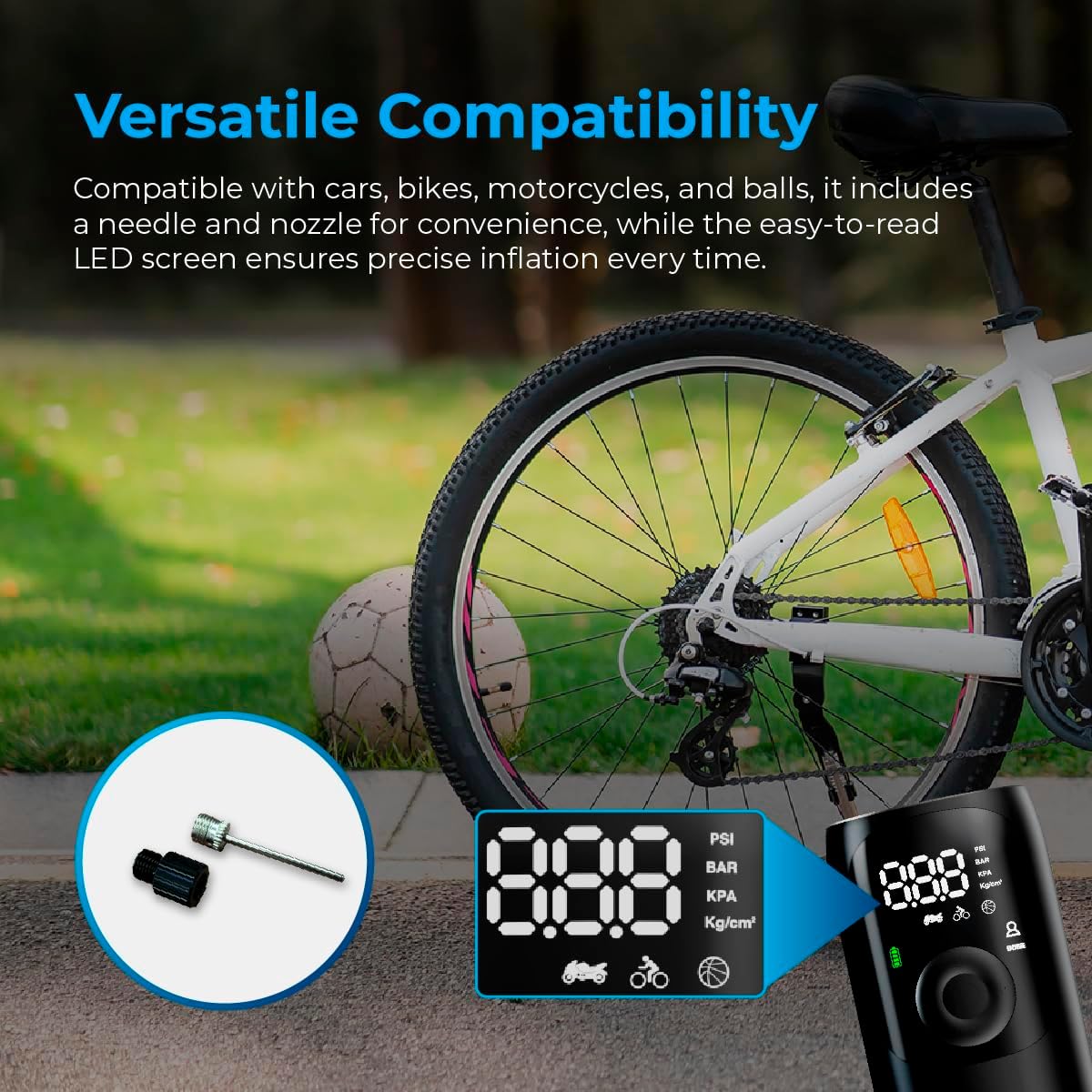
Image: Close-up of the AutoSky Portable Tire Inflator showing the included needle and nozzle accessories for different inflation types.
6. Naudojimo instrukcijos
6.1 Įjungimas / išjungimas
Press and hold the power button for 3 seconds to turn the compressor on or off.
6.2 Pripūtimo procesas
- Prisijunkite: Connect one end of the air hose to the inflator and the other end to the valve of the item you wish to inflate. Attach the appropriate nozzle or needle if required.
- Įjungimas ir režimo pasirinkimas: Press and hold the power button for 3 seconds to turn on the compressor. Press the 'M' button to cycle through the inflation modes (Car, Motorcycle, Bicycle, Ball) until the desired mode is selected. The display will show the recommended pressure range for each mode.
- Nustatyti slėgį: Use the '+' and '-' buttons to adjust the target pressure value. Refer to the item's manufacturer recommendations for correct pressure.
- Pradėti infliaciją: Press the power button again to start the inflation process. The compressor will automatically stop once the preset pressure is reached.
- Atsijungti: Carefully disconnect the air hose from the item and the inflator.

Image: Visual guide demonstrating the three main steps for using the inflator: connecting the hose, setting the pressure, and starting inflation.

Image: Display of the AutoSky Portable Tire Inflator highlighting different inflation modes (car, motorcycle, bicycle, ball) and their respective pressure ranges (PSI).
6.3 Naudojimas kaip išorinės baterijos
To use the inflator as a power bank, connect your USB-powered device (e.g., smartphone, tablet) to the USB output port on the inflator using your device's charging cable. The inflator will automatically begin charging your device.

Image: The AutoSky Portable Tire Inflator functioning as both a power bank, charging a smartphone, and an LED flashlight illuminating a dark area.
6.4 LED žibintuvėlio naudojimas
With the device powered on, press the flashlight button (usually indicated by a light bulb icon) to cycle through the flashlight modes: Steady On, Strobe, and SOS. Press again to turn off the flashlight.
7. Priežiūra
- Valymas: Pripūtimo įrenginio išorę nuvalykite minkštu, sausu skudurėliu. Nenaudokite stiprių cheminių medžiagų ar abrazyvinių valiklių.
- Saugykla: Store the device and its accessories in the provided carry bag in a cool, dry place, away from direct sunlight and extreme temperatures.
- Akumuliatoriaus priežiūra: To maintain battery health, charge the device at least once every three months, even if not in use.
- Žarnos patikrinimas: Regularly inspect the air hose for any signs of wear, cracks, or damage. Replace if necessary.
8. Problemų sprendimas
| Problema | Galima priežastis | Sprendimas |
|---|---|---|
| Pripūtiklis neįsijungia. | Žema akumuliatoriaus įtampa arba jis neįkrautas. | Charge the device fully. Ensure the power button is held for 3 seconds. |
| Infliacija lėta arba neveikia. | Air hose not securely connected; incorrect nozzle; leak in hose/valve. | Ensure all connections are tight. Check for leaks. Verify correct nozzle is used. |
| Įrenginys perkaito ir išsijungia. | Ilgalaikis nepertraukiamas veikimas. | Prieš tęsdami naudojimą, leiskite pripūtimo įrenginiui atvėsti bent 15–20 minučių. |
| Netikslus slėgio rodmuo. | Valve connection not secure. | Ensure the air hose is firmly attached to the item's valve. |
9. Specifikacijos
- Modelis: AAC-301
- Gaminio matmenys: 6 x 3 x 15.7 cm
- Prekės svoris: 572 g (0.57 kg)
- Maitinimo šaltinis: Maitinamas su baterijomis (pridedama 1 ličio jonų baterija)
- Maksimalus slėgis: Up to 150 PSI (as indicated by device modes)
- Spalva: Juoda
- Gamintojas: Promaster Electronic LLC

Image: The AutoSky Portable Tire Inflator next to a car tire, emphasizing its portability, power bank function, auto shut-off, and preset pressure capabilities.
10. Garantija ir palaikymas
For warranty information and customer support, please refer to the warranty card included in your product packaging or contact AutoSky customer service directly. Contact details can typically be found on the official AutoSky websvetainėje arba ant produkto pakuotės.
Gamintojas: Promaster Electronic LLC
Pirmą kartą pasiekiama data: 3 m. rugpjūčio 2024 d


