1. Įvadas
The GODIYMODULES BP1048 is a versatile Bluetooth 5.0 audio pre-amplifier and DSP tuning module designed for advanced audio applications. It integrates an EQ40 electronic frequency division module, TWS audio stereo capabilities, and multiple input/output options, making it suitable for custom audio projects requiring precise sound control and wireless connectivity.
2. Pagrindinės savybės
- EQ40 Bands: Offers 40 adjustable frequency bands for comprehensive sound customization.
- Customizable Crossover: Allows for adjustable bass, mid, and treble crossover points.
- Garso patobulinimai: Includes Bass subwoofer, Vocal optimization, Dynamic range compression, Anti-breakdown, Low-cut, Low-pass, High-pass, High-cut, 3D sound effect, music delay, Sound field optimization, and Noise elimination.
- Keli įėjimai: Supports U disk lossless playback, Mobile phone OTG music input, Bluetooth dual mode 5.0, AUX wired input, and Computer USB sound card input.
- Universalūs išėjimai: Provides low-pass 2.1 output, 2.0 output, mono output, and electronic 2 crossover output.
- TWS funkcionalumas: Two modules can be paired for wireless stereo sound.
- Driver-Free Tuning: Online tuning with software instructions, no driver installation required for data saving.
- Kompaktiškas dizainas: Small form factor (3.8 x 4.5 cm) for easy integration.
3. Specifikacijos
| Funkcija | Detalė |
|---|---|
| Modelio numeris | BP1048 |
| Gamintojas | GODIYMODULES |
| Dalies numeris | DSP-1048-001 |
| Matmenys (I x P x A) | 3.8 x 4.5 x 0.03 cm (38 x 45 mm) |
| Medžiaga | FR4, Rigid Substrate |
| Montavimo tipas | Paviršinis montavimas |
| Bluetooth versija | 5.0 (dvigubas režimas) |
| EQ juostos | 40 |
| Maitinimo šaltinis | Single battery power supply, USB-C (5V) |
| Garso įėjimai | U disk, Mobile OTG, Bluetooth, AUX, USB Sound Card |
| Garso išvestys | Low-pass 2.1, 2.0, Mono, Electronic 2 Crossover |
4. Produktas baigtasview ir sąsajos
The BP1048 module features various connectors and components for power, audio input/output, and external controls. Familiarize yourself with the layout for proper setup and operation.
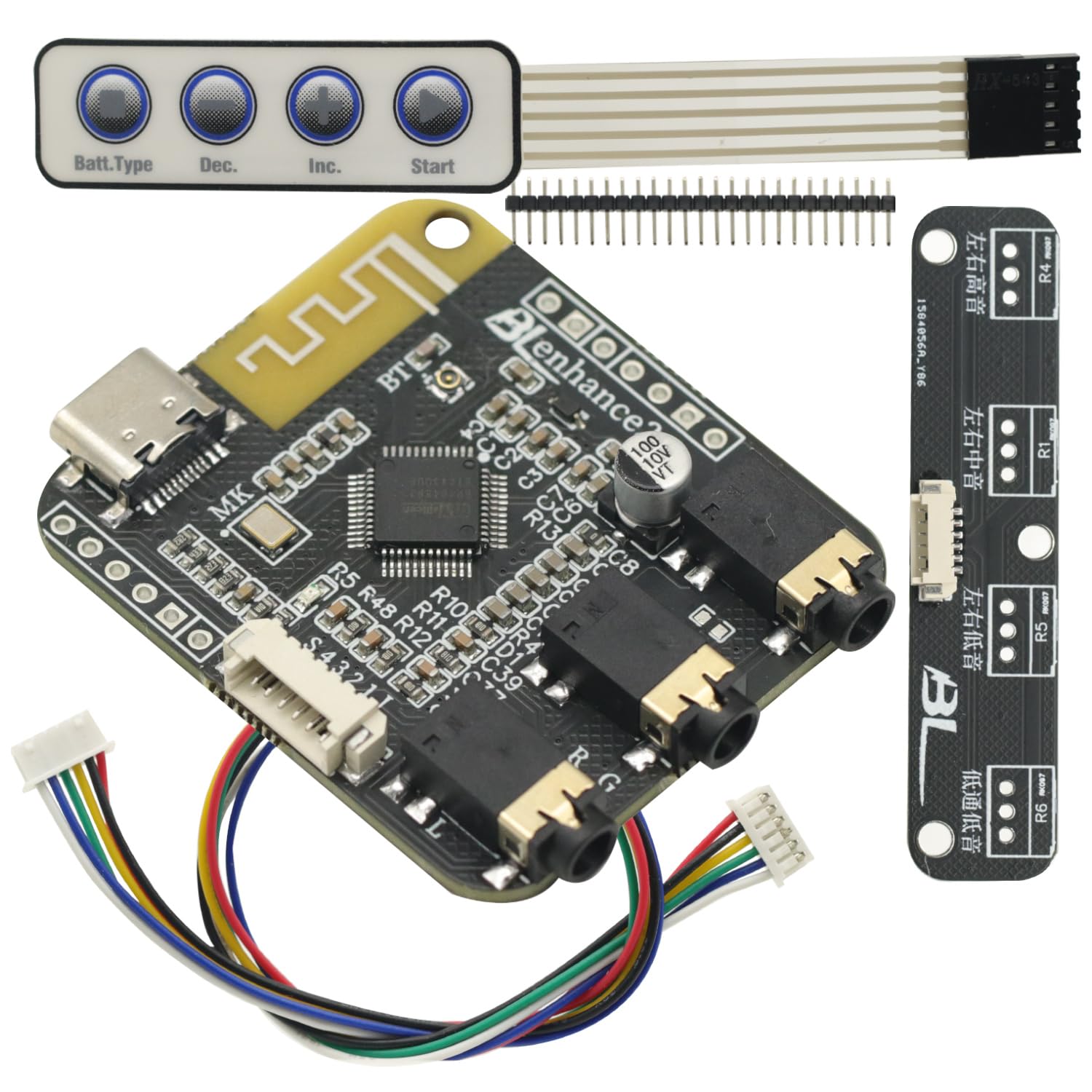
4.1 paveikslas: BP1048 module with included button panel and pin headers. This image displays the main board, a separate wired button control panel, and various pin headers for customization and connection.

4.2 paveikslas: Į viršų view of the BP1048 module, highlighting the Bluetooth antenna, USB-C port, audio output jacks, and various surface-mount components including the DSP chip.

4.3 paveikslas: Apačia view of the BP1048 module, showing clearly labeled connection points for stereo output, bass output, AUX input, USB data, power (V+, V-, 5V), mute, LED, and external key controls.
4.1 Interface Descriptions (Refer to Figure 4.3)
- Stereo Output (立体声输出): Left and Right channel audio output.
- Bass Output (低音输出): Dedicated low-frequency output for subwoofers.
- AUX Audio Input (AUX音频输入): Standard auxiliary audio input.
- USB-C prievadas: Used for power supply (5V), computer USB sound card input, and data connection for tuning.
- Power Input (电源5V): V+ and V- terminals for external 5V power supply.
- Nutildyti: Mute control pin.
- LED: Status indicator LED connection.
- External Key Controls (外接按键): Pins for connecting external buttons for volume up/down, previous/next track, and pause/play.
- Potentiometer Extension (电位器拓展): Pins for connecting external potentiometers for bass, mid, and treble adjustments.
5. Sąrankos instrukcijos
Follow these steps to properly set up your BP1048 module.
5.1 Maitinimo jungtis
- Connect a 5V DC power source to the USB-C port on the module. Alternatively, use the V+ and V- terminals on the bottom of the board for a single battery power supply, ensuring correct polarity.
- Įsitikinkite, kad maitinimo šaltinis yra stabilus ir atitinka nurodytą įtampątage diapazonas, kad būtų išvengta žalos.
5.2 Garso įvesties jungtis
- Bluetooth: Power on the module. It will automatically enter pairing mode. Ieškokite "BP1048" (or similar) on your device and connect.
- AUX įvestis: Connect an audio source (e.g., smartphone, MP3 player) to the AUX audio input jack using a 3.5mm audio cable.
- U diskas: Insert a USB flash drive containing lossless audio files into the designated USB port (if an external USB interface is connected).
- Computer USB Sound Card: Connect the module to your computer via the USB-C port. The module will be recognized as an audio output device.
- Mobile Phone OTG: Connect your mobile phone via an OTG cable to the USB-C port for direct audio input.
5.3 Garso išvesties jungtis
- Connect your speakers or amplifier to the appropriate audio output jacks (Stereo Output, Bass Output) on the module.
- For 2.1 systems, use both Stereo and Bass outputs. For 2.0 or mono, use the corresponding outputs.
- If using the electronic 2 crossover output, ensure your amplifier or speakers are compatible and configured correctly.
5.4 External Controls Connection (Optional)
- Connect the provided button panel or custom buttons to the 'External Key Controls' pins for volume, track control, and pause/play functionality.
- Connect external potentiometers to the 'Potentiometer Extension' pins for physical bass, mid, and treble adjustments if desired.
6. Operacija
Once the module is set up, you can begin operating it using its various functions.
6.1 Įvesties šaltinio pasirinkimas
The module automatically detects and prioritizes input sources. Bluetooth is typically prioritized when connected. To switch inputs, disconnect the current source or use the tuning software.
6.2 Bluetooth Pairing and TWS Mode
- Standard Bluetooth: Power on the module. It will enter pairing mode. On your device, search for and select the module's Bluetooth name (e.g., "BP1048").
- TWS Wireless Stereo: To create a wireless stereo pair, power on two BP1048 modules. Follow the specific one-key pairing instructions provided with the tuning software or module documentation to link them. Once paired, one module acts as the master (left channel) and the other as the slave (right channel), providing a true wireless stereo experience.
6.3 EQ Tuning and DSP Functions
The BP1048 module's advanced DSP features are controlled via dedicated software. This software allows for real-time tuning and configuration.
- Connect the module to a computer via the USB-C port.
- Launch the provided tuning software (instructions for obtaining the software should be included with your purchase).
- Within the software, you can adjust the 40-band EQ, set crossover points, enable 3D sound effects, optimize vocals, apply dynamic range compression, and configure other audio processing features.
- The software allows for online listening while tuning, and settings can be saved directly to the module's chip without requiring driver installation.
7. Problemų sprendimas
If you encounter issues with your BP1048 module, refer to the following common troubleshooting steps:
- Nėra galios: Ensure the 5V power supply is correctly connected and providing sufficient current. Check USB-C cable or battery connections.
- Nėra garso išvesties: Verify that audio cables are securely connected to the correct output jacks. Check the volume levels on both the module (if external controls are used) and the connected amplifier/speakers. Ensure the correct input source is selected.
- „Bluetooth“ ryšio problemos: Make sure the module is in pairing mode. Disconnect any previously paired devices. Try restarting both the module and your Bluetooth device. Ensure the devices are within range.
- Iškraipytas garsas: Patikrinkite tinkamą stiprinimo lygįtaging in your audio chain. Reduce input volume if it's too high. Ensure speaker impedance matches ampkeltuvo reikalavimai.
- Tuning Software Not Connecting: Ensure the USB-C cable is properly connected to the computer and the module. Close and reopen the tuning software. Try a different USB port on your computer.
8. Priežiūra
To ensure the longevity and optimal performance of your BP1048 module, follow these maintenance guidelines:
- Valymas: Use a soft, dry cloth to gently wipe the module. Avoid using liquid cleaners or solvents, as they can damage components.
- Aplinka: Modulį naudokite ir laikykite sausoje aplinkoje, atokiau nuo ekstremalių temperatūrų, drėgmės ir tiesioginių saulės spindulių.
- Tvarkymas: Handle the module with care to avoid physical damage to the circuit board or connectors. Avoid touching the electronic components directly.
- Išjungti: Disconnect power when the module is not in use for extended periods.
9. Garantija ir palaikymas
For warranty information, technical support, or service inquiries, please contact GODIYMODULES directly through their official website or the retailer from whom you purchased the product. Please have your product model number (BP1048) and purchase details ready when contacting support.