Įvadas
The Amazon Echo Show 8 (newest model) is a smart display designed to enhance your daily routines. It features a vibrant 8.7-inch HD touchscreen, spatial audio capabilities, and an integrated smart home hub. Powered by the AZ3 Pro chip and Omnisense technology, it offers personalized experiences and efficient performance. This device includes early access to Alexa+, an advanced AI assistant providing proactive information and tailored content.

Image: The Amazon Echo Show 8, showcasing its vibrant display with smart home interface and a family photo. The device is positioned on a wooden surface.
Sąranka
To begin using your Echo Show 8, follow these steps:
- Išpakuokite įrenginį: Ensure all components are present: Echo Show 8 device, power adapter (30W), and the quick start guide.
- Prijunkite maitinimą: Plug the power adapter into the Echo Show 8 and then into a wall outlet. The device will power on automatically.
- Vykdykite ekrane pateikiamus nurodymus: The Echo Show 8 will guide you through the initial setup process on its touchscreen. This includes selecting your language, connecting to a Wi-Fi network, and logging into your Amazon account.
- „Wi-Fi“ ryšys: The device supports Wi-Fi 6E (802.1ax) and 802.11a/b/g/n/ac networks. Amazon Wi-Fi simple setup is available for easy connection.
- „Alexa“ programa: For full functionality and management, download the Alexa app on your Fire OS, Android, or iOS device. The app is also accessible via a web naršyklė.

Image: A graphic introducing Alexa+, highlighting its role as a smarter, more proactive AI assistant.
Naudojimo instrukcijos
The Echo Show 8 integrates various features to assist with daily tasks and entertainment.
Ekranas ir garsas
- Vibrant HD Display: The 8.7-inch HD touchscreen provides a clear visual experience for content viewing, video calls, and smart home management.
- Erdvinis garsas: Enjoy room-filling spatial audio with crisper vocals and an enhanced sound stage. The device features a 2.8-inch woofer and two full-range drivers.
- Medijos srautas: Stream music and watch shows from services like Prime Video and Netflix. Alexa+ can assist in discovering new content based on your preferences.

Image: Two individuals in a kitchen, with the Echo Show 8 displaying music playback, illustrating its audio capabilities in a home setting.
Everyday Assistant with Alexa+
- Informacija iš pirmo žvilgsnio: View calendars, recipes, and shopping lists directly on the display.
- Suasmenintas turinys: Alexa+ provides a personalized home screen experience with glanceable information, customized notifications, and helpful follow-ups.
- Balso komandos: Use voice commands to find recipes, make reservations, order groceries, and manage various tasks.
Video Calls and Photo Memories
- Crystal-Clear Video Calls: The 13 MP camera with auto-framing, 3.3x zoom, and noise reduction technology ensures natural video calls.
- Tiesiogiai View: Utilize the live view feature to check on your home, family, or pets remotely.
- Skaitmeninis nuotraukų rėmelis: When idle, the device can display your photo memories as a digital photo frame. Alexa+ can curate slideshows or find specific photos.
Išmaniojo namo valdymas
The Echo Show 8 features a built-in smart home hub, supporting Zigbee, Matter, and Thread Border Router protocols. This allows for direct control of compatible smart devices.
- Įrenginio susiejimas: Pair and control thousands of devices that work with Alexa without requiring a separate hub.
- Centralizuotas valdymas: Manage lights, thermostats, and other smart devices using the display or voice commands.
- Kameros transliacijos: Lengvai view feeds from compatible smart cameras.
- „Omnissense“ technologija: This technology enables ambient AI for proactive and personalized experiences, including visual ID, proximity and presence detection, temperature sensing, and adaptive brightness/color. It can activate routines based on temperature, presence, or visual ID.
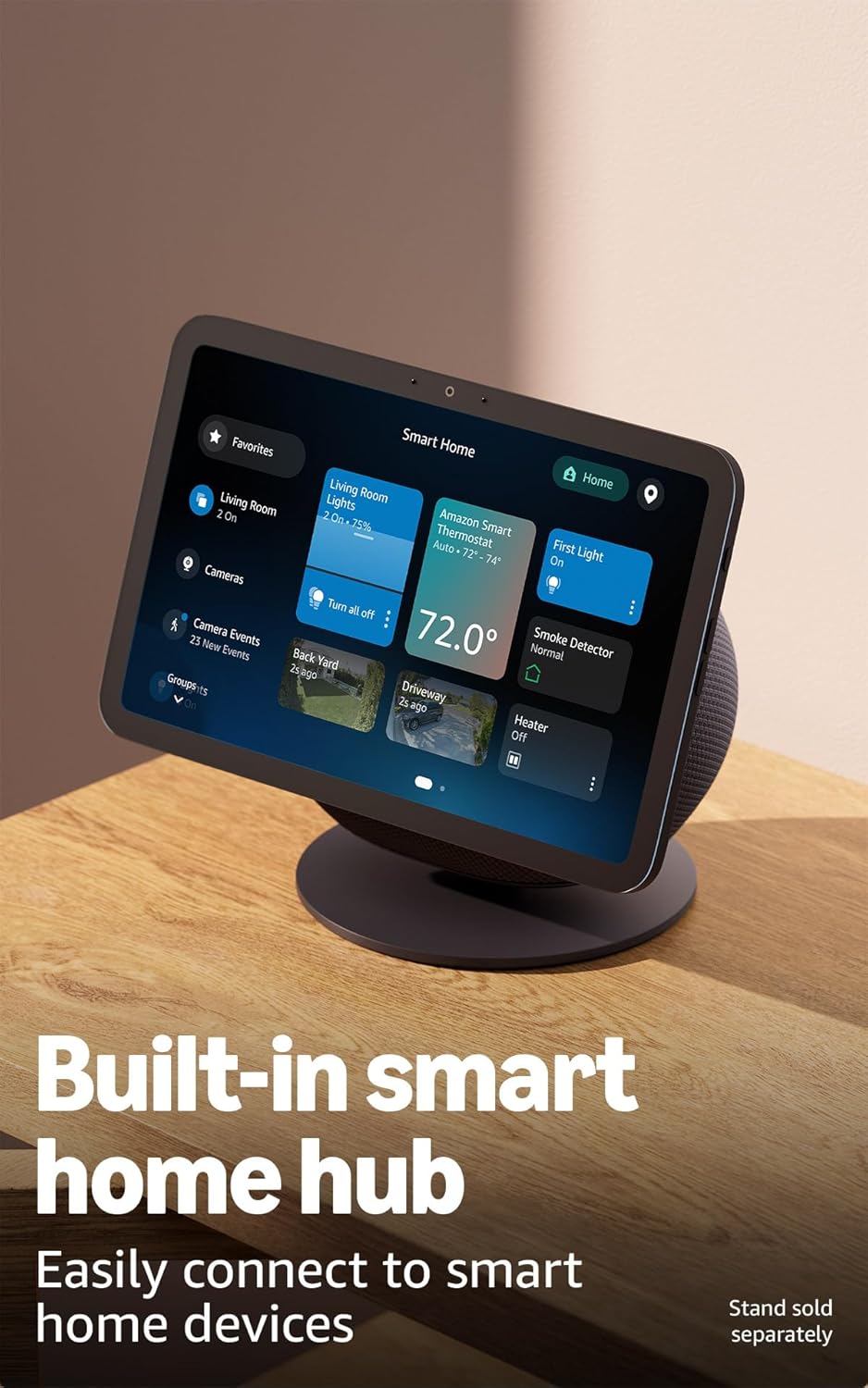
Image: The Echo Show 8 displaying its smart home control interface, demonstrating its capability to manage connected devices.
Privatumo funkcijos
„Echo Show 8“ sukurtas su keliais privatumo kontrolės sluoksniais:
- Microphones & Camera Button: A dedicated button allows you to physically enable or disable the microphones and camera.
- Specialūs kameros valdikliai: Additional camera controls are available both on the device and within the Alexa app.
- „Wake Word“ technologija: Įrenginys pradeda įrašyti ir siųsti garsą į debesį tik aptikęs pažadinimo žodį.
- Balso įrašų valdymas: Jūs turite galimybę iš naujoview ir ištrinti savo balso įrašus.

Vaizdas: Stambus planas view of the Echo Show 8's side, highlighting the physical button for controlling microphone and camera privacy.
Prieinamumo funkcijos
The Echo Show 8 includes various accessibility features to personalize Alexa to your needs. These can be accessed via Nustatymai → Prieinamumas savo įrenginyje.
- Palieskite, kad pasiektumėte Alexa: Pasiekite „Alexa“ lietimu per ekrano plyteles arba klaviatūrą, įskaitant mėgstamiausių veiksmų išsaugojimą.
- Adaptyvus klausymasis: Suteikia daugiau laiko baigti kalbėti prieš Alexa atsakant.
- Pageidaujamas kalbėjimo tempas: Valdykite, kaip greitai arba lėtai Alexa kalba.
- Subtitrai: Alexa Captioning, Call Captioning, and Closed Captioning provide text for supported content.
- Parodyk ir papasakok: Helps users who are blind or visually impaired identify products by saying "Alexa, what am I holding."
- BalsasView Ekrano skaitytuvas: Enables access for users who are blind or visually impaired.
- Ekrano didintuvas: Priartinkite / atitolinkite ir judinkite ekraną.
- Pranešti, kai bus netoliese: Leidžiami pranešimų garsai, kai aptinkamas šalia jūsų „Echo“ įrenginio.
- „Kindle“ skaitymas garsiai: „Alexa“ gali garsiai skaityti jūsų „Kindle“ knygas.
- Tekstas realiuoju laiku: Type live text during a video call.
- Papildomi nustatymai apima spalvų inversiją, spalvų korekciją ir garso užklausą.
Priežiūra
To ensure optimal performance and longevity of your Echo Show 8:
- Valymas: Švelniai nuvalykite ekraną ir įrenginio išorę minkštu, nepūkuotu skudurėliu. Venkite abrazyvinių valiklių ar purškiklių.
- Programinės įrangos atnaujinimai: Ensure your device is connected to Wi-Fi to receive automatic software security updates. These updates improve functionality and security.
- Vieta: Padėkite įrenginį ant stabilaus, lygaus paviršiaus, atokiau nuo tiesioginių saulės spindulių, šilumos šaltinių ir drėgmės.
Trikčių šalinimas
If you encounter issues with your Echo Show 8, consider the following steps:
- Nėra galios: Įsitikinkite, kad maitinimo adapteris yra tvirtai prijungtas tiek prie įrenginio, tiek prie veikiančio sieninio lizdo.
- „Wi-Fi“ ryšio problemos:
- Patikrinkite, ar jūsų „Wi-Fi“ maršrutizatorius įjungtas ir veikia.
- Paleiskite „Echo Show 8“ iš naujo, kelioms sekundėms jį atjungdami ir vėl prijungdami.
- Įrenginio nustatymuose patikrinkite savo „Wi-Fi“ slaptažodį.
- Alexa neatsako:
- Ensure the microphone is not disabled (check the privacy button on the device).
- Kalbėkite aiškiai ir normaliu garsumu.
- Pabandykite iš naujo paleisti įrenginį.
- Ekranas nereaguoja:
- Iš naujo paleiskite įrenginį.
- Įsitikinkite, kad ekranas yra švarus ir be šiukšlių.
- Programinės įrangos problemos: Ensure your device has the latest software updates. If issues persist, a factory reset may be necessary (consult the Alexa app or Amazon support for instructions).
Specifikacijos
| Funkcija | Detalė |
|---|---|
| Dydis | 8.2 x 5 x 5.9 col. (208 mm x 127 mm x 150 mm) |
| Svoris | 37 gramų (1049 uncijos) |
| Ekranas | 8.7” HD touchscreen with 800 x 1340 resolution |
| Fotoaparatas | 13 MP su automatiniu kadravimu |
| Garsas | 1 x 2.8 colio žemųjų dažnių garsiakalbis ir 2 viso diapazono garsiakalbiai |
| Wi-Fi ryšys | Wi-Fi 6E (802.1ax) tri-band (SISO), supports 802.11a/b/g/n/ac |
| „Smart Home Hub“ | „Zigbee“ + „Matter“ + gijų kraštų maršrutizatorius |
| Bluetooth ryšys | A2DP for audio streaming, AVRCP for voice control of connected mobile devices |
| Procesorius | AZ3 Pro su dirbtinio intelekto greitintuvu |
| Jutikliai | Ambient Temperature, Ambient Light, Presence Detection, Camera |
| Omnissense technologija | Ambient AI for proactive and personalized experiences (visual ID, proximity, presence, temperature sensing, adaptive brightness/color) |
| Kalba | Alexa kalba angliškai ir ispaniškai |
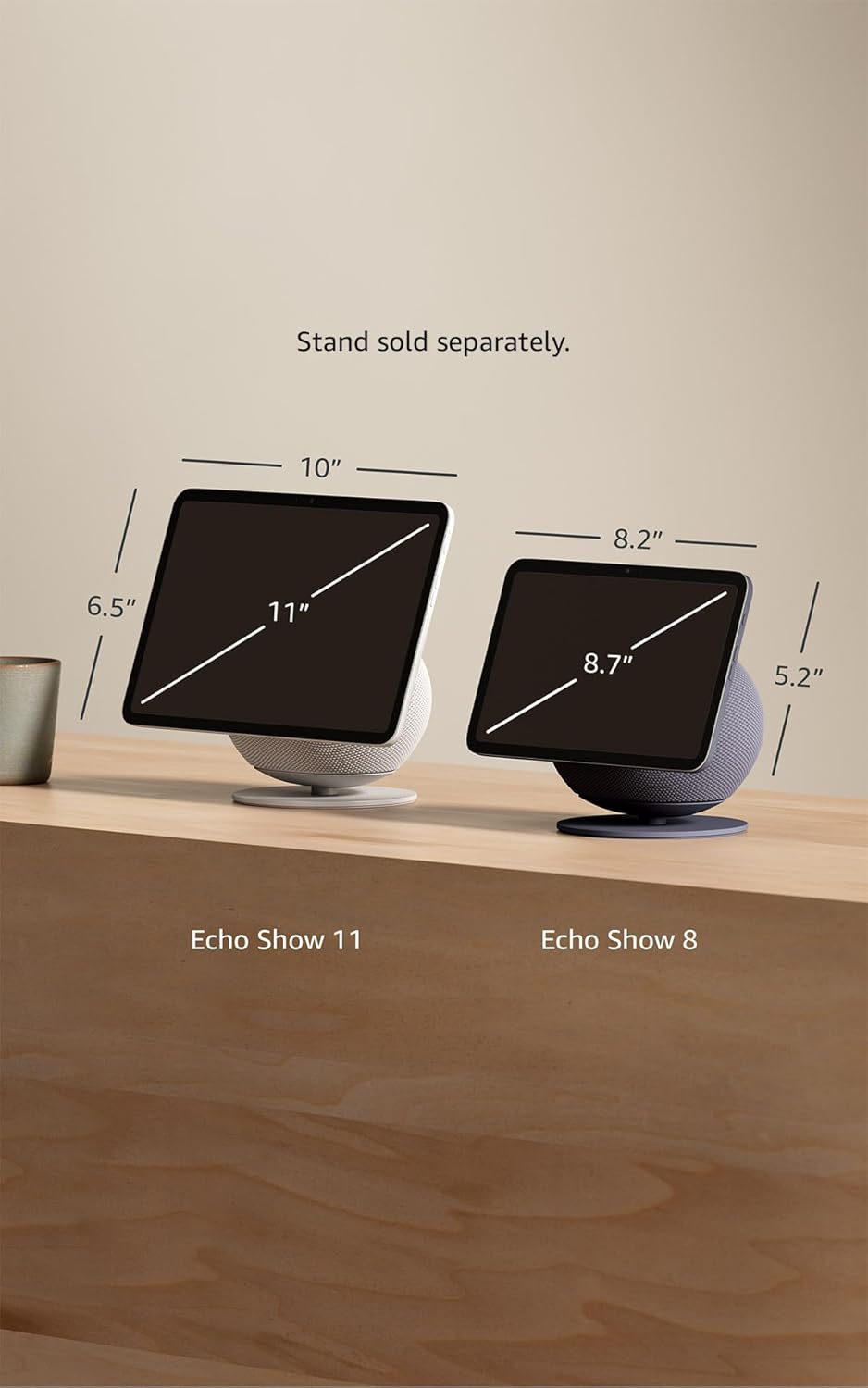
Image: A visual comparison of the Echo Show 11 and Echo Show 8, highlighting the dimensions of the 8.7-inch display model.
Garantija ir palaikymas
Your Amazon Echo Show 8 comes with a 1-year limited warranty and service. Extended warranty options (1-year, 2-year, and 3-year) are available for purchase separately for U.S. customers.
For detailed terms of use, warranty information, and additional support, please refer to the official Amazon support resources or visit the Alexa Privacy Hub for privacy-related inquiries.
For information specific to your device or to manage your content and devices, visit Tvarkykite savo turinį ir įrenginius.


