1. Įvadas
Thank you for choosing an Aveek Professional Audio Mixer. This manual provides detailed instructions for the setup, operation, and maintenance of your Aveek F-5A Professional Audio Mixer and Aveek MIX400 4-Channel Low Noise Mini Line Audio Mixer. Please read this manual thoroughly before using your device to ensure proper functionality and to prevent damage.
The Aveek audio mixer series is designed to provide high-quality audio mixing solutions for various applications, from home studios to live performances. Both models offer distinct features tailored to different user needs.

Image 1.1: Aveek F-5A (left) and Aveek MIX400 (right) Audio Mixers. The F-5A is a multi-channel mixer with XLR inputs and USB connectivity, while the MIX400 is a compact 4-channel line mixer.
2. Svarbios saugos instrukcijos
- Read these instructions carefully before operation.
- Išsaugokite šias instrukcijas, kad galėtumėte pasinaudoti ateityje.
- Atkreipkite dėmesį į visus įspėjimus ant gaminio ir naudojimo instrukcijose.
- Nenaudokite šio prietaiso šalia vandens.
- Valykite tik sausa šluoste.
- Neužblokuokite jokių ventiliacijos angų. Montuokite pagal gamintojo instrukcijas.
- Nemontuokite šalia jokių šilumos šaltinių, pvz., radiatorių, šilumokaičių, viryklių ar kitų įrenginių (įskaitant ampkeltuvai), kurie gamina šilumą.
- Nepažeiskite poliarizuoto arba įžeminto kištuko saugos tikslo. Poliarizuotas kištukas turi du ašmenis, kurių vienas platesnis už kitą. Įžeminimo tipo kištukas turi dvi mentes ir trečią įžeminimo šakelę. Platus ašmenys arba trečioji šakelė yra jūsų saugumui. Jei pateiktas kištukas netelpa į jūsų elektros lizdą, kreipkitės į elektriką, kad pakeistų pasenusį lizdą.
- Saugokite maitinimo laidą, kad ant jo neužeitų ar nesuspaustų, ypač prie kištukų, patogių lizdų ir toje vietoje, kur jie išeina iš aparato.
- Naudokite tik gamintojo nurodytus priedus/priedus.
- Atjunkite šį įrenginį žaibuojant arba kai nenaudojate ilgą laiką.
- Visus techninės priežiūros darbus patikėkite kvalifikuotam techninės priežiūros personalui. Techninė priežiūra reikalinga, kai aparatas buvo kaip nors pažeistas, pvz., pažeistas maitinimo laidas arba kištukas, į aparatą išsiliejo skystis ar įkrito daiktai, aparatas buvo paveiktas lietaus ar drėgmės, neveikia normaliai. , arba buvo numestas.
3. Pakuotės turinys
Please check the package contents upon unboxing. If any items are missing or damaged, contact Aveek customer support.
- Aveek Audio Mixer (F-5A or MIX400, depending on model purchased)
- Power Adapter (5V-2A Type-C for F-5A, 5V for MIX400)
- USB Type-C to USB Cable (for F-5A)
- Vartotojo vadovas (šis dokumentas)
4. Produktas baigtasview ir Savybės
4.1 Aveek F-5A Professional Audio Mixer
The Aveek F-5A is a versatile professional audio mixer designed for comprehensive sound control and recording. It features multiple input options and advanced functionalities.
- Mikrofono / linijos įėjimai: 3 XLR/TRS combo jacks for microphones or line-level instruments.
- Stereo linijos įėjimai: L/R 6.35mm and L/R RCA stereo inputs for connecting CD players, keyboards, or computers.
- USB-B Interface: Built-in sound card for direct connection to computers, mobile phones, or tablets for mixing and recording. Requires a USB to Phone OTG Adapter for mobile devices.
- USB-A sąsaja: For MP3 music playback from a USB stick or recording audio output to a USB stick.
- Ultra-Low Noise Design: Utilizes a 5V-2A (Type-C) adapter power supply and six ROHM low-noise operational amplifuotojai, užtikrinantys aukščiausią garso kokybę.
- Išėjimai: L/R RCA output and L/R 6.35mm Main output for active speakers, power amplifiers, or active sound systems.
- „Phantom Power“: +48V phantom power for condenser microphones.
- Efektai: Built-in digital effects processor (Reverb, Delay).

Image 4.1: Front panel overview of the Aveek F-5A mixer, detailing input jacks, control knobs (gain, treble, bass, effect, volume), USB ports, and output connections.
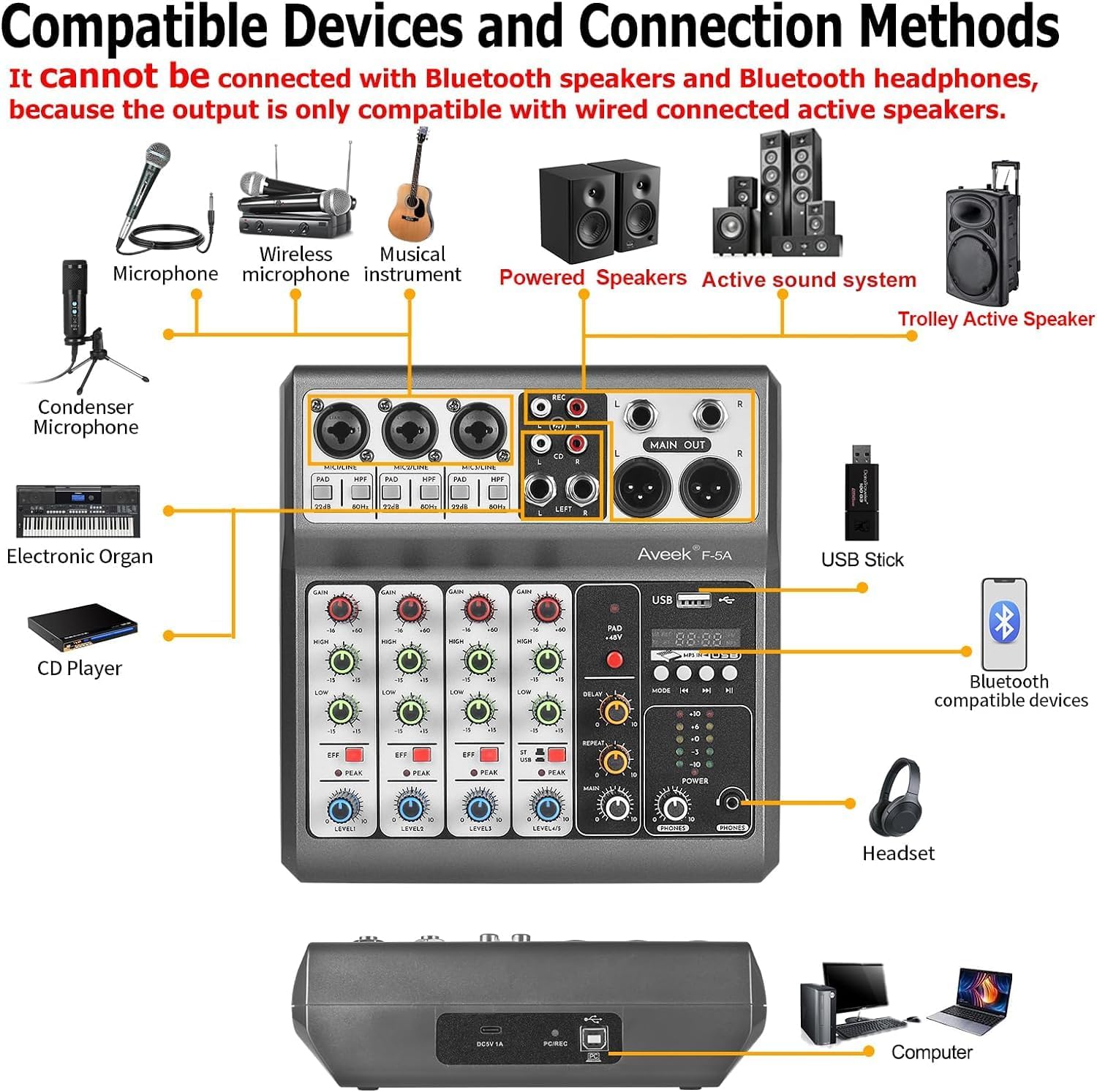
Image 4.2: Diagram illustrating compatible devices and connection methods for the Aveek F-5A mixer, including microphones, instruments, speakers, and computers. Note: Bluetooth output devices are not supported.
4.2 Aveek MIX400 4-Channel Low Noise Mini Line Audio Mixer
The Aveek MIX400 is a compact and efficient 4-channel stereo line mixer, ideal for combining multiple audio sources into a single output with minimal noise.
- 4-Inputs 1-Output: Four independent stereo/mono input channels combining into one stereo output.
- Įvesties suderinamumas: Suitable for dynamic microphones, electronic instruments, CDs, and computers.
- Itin mažas triukšmo lygis: Designed for superior sound quality with low noise and minimal distortion.
- Kompaktiškas dizainas: Small footprint for easy integration into any setup.

Image 4.3: Front panel of the Aveek MIX400, showing four input channels with individual volume controls, mono/stereo switches, and a master output volume control.
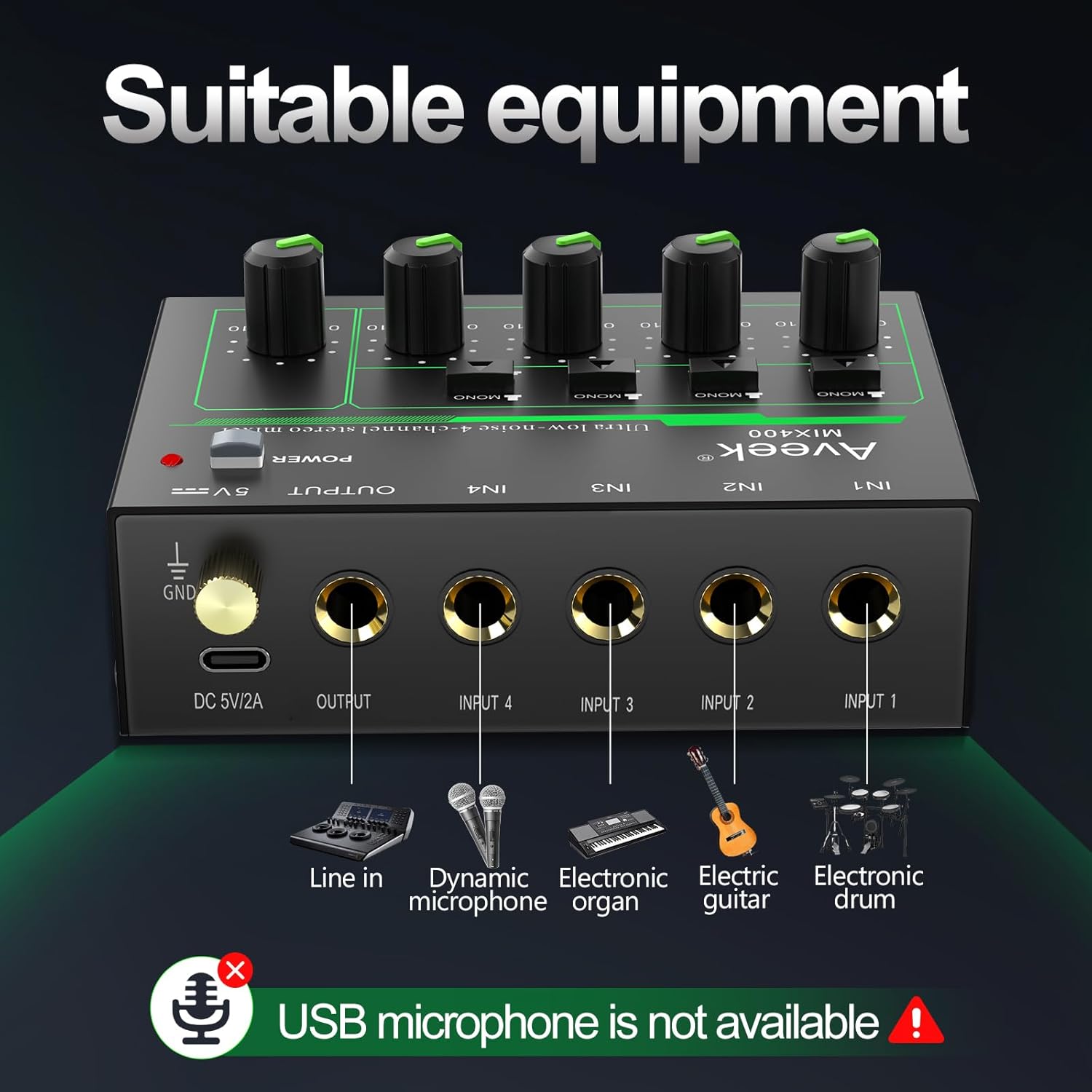
Image 4.4: Diagram illustrating suitable equipment for the Aveek MIX400, including line-in devices, dynamic microphones, electronic organs, electric guitars, and electronic drums. USB microphones are not supported.
5. Sąranka ir jungtys
5.1 Maišytuvo maitinimas
Both Aveek mixers require external power. Ensure the mixer is turned off before connecting the power supply.
- Aveek F-5A: Connect the provided USB Type-C to USB cable to the mixer's Type-C power port and then to the 5V-2A power adapter. Plug the adapter into a standard wall outlet. The F-5A can also be powered by a power bank or a computer's USB port.
- Aveek MIX400: Connect the provided 5V power adapter to the mixer's DC 5V/2A port and then to a standard wall outlet.
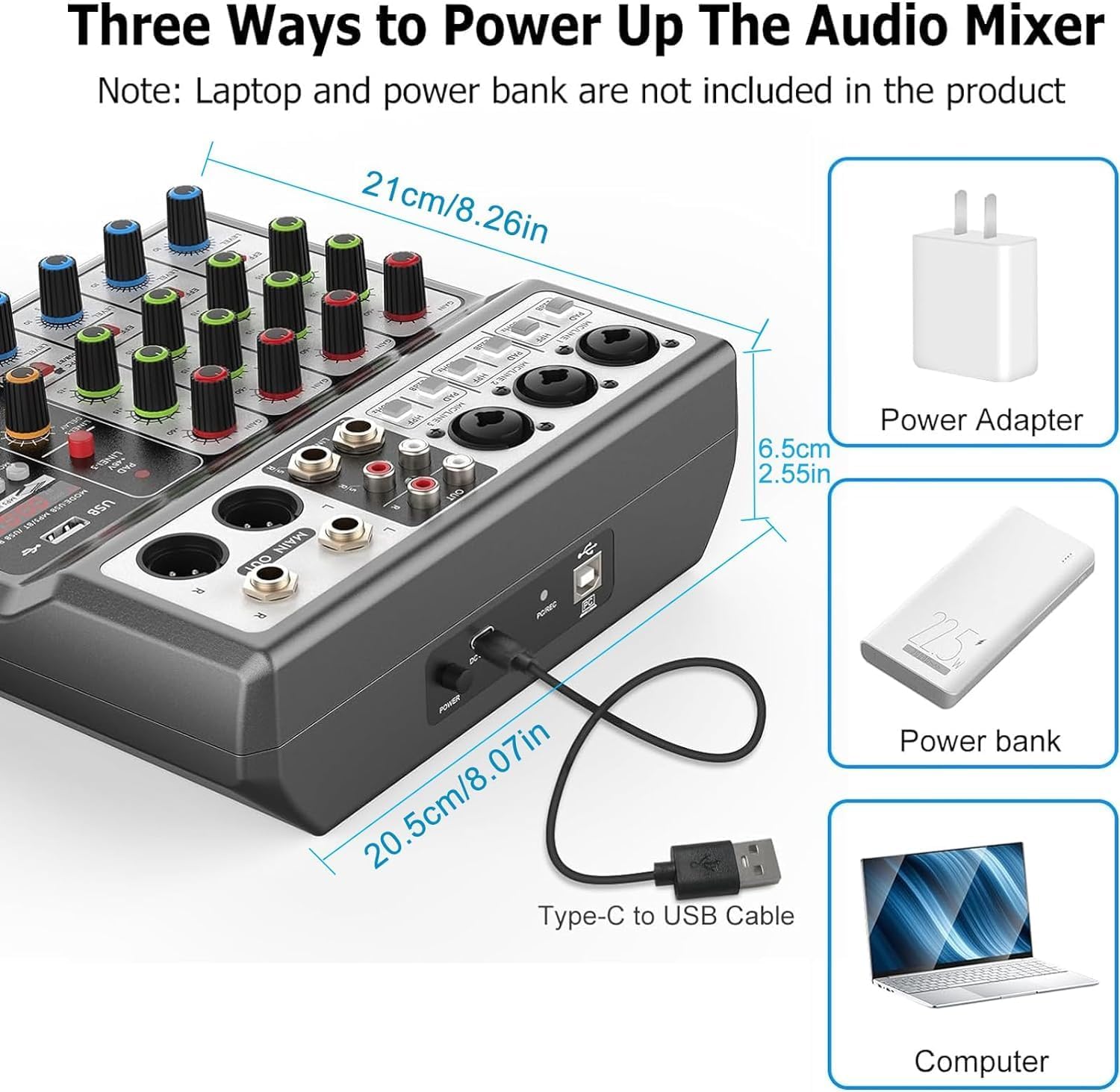
Image 5.1: Powering options for the Aveek F-5A mixer, including a power adapter, power bank, or computer USB port via a Type-C to USB cable.
5.2 Connecting Audio Devices (Aveek F-5A)
Refer to Image 4.1 and 4.2 for visual guidance.
- Mikrofonai: Connect dynamic or condenser microphones to the XLR/TRS combo jacks (MIC1, MIC2, MIC3). For condenser microphones, activate the +48V phantom power switch if required.
- Instruments/Line Devices: Connect instruments (e.g., guitar, keyboard) or other line-level devices to the TRS inputs or the L/R RCA stereo inputs.
- Computer/Mobile Device (USB-B): Use a USB-B cable to connect the mixer to your computer for recording or playback. For mobile phones/tablets, an OTG adapter is required for data transfer.
- USB Stick (USB-A): Insert a USB stick into the USB-A port for MP3 playback or recording.
- Išėjimai: Connect your active speakers, power amplifier, or active sound system to the MAIN OUT (6.35mm TRS) or RCA OUT jacks.
- Ausinės: Prijunkite ausines prie PHONES lizdo stebėjimui.
5.3 Connecting Audio Devices (Aveek MIX400)
Refer to Image 4.3 and 4.4 for visual guidance.
- Įėjimai: Connect your audio sources (e.g., dynamic microphone, electronic organ, electric guitar, electronic drum, CD player) to the IN1, IN2, IN3, IN4 jacks. These are 1/4" TS/TRS inputs.
- Išvestis: Connect the mixer's OUTPUT jack to your active speakers or ampgyvesnis.

5.2 pav.: Išsamus view of the Aveek MIX400 input and output jacks, illustrating the use of TRS for stereo and TS for mono connections.

Image 5.3: The Aveek MIX400 connected to a dynamic microphone, demonstrating a typical input setup. USB microphones are not compatible.
6. Operacija
6.1 Aveek F-5A Operation
- Maitinimas: After connecting all devices and power, press the POWER switch to turn on the mixer.
- Įvesties padidėjimas: Adjust the GAIN knob for each channel to set the input level. Ensure the PEAK indicator does not light up consistently, which indicates clipping.
- Išlyginimas: Use the TREBLE and BASS knobs to adjust the high and low frequencies for each channel.
- Efektai: Use the EFF knob to send a portion of the channel signal to the internal effects processor. Adjust the MP3 playback adjustment and Reverb/Delay controls for desired effect.
- Kanalo garsumas: Adjust the CHANNEL VOLUME knob for each input to balance the mix.
- Pagrindinis garsas: Use the MASTER VOLUME knob to control the overall output level.
- Stebėjimas: Adjust the MONITOR VOLUME knob for headphone output.
- USB funkcijos:
- USB-B (PC/Mobile): When connected to a computer, the mixer acts as an audio interface. Select it as your input/output device in your operating system's sound settings.
- USB-A (Playback/Record): Insert a USB stick. Use the MODE/USB/MP3/BT/REC controls to play MP3 files or record the main mix directly to the USB stick.
6.2 Aveek MIX400 Operation
- Maitinimas: After connecting all devices and power, press the POWER switch to turn on the mixer. The power indicator light will illuminate.
- Įvesties režimas: For each input channel (IN1-IN4), select either MONO (TS input) or STEREO (TRS input) using the switch.
- MONO Mode: Recommended for mono sound input. Mono sound uses one channel output in Stereo mode.
- STEREO Mode: Stereo sound uses two channels output in any mode.
- Įvesties garsumas: Adjust the individual volume control knob for each input channel (IN1-IN4) to balance the levels of your audio sources.
- Master Output Volume: Adjust the OUTPUT volume control knob to set the overall output level of the mixed audio.
Image 6.1: Front panel of the Aveek MIX400, highlighting the power switch, mono/stereo input mode selectors, individual input volume controls, and master output volume control.
7. Priežiūra
- Valymas: Use a soft, dry cloth to clean the exterior of the mixer. Do not use liquid cleaners or solvents.
- Saugykla: Jei maišytuvas nenaudojamas ilgesnį laiką, jį laikykite vėsioje, sausoje vietoje, toliau nuo tiesioginių saulės spindulių ir ekstremalių temperatūrų.
- Vėdinimas: Užtikrinkite tinkamą vėdinimą aplink maišytuvą, kad jis neperkaistų. Neužblokuokite ventiliacijos angų.
- Kabelių valdymas: Avoid bending or pinching cables, especially power cords, to prevent damage.
8. Problemų sprendimas
| Problema | Galima priežastis | Sprendimas |
|---|---|---|
| Nėra galios | Power cable not connected; power adapter faulty; power outlet not working. | Check power connections; try a different power outlet; ensure correct power adapter is used. |
| Nėra garso išvesties | Output cables not connected; output volume too low; incorrect input selection; connected to passive speakers. | Verify output cable connections; increase MASTER VOLUME; ensure input devices are active; connect to active speakers or an ampgyvesnis. |
| Iškraipytas garsas | Input gain too high (clipping); faulty cables; impedance mismatch. | Reduce input GAIN (F-5A) or individual channel volume (MIX400); replace cables; ensure compatible devices are connected. |
| Microphone not working (F-5A) | +48V phantom power not enabled for condenser mic; mic cable faulty; mic gain too low. | Activate +48V switch; check/replace mic cable; increase GAIN. |
| USB recording/playback issues (F-5A) | Incorrect USB mode selected; USB stick not formatted correctly; USB to OTG adapter not working (for mobile). | Ensure correct USB mode; format USB stick to FAT32; verify OTG adapter functionality. |
If you encounter issues not listed here or if the problem persists, please contact Aveek customer support for assistance.
9. Specifikacijos
General Specifications (Applicable to both models where relevant)
- Prekinis ženklas: Aveek
- Maitinimo šaltinis: Su laidu elektra
- Ryšio technologija: USB (F-5A), Line (MIX400)
- Išvesties jungties tipas: RCA, TRS
Aveek F-5A profesionalus garso maišytuvas
- Įvesties kanalai: 3 x XLR/TRS Combo, 1 x Stereo 6.35mm, 1 x Stereo RCA
- Išvesties kanalai: 1 x Stereo 6.35mm Main Out, 1 x Stereo RCA Out, 1 x Headphone Out
- USB sąsaja: USB-B (PC/Mobile), USB-A (Playback/Record)
- „Phantom Power“: +48V
- Maitinimas: 5 V – 2 A (C tipo)
- Matmenys (apytiksliai): 21cm (W) x 20.5cm (D) x 6.5cm (H) / 8.26in (W) x 8.07in (D) x 2.55in (H)
Image 9.1: Approximate dimensions of the Aveek F-5A mixer.
Aveek MIX400 4-Channel Low Noise Mini Line Audio Mixer
- Kanalų skaičius: 4 įvestis, 1 išvestis
- Įvesties tipas: 1/4" TS/TRS (Mono/Stereo selectable)
- Išvesties tipas: 1/4 colio TRS jungtis
- Maitinimas: 5V DC
10. Garantija ir palaikymas
Aveek products are designed for reliability and performance. For information regarding warranty coverage, technical support, or service inquiries, please refer to the warranty card included with your product or visit the official Aveek websvetainę.
For direct assistance, you may contact Aveek customer support through the retailer where the product was purchased or via the contact information provided on the Aveek brand store page on Amazon: Aveek Store.


