1. Įvadas
Ačiū, kad pirkoteasing the AFK Portable Bluetooth Wireless Speaker. This manual provides detailed instructions on how to set up, operate, and maintain your speaker to ensure optimal performance and longevity. Please read this manual thoroughly before using the product.

Image: The AFK Portable Bluetooth Wireless Speaker, showcasing its sleek black cylindrical design and top-mounted control panel.
2. Produktas baigtasview
2.1 Pakuotės turinys
Išpakuodami, patikrinkite pakuotės turinį:
- AFK Portable Bluetooth Wireless Speaker (Model: BT528) with built-in microphone
- USB-C įkrovimo laidas
- Vartotojo vadovas (šis dokumentas)
2.2 Pagrindinės savybės
- Galingas garsas: Dual speaker drivers and a powerful amplifier module deliver up to 15W room-filling sound with punchy bass, strong midranges, and crisp highs.
- Bluetooth 5.3 ryšys: Offers fast and stable wireless connections up to 100 feet (30 meters).
- Dinaminis apšvietimas: Features 5 colorful light colors and 6 light modes, including mixed color flashes that sync with the beat, creating an immersive audio-visual experience.
- Prailgintas grojimo laikas: Enjoy up to 18 hours of non-stop playback at 50% volume, or up to 4 hours at 100% volume. Lights can be turned off to conserve battery.
- Kelios atkūrimo parinktys: Supports wireless playback via Bluetooth, TF card, or USB.
- Integruotas mikrofonas: Allows for clear hands-free calls within the Bluetooth range.
- Nešiojamas dizainas: Lightweight and easy to carry for indoor and outdoor use.
- USB-C įkrovimas: Convenient and modern USB-C port for charging.
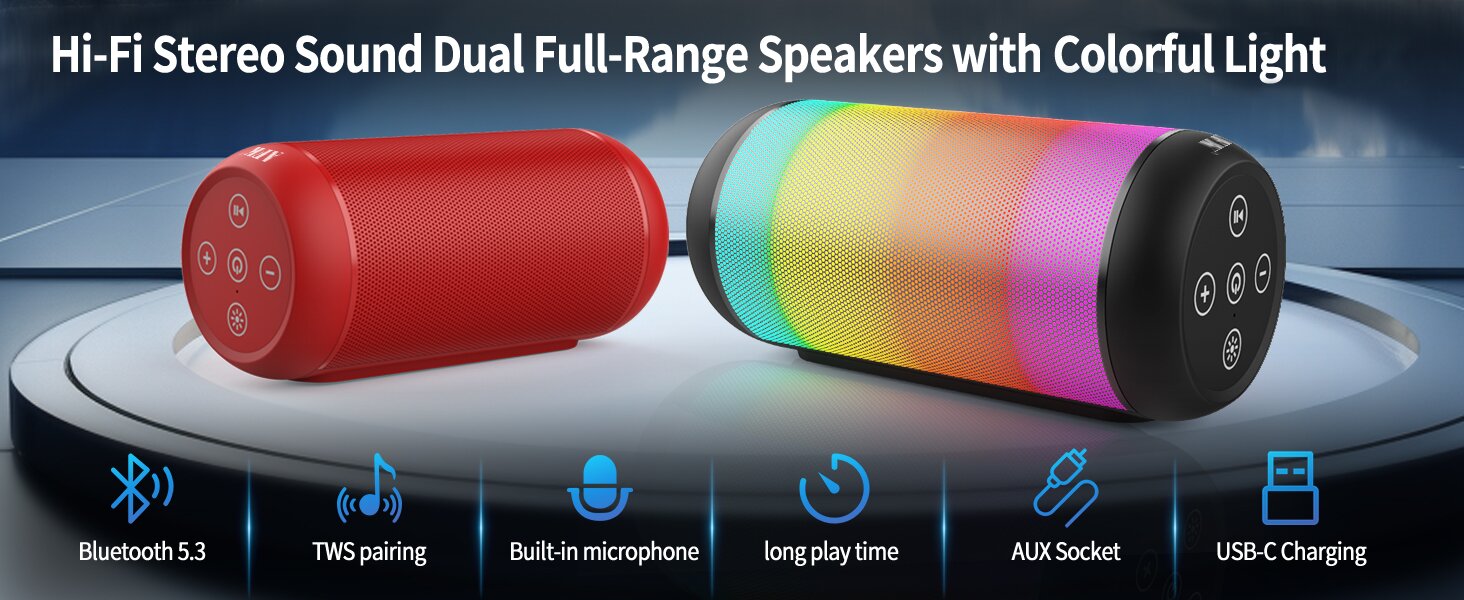
Image: An illustration highlighting key features such as Bluetooth 5.3, TWS pairing, built-in microphone, long playtime, AUX socket, and USB-C charging.

Paveikslėlis: Pjūvis view illustrating the dual speaker drivers responsible for deep bass stereo sound.

Image: The speaker positioned on a table, demonstrating its 360-degree stereo surround sound capability.
3. Sąranka
3.1 Garsiakalbio įkrovimas
Before first use, fully charge the speaker. Connect the provided USB-C charging cable to the speaker's USB-C port and the other end to a compatible USB power adapter (not included) or a computer's USB port. The charging indicator light will show the charging status and turn off when fully charged.
3.2 Įjungimas / išjungimas
- Norėdami įjungti: paspauskite ir palaikykite maitinimo mygtuką (⏻) for a few seconds until you hear an audible prompt and the indicator lights turn on.
- Norėdami išjungti: paspauskite ir palaikykite maitinimo mygtuką (⏻) again for a few seconds until you hear an audible prompt and the indicator lights turn off.
4. Naudojimo instrukcijos
4.1 Bluetooth poravimas
Norėdami prijungti garsiakalbį prie „Bluetooth“ įrenginio:
- Ensure the speaker is powered on and in Bluetooth pairing mode (indicated by a flashing blue light, or similar).
- Savo įrenginyje (išmaniajame telefone, planšetiniame kompiuteryje, kompiuteryje) įjunkite „Bluetooth“ ir ieškokite galimų įrenginių.
- Select "AFK Speaker" (or similar name) from the list of found devices.
- Suporavus garsiakalbį, jis rodys sėkmingą ryšį (pvz., šviečianti mėlyna lemputė arba garsinis pranešimas).
The speaker will automatically attempt to reconnect to the last paired device when powered on, if the device is within range and Bluetooth is enabled.

Image: The speaker in an outdoor setting, demonstrating its stable Bluetooth connection range of up to 100 feet.
4.2 Muzikos atkūrimas
- „Bluetooth“ režimas: Once paired, play music from your connected device. Use the speaker's control buttons or your device to control playback (play/pause, next/previous track, volume).
- TF kortelės / USB režimas: Insert a TF card or USB drive containing audio files into the respective port on the speaker. The speaker will automatically switch to the corresponding mode and begin playback. Use the speaker's control buttons for navigation.
4.3 Controlling Lights
The speaker features dynamic lighting modes. Press the Light button (💡) to cycle through the available light modes:
- Tarry Sky Light
- Kvėpavimas
- Teka
- Greitas šuolis
- Rhythm Jump
- Šviesa išjungta

Paveikslėlis: Viršview of the six dynamic light modes available on the speaker, including options to turn the lights off.
4.4 Skambučių tvarkymas
Naudodami integruotą mikrofoną, galite valdyti skambučius, kai esate prisijungę per „Bluetooth“:
- Atsiliepti / Baigti skambutį: Paspauskite atkūrimo / pristabdymo mygtuką (⏸) vieną kartą.
- Atmesti skambutį: Paspauskite ir palaikykite nuspaudę mygtuką „Paleisti / pristabdyti“ (⏸) 2 sekundes.

Image: The speaker being used for a hands-free call, demonstrating the functionality of its built-in microphone.
5. Priežiūra
5.1 Valymas
To clean your speaker, use a soft, dry, lint-free cloth. Do not use abrasive cleaners, alcohol, or chemical solvents, as these may damage the surface or internal components. Avoid getting moisture into any openings.
5.2 Saugykla
Store the speaker in a cool, dry place away from direct sunlight, extreme temperatures, and humidity. If storing for an extended period, charge the battery periodically (e.g., every 3 months) to maintain battery health.
6. Problemų sprendimas
If you encounter issues with your AFK Portable Bluetooth Wireless Speaker, please refer to the following common problems and solutions:
| Problema | Galima priežastis | Sprendimas |
|---|---|---|
| Garsiakalbis neįsijungia. | Išsikrovusi baterija; netinkamai paspaustas maitinimo mygtukas. | Visiškai įkraukite garsiakalbį. Paspauskite ir kelias sekundes palaikykite nuspaudę maitinimo mygtuką. |
| Nėra garso. | Per mažas garsumas; įrenginys neprijungtas; neteisingas įvesties režimas. | Increase speaker and device volume. Ensure Bluetooth is connected or TF/USB is inserted correctly. |
| Nepavyksta susieti per „Bluetooth“. | Garsiakalbis neporavimo režime; įrenginio „Bluetooth“ išjungtas; per toli nuo garsiakalbio; trukdžiai. | Ensure speaker is in pairing mode. Turn device Bluetooth off/on. Move device closer to speaker. Avoid strong electromagnetic interference. |
| Trumpas baterijos veikimo laikas. | High volume usage; Lights constantly on; Battery degradation. | Reduce volume. Turn off lights when not needed. Battery life naturally decreases over time. |
7. Specifikacijos
| Funkcija | Detalė |
|---|---|
| Modelio pavadinimas | BT528-BLK-US |
| Garsiakalbio tipas | Dvigubas garsiakalbis |
| Ryšio technologija | Bluetooth 5.3 |
| Belaidžio ryšio technologija | Bluetooth |
| Didžiausias diapazonas | 30 metro (100 pėdos) |
| Didžiausia garsiakalbio išėjimo galia | 11 Watts (RMS) / 15 Watts (Peak) |
| Dažnio atsakas | 20 KHz (pastaba: tai greičiausiai yra viršutinė riba, tipinis diapazonas yra 20 Hz–20 kHz) |
| Garso išvesties režimas | Stereo |
| Erdvinio garso kanalo konfigūracija | 2.0 |
| Ypatinga funkcija | Built-in Microphone, Dynamic LED Lights |
| Rekomenduojami naudojimo būdai | Indoor/Outdoor, Sport, Outdoor Events, Parties, Camping, žygiai |
| Suderinami įrenginiai | Desktop, Smartphone, Tablet, Television |
| Maitinimo šaltinis | Maitinamas su baterijomis (pridedama 1 ličio jonų baterija) |
| Kontrolės metodas | Palieskite Mygtukai |
| Spalva | Juoda |
| Gaminio matmenys | 2.6 colio gylis x 6.1 colio plotis x 2.6 colio aukštis (6.6 cm gylis x 15.5 cm plotis x 6.6 cm aukštis) |
| Prekės svoris | 1.26 svaro (0.57 kilogramo) |
| Yra atsparus vandeniui | NETEISINGA |
8. Garantija ir palaikymas
8.1 Ribota garantija
This AFK Portable Bluetooth Wireless Speaker comes with a limited warranty. Please refer to the warranty card included in your package or contact AFK customer support for specific terms and conditions. The warranty typically covers manufacturing defects and malfunctions under normal use.
8.2 Pagalba klientams
For further assistance, technical support, or warranty claims, please contact AFK customer service. Contact information can usually be found on the product packaging, the official AFK websvetainėje arba per savo mažmenininko pagalbos kanalus.


