1. Produktas baigtasview
The OBDSTAR iScan BRP is a professional, portable diagnostic tablet specifically designed for BRP (Can-am) systems. It offers comprehensive diagnostic capabilities for motorcycles, snowmobiles, ATVs, and UTVs. Featuring a 5.0-inch capacitive touchscreen and running on Android 5.1.1, this tool provides an intuitive and efficient diagnostic experience.

Figure 1.1: The OBDSTAR iScan BRP Diagnostic Tool, showcasindėl savo vartotojo sąsajos ir tvirto dizaino.
Pagrindinės funkcijos:
- Professional Diagnostics: Tailored for BRP systems, offering superb performance.
- Išplėstinės funkcijos: Supports automatic scanning, VIN recognition, control module programming/coding, ECU setting, instrument coding, TPMS, maintenance light reset, CO/idle speed/A/F value adjustment, ABS control unit setting, EOL mode, transmission memory reset, and clear computer memory.
- Patogi vartotojo sąsaja: Equipped with Android 5.1.1 operating system and a simple, intuitive menu guide for quick operation.
- Duomenų stebėjimas realiuoju laiku: Records and plays back data streams to quickly and accurately locate sensor and component faults.
- Kelių kalbų palaikymas: Available in English, Spanish, Portuguese, French, German, Italian, Polish, Russian, Turkish, Indonesian, Farsi, Thai, Vietnamese.
- Ryšys: Wi-Fi for one-click software updates and remote assistance.
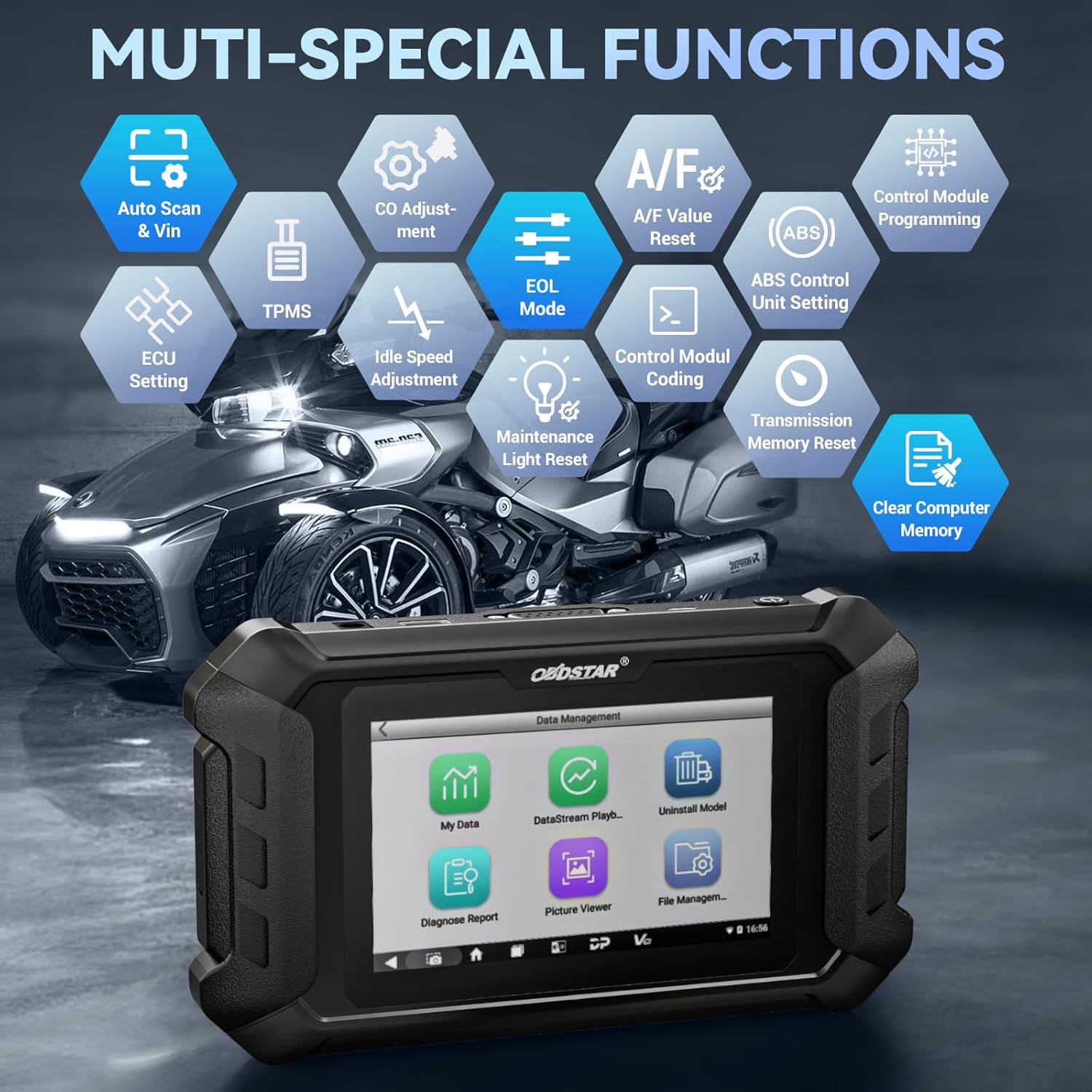
1.2 pav. Baigtaview of the multi-special functions supported by the OBDSTAR iScan BRP, including Auto Scan & VIN, ECU Setting, TPMS, A/F Value Reset, and more.
2. Pakuotės turinys
Atidarę pakuotę, patikrinkite, ar yra visi toliau išvardyti daiktai ir ar jie yra geros būklės:
- Main Tablet (OBDSTAR iScan BRP Diagnostic Tool)
- 12V2A įkroviklis
- Pagrindinis kabelis
- BRP Cable
- Vartotojo vadovas

Figure 2.1: All components included in the OBDSTAR iScan BRP package: Main Tablet, 12V2A Charger, Main Cable, BRP Cable, and User Manual.
3. Sąrankos vadovas
3.1 Pradinis įjungimas ir konfigūracija
- Įkraukite įrenginį: Connect the 12V2A charger to the diagnostic tool and a power outlet. Ensure the device is fully charged before first use.
- Maitinimas: Paspauskite ir palaikykite nuspaudę planšetinio kompiuterio šone esantį maitinimo mygtuką, kol ekranas įsijungs.
- Kalbos pasirinkimas: Upon first boot, you will be prompted to select your preferred language. Choose English or another supported language from the list.
- „Wi-Fi“ ryšys: Navigate to the system settings and connect to a stable Wi-Fi network. This is crucial for software updates and remote assistance.
- Programinės įrangos naujinimas: After connecting to Wi-Fi, it is recommended to perform a one-click software update to ensure you have the latest diagnostic software and vehicle coverage.
4. Naudojimo instrukcijos
4.1 Prijungimas prie transporto priemonės
- Locate Diagnostic Port: Identify the diagnostic port on your BRP vehicle (motorcycle, snowmobile, ATV, or UTV). Refer to your vehicle's service manual for the exact location.
- Prijunkite kabelius: Use the appropriate Main Cable and BRP Cable to connect the diagnostic tool to the vehicle's diagnostic port. Ensure connections are secure.
- Įjunkite degimą: Turn the vehicle's ignition to the 'ON' position (do not start the engine unless instructed by the diagnostic procedure).
4.2 Diagnostikos atlikimas
- Select 'MOTO Diag': From the main menu of the diagnostic tool, tap on the 'MOTO Diag' icon to enter the motorcycle diagnostic interface.
- Transporto priemonės pasirinkimas: Select the correct vehicle brand (BRP) and model from the list.
- Automatic VIN Recognition: The tool supports automatic VIN recognition. If prompted, allow the tool to read the VIN for faster vehicle identification.
- Sistemos nuskaitymas: Initiate an automatic system scan to identify all available control modules and detect any diagnostic trouble codes (DTCs).
- Diagnostinės funkcijos:
- Skaitykite kodus: View current, pending, and historic diagnostic trouble codes.
- Išvalyti kodus: Erase diagnostic trouble codes from the vehicle's ECU.
- Duomenų srautas: Monitor real-time data parameters from various sensors and components. Data can be displayed in text, waveform, or instrument diagram formats.
- Active Test (Motion Test): Perform specific tests on actuators and components to verify their functionality.
- Specialios funkcijos: Access advanced functions such as ECU setting, instrument coding, TPMS reset, maintenance light reset, CO adjustment, idle speed adjustment, A/F value reset, ABS control unit setting, EOL mode, transmission memory reset, and clear computer memory.
- Save and Print Reports: After diagnosis, you can save diagnostic reports and, if connected to a compatible printer, print them for record-keeping.

Figure 4.1: The diagnostic tool's interface highlighting features like Auto VIN & Scan, One Click Upgrade, Professional Tech Support, and Live Data monitoring.

Figure 4.2: The Auto VIN & Scan feature streamlines vehicle identification for efficient diagnostics.

Figure 4.3: The Data Play Back function allows for review of recorded real-time data, aiding in fault analysis.
5. Priežiūra
5.1 Programinės įrangos naujiniai
Regular software updates are essential to ensure your diagnostic tool has the latest vehicle coverage, bug fixes, and new features. Connect the device to a Wi-Fi network and use the 'Upgrade' function on the main menu for one-click updates.
5.2 Valymas ir laikymas
- Nuvalykite prietaisą minkšta, damp audinys. Nenaudokite abrazyvinių valiklių ar tirpiklių.
- Įrankį laikykite vėsioje, sausoje vietoje, toliau nuo tiesioginių saulės spindulių ir ekstremalių temperatūrų.
- Laikykite laidus tvarkingai suvyniotus, kad nepažeistumėte.
6. Problemų sprendimas
| Problema | Galima priežastis | Sprendimas |
|---|---|---|
| Įrenginys neįsijungia. | Low battery; faulty charger/cable; device malfunction. | Charge the device for at least 30 minutes. Try a different charger/cable. If problem persists, contact support. |
| Nepavyksta prisijungti prie transporto priemonės. | Incorrect cable connection; vehicle ignition off; incompatible vehicle model; damaged diagnostic port. | Ensure cables are securely connected. Turn vehicle ignition ON. Verify vehicle compatibility. Check vehicle's diagnostic port for damage. |
| Nepavyksta atnaujinti programinės įrangos. | Unstable Wi-Fi connection; insufficient storage; server issue. | Ensure strong Wi-Fi signal. Check available storage space. Try updating again later. |
| Ekranas nereaguoja. | Programinės įrangos triktis; fizinė žala. | Paleiskite įrenginį iš naujo. Jei problema išlieka, susisiekite su palaikymo tarnyba. |
7. Specifikacijos
- Modelis: SP540
- Operacinė sistema: Android 5.1.1
- Procesorius: RK3128 Quad-core
- Ekranas: 5.0 colių talpinis jutiklinis ekranas
- Ryšys: Wi-Fi
- Baterija: 1 ličio polimero baterija (pridedama)
- Prekės svoris: Maždaug 2.55 svaro
- Pakuotės matmenys: Maždaug 12.91 x 9.29 x 2.76 colio
- Kilmės šalis: Kinija
- Palaikomos kalbos: EN, ES, PT, FR, DE, IT, PL, RU, TR, ID, FA, TH, VN

Figure 7.1: Hardware highlights of the OBDSTAR iScan BRP, including Wi-Fi, Android 5.1.1, 5.0 Inch Touch Screen, RK3128 Quad-core Processor, and Intuitive Menu Guidance.
8. Palaikymas ir garantija
8.1 Techninė pagalba
OBDSTAR provides technical support for the iScan BRP diagnostic tool. You can utilize the one-click remote help function on the device to receive assistance from OBDSTAR technical staff.
8.2 Grąžinimo politika
This product is eligible for a 30-day refund/replacement return policy from the date of purchase. Please refer to your retailer's specific return terms and conditions for detailed information.


