1. Svarbi saugos informacija
Please read all instructions carefully before using the Spacekey Body Hair Trimmer TM-8007. Retain this manual for future reference.
- Atsargiai: Keep away from water sources. Do not use this appliance near bathtubs, showers, basins arba kituose induose su vandeniu.
- Avoid use on infants. This device is not intended for use on children.
- Do not use while sleeping or in slippery conditions. Ensure a stable and dry environment during operation.
- Prieš valydami visada atjunkite žoliapjovę nuo elektros tinklo.
- In case of skin irritation, discontinue use and consult a doctor.
- Laikyti vaikams nepasiekiamoje vietoje.
- Visada laikykitės rekomenduojamų valymo ir priežiūros procedūrų, aprašytų šiame vadove.
- Do not attempt to repair or disassemble the trimmer yourself. Contact authorized service personnel for any repairs.
- Use only the charging cable and adapter provided with the device.
2. Produktas baigtasview
The Spacekey Body Hair Trimmer TM-8007 is designed for efficient and comfortable body hair grooming. Familiarize yourself with its components:
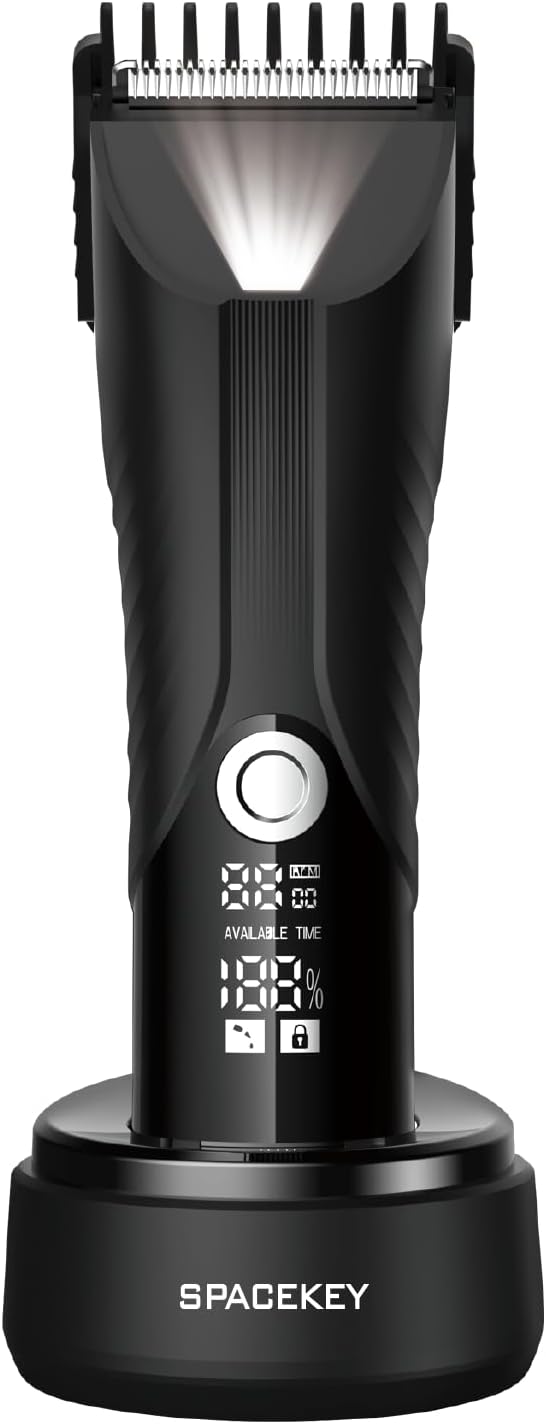
1 vaizdas: Priekyje view of the Spacekey Body Hair Trimmer TM-8007, showing the ceramic blade, power button, digital display indicating battery percentage and available time, and the charging base with the Spacekey logo.
Pagrindiniai komponentai:
- Keraminis peiliukas: Designed for precise and safe trimming.
- Maitinimo mygtukas: Įjungia ir išjungia įrenginį.
- Skaitmeninis ekranas: Shows battery level, available usage time, and potentially a travel lock indicator.
- Įkrovimo bazė: Provides a stable stand and charges the trimmer.
- Trimming Guards: Various sizes for different hair lengths (typically included).
- Įkrovimo prievadas: Įkrovimo laido prijungimui.
3. Sąranka
- Pradinis mokestis: Before first use, fully charge the trimmer. Connect the charging cable to the trimmer's charging port or place it on the charging base. Plug the adapter into a power outlet. The digital display will indicate charging status. A full charge typically takes several hours. Refer to product packaging for specific charging time.
- Pritvirtinkite apipjaustymo apsaugą: Select the desired trimming guard based on your preferred hair length. Align the guard with the trimmer head and press firmly until it clicks into place. Ensure it is securely attached before use.
- Detaching Trimming Guard: To remove, gently push the guard away from the trimmer head while holding the trimmer body.
4. Naudojimo instrukcijos
- Įjungimas / išjungimas: Press and hold the power button for a few seconds to turn the trimmer on or off. A short press may activate/deactivate the travel lock. Refer to product details for specific button press durations.
- Baterijos tikrinimas: Skaitmeninis ekranas rodo dabartinį akumuliatoriaus procentątage and available usage time.
- Apipjaustymas:
- Prieš kirpdami įsitikinkite, kad jūsų oda yra švari ir sausa.
- Laikykite žoliapjovę nedideliu kampu prie odos.
- Move the trimmer slowly and steadily against the direction of hair growth for best results.
- For sensitive areas, use caution and consider using a longer guard setting initially.
- Kelionės užraktas: The digital display may show a lock icon. To activate/deactivate the travel lock, press and hold the power button for a specific duration. This prevents accidental activation during travel. Refer to product details for specific button press durations.
5. Priežiūra ir valymas
Reguliarus valymas užtikrina optimalų našumą ir pailgina žoliapjovės tarnavimo laiką.
- Išjunkite ir atjunkite: Always ensure the trimmer is turned off and unplugged from any power source before cleaning.
- Pašalinti plaukus: Detach the trimming guard. Use the provided cleaning brush to remove loose hairs from the blade and trimmer body.
- Skalavimo peiliukai: The trimmer head is designed to be rinsed under running water. Do not submerge the entire trimmer unless explicitly stated as fully submersible in the product documentation.
- Kruopščiai išdžiovinkite: Allow the blade head and trimmer to air dry completely before reattaching the guard or storing.
- Lubricate Blades (Optional): Periodically apply a small drop of clipper oil (not included, but often recommended) to the blades to maintain smooth operation. Turn the trimmer on for a few seconds to distribute the oil.
- Saugykla: Trimmerį laikykite sausoje, vėsioje vietoje, toliau nuo tiesioginių saulės spindulių ir drėgmės.
6. Problemų sprendimas
| Problema | Galima priežastis | Sprendimas |
|---|---|---|
| Žoliapjovė neįsijungia. | Senka baterija. Travel lock activated. | Pilnai įkraukite žoliapjovę. Deactivate travel lock by pressing and holding the power button. |
| Prastas kirpimo našumas. | Peiliai užsikimšę plaukais. Ašmenys nuobodūs. Nepakankamas įkrovimas. | Kruopščiai nuvalykite peiliukus. Consider replacing the blade head (if available) or contacting support. Įkraukite žoliapjovę. |
| Žoliapjovė skleidžia neįprastą triukšmą. | Peiliams reikalingas tepimas. Foreign object lodged in blades. | Apply clipper oil to blades. Carefully inspect and remove any obstructions (ensure trimmer is off). |
7. Specifikacijos
| Funkcija | Detalė |
|---|---|
| Prekės ženklas | Erdvės klavišas |
| Modelio numeris | TM-8007 |
| Maitinimo šaltinis | Su laidu elektra |
| Baterijos | Reikalinga 1 AA baterija (yra komplekte) |
| Prekės svoris | 11.46 uncijos |
| Spalva | Pilka |
| Rekomenduojami naudojimo būdai | Genital, Leg, Pubic, Under Arm |
| Pakuotės matmenys | 6.73 x 6.54 x 2.48 colio |
| Gamintojas | SPACEKLIUS |
Note on Power Source: The product data lists both "Corded Electric" and "1 AA batteries required (included)". Typically, body trimmers are rechargeable (internal battery) and charged via a corded connection. The AA battery reference might be an error or refer to a specific internal component not user-replaceable. Please refer to the product packaging for definitive power source information.
8. Garantija ir palaikymas
For warranty information, technical support, or service inquiries, please refer to the warranty card included with your product or visit the official Spacekey website. You may also contact Spacekey customer service directly through their official channels.
Palaikymas internetu: Visit the Spacekey Store on Amazon
9. Teisinis atsisakymas
Statements regarding dietary supplements have not been evaluated by the FDA and are not intended to diagnose, treat, cure, or prevent any disease or health condition. This product is a personal grooming appliance and should be used as intended.


