1. Produktas baigtasview
The BEA Condor/IS40 and Condor XL/IS40XL are advanced dual-technology sensors designed for industrial door applications. These sensors integrate a microwave motion detector and an active infrared presence sensor within a single housing, providing comprehensive detection capabilities. The microwave component utilizes a FALCON-type planar antenna for reliable activation, effectively filtering out pedestrians, cross-traffic, and potential interferences. The active infrared technology establishes a presence area to detect vehicles and objects that remain stationary near the door.
The standard Condor/IS40 model is suitable for mounting heights ranging from 3.5 meters (approximately 8 feet) to 6 meters (approximately 16 feet). For lower mounting requirements, the Condor XL/IS40XL can be installed at heights from 2 meters (approximately 6.5 feet) to 3.5 meters (approximately 11.5 feet). Both models feature a rugged IP65-rated enclosure, ensuring durability and reliable operation in harsh industrial environments, with protection against dust, rain, and hose-directed water.
2. Pagrindinės savybės
- Accurate & Reliable Detection: Features a planar antenna for precise pedestrian/vehicle filtering and effective cross-traffic rejection.
- Energiją taupantis: The optimized detection area helps reduce door timer settings, leading to energy savings proportional to the number of door closing cycles.
- Fast Installation and Service: Offers an efficient alternative to traditional induction loops, simplifying installation and maintenance procedures.
- Designed for Industrial Environments: Housed in an IP65-rated, rugged enclosure, providing protection against door vibrations and environmental interferences.
- Adjustable Detection Settings: Provides six modes of detection filtering for microwave immunity, pedestrian rejection, and parallel traffic rejection.
- Customizable Infrared Patterns: Offers nine unique infrared patterns for flexible presence detection in various industrial settings.
- Reduced False Detections: Adjustable infrared immunity modes help mitigate environmental disturbances such as subtle door vibrations, light, and sun glare.
3. Sąranka ir diegimas
Proper installation is crucial for optimal performance of the Condor/IS40 and Condor XL/IS40XL sensors. Ensure the sensor is mounted securely and within the recommended height ranges for your specific model.
- Condor/IS40: Recommended mounting height between 3.5 m (11.5 ft) and 6 m (19.7 ft).
- Condor XL/IS40XL: Recommended mounting height between 2 m (6.5 ft) and 3.5 m (11.5 ft).
Refer to the following diagrams for component identification and typical installation scenarios:
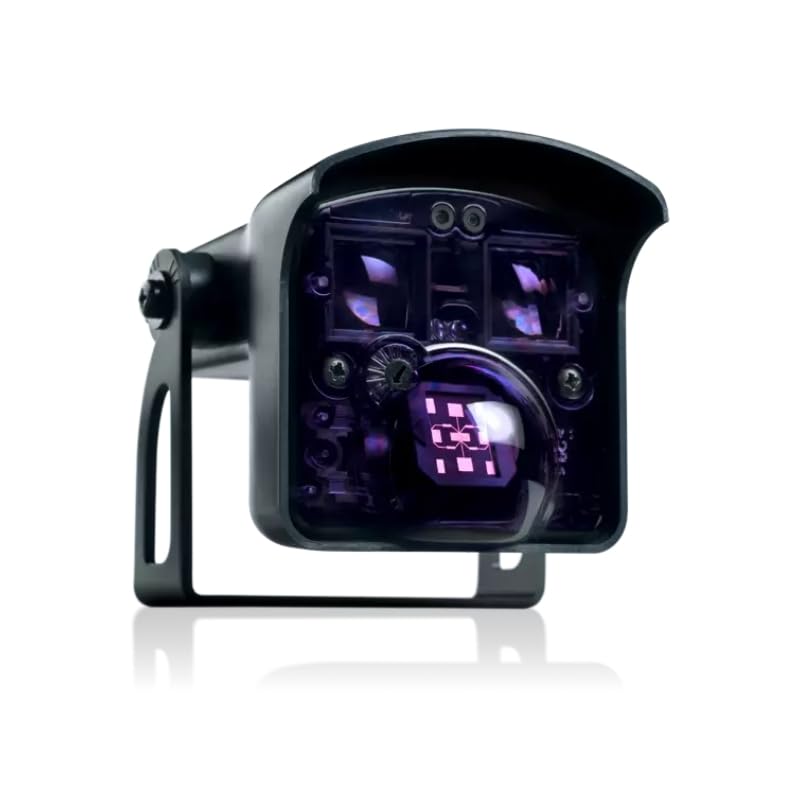
Figure 3.1: Sensor Components. Diagram showing the components of the BEA Condor/IS40 sensor, including push buttons, infrared detection, radar angle, radar detection, sensor angle, bracket, and cable.

Figure 3.2: Detection Area Comparison. Comparative diagram illustrating the detection areas and mounting heights for the Condor/IS40 and Condor XL/IS40XL models, showing their application for different door sizes and traffic types.
Detailed wiring instructions and specific mounting hardware requirements are provided in the separate installation guide included with your product. Ensure all electrical connections are made by a qualified professional and comply with local electrical codes.
4. Naudojimo instrukcijos
The Condor/IS40 and Condor XL/IS40XL sensors operate using a combination of microwave motion detection and active infrared presence detection to ensure safe and efficient door operation.
4.1. Motion Detection (Microwave)
The microwave radar detects moving objects within its field. This is primarily used to trigger the door opening sequence when a vehicle or person approaches. The sensor's advanced signal processing minimizes false triggers from cross-traffic or environmental interferences.
4.2. Presence Detection (Active Infrared)
The active infrared curtain creates a detection zone directly in front of the door. This zone ensures that the door remains open as long as an object (vehicle or person) is present within the detection area, preventing accidental closures. The infrared patterns are customizable to suit specific application needs.
Observe the following operational scenarios:

Figure 4.1: Vehicle Detection. Illustration demonstrating the sensor's detection field for vehicles, showing a forklift within the microwave motion and active infrared presence zones.

Figure 4.2: Pedestrian Detection. Illustration demonstrating the sensor's detection field for pedestrians, showing a person within the microwave motion and active infrared presence zones.
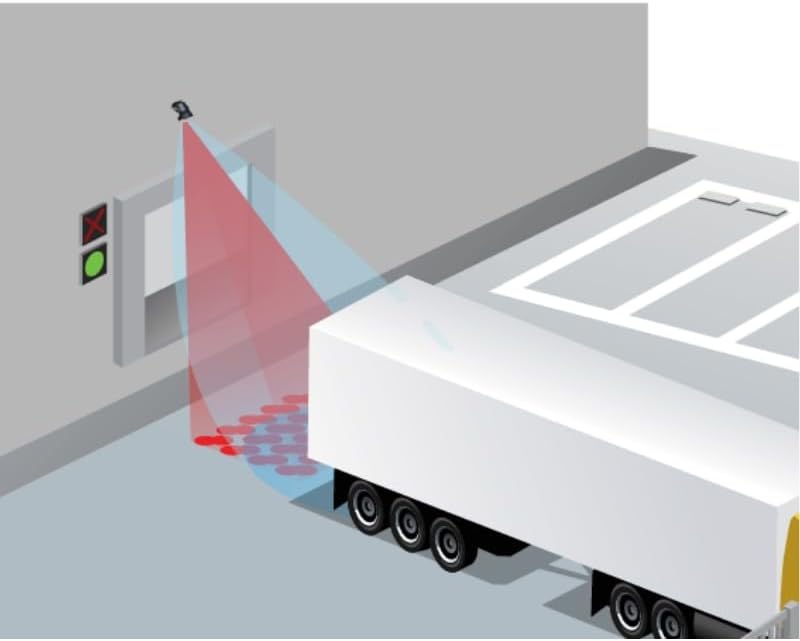
Figure 4.3: Truck Approach Detection. Illustration showing the sensor mounted on a wall, detecting a truck approaching an industrial door, highlighting the detection zones.
The sensor's settings, including detection sensitivity and filtering modes, can be adjusted to optimize performance for specific traffic types (pedestrian, vehicle) and environmental conditions. Refer to the detailed configuration guide for instructions on adjusting these settings, especially if your model includes a remote control.
5. Priežiūra
The BEA Condor/IS40 and Condor XL/IS40XL sensors are designed for minimal maintenance due to their robust IP65-rated housing. However, periodic checks are recommended to ensure continued optimal performance.
- Valymas: Periodically clean the sensor's front face with a soft, damp cloth to remove any accumulated dust, dirt, or debris that might obstruct the detection fields. Avoid abrasive cleaners or solvents.
- Vizuali apžiūra: Regularly inspect the sensor and its mounting bracket for any signs of physical damage, loose connections, or corrosion.
- Kabelio vientisumas: Check the cable for any cuts, fraying, or damage. Ensure it is securely connected and protected from mechanical stress.
- Funkcionalumo testas: Periodically test the sensor's motion and presence detection by simulating traffic (e.g., walking through the detection zone, placing an object in the presence zone) to ensure the door responds correctly.
If any issues are observed during maintenance, refer to the troubleshooting section or contact technical support.
6. Problemų sprendimas
This section provides basic troubleshooting steps for common issues. For more complex problems, please contact BEA technical support.
- Durys neatsidaro / neužsidaro:
- Check power supply to the sensor.
- Ensure the sensor's detection fields are clear of obstructions.
- Patikrinkite, ar laidų jungtys yra saugios ir teisingos.
- Confirm sensor settings (sensitivity, detection modes) are appropriate for the application.
- False Triggers/Unwanted Openings:
- Adjust microwave sensitivity to reduce detection of distant or irrelevant motion.
- Review and adjust pedestrian/cross-traffic rejection settings.
- Ensure the sensor is not detecting reflections from highly reflective surfaces.
- Door Closes Prematurely:
- Check the active infrared presence zone for proper coverage.
- Ensure no objects are blocking the infrared beams.
- Verify the infrared immunity settings are not too aggressive, which might cause premature closure in the presence of minor disturbances.
Always power off the sensor before performing any inspection or adjustment that requires direct access to internal components or wiring.
7. Techninės specifikacijos
| Funkcija | Specifikacija |
|---|---|
| Tiekimas ttage | 12V to 24V AC ±10%; 12V to 24V DC +10% / -3% |
| Energijos suvartojimas | <3.5 W / VA |
| Tinklo dažnis | 50–60 Hz |
| Išvestis | 2 relės (be galimo perjungimo kontakto) |
| Maks. Susisiekite su ttage | 42 V AC / DC |
| Maks. Susisiekite su srove | 1 A (varža) |
| Maks. Perjungimo galia | 30 W (DC) / 42 VA (AC) |
| Išvesties sulaikymo laikas | 0.5 s |
| Mounting Height (Condor/IS40) | 3.5 m - 6 m |
| Mounting Height (Condor XL/IS40XL) | 2 m - 3.5 m |
| Temperatūros diapazonas | -30 °C to +60 °C (except for cold storage) |
| Drėgmė | 0 - 95% non-condensing |
| Apsaugos laipsnis | IP65 |
| Matmenys (I x A x P) | 127 mm x 102 mm x 96 mm |
| Medžiagos | ABS and Polycarbonate |
| Svoris | 400 g |
| Kabelio ilgis | 10 m |
| Technologijos | Microwave Doppler Radar, Active Infrared |
| Siųstuvo dažnis/bangos ilgis | 24.150 GHz (Microwave), 875 nm (Infrared) |
| Aptikimo režimas | Motion (Microwave), Motion & Presence (Infrared) |
| Min. Aptikimo greitis | 5 cm/s |
| Reakcijos laikas | 100 ms (Microwave), 250 ms (Infrared) |
| Pakreipimo kampas | -8° - 22° (Radar), 15° - 45° (Infrared) |
8. Garantija ir palaikymas
For information regarding product warranty, please refer to the warranty card included with your purchase or visit the official BEA websvetainėje. Garantijos sąlygos ir nuostatos gali skirtis priklausomai nuo regiono.
If you require technical assistance, have questions about installation, operation, or troubleshooting beyond the scope of this manual, please contact BEA customer support. Contact details can typically be found on the product packaging or the manufacturer's websvetainę.
When contacting support, please have your product model number (Condor/IS40 or Condor XL/IS40XL) and any relevant purchase information ready to expedite assistance.


