1. Įvadas ir pabaigaview
The ATOMSTACK A24 Pro Ultra is a high-performance 24W optical laser engraving and cutting machine designed for precision work on a wide range of materials. Featuring a unibody frame and a B3 protective enclosure, it offers both powerful capabilities and enhanced safety.
This machine combines four 6W lasers to achieve a total output of 24W, enabling efficient cutting of materials such as 25mm wood and 30mm acrylic in a single pass. Its fine engraving capability, with an ultra-fine laser spot of 0.06 x 0.06 mm, allows for intricate designs on various surfaces including wood, metal, leather, and glass.
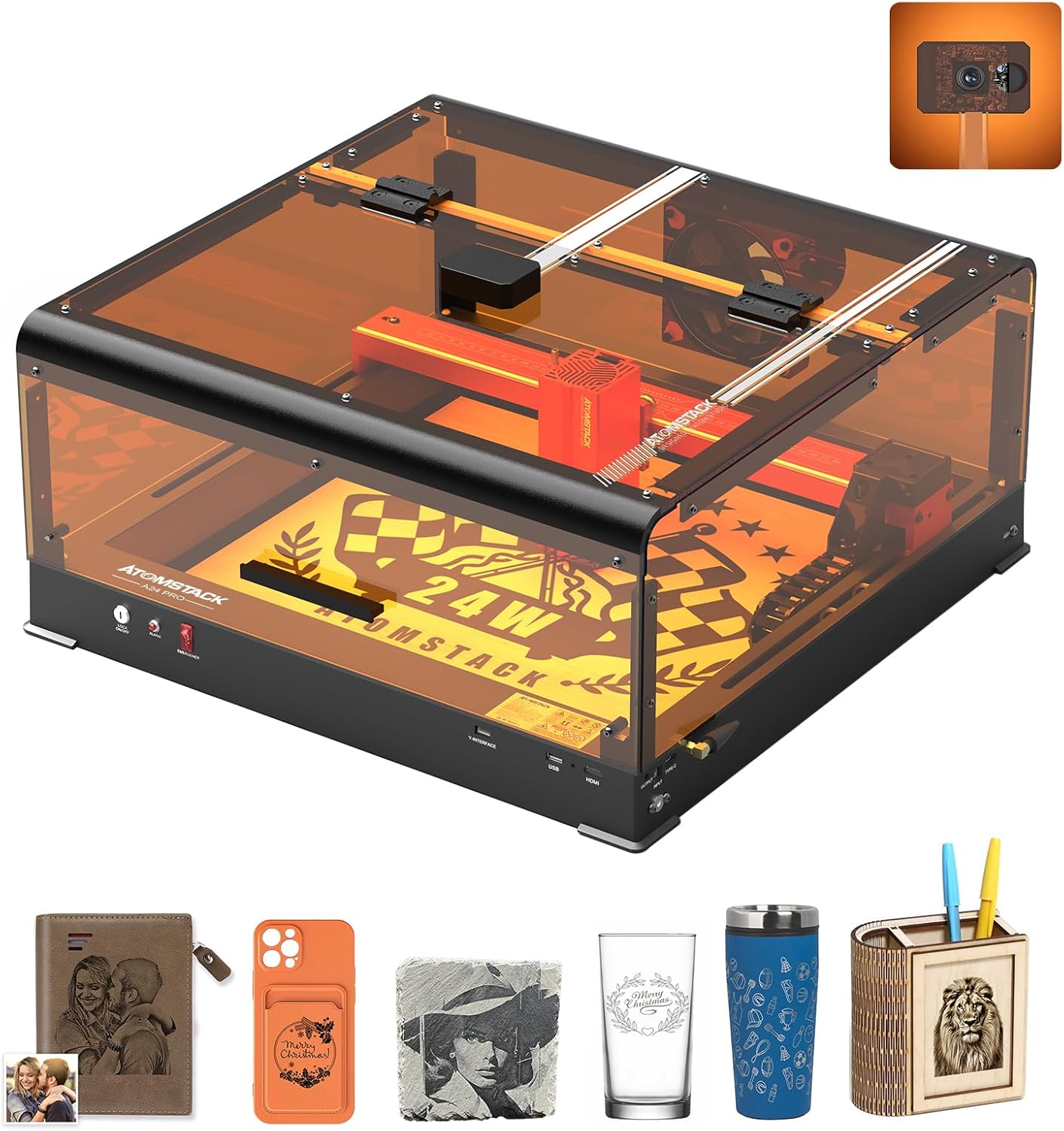
Image: The ATOMSTACK A24 Pro Ultra laser engraving machine, showcasing its compact design and integrated protective enclosure.
2. Saugos informacija
The ATOMSTACK A24 PRO ULTRA is a Class 1 diode laser engraving machine engineered with user safety as a priority. Adherence to safety guidelines is crucial for safe operation.
- Integruotos saugos funkcijos: Equipped with a safety interlock, position movement detection, limit switches, and 2-level protection.
- Pakreipimo aptikimas: An integrated gyroscope triggers an alarm and stops operation if the machine tilts more than 15-20 degrees, preventing accidental laser exposure.
- Avarinio stabdymo mygtukas: A prominent emergency stop button allows for immediate shutdown in unexpected situations.
- B3 Protective Enclosure: The included B3 enclosure provides protection against intense laser light and effectively blocks smoke, creating a safer working environment. It also features interlocks that automatically shut off the laser if the cover is opened during operation.
- Akių apsauga: Always wear appropriate laser safety glasses when operating the machine, even with the protective enclosure, to ensure maximum eye safety.
- Vėdinimas: Ensure adequate ventilation during operation. The B3 enclosure includes a powerful 75,000 RPM exhaust fan to remove smoke and fumes.

Vaizdas: Viršview of the comprehensive safety features integrated into the ATOMSTACK A24 Pro Ultra.
3. Sąranka
Before operating your ATOMSTACK A24 Pro Ultra, ensure proper assembly and setup according to the included quick start guide. Key setup considerations include:
- Išpakavimas: Carefully unpack all components, including the laser engraver unit and the B3 protective enclosure.
- Vieta: Place the machine on a stable, level, and fire-resistant surface in a well-ventilated area.
- Korpuso surinkimas: Assemble the B3 protective enclosure around the laser unit. Ensure all connections are secure and the enclosure is properly sealed to contain laser light and smoke.
- Maitinimo jungtis: Connect the power adapter to the machine and then to a suitable power outlet (100-240V AC, 50/60Hz).
- Programinės įrangos diegimas: Install the recommended control software (AtomStack Studio, LaserGRBL, or LightBurn) on your computer (Windows/Linux/MacOS).
- Ryšys: Connect the machine to your computer via USB, WiFi, or use the mobile APP for control.

Image: The powerful 24W diode laser module, capable of precise and fast cuts.

Image: The enhanced cutting capabilities of the second-generation blue laser, showing increased thickness in a single pass.
4. Naudojimo instrukcijos
The ATOMSTACK A24 Pro Ultra offers versatile engraving and cutting functionalities. Familiarize yourself with the control software and material settings for optimal results.
4.1. Preparing Your Project
- Dizaino kūrimas: Create or import your design using compatible software. The machine supports JPG, JPEG, SVG, PNG, BMP, PDF, G-Code, and DXF file tipai.
- Medžiagos išdėstymas: Place the material to be engraved or cut within the working area (365 x 305 mm). The B3 enclosure's integrated camera and cross-laser positioning function aid in precise material alignment.
- Fokusavimas: The A24 Pro Ultra features a fixed-focus laser, eliminating the need for manual focusing.
4.2. Graviravimas ir pjovimas
- Programinės įrangos nustatymai: Adjust laser power, speed (up to 600 mm/s), and passes in your control software (AtomStack Studio, LaserGRBL, LightBurn) based on the material and desired outcome.
- Palaikomos medžiagos:
- Graviravimas: Wood, bamboo, cardboard, plastic, leather, PCB, aluminum oxide, non-reflective galvanized and painted metal, 304 mirror stainless steel, glass, ceramic, cotton fabric, stone plate.
- Pjovimas: Cardboard, non-woven fabric, wood, plywood, acrylic (transparent requires painting black), thin plastic sheets, sponges, aluminum, stainless steel, and other thin metal sheets.
- Pradėti operaciją: Initiate the engraving or cutting process from the software. Monitor the process through the B3 enclosure's transparent cover.
- Gyvenimo aprašymo funkcija: The machine supports resuming engraving, allowing you to continue work without starting over, saving time and material.

Image: The ATOMSTACK A24 Pro Ultra's resume function, enabling seamless continuation of projects.

Image: Highlighting the impressive engraving speed of 600mm/s for increased productivity.

Vaizdas: pvzamples of diverse creations possible with the ATOMSTACK A24 Pro Ultra on over 400 materials.
5. Priežiūra
Regular maintenance ensures the longevity and optimal performance of your ATOMSTACK A24 Pro Ultra.
- Lazerio lęšio valymas: Kad išlaikytumėte graviravimo tikslumą, periodiškai valykite lazerio lęšį minkštu, nepūkuotu skudurėliu ir lęšių valymo tirpalu.
- Bėgių ir diržų valymas: Keep the X and Y axis linear guides and belts free from dust and debris to ensure smooth motion.
- Enclosure Maintenance: Clean the interior of the B3 protective enclosure regularly to remove accumulated smoke residue. Ensure the exhaust fan is clear of obstructions for efficient smoke extraction.
- Firmware atnaujinimai: Patikrinkite oficialią ATOMSTACK svetainę websvetainėje, kurioje pateikiami visi galimi programinės įrangos atnaujinimai, kad jūsų įrenginyje būtų naujausios funkcijos ir patobulinimai.

Image: The B3 protective cover, emphasizing its role in safe and worry-free engraving and cutting, including its 7500 RPM fan for ventilation.
6. Problemų sprendimas
This section provides general guidance for common issues. For detailed troubleshooting, refer to the official ATOMSTACK support resources.
| Problema | Galima priežastis | Sprendimas |
|---|---|---|
| Lazeris neveikia arba silpnas jo galingumas | Dirty laser lens; incorrect power settings; loose cable connection. | Clean the laser lens; verify power settings in software; check all cable connections. |
| Engraving/Cutting not precise or skipping | Loose belts; dirty rails; incorrect speed settings; material not flat. | Check and tighten belts; clean rails; adjust speed settings; ensure material is flat and secured. |
| Įrenginys neprisijungia prie kompiuterio / programėlės | Incorrect drivers; WiFi issues; USB cable fault. | Reinstall drivers; check WiFi connection; try a different USB cable or port. |
| Smoke not clearing effectively | Blocked exhaust fan; inadequate ventilation. | Clean the exhaust fan and its vents; ensure the working area is well-ventilated. |
7. Specifikacijos
Detailed technical specifications for the ATOMSTACK A24 Pro Ultra laser engraver:
- Gamintojas: ATSISAKYMAS
- Modelio numeris: A24 PRO Ultra
- Mašinos galia: 120 W
- Laser Module Output Power: 24 W
- Įvestis: 100–240 V kintama srovė, 50/60 Hz
- Išvestis: 24V 5A
- Lazerio bangos ilgis: 455 ± 5 kv.m
- Laser Spot: 0.06 x 0.08 mm
- Graviravimo greitis: 600 mm/s
- Darbo sritis: 365 x 305 mm (Extendable up to 800 x 365 mm with R5 automatic feeder)
- Engraving Precision: 0.02 mm
- Fokusavimo metodas: Fixed-focus laser, no focusing required
- Operacinės sistemos: Windows/Linux/MacOS
- Valdymo programinė įranga: AtomStack Studio, LaserGRBL, LightBurn
- Palaikoma File Tipai: JPG, JPEG, SVG, PNG, BMP, PDF, G kodas, DXF
- Connection/Transmission: „Wi-Fi“, USB, programėlė
- Sertifikatai: CE, FCC, RoHS, FDA, PSE
- Įtraukti komponentai: 1 ATOMSTACK A24 Pro Laser Engraver

Image: Dimensions and connectivity options of the ATOMSTACK A24 Pro Ultra.
8. Palaikymas ir garantija
For technical support, warranty claims, or spare parts inquiries, please contact ATOMSTACK customer service directly. Refer to your purchase documentation for specific warranty terms and conditions.
Gamintojas: ATSISAKYMAS
ASIN: B0DDPLX573
Data, kai pirmą kartą pasirodė Amazon.com.be: 20 m. rugpjūčio 2024 d


