Įvadas
The Ring Outdoor Cam Pro, Plug-In, is a high-definition security camera designed for outdoor use at homes and businesses. It provides advanced surveillance features to help monitor your property effectively.
- Retinal 4K Video: Capture clear video footage with 4K resolution.
- 10x Enhanced Zoom: Magnify details in your video feed.
- Low-Light Sight: Experience true color video in low ambient light and crisp black-and-white in total darkness.
- 3D Motion Detection: Receive precise alerts based on radar-powered motion detection.
- Dvipusis pokalbis: Bendraukite su lankytojais arba atbaidykite įsibrovėlius naudodami įmontuotą garsiakalbį ir mikrofoną.
- Atsparus oro sąlygoms: Designed for outdoor installation in various weather conditions.
Kas yra dėžutėje
Prieš pradėdami diegti, patikrinkite, ar yra visi komponentai:
- Ring Outdoor Cam Pro, Plug-In (2nd Gen)
- Outdoor/Indoor Power Adapter (USB-C, 17.8-ft.)
- Diegimo aparatinė įranga
- Sąrankos vadovas
- Warranty and Safety Document
- Saugos lipdukas
Sąranka ir diegimas
The estimated installation time for the Ring Outdoor Cam Pro is approximately 10 minutes. This camera requires a standard power outlet and can be mounted on a vertical or horizontal surface.
Galios reikalavimai
The camera is powered by the included USB-C 17.8-ft. (5.45-m.) 20W Outdoor/Indoor Power Adapter. This is a plug-in only model and does not support battery operation.
Ryšys
The camera connects via Wifi 6 (802.11ax) with dual-band support for 2.4GHz and 5.0GHz networks. A recommended minimum upload speed of 15 Mbps is advised for optimal performance. Video resolution may vary based on internet bandwidth.
Montavimo parinktys
The Ring Outdoor Cam Pro offers flexible mounting options for various outdoor locations. Ensure the camera is positioned to cover the desired area.
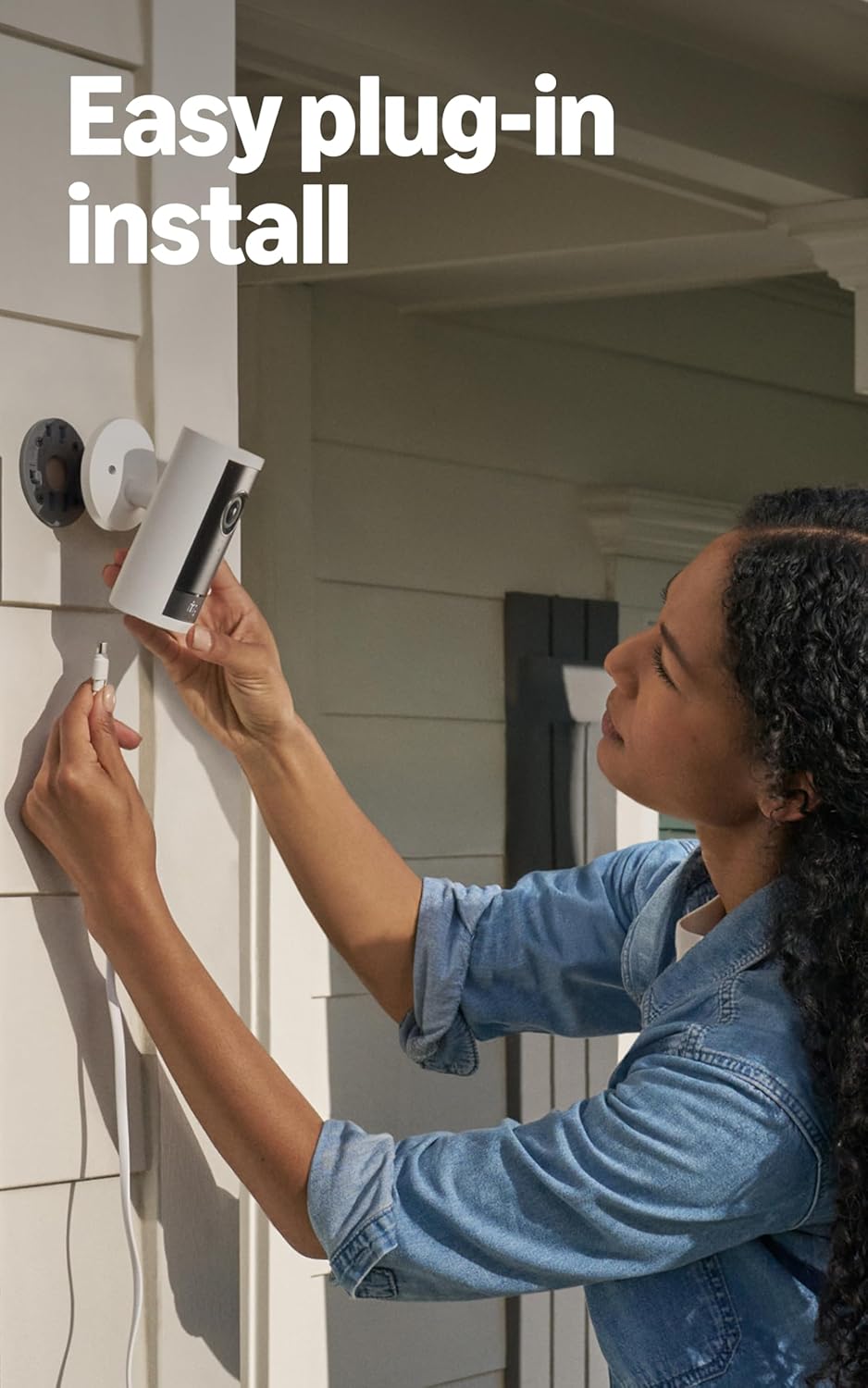
Image: Easy plug-in installation of the Ring Outdoor Cam Pro. The camera is being connected to its power adapter on an exterior wall.
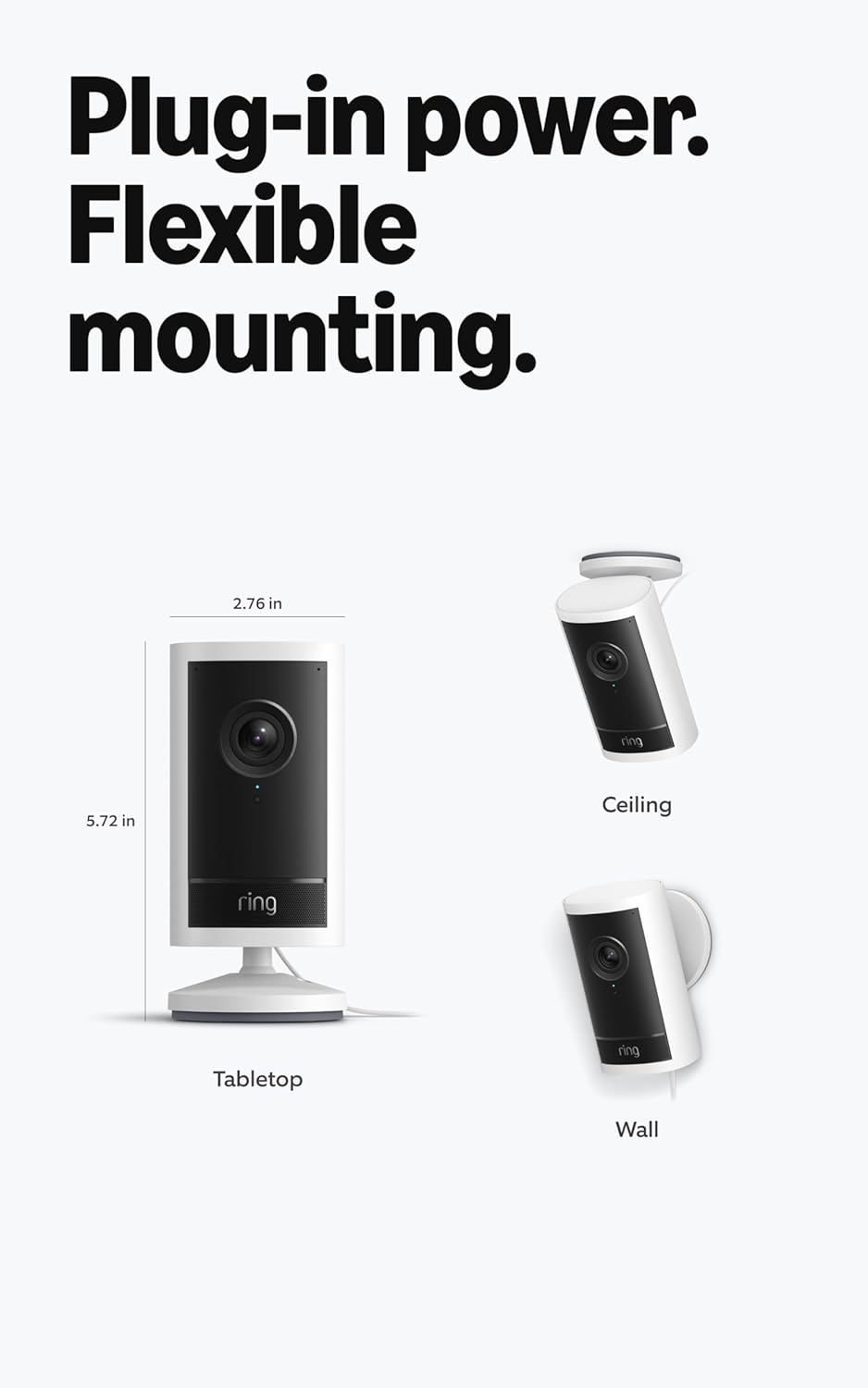
Image: Flexible mounting options for the Ring Outdoor Cam Pro, including tabletop, wall, and ceiling installations, along with its dimensions (2.76 in width, 5.72 in height).
Naudojimo instrukcijos
Once installed and connected to the Ring app, your Outdoor Cam Pro provides comprehensive security monitoring.
Vaizdo stebėjimas
The camera records in 4K video resolution, offering a 140° horizontal and 85° vertical field of view. Utilize the 10x Enhanced Zoom to focus on specific areas within the video feed.

Image: The Ring Outdoor Cam Pro mounted on an exterior wall, highlighting its design and 4K video capability.

Image: A demonstration of the 10x Enhanced Zoom feature, showing a zoomed-in view of a person's face from a wider outdoor camera perspective.
Naktinis matymas
With Low-Light Sight, the camera provides true color video in dimly lit conditions. In complete darkness, it automatically switches to crisp black-and-white night vision to maintain clear detail.

Image: A split image demonstrating Adaptive Night Vision, showing a dark scene on the left and the same scene with a person clearly visible in black-and-white night vision on the right.
Judesio aptikimas ir įspėjimai
The camera features radar-powered 3D Motion Detection, allowing for customizable motion zones. This helps in receiving precise alerts to your phone, reducing false alarms.

Image: A smartphone displaying the Ring app interface, showing how to set up 3D Motion Detection zones on a map of the monitored area.
Dvipusis pokalbis ir sirena
Engage in real-time conversations using the Two-Way Talk feature with Audio+ and advanced noise cancellation. A remote-activated security siren is also available for deterring unwanted activity.
Priežiūra
To ensure optimal performance and longevity of your Ring Outdoor Cam Pro, follow these maintenance guidelines:
- Objektyvo valymas: Reguliariai valykite fotoaparato objektyvą minkšta,amp cloth to remove dust, dirt, or smudges that may affect video clarity.
- Maitinimo jungtis: Regularly check the power adapter and cable for any signs of damage or loose connections. Ensure the plug is securely seated in the outlet.
- „Wi-Fi“ signalas: Monitor your Wi-Fi signal strength through the Ring app to ensure a stable connection. Poor signal can lead to interrupted video feeds or missed alerts.
- Aplinkos sąlygos: The camera is weather-resistant and designed to operate between -5°F to 120°F (-20.5°C to 48.5°C). In extreme heat and direct sunlight, the camera may temporarily turn off to prevent overheating. Ensure proper ventilation around the camera if possible.
- Programinės įrangos atnaujinimai: Keep the Ring app and camera firmware updated to benefit from the latest features and security enhancements.
Trikčių šalinimas
If you encounter issues with your Ring Outdoor Cam Pro, refer to the following common troubleshooting steps:
- Fotoaparatas neprisijungęs:
- Patikrinkite maitinimo jungtį, kad įsitikintumėte, jog kamera gauna maitinimą.
- Verify your Wi-Fi network is operational and the signal strength is adequate.
- Try power cycling the camera by unplugging it for a few seconds and then plugging it back in.
- Ensure your router is within range and not obstructed.
- Prasta vaizdo kokybė:
- Confirm your internet upload speed meets the recommended minimum of 15 Mbps.
- Nuvalykite kameros objektyvą, ar nėra kliūčių ar dėmių.
- Video quality can be affected by internet bandwidth and device temperature.
- Judesio aptikimo problemos:
- Review your 3D Motion Detection zone settings in the Ring app to ensure they cover the desired areas.
- Adjust motion sensitivity settings if you are receiving too many or too few alerts.
- Garso problemos:
- Ensure the microphone and speaker settings are enabled in the Ring app.
- Check for any physical obstructions around the microphone or speaker.
- Environmental factors like strong winds can affect audio clarity.
- Camera Not Mounting Correctly:
- Ensure you are using the provided installation hardware.
- The camera is designed for vertical or horizontal surface mounting.
Specifikacijos
| Matmenys | 2.8 in x 5.7 in x 2.8 in (7 cm x 14.5 cm x 7 cm) including stand base and universal mounting plate |
| Galimos spalvos | Juoda, Balta |
| Vaizdo įrašas | 4K video resolution, Low-Light Sight, up to 10x Enhanced Zoom |
| Judesio aptikimas | 3D Motion Detection with Customizable Motion Zones |
| Laukas View | 140° horizontaliai, 85° vertikaliai |
| Garsas | Two-Way Talk with Audio+ and advanced noise cancellation |
| Sirena | Nuotoliniu būdu įjungiama apsaugos sirena |
| Galia | USB-C 17.8-ft. (5.45-m.) 20W Outdoor/Indoor Power Adapter |
| Interneto reikalavimai | Recommended minimum upload speed of 15 Mbps for optimal performance. Video resolution may vary depending on internet bandwidth. |
| Ryšys | Wifi 6 (802.11ax), Dual-band wifi connection @ 2.4GHz, 5.0GHz |
| Estimated Install Time | 10 minučių |
| Eksploatavimo sąlygos | -5°F to 120°F (-20.5°C to 48.5°C), Weather Resistant. Camera may temporarily turn off when exposed to direct sunlight in extreme heat conditions. |
| Sąrankos reikalavimas | Vertical or horizontal surface for mounting, Standard power outlet |
Informacija apie garantiją
The Ring Outdoor Cam Pro, Plug-In, comes with a 1 metų ribota garantija.
Šiam įrenginiui suteikiami garantuoti programinės įrangos saugos naujinimai mažiausiai ketverius metus po to, kai paskutinį kartą įrenginį bus galima įsigyti kaip naują įrenginį mūsų svetainėje. websites. For specific information regarding your device's software security updates, visit the Software Security Updates section in the Ring Control Center.
Palaikymas
For further assistance, detailed guides, or to contact customer support, please visit the official Ring support website. You can also access additional resources through the Ring app.
For more information on Ring products and services, visit: Žiedų parduotuvė „Amazon“ platformoje


