Įvadas
This manual provides comprehensive instructions for the Marvo K604 RGB Gaming Keyboard. It covers essential information for setup, operation, maintenance, and troubleshooting to ensure optimal performance and longevity of your device. Please read this manual thoroughly before using the keyboard.

Image: The Marvo K604 RGB Gaming Keyboard integrated into a typical gaming desk setup, showcasing visą jo išdėstymą ir RGB apšvietimą.
Sąrankos instrukcijos
- Išpakuokite klaviatūrą: Carefully remove the Marvo K604 keyboard from its packaging. Ensure all components, including the USB cable, are present.
- Prisijunkite prie kompiuterio: Locate an available USB-A port on your computer. Insert the USB connector of the keyboard cable into the USB port.
- Tvarkyklės diegimas: The Marvo K604 is a plug-and-play device. Your operating system (Windows, macOS, Linux) should automatically detect and install the necessary drivers. No additional software installation is typically required.
- Vieta: Place the keyboard on a stable, flat surface. Adjust the keyboard feet on the underside if you prefer an angled typing position.
Paveikslėlis: stambus planas iš šono view of the Marvo K604 keyboard keys, highlighting the ergonomic design and the visible RGB backlighting beneath the keycaps.
Naudojimo instrukcijos
Pagrindinės klaviatūros funkcijos
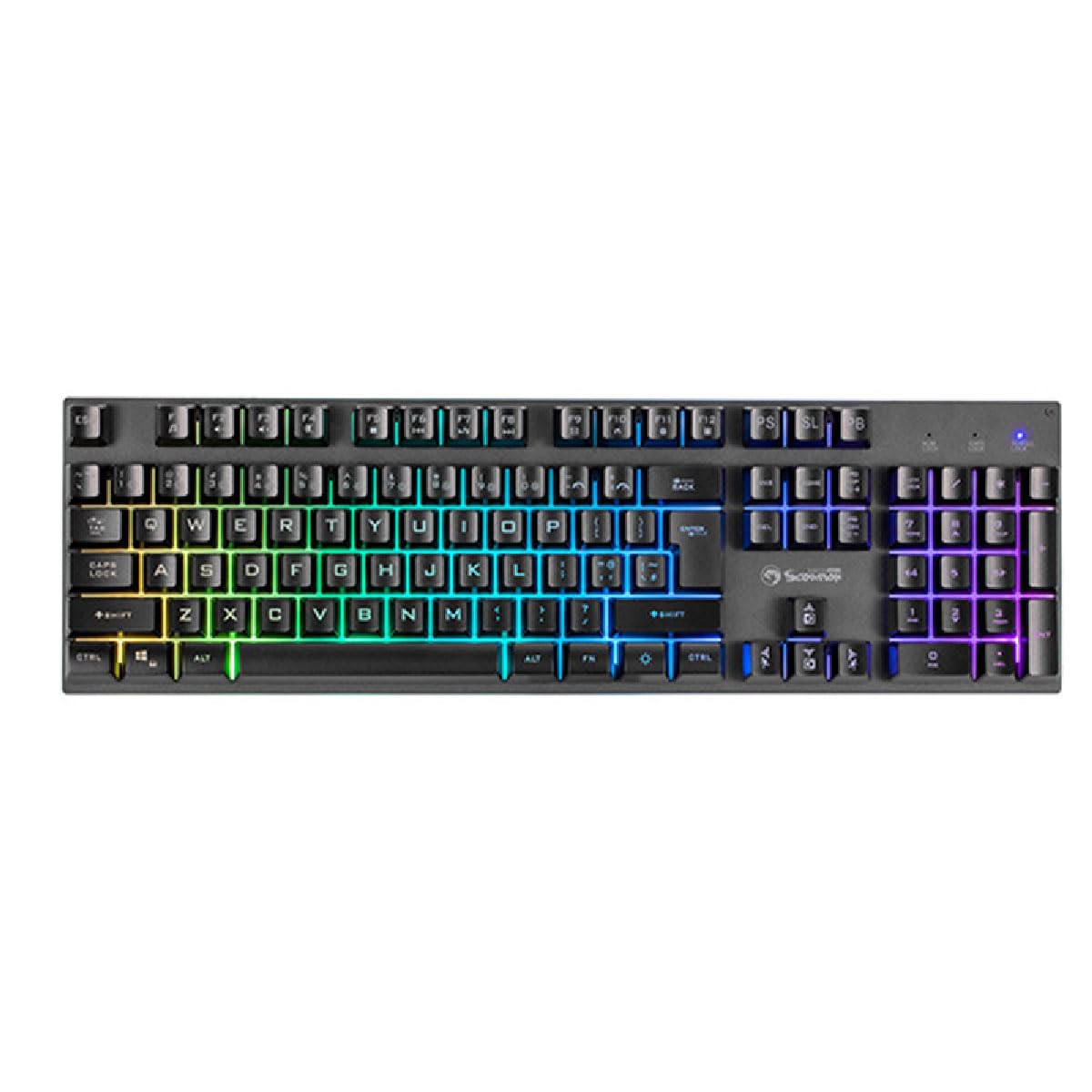
The Marvo K604 is a standard 104-key layout keyboard. All keys function as labeled. For specific operating system shortcuts, refer to your computer's documentation.
RGB foninio apšvietimo valdymas
The keyboard features customizable RGB backlighting. Use the following key combinations to adjust the lighting effects:
- Fn + Scroll Lock (SL): Cycles through various RGB lighting modes.
- Fn + Print Screen (PS): Adjusts the brightness of the backlighting.
- Fn + Pause Break (PB): Changes the speed of dynamic lighting effects.
- Fn + Arrow Keys (Up/Down): Adjusts brightness (alternative).
- Fn + Arrow Keys (Left/Right): Adjusts effect direction or color cycle speed.

Paveikslėlis: aiškus vaizdas iš viršaus į apačią view of the Marvo K604 keyboard, displaying its full 104-key layout and the vibrant, multi-color RGB backlighting across all keys.
Priežiūra
Proper maintenance ensures the longevity and performance of your Marvo K604 keyboard.
- Valymas:
- Prieš valydami atjunkite klaviatūrą nuo kompiuterio.
- Klaviatūros paviršiui nuvalyti naudokite minkštą, sausą šluostę.
- Dulkėms ir šiukšlėms tarp klavišų pašalinti naudokite suslėgtą orą.
- Esant sunkiai įveikiamoms dėmėms, švelniai dampen a cloth with water or a mild, non-abrasive cleaner. Avoid excessive moisture.
- Saugykla: Klaviatūrą laikykite švarioje, sausoje vietoje, toliau nuo ekstremalių temperatūrų ir tiesioginių saulės spindulių.
- Venkite išsiliejimo: Do not expose the keyboard to liquids. In case of a spill, immediately disconnect the keyboard and allow it to dry completely before reconnecting.
Trikčių šalinimas
If you encounter issues with your Marvo K604 keyboard, try the following solutions:
- Klaviatūra nereaguoja:
- Įsitikinkite, kad USB laidas yra tvirtai prijungtas prie klaviatūros ir kompiuterio.
- Pabandykite prijungti klaviatūrą prie kito kompiuterio USB prievado.
- Iš naujo paleiskite kompiuterį.
- Išbandykite klaviatūrą kitame kompiuteryje, kad nustatytumėte, ar problema susijusi su klaviatūra, ar su kompiuterio sąranka.
- RGB apšvietimas neveikia:
- Ensure the keyboard is properly connected and powered on.
- Try cycling through the RGB modes using Fn + Scroll Lock (SL).
- Reguliuokite ryškumą naudodami Fn + Print Screen (PS) or Fn + Arrow Keys (Up/Down).
- Neregistruojami raktai:
- Patikrinkite, ar po klaviatūros dangteliu nėra jokių fizinių kliūčių.
- Išvalykite klaviatūrą, kaip aprašyta skyriuje „Priežiūra“.
- If only specific keys are affected, and cleaning does not resolve the issue, contact customer support.
Specifikacijos
| Prekės ženklas | MARVO |
| Modelis | K604 |
| Tipas | 104-key Gaming Keyboard |
| Ryšys | USB-A |
| Kabelio ilgis | 150 cm |
| Spalva | Juoda |
| Klaviatūros apšvietimas | RGB |
| Suderinami įrenginiai | PC |
| Prekės svoris | 1.61 svaro |
| Pakuotės matmenys | 17.99 x 6.18 x 1.81 colio |
| Ypatingos savybės | Ergonomic, Lightweight, Portable |
| Įtraukti komponentai | USB kabelis |
Informacija apie garantiją
Marvo products are manufactured to the highest quality standards. This product is covered by a limited warranty against manufacturing defects from the date of purchase. Please retain your proof of purchase for warranty claims. The warranty does not cover damage caused by misuse, accident, modification, or unauthorized repair.
For detailed warranty terms and conditions, please refer to the official Marvo websvetainėje arba susisiekite su klientų aptarnavimo tarnyba.
Pagalba klientams
If you require further assistance or have questions not covered in this manual, please contact Marvo customer support:
- Websvetainė: www.marvo-tech.com (Pastaba: tai yra vietos žymeklis URL, please refer to your product packaging or official Marvo sources for the correct support websvetainę.)
- El. paštas: support@marvo-tech.com (Note: This is a placeholder email, please refer to your product packaging or official Marvo sources for the correct support email.)
When contacting support, please have your product model (K604) and proof of purchase readily available.


