Įvadas
This manual provides comprehensive instructions for the FL ESPORTS CMK98 Wireless Mechanical Gaming Keyboard. Designed for both Windows and Mac systems, this 99-key layout keyboard features tri-mode connectivity, hot-swappable switches, and customizable RGB lighting. Please read this manual thoroughly to ensure proper setup and operation.

Paveikslėlis: Viršview of the FL ESPORTS CMK98 keyboard, highlighting its gasket structure, high-quality silencer fills, hot-swap capability, software support, PBT keycaps, wireless 3-mode connectivity, Win/Mac compatibility, 16.8 million RGB lighting, 4000mAh battery, and 96% compact layout.
Sąranka
1. Pakuotės turinys
- FL ESPORTS CMK98 Wireless Mechanical Gaming Keyboard
- USB-C kabelis
- 2.4GHz USB Receiver (stored in keyboard)
- Klaviatūros traukiklis
- Jungiklio traukiklis
- Vartotojo vadovas (šis dokumentas)
2. Ryšio režimai
The CMK98 keyboard supports three connection modes: Bluetooth 5.0, 2.4GHz Wireless, and USB-C Wired.
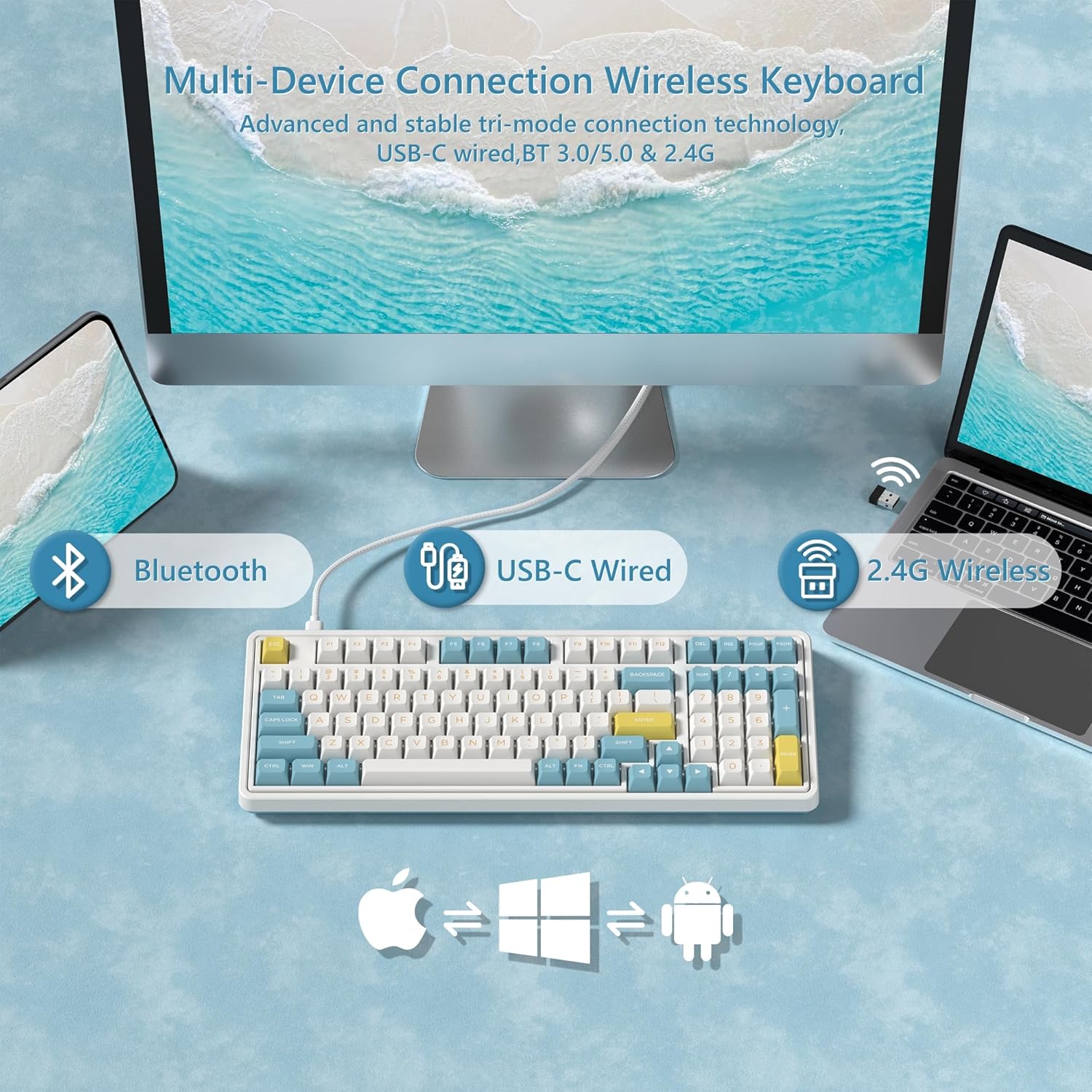
Image: Diagram illustrating the versatile connectivity options of the CMK98 keyboard, demonstrating how it can connect to multiple devices using Bluetooth, a USB-C cable, or the 2.4GHz wireless receiver.
2.1. 2.4 GHz belaidis režimas
- Locate the 2.4GHz USB receiver stored in the compartment on the back of the keyboard.
- Prijunkite USB imtuvą prie laisvo kompiuterio USB prievado.
- On the keyboard's side switch, slide it to the 2.4G wireless icon position.
- Klaviatūra turėtų automatiškai prisijungti.
Video: Demonstrates the setup and connection process for the FL ESPORTS CMK98 keyboard, including locating the 2.4GHz receiver and switching modes.

Image: A close-up of the keyboard's side, featuring the toggle switch for selecting between Bluetooth, 2.4GHz wireless, and USB-C wired modes, alongside the USB-C charging port.
2.2. „Bluetooth“ režimas
- On the keyboard's side switch, slide it to the Bluetooth icon position.
- Paspauskite ir palaikykite FN + Q, FN + W, arba FN + E 3–5 sekundes, kad įjungtumėte susiejimo režimą (indikatoriaus lemputė greitai mirksės).
- On your device (computer, tablet, phone), open Bluetooth settings and search for "CMK98".
- Select "CMK98" to pair. The indicator light will become solid when connected.
- You can pair up to three Bluetooth devices and switch between them using FN + Q/W/E.
2.3. Laidinis USB-C režimas
- Prijunkite pateiktą USB-C laidą prie klaviatūros USB-C prievado.
- Prijunkite kitą USB-C kabelio galą prie laisvo kompiuterio USB prievado.
- On the keyboard's side switch, slide it to the USB-C wired icon position.
- Klaviatūra veiks kaip laidinis įrenginys ir bus kraunama vienu metu.
3. Operacinės sistemos suderinamumo jungiklis
The keyboard features a switch on the back to toggle between Windows (WIN) and Mac (MAC) compatibility modes. Ensure this switch is set correctly for your operating system to ensure proper key mapping.

Paveikslėlis: detalus view of the keyboard's bottom, highlighting the switch used to select between Mac and Windows operating system compatibility modes.
Naudojimo instrukcijos
1. Pagrindinės funkcijos ir išdėstymas
The CMK98 features a 99-key layout, including a dedicated number pad. Standard keyboard functions apply. Use the FN key in combination with other keys for secondary functions, such as media control or lighting adjustments.
Video: Demonstrates the compact 99-key layout of the CMK98 mechanical keyboard and its "creamy" typing sound.
2. RGB apšvietimas
The keyboard features 1.68 million customizable RGB backlight options. Specific key combinations with the FN key allow you to cycle through various lighting effects, adjust brightness, and change speed. Refer to the software section for advanced customization.
3. Macro Programming (Pro Software)
All keys support macro customization. Download the dedicated driver software from the official FL ESPORTS website to record and edit macros, customize key functions, and set music rhythm lighting effects. The software also supports N-key rollover for simultaneous key presses.

Image: This image displays the user interface of the CMK98's dedicated software, where users can customize key functions, create macros, and manage RGB lighting effects.
4. Hot-Swappable Switches and Keycaps
The CMK98 features a hot-swappable PCB, allowing you to easily replace 3-pin or 5-pin mechanical switches without soldering. The included keycap puller and switch puller facilitate this process.
- Norėdami švelniai nuimti norimą klavišo dangtelį, naudokite klavišo dangtelio traukiklį.
- Use the switch puller to carefully grip and pull out the switch.
- Sulygiuokite naujo jungiklio kaiščius su spausdintinės plokštės skylėmis ir tvirtai paspauskite, kol jis spragtelėdamas užsifiksuos.
- Uždėkite klavišo dangtelį.

Vaizdas: Padidintas view of a single mechanical switch, illustrating its internal components and design.
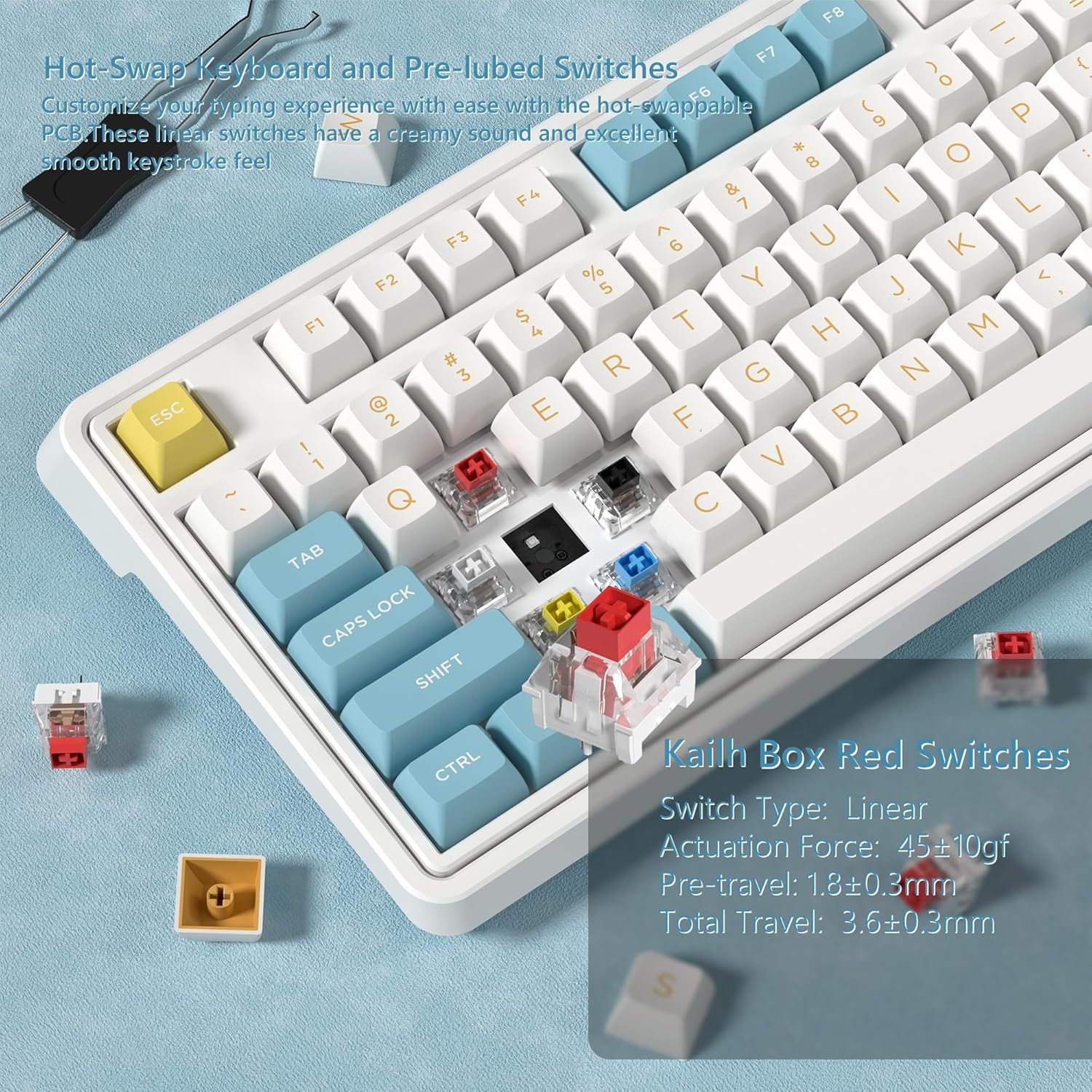
Paveikslėlis: detalus view showing how to remove and install mechanical switches on the hot-swappable PCB of the CMK98 keyboard, along with the tools provided for this process.
5. Baterijos valdymas
The keyboard is equipped with a built-in 4000mAh lithium polymer battery. Connect the USB-C cable to charge the keyboard. An indicator light will typically show charging status.
- Įkrovimas: Connect the keyboard via USB-C cable to a power source.
- Baterijos veikimo laikas: Up to 260 hours with backlight off, up to 35 hours with backlight on (usage may vary).

Image: This graphic highlights the keyboard's 4000mAh battery, providing estimated usage times of 260 hours with the backlight off and 35 hours with the backlight on.
Priežiūra
1. Valymas
Norėdami išvalyti klaviatūrą, pirmiausia atjunkite ją nuo visų maitinimo šaltinių. Naudokite minkštą, nepūkuotą šluostę, šiek tiek sudrėkintąampened with water or a mild cleaning solution. Avoid harsh chemicals or abrasive materials. For cleaning between keycaps, use compressed air or remove keycaps with the provided puller for thorough cleaning.
2. Switch and Keycap Care
When replacing switches or keycaps, handle them gently to avoid damaging the pins or the PCB sockets. Store spare switches and keycaps in a clean, dry place.
Trikčių šalinimas
- Klaviatūra nereaguoja:
- Įsitikinkite, kad klaviatūra įkrauta.
- Check the connection mode switch (2.4G, Bluetooth, USB-C) is set correctly.
- Jei naudojate 2.4 GHz dažnį, įsitikinkite, kad USB imtuvas yra tvirtai prijungtas.
- For Bluetooth, re-pair the device.
- Pabandykite prijungti per USB-C laidą, kad atmestumėte belaidžio ryšio problemas.
- Raktai neregistruojami arba įvedami du kartus:
- Tai gali rodyti sugedusį jungiklį. Norėdami pakeisti pažeistą jungiklį, naudokite karštojo keitimo funkciją.
- Įsitikinkite, kad klavišų dangteliai tinkamai įdėti.
- RGB apšvietimas neveikia:
- Check if the lighting is turned off or set to minimum brightness using FN key combinations.
- Ensure the keyboard software is installed and updated for full control.
- „Bluetooth“ ryšys nestabilus:
- Įsitikinkite, kad klaviatūra yra jūsų įrenginio diapazone.
- Sumažinkite kitų belaidžių įrenginių keliamus trukdžius.
- Pabandykite iš naujo susieti klaviatūrą.
Specifikacijos
| Funkcija | Detalė |
|---|---|
| Modelis | CMK98 |
| Ryšys | 2.4G belaidis ryšys, „Bluetooth 5.0“, USB-C laidinis ryšys |
| Išdėstymas | 99 keys with Number Pad |
| Jungikliai | Hot-Swappable (3-pin/5-pin compatible), Pre-lubed Linear Switches |
| Klaviatūros | Dvigubo šūvio PBT |
| Foninis apšvietimas | 1.68 milijono RGB |
| Baterija | 4000mAh ličio polimeras |
| Suderinamumas | Windows, Mac |
| Ypatingos savybės | Gasket Structure, PCB Single Key Slotting, Macro Customization, N-Key Rollover |
| Matmenys | 16.97 x 8.15 x 2.32 colio |
| Prekės svoris | 4.36 svaro |
Garantija ir palaikymas
For warranty information and technical support, please refer to the official FL ESPORTS websvetainėje arba susisiekite su jų klientų aptarnavimo tarnyba. Išsaugokite pirkimo kvitą garantiniams reikalavimams.
Gamintojas: FL ESPORTS


