1. Įvadas
This manual provides essential information for the installation, operation, and maintenance of your ZOTAC GAMING GeForce RTX 4070 Ti SUPER SOLID OC 16GB graphics card. Please read this manual thoroughly before installation to ensure proper functionality and to prevent damage.

Image 1.1: ZOTAC GAMING GeForce RTX 4070 Ti SUPER SOLID OC 16GB Graphics Card and its retail packaging.
2. Pakuotės turinys
Patikrinkite, ar pakuotėje yra visi reikalingi daiktai:
- ZOTAC GAMING GeForce RTX 4070 Ti SUPER SOLID OC 16GB Graphics Card
- GPU palaikymo stovas
- Vartotojo vadovas (šis dokumentas)
- Power Adapter Cable (if applicable, check your specific model)
3. Sistemos reikalavimai
- Su PCI Express suderinama pagrindinė plokštė su vienu dvigubo pločio x16 grafikos lizdu
- Minimum 750W power supply with three available 8-pin PCIe power connectors (or equivalent 12VHPWR connector)
- Minimum 16GB system memory
- Microsoft Windows 10/11 64-bit or Linux 64-bit operating system
- Interneto ryšys tvarkyklės diegimui
4. Diegimo vadovas
4.1. Paruošimas
- Išjunkite kompiuterį ir atjunkite maitinimo kabelį.
- Atidarykite kompiuterio dėklą.
- Įžeminkite save, kad iškrautumėte statinę elektrą.
4.2. Vaizdo plokštės diegimas
- Raskite laisvą PCI Express x16 lizdą pagrindinėje plokštėje.
- Nuimkite reikiamus išplėtimo lizdų dangtelius nuo kompiuterio korpuso.
- Carefully insert the graphics card into the PCIe x16 slot until it is fully seated. Ensure the retention clip locks into place.
- Pritvirtinkite vaizdo plokštę prie korpuso varžtais.
- Connect the required power cables from your power supply to the graphics card. This model typically requires three 8-pin PCIe power connectors or a single 12VHPWR connector. Ensure all connections are secure.
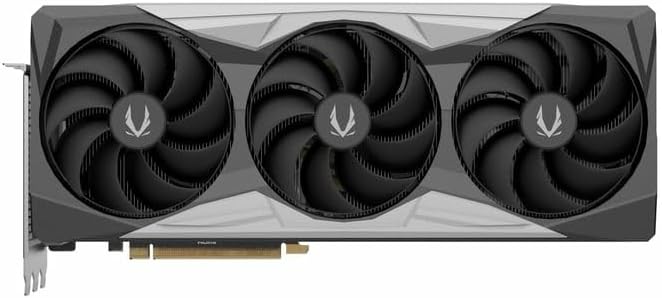
4.1 vaizdas: priekis view vaizdo plokštės, kurioje rodomas trijų ventiliatorių dizainas.
4.3. Installing the GPU Support Stand
The included GPU support stand helps prevent sag and provides additional stability for the graphics card. Follow the instructions provided with the stand for proper installation within your PC case.
4.4. Closing the Case and Connecting Peripherals
- Uždarykite kompiuterio dėklą.
- Connect your monitor(s) to the display outputs on the graphics card (DisplayPort or HDMI).
- Reconnect the power cable and other peripherals to your computer.

4.2 vaizdas: galinis view of the graphics card, showing three DisplayPort outputs and one HDMI output.
5. Naudojimo instrukcijos
5.1. Tvarkyklės diegimas
- Įjunkite kompiuterį.
- Kai operacinė sistema bus įkelta, atsisiųskite naujausius grafikos tvarkykles iš oficialios NVIDIA svetainės. websvetainė (www.nvidia.com/drivers) arba ZOTAC websvetainė (www.zotac.com/support).
- Vykdykite ekrane pateikiamus nurodymus, kad užbaigtumėte tvarkyklės diegimą. Gali reikėti paleisti sistemą iš naujo.
5.2. Programinės įrangos pagalbinės programos
ZOTAC provides utilities such as FireStorm for monitoring and adjusting graphics card settings, including fan speed control (Active Fan Control, FREEZE Fan Stop) and performance profiles. These can be downloaded from the ZOTAC websvetainę.
6. Priežiūra
- Dulkių šalinimas: Reguliariai valykite dulkes nuo vaizdo plokštės ventiliatorių ir radiatoriaus suslėgtu oru. Prieš valydami įsitikinkite, kad kompiuteris yra išjungtas ir atjungtas nuo elektros tinklo.
- Tvarkyklės atnaujinimai: Keep your graphics drivers updated to ensure optimal performance and compatibility.
- Temperatūros stebėjimas: Use monitoring software to keep track of the graphics card's temperature during operation. Excessive temperatures can indicate poor airflow or dust buildup.

6.1 paveikslas: Kampinis view of the graphics card, highlighting its robust cooling solution.
7. Problemų sprendimas
- Nėra ekrano išvesties:
- Įsitikinkite, kad monitoriaus kabelis yra tvirtai prijungtas prie grafikos plokštės ir monitoriaus.
- Įsitikinkite, kad vaizdo plokštė yra visiškai įstatyta į PCIe lizdą.
- Check that all power cables are properly connected to the graphics card.
- Jei įmanoma, išbandykite su kitu monitoriumi arba kabeliu.
- Sistemos nestabilumas arba gedimai:
- Ensure graphics drivers are correctly installed and up to date.
- Check for adequate power supply capacity.
- Stebėkite temperatūrą, kad išvengtumėte perkaitimo.
- Verify system memory (RAM) stability.
- Fan Noise or Malfunction:
- Nuvalykite dulkes nuo ventiliatorių ir radiatoriaus.
- Ensure no cables are obstructing fan rotation.
- Use ZOTAC FireStorm utility to check fan speed settings.
8. Specifikacijos
| Funkcija | Detalė |
|---|---|
| Modelio numeris | ZT-D40730R-10P |
| Grafikos procesorius | NVIDIA GeForce RTX 4070 Ti SUPER |
| Vaizdo įrašų atmintis | 16 GB GDDR6X |
| Atminties sąsaja | 256 bitų |
| Atminties laikrodis | 21000 MHz (efektyvus) |
| Variklio laikrodis | Padidinimas: 2640 MHz |
| Ekrano išėjimai | 3 x DisplayPort 1.4a, 1 x HDMI 2.1a |
| HDCP palaikymas | Taip |
| Maksimali skaitmeninė raiška | Up to 4K (7680x4320 @60Hz) |
| PCI Express | PCI Express 4.0 x16 |
| Rekomenduojamas maitinimo šaltinis | 750W |
| Maitinimo jungtys | 1 x 12VHPWR (or 3 x 8-pin PCIe via adapter) |
| Matmenys (IxPxH) | 16.73 x 11.54 x 3.94 colio (apytiksliai) |
| Svoris | 2.2 svaro (apytiksliai) |
| Aušinimo sistema | IceStorm 2.0 Advanced Cooling, Triple 100mm Fans, FREEZE Fan Stop, Active Fan Control |
| Savybės | NVIDIA DLSS 3.5, Ray Tracing, Metal Backplate, GPU Support Stand |
9. Garantija ir palaikymas
Išsamesnės informacijos apie garantiją ieškokite prie gaminio pridėtoje garantijos kortelėje arba apsilankykite oficialioje ZOTAC svetainėje. website's support section. ZOTAC provides technical support and resources for their products.
- ZOTAC palaikymas Websvetainė: www.zotac.com/support
- Produkto registracija: Užregistruokite savo produktą ZOTAC svetainėje websvetainę, kad suaktyvintumėte garantiją ir gautumėte produkto atnaujinimus.