1. Produktas baigtasview
The MageGee LIGHT87 is a versatile 87-key wireless mechanical keyboard designed for gaming and productivity. It features a gasket-mounted structure for a creamy typing sound, hot-swappable switches, vibrant RGB backlighting, and multiple connectivity options including 2.4GHz wireless, Bluetooth 5.0, and USB-C wired mode. It is equipped with an 8000mAh battery and durable side-printed PBT keycaps.

1 pav.: Iš viršaus į apačią view of the MageGee LIGHT87 Wireless Mechanical Keyboard, showcasing its 87-key layout and RGB backlighting.

2 pav. Baigtaview of the MageGee LIGHT87's key features, including 8000mAh battery, PBT keycaps, Win/Mac dual system support, gasket mount, 5 layers of silencing foams, 16.8 million RGB backlight, triple mode connection, custom hot-swappable switches, and 87-key anti-ghosting.
2. Pakuotės turinys
Prieš pradėdami, įsitikinkite, kad pakuotėje yra visi reikalingi daiktai:
- MageGee LIGHT87 Wireless Mechanical Keyboard
- USB-C į USB-A laidas
- 2.4 GHz USB imtuvas
- Klaviatūros traukiklis
- Jungiklio traukiklis
- Vartotojo vadovas (šis dokumentas)

Figure 3: Contents of the MageGee LIGHT87 keyboard package, including the keyboard, USB cable, keycap puller, switch puller, and user manual.
3. Sąranka ir ryšys
The MageGee LIGHT87 keyboard offers three connection modes: USB-C wired, 2.4GHz wireless, and Bluetooth 5.0.
3.1 Klaviatūros įkrovimas
Before first use, it is recommended to fully charge the keyboard. Connect the provided USB-C cable to the keyboard's USB-C port and the other end to a USB power source (e.g., computer USB port, wall adapter). The keyboard features an 8000mAh large-capacity battery.

Figure 4: Illustration of the 8000mAh battery capacity, providing approximately 53 hours with RGB backlight on and 400 hours with RGB backlight off.

Figure 5: Detailed battery life estimates: 53 hours with backlight on, 400 hours with backlight off, and 450 hours of sleep standby time.
3.2 Ryšio režimai
The keyboard supports seamless switching between wired, 2.4GHz, and Bluetooth modes.
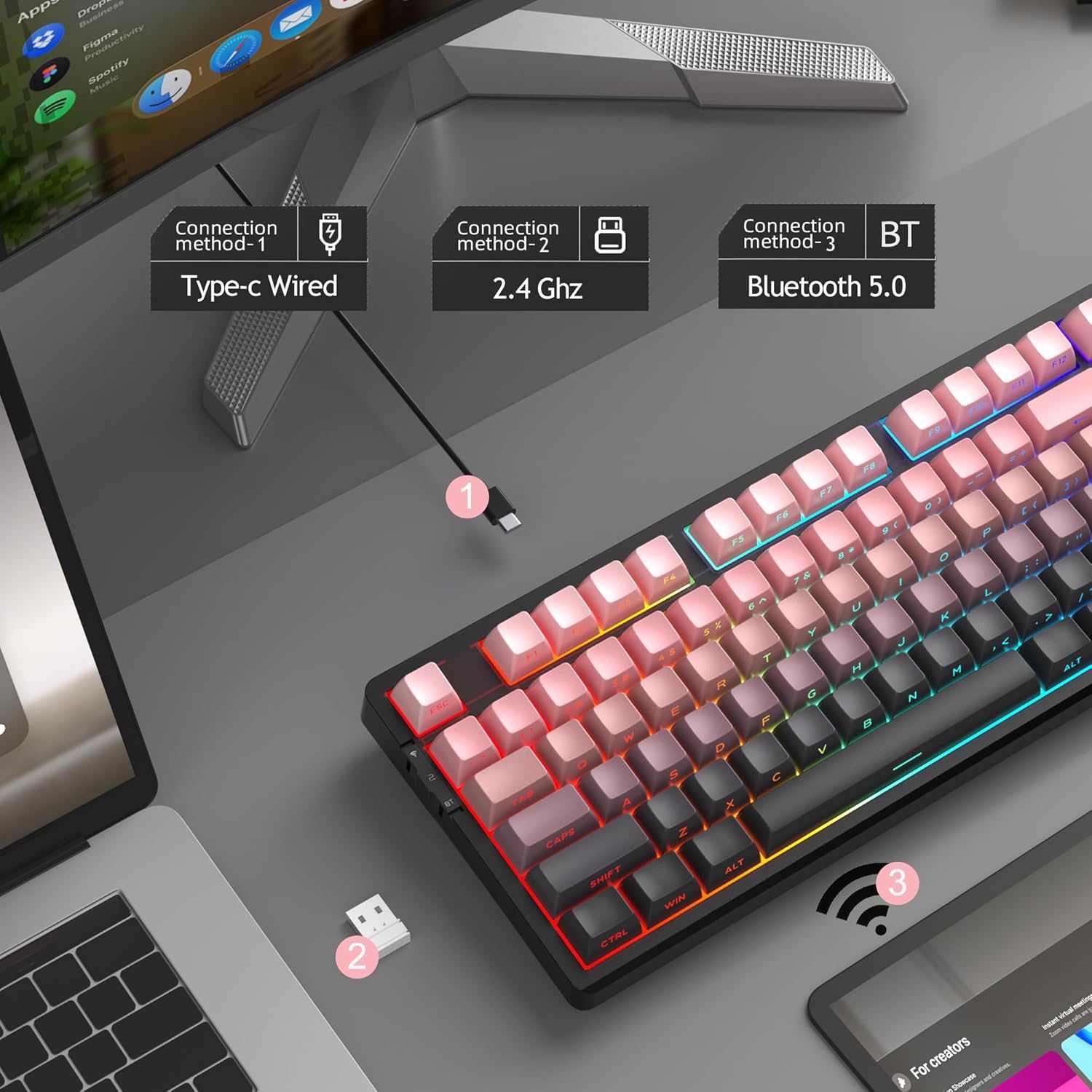
Figure 6: Visual representation of the three connection methods: Type-C Wired, 2.4 GHz Wireless, and Bluetooth 5.0.

Figure 7: Detailed instructions for switching between 2.4GHz, Bluetooth 5.0, and Type-C wired modes using the toggle switch and Fn key combinations.
3.2.1 USB-C laidinis režimas
- Connect the USB-C cable to the keyboard and your computer's USB port.
- Toggle the switch on the keyboard to the "2" position (wired mode).
- Jūsų sistema automatiškai atpažins klaviatūrą.
3.2.2 2.4 GHz belaidis režimas
- Suraskite 2.4 GHz USB imtuvą (paprastai laikomą klaviatūros skyriuje).
- Prijunkite USB imtuvą prie laisvo kompiuterio USB prievado.
- Toggle the switch on the keyboard to the "wifi" icon position (2.4G wireless mode).
- Paspauskite fn+4 to activate 2.4GHz mode. The keyboard should connect automatically.
3.2.3 „Bluetooth 5.0“ režimas
Klaviatūra gali prisijungti prie iki trijų „Bluetooth“ įrenginių.
- Toggle the switch on the keyboard to the "BT" position (Bluetooth mode).
- Paspauskite ir palaikykite fn+1, fn+2, arba fn+3 for 3-5 seconds to enter pairing mode for the desired channel. The indicator light will flash rapidly.
- On your device (PC, laptop, tablet, smartphone), enable Bluetooth and search for "MageGee LIGHT87".
- Select the keyboard to pair. Once connected, the indicator light will stop flashing.
- Norėdami perjungti susietus „Bluetooth“ įrenginius, tiesiog paspauskite fn+1, fn+2, arba fn+3.
4. Naudojimo instrukcijos
4.1 RGB foninio apšvietimo valdymas
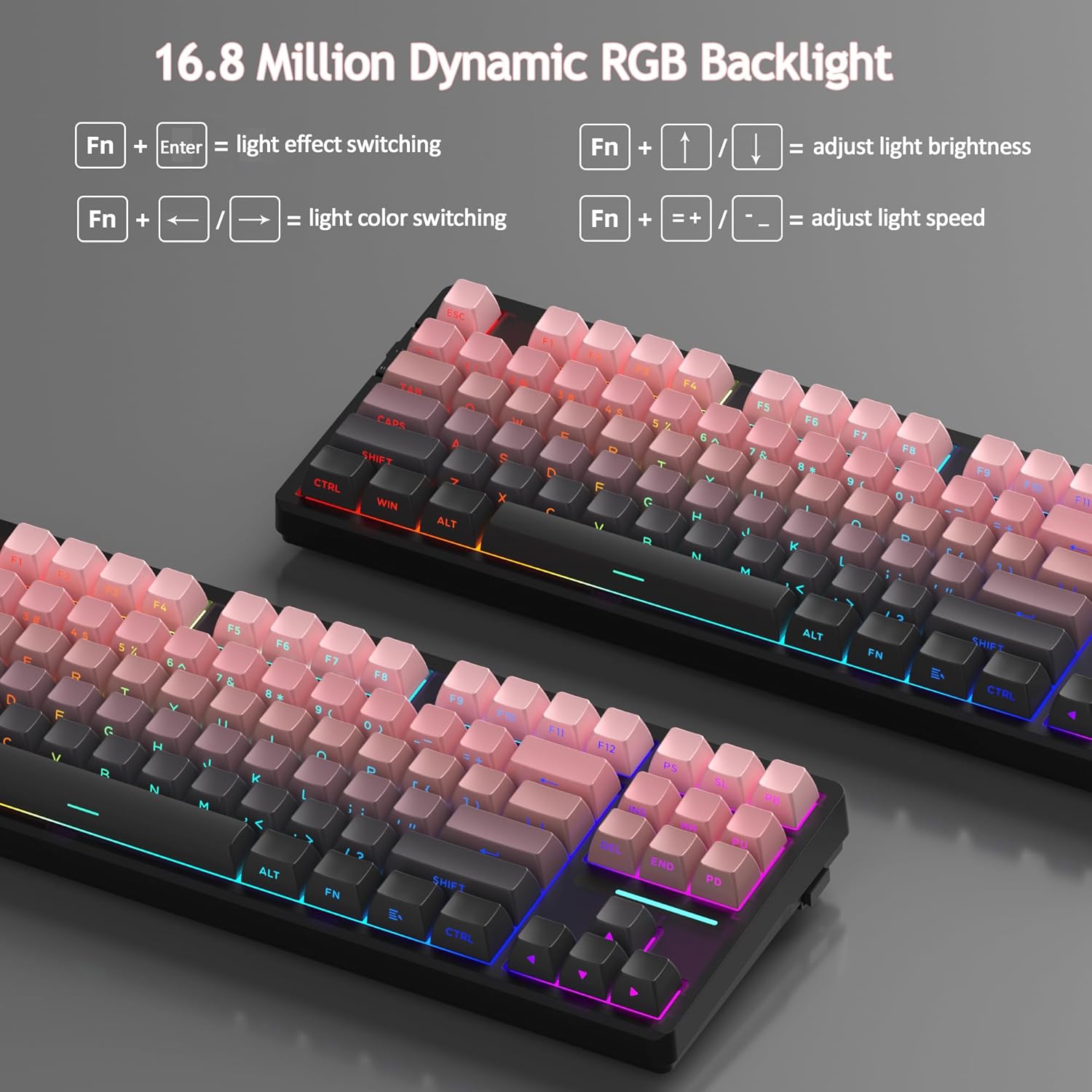
The MageGee LIGHT87 features 16.8 million cool RGB backlight options with various effects.
- Fn + Enter: Toggle between approximately 20 different backlight modes/effects.
- Fn + ←: Adjust light direction (for certain effects).
- Fn + →: Adjust light color (for static modes or color cycling).
- Fn + ↑: Padidinkite foninio apšvietimo ryškumą.
- Fn + ↓: Sumažinkite foninio apšvietimo ryškumą.
- Fn + =+: Increase backlight speed (for dynamic effects).
- Fn + -_: Decrease backlight speed (for dynamic effects).
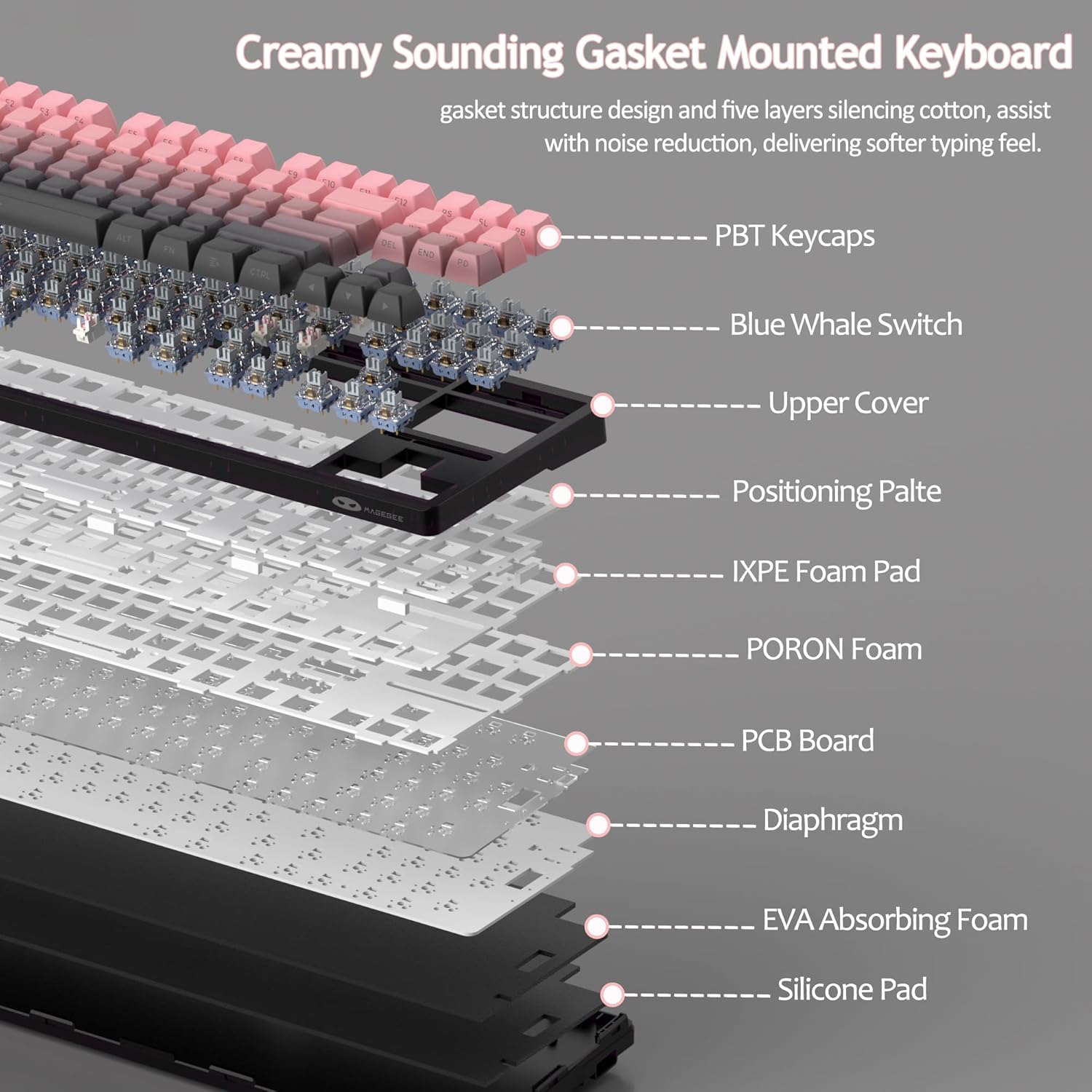
Figure 8: Visual guide to RGB backlight control key combinations.

Figure 9: Table summarizing RGB backlight functions and their corresponding Fn key combinations.
4.2 Karštuoju būdu keičiami jungikliai
The LIGHT87 keyboard features hot-swappable sockets, allowing you to change switches without soldering. It supports both 3-pin and 5-pin mechanical switches. The keyboard comes pre-installed with quiet linear Blue Whale switches.

Figure 10: Diagram illustrating the hot-swappable switch mechanism, showing compatibility with 3-pin and 5-pin switches and the pre-lubed Blue Whale switch.

Figure 11: Specifications of the Blue Whale Switch, including linear type, conduction stroke, total travel, operating force, material, and lifespan.
To Replace Switches:
- Atsargiai nuimkite klavišo dangtelį naudodami pridedamą klavišo dangtelio ištraukiklį.
- Jungiklio traukikliu švelniai suimkite viršutinį ir apatinį jungiklio spaustukus.
- Patraukite jungiklį tiesiai į viršų, kad jį nuimtumėte nuo PCB.
- Suderinkite naujo jungiklio kaiščius su PCB skylėmis.
- Press the new switch firmly into place until it clicks. Ensure it is seated properly and not bent.
- Uždėkite klavišo dangtelį.
4.3 Tarpinės sandara ir garsas Dampening
The LIGHT87 utilizes a gasket-mounted design, which provides a softer, more flexible typing feel and contributes to a "creamy thock" sound profile. Additionally, it incorporates five layers of sound-absorbing foams to effectively reduce noise and improve typing comfort.

12 pav.: sprogo view of the keyboard's internal components, highlighting the gasket structure and various foam layers (IXPE Foam Pad, PORON Foam, EVA Absorbing Foam, Silicone Pad) for sound dampening.
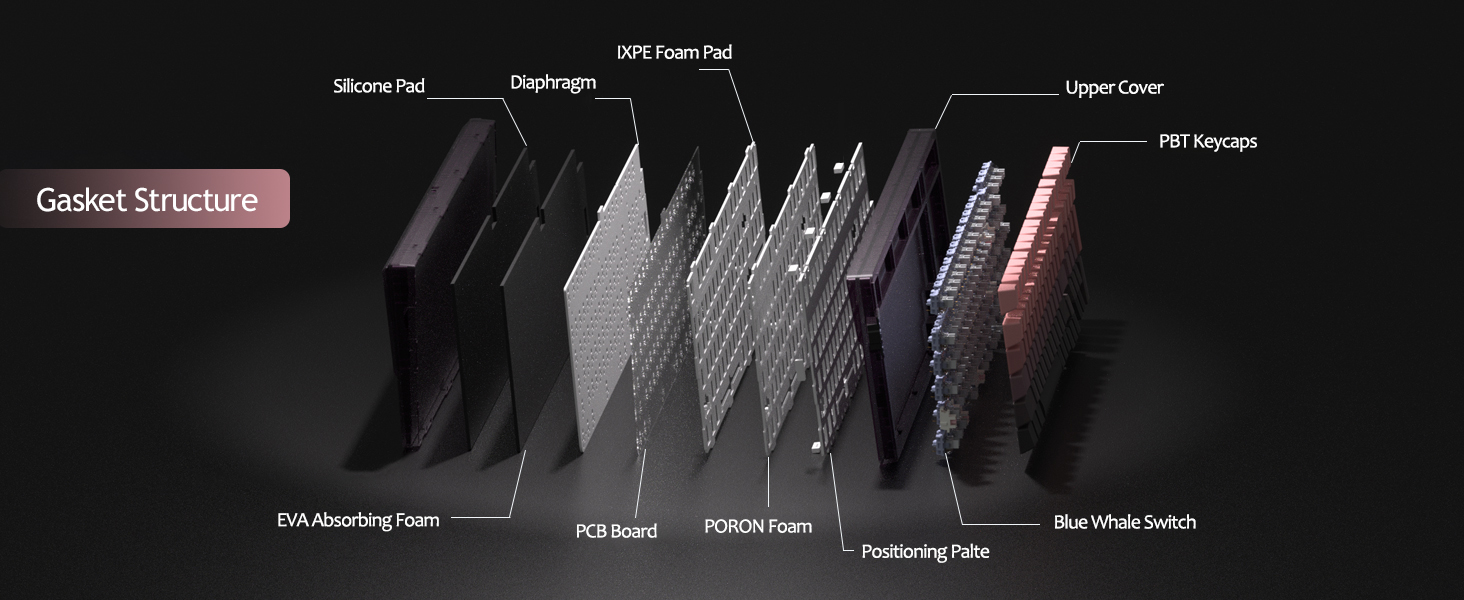
Figure 13: Detailed diagram of the gasket structure, showing how the plate is isolated from the case by gaskets, along with the various foam layers.
4.4 PBT Keycaps
The keyboard is equipped with durable PBT keycaps, known for their resistance to shine and wear over time. The legends are side-printed for a clean top surface aesthetic.
14 pav. Iš arti view of the keyboard's side-printed PBT keycaps.
4.5 Layout and Compatibility
The LIGHT87 features a compact 80% (TKL) layout with 87 keys, saving desktop space while retaining essential function and arrow keys. It supports both Windows and Mac operating systems, and all 87 keys feature 100% anti-ghosting for accurate input during intense gaming or typing sessions.
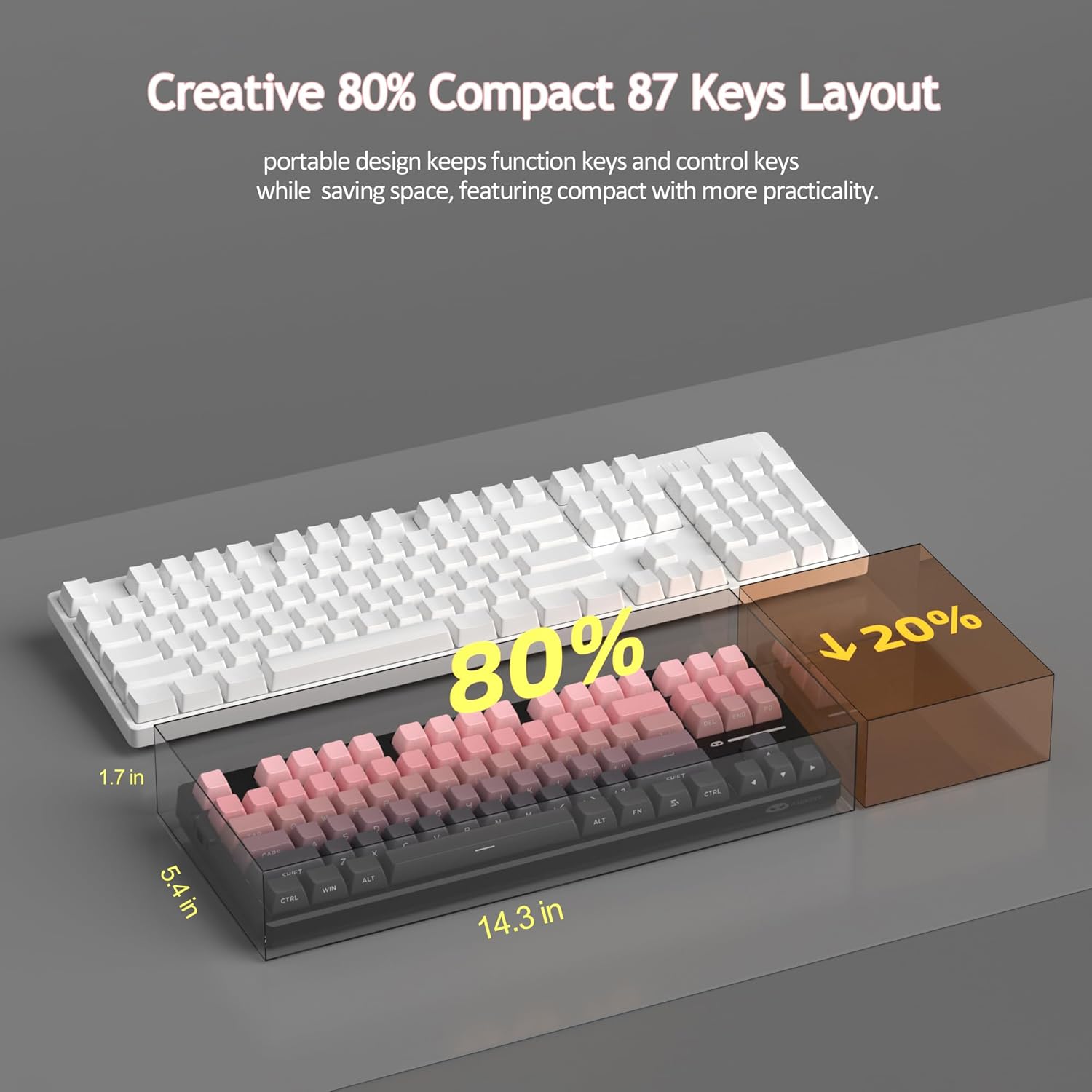
Figure 15: Comparison illustrating the compact 80% layout of the LIGHT87 keyboard compared to a full-size keyboard, highlighting space savings.

Figure 16: The MageGee LIGHT87 keyboard integrated into a desktop setup, demonstrating its use with a computer and monitor.
5. Priežiūra
5.1 Klaviatūros valymas
To maintain the performance and appearance of your keyboard, regular cleaning is recommended.
- Prieš valydami atjunkite klaviatūrą nuo kompiuterio.
- Dulkėms ir šiukšlėms pašalinti iš tarpų tarp klavišų dangtelių naudokite minkštą šepetėlį arba suslėgtą orą.
- For stubborn dirt, you can carefully remove keycaps using the provided keycap puller and clean the surface underneath with a slightly damp, lint-free cloth. Ensure the cloth is not dripping wet.
- Wipe the keycaps and keyboard surface with a dry, soft cloth.
- Do not use harsh chemicals, abrasive cleaners, or immerse the keyboard in liquid.

Figure 17: Image showing keycaps being removed from the keyboard, useful for cleaning or switch replacement.
5.2 Klaviatūros kampo reguliavimas
The keyboard features adjustable feet to customize your typing angle for ergonomic comfort.

Figure 18: Image demonstrating the adjustable feet on the underside of the keyboard for tilt customization.

19 pav.: Šoninis profilisfile of the keyboard illustrating its ergonomic keycap profile patogiam rašymui.
6. Problemų sprendimas
| Problema | Galima priežastis | Sprendimas |
|---|---|---|
| Klaviatūra nereaguoja laidiniu režimu. | Loose cable connection, incorrect mode selected, faulty USB port. | Ensure USB-C cable is securely connected. Check if the keyboard switch is set to "2" (wired mode). Try a different USB port on your computer. |
| 2.4GHz wireless not connecting. | USB receiver not plugged in, incorrect mode, low battery. | Ensure the 2.4GHz USB receiver is plugged in. Set the keyboard switch to "wifi" icon and press fn+4. Charge the keyboard. |
| Bluetooth pairing failed or connection unstable. | Incorrect pairing procedure, interference, device Bluetooth issues, low battery. | Ensure keyboard switch is set to "BT". Press and hold Fn + 1/2/3 to re-enter pairing mode. Forget the device on your computer/device and re-pair. Move closer to the device. Charge the keyboard. Restart your device's Bluetooth. |
| Foninis apšvietimas neveikia arba užstringa. | Backlight turned off, low battery, software glitch. | Paspauskite Fn + ↑ to increase brightness. Charge the keyboard. Try cycling through backlight modes with Fn + Enter. |
| Certain keys not responding. | Atsilaisvinęs arba sugedęs jungiklis, šiukšlės po klaviatūros dangteliu. | Remove the keycap and check for debris. If hot-swappable, try reseating the switch or replacing it with a known working switch. |
7. Specifikacijos
| Funkcija | Detalė |
|---|---|
| Modelis | LIGHT87 |
| Prekės ženklas | MageGee |
| Ryšys | 2.4 GHz belaidis ryšys, „Bluetooth 5.0“, laidinis USB-C ryšys |
| Išdėstymas | 87 klavišų (80 % TKL) |
| Jungikliai | Hot-swappable (3-pin/5-pin compatible), Blue Whale Linear Switches |
| Klaviatūros | Side-printed PBT |
| Foninis apšvietimas | 16.8 milijono RGB |
| Baterijos talpa | 8000 mAh |
| Baterijos veikimo laikas (RGB įjungtas) | apytiksliai 53 valandas |
| Baterijos veikimo laikas (RGB išjungtas) | apytiksliai 400 valandas |
| Suderinami įrenginiai | PC, Laptop, Tablet, Smartphone, Gaming Console |
| Operacinės sistemos palaikymas | Windows, macOS |
| Anti-Ghosting | All 87 keys |
| Matmenys (paketas) | 15.91 x 7.17 x 2.6 colio |
| Prekės svoris | 2.72 svaro |
8. Garantija ir palaikymas
MageGee products are designed for reliability and performance. For warranty information and customer support, please refer to the official MageGee websvetainėje arba susisiekite su pardavėju tiesiogiai per savo pirkimo platformą.
You can visit the official MageGee store on Amazon for more information and product updates: MageGee Amazon Store


