1. Produktas baigtasview
The ErGear Height Adjustable Desk is an electric standing desk designed for computer workplaces, offering excellent stability and ergonomic flexibility. It features a sturdy steel frame with aviation lifting column connections, ensuring a firm foundation even at full height. The desk includes a memory function for convenient height adjustments and comes with a practical storage bag.

Image 1.1: The ErGear Height Adjustable Desk in a typical office setup, showcasing its sleek design and ampmaža darbo vieta keliems monitoriams ir priedams.
2. Saugos informacija
Svarbus saugos įspėjimas: Norėdami užtikrinti saugų darbą ir išvengti žalos, laikykitės šių nurodymų:
- Neviršykite maksimalaus svorio, 80 kg (176 lbs) on the desk surface. Overloading can lead to instability and potential damage to the lifting mechanism.
- Kad išvengtumėte nelaimingų atsitikimų, darbo metu laikykite vaikus ir naminius gyvūnus atokiau nuo stalo.
- Ensure there are no obstructions in the desk's path when adjusting height. Check for cables, chairs, or other objects that could be pinched or damaged.
- Nesėdėkite ir nestovėkite ant stalo.
- Prieš valydami stalą ar atlikdami bet kokią techninę priežiūrą, atjunkite jį nuo elektros lizdo.
- If the desk malfunctions or makes unusual noises, discontinue use immediately and consult the troubleshooting section or contact customer support.

Image 2.1: Illustration demonstrating the desk's robust 80KG load capacity, emphasizing the importance of not exceeding this limit for safe and reliable performance.
3. Pakuotės turinys
Before assembly, please verify that all components listed below are present and undamaged. If any parts are missing or damaged, contact customer support.
- Stalinis paviršius (1)
- Lifting Columns/Legs (2)
- Feet/Bases (2)
- Valdymo skydelis (1)
- Valdymo langelis (1)
- Maitinimo adapteris ir laidas (1)
- Laikymo krepšys (1)
- Hardware Kit (Screws, Allen wrenches, Cable ties)
- Naudojimo vadovas (šis dokumentas)
4. Sąranka ir surinkimas
Surinkimui paprastai reikia dviejų žmonių. Atlikite šiuos bendruosius veiksmus. Išsamesnių, jūsų modeliui skirtų instrukcijų ieškokite pridėtoje surinkimo schemoje.
- Paruoškite darbo vietą: Clear a large, flat area for assembly. Lay down a blanket or cardboard to protect the desktop surface from scratches.
- Attach Lifting Columns to Desktop: Carefully place the desktop upside down. Attach the lifting columns to the pre-drilled holes on the underside of the desktop using the provided screws.
- Attach Feet to Lifting Columns: Secure the feet/bases to the bottom of the lifting columns.
- Install Control Box and Control Panel: Mount the control box to the designated area under the desktop. Connect the control panel to the control box, and then connect the lifting columns to the control box. Ensure all cables are securely connected and routed neatly.
- Install Storage Bag: Attach the storage bag to the side of the desk as desired, typically using hooks or clips provided.
- Prijunkite maitinimą: Prijunkite maitinimo adapterį prie valdymo dėžutės, o tada – prie sieninio lizdo.
- Initial Calibration (if required): Some models may require an initial calibration. Refer to the specific assembly diagram for your model for details on how to perform this. Typically, this involves pressing and holding the "Down" button until the desk reaches its lowest point and slightly retracts.

4.1 paveikslėlis: Stambus planas view of the desk's side storage pockets, demonstrating their capacity for organizing various office supplies and documents. These pockets are typically attached during assembly.
5. Naudojimo instrukcijos
5.1. Aukščio reguliavimas
The ErGear Height Adjustable Desk features an electric lifting system for smooth and precise height adjustments.
- Norėdami pakelti stalą: Paspauskite ir palaikykite "Aukštyn" arrow button (▲) on the control panel. The desk will move upwards. Release the button when the desired height is reached.
- Norėdami nuleisti stalą: Paspauskite ir palaikykite "Žemyn" arrow button (▼) on the control panel. The desk will move downwards. Release the button when the desired height is reached.
5.2. Atminties funkcija
The desk's memory function allows you to save and recall preferred sitting and standing heights.
- To Save a Height Setting:
- Stalo aukštį reguliuokite pagal poreikį naudodami mygtukus aukštyn / žemyn.
- Paspauskite „M“ (Memory) button. The display may flash or show "S-".
- Within a few seconds, press one of the numbered preset buttons (1, 2, 3 arba 4) to save the current height to that position. The display will confirm the save (e.g., "S-1").
- To Recall a Saved Height:
- Tiesiog paspauskite atitinkamą sunumeruotą išankstinio nustatymo mygtuką (1, 2, 3 arba 4). Stalas automatiškai pasislinks į išsaugotą aukštį.

Image 5.1: Visual representation of the desk's adjustable height range, illustrating movement from a minimum of 71cm to a maximum of 119cm, allowing users to set ideal sit or stand positions.
6. Priežiūra
Regular maintenance helps ensure the longevity and smooth operation of your ErGear desk.
- Valymas: Wipe the desktop surface and legs with a soft, damp šluoste. Venkite stiprių cheminių medžiagų ar abrazyvinių valiklių, kurie gali pažeisti apdailą.
- Kabelių valdymas: Periodically check and organize cables to prevent tangling or interference with the lifting mechanism. Use the provided cable ties if necessary.
- Patikra: Reguliariai tikrinkite visus varžtus ir jungtis, kad jie būtų tvirtai priveržti. Jei reikia, priveržkite.
- Svorio pasiskirstymas: Distribute weight evenly on the desktop to prevent strain on the lifting mechanism.
7. Problemų sprendimas
If you encounter issues with your ErGear desk, refer to the following common troubleshooting steps:
| Problema | Galima priežastis | Sprendimas |
|---|---|---|
| Stalas nejuda. | Power cable disconnected; Overload; Motor protection activated. | Check power connections. Reduce weight on desk. Unplug for 20 minutes, then plug back in. |
| Stalas juda netolygiai arba skleidžia neįprastą triukšmą. | Loose connections; Obstruction; Uneven weight distribution. | Check all screws and connections. Remove any obstructions. Redistribute weight evenly. |
| Error code displayed (e.g., E01, E02). | Konkretus gedimas arba jutiklio problema. | Refer to the specific error code in your detailed assembly manual or contact customer support. Often, a power cycle (unplug, wait 20s, plug in) can resolve temporary errors. |
| Atminties funkcija neveikia. | Neteisinga išsaugojimo procedūra. | Ensure you press "M" then the preset number within the specified time. Repeat the saving process. |
If the problem persists after trying these solutions, please contact ErGear customer support.
8. Specifikacijos
| Funkcija | Detalė |
|---|---|
| Prekės ženklas | ErGear |
| Modelio numeris | 7B-N1-UK |
| Gaminio matmenys | 120 cm (Width) x 60 cm (Depth) x 70-119 cm (Height) |
| Svoris | 17.86 kg |
| Medžiaga | Grūdintas stiklas, legiruotas plienas |
| Spalva | Juoda |
| Maksimali apkrova | 80 kg (176 svaro) |
| Ypatingos savybės | Adjustable height, Memory function |
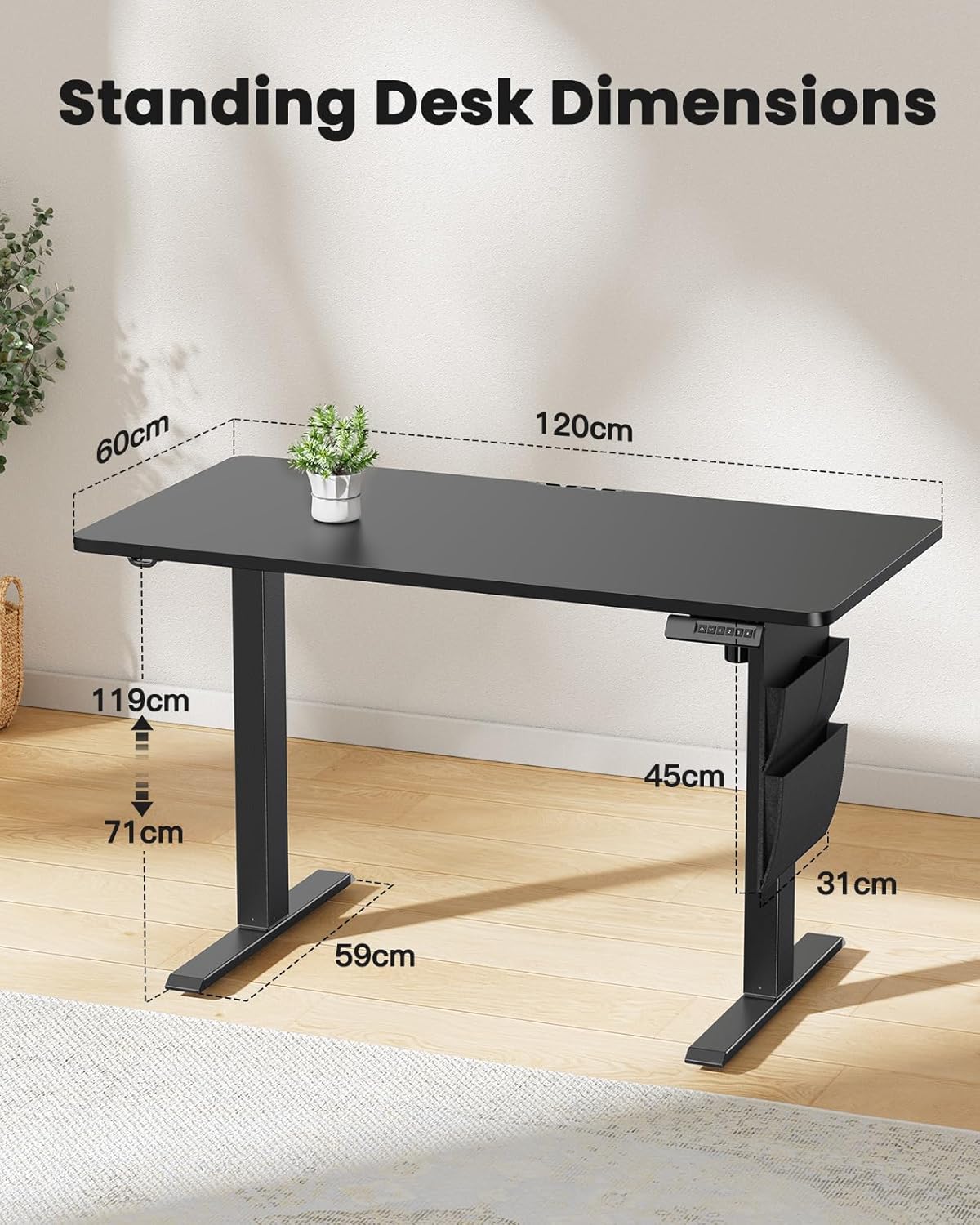
Image 8.1: Detailed diagram illustrating the key dimensions of the ErGear standing desk, including desktop width (120cm), depth (60cm), and height range (71cm to 119cm).
9. Garantija ir palaikymas
ErGear products are designed for durability and performance. For any questions, technical assistance, or warranty claims, please contact ErGear customer support.
- Grąžinimo politika: This product is eligible for a refund or replacement within 30 days of purchase, as per standard policy.
- Kontaktinė informacija: Please refer to the contact details provided on the ErGear official webNaujausius pagalbos kanalus rasite svetainėje arba pirkimo dokumentuose.


