1. Įvadas
Thank you for choosing the LIECTROUX YW810 Robot Window Cleaner. This intelligent device is designed to simplify window cleaning, offering efficient and safe operation for various glass surfaces. This manual provides essential information for the proper setup, operation, maintenance, and troubleshooting of your robot window cleaner. Please read this manual thoroughly before using the product to ensure optimal performance and safety.
2. Produktas baigtasview
2.1 Pagrindinės savybės
- Deep Window Cleaning: Integrated suction motor provides 2800Pa strong suction, combined with dual spiral cleaning heads and microfiber cloths for effective cleaning on vertical glass surfaces.
- Universalus pritaikymas: Compatible with various glass types, windows, tiles, glass floors, and hard-to-reach areas like high-rise interior/exterior windows.
- Intelligent Cleaning Modes: Features 3 pre-programmed automatic cleaning modes, intelligent AI path planning, and remote control for comprehensive window cleaning.
- APP valdymas: Control the robot via a smartphone application with a simple operating interface.
- Safety and Fall Protection: Integruotas UPS akumuliatorius užtikrina 25 minučių absorbcinę apsaugą išjungimo metutages, preventing falls. Equipped with a 4m professional safety rope and a 5.2m adapter cord.
- Dual Water Spray: Automatic water spraying function to assist in cleaning.
- Micron-scale Atomization Technology: Bilateral ultrasonic water atomization (15um mist) to soften stubborn stains.
- Mažo triukšmo veikimas: Noise level during operation is ≤65dB.
2.2 Produkto komponentai
The LIECTROUX YW810 includes the main robot unit, power adapter, extension cords, safety rope, remote control, and microfiber cleaning cloths.

Figure 2.2.1: LIECTROUX YW810 Robot Window Cleaner and its smartphone application interface.

2.2.2 pav. Išsamus view of the robot's cleaning mechanism, highlighting micron-scale spray, double-disc rotation, and microfiber cloth.

Figure 2.2.3: Illustration of the microfiber cleaning pads, designed to effectively remove various types of stains including rain marks, dirt, and general grime.
3. Sąranka
- Pritvirtinkite valymo šluostes: Ensure the microfiber cleaning cloths are securely attached to the robot's cleaning pads.
- Prijunkite maitinimą: Connect the power adapter to the robot and then plug it into a power outlet. The robot requires continuous power to operate.
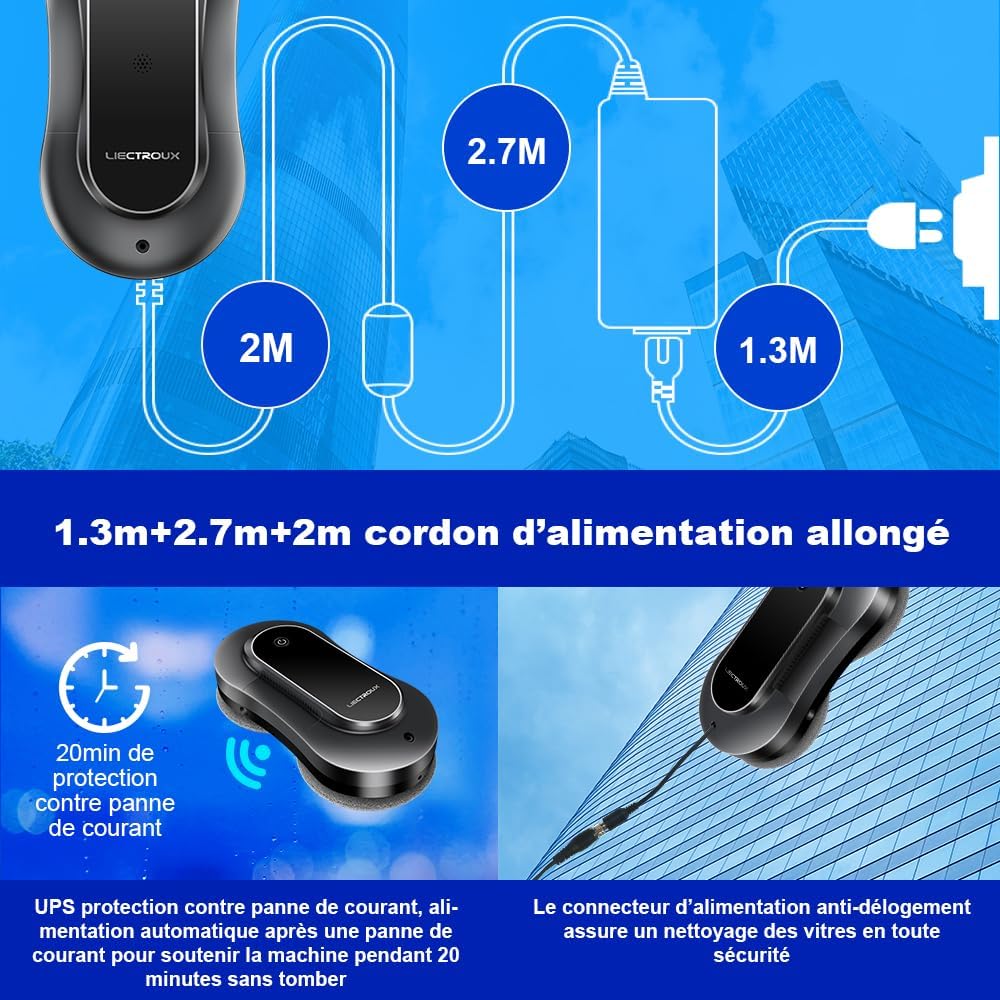
Figure 3.1: Diagram showing the extended power cord setup (1.3m + 2.7m + 2m) and the anti-dislodgement power connector for secure operation.
- Pritvirtinkite apsauginį lyną: Always attach the professional safety rope to a secure anchor point before placing the robot on the window. This is crucial for preventing falls, especially when cleaning high windows.

Figure 3.2: Illustration of the robot's multiple safety protections, including the bionic suction cup and the safety rope, capable of supporting up to 6KG.
- Užpildykite vandens baką: Locate the water tank and fill it with appropriate window cleaning solution or distilled water. The robot features dual water spray for effective cleaning.
- Maitinimas: Norėdami įjungti robotą, paspauskite maitinimo mygtuką.
4. Naudojimo instrukcijos
4.1 Placing the Robot on the Window
Hold the robot firmly against the glass surface. The suction motor will activate, creating a strong vacuum seal. Ensure the robot is securely attached before releasing it.
4.2 Valymo režimai ir valdymas
The LIECTROUX YW810 offers both automatic and manual cleaning options.
- Automatinio valymo režimai: The robot features 3 pre-programmed automatic cleaning modes. These modes utilize intelligent AI path planning to cover the entire window surface efficiently.

Figure 4.2.1: The robot's intelligent path planning, illustrating three cleaning patterns: Top-down, Left-to-right, and Right-to-left.
- APP valdymas: Download the dedicated LIECTROUX app on your smartphone. After activating the robot's power button, you can connect and control the robot via the app. The app interface is designed for ease of use.

Figure 4.2.2: Controlling the robot window cleaner using the smartphone application, showing the simple interface for operation.
- Nuotolinio valdymo pultas: Use the provided 2.4G wireless remote control to operate the robot. It has an effective operating distance of 15 meters, allowing you to control the window cleaner remotely with a simple press of a button.

Figure 4.2.3: Operating the robot with the one-button remote control, demonstrating its ease of use from a distance.
4.3 Removing the Robot from the Window
Once cleaning is complete, or if you need to remove the robot, firmly grasp the robot and press the release button (if applicable, or power off). The suction will disengage, allowing you to safely remove the device. Always ensure you have a firm grip on the robot before disengaging suction.
5. Priežiūra
- Mikropluošto valymo šluostės: After each use, remove the microfiber cleaning cloths from the robot. Wash them with water and mild detergent. Allow them to air dry completely before reattaching for next use.
- Cleaning the Robot Body: Nuvalykite roboto išorę minkšta, d šluosteamp šluoste. Nenaudokite abrazyvinių valiklių ir nemerkite roboto į vandenį.
- Vandens rezervuaro priežiūra: Regularly empty and rinse the water tank to prevent residue buildup. Use only recommended cleaning solutions or distilled water to avoid clogging the spray nozzles.
- Saugykla: Kai nenaudojate, robotą laikykite vėsioje, sausoje vietoje, apsaugotoje nuo tiesioginių saulės spindulių.
6. Problemų sprendimas
If you encounter issues with your LIECTROUX YW810, please refer to the following common problems and solutions:
| Problema | Galima priežastis | Sprendimas |
|---|---|---|
| Robotas nelimpa prie lango. | Nepakankamas siurbimas; nešvarūs valymo kempinėlės; nelygus paviršius. | Ensure power is connected and robot is powered on. Clean or replace microfiber cloths. Ensure surface is clean and relatively flat. |
| Robotas nukrenta veikimo metu. | Galia tautage; safety rope not attached; suction loss. | Ensure continuous power supply. Always attach the safety rope to a secure point. Check for obstructions or excessive dirt on the window. The UPS battery provides temporary power during outages. |
| Robotas nejuda arba nevalo efektyviai. | Dirty cleaning pads; low water in tank; obstacle detection. | Clean or replace microfiber cloths. Refill water tank. Clear any obstacles from the cleaning path. |
| APP or remote control not responding. | Robot not powered on; battery low (remote); out of range; connectivity issue. | Ensure robot is powered on. Replace remote control batteries. Move closer to the robot. Re-pair the device if necessary. |
7. Specifikacijos
| Funkcija | Specifikacija |
|---|---|
| Prekės ženklas | LIECTROUX |
| Modelio pavadinimas | YW810 |
| Spalva | Sidabrinė pilka |
| Medžiaga | ABS |
| Gaminio matmenys (I x P x A) | 29.5L x 14.5W x 8.2H centimetrai |
| Prekės svoris | 4 kilogramo |
| Maitinimo šaltinis | Su laidu elektra |
| Kontrolės metodas | Application, Remote Control |
| Ypatinga funkcija | Fall Protection (Anti-drop) |
| Siurbimo galia | 2800Pa (from feature bullets) |
| UPS akumuliatoriaus atsarginė kopija | 25 minutes (from feature bullets) |
| Triukšmo lygis | ≤65dB (from aplus media image) |
8. Saugos informacija
To ensure safe operation of your LIECTROUX YW810 Robot Window Cleaner, please observe the following safety guidelines:
- Always connect the safety rope to a secure anchor point before placing the robot on any vertical surface.
- Ensure the robot is continuously connected to a power source during operation. The built-in UPS battery is for emergency power loss only, not for cordless operation.
- Do not use the robot on cracked, damaged, or extremely dirty glass surfaces.
- Laikykite rankas, plaukus ir laisvus drabužius atokiai nuo judančių roboto dalių.
- Do not allow children or pets to approach the robot during operation.
- Use only the recommended cleaning solutions or distilled water in the water tank.
- Do not attempt to disassemble or repair the robot yourself. Contact qualified service personnel for assistance.
- Ensure the power cord and safety rope are not tangled or obstructed during operation.
9. Garantija ir palaikymas
Specific warranty details for the LIECTROUX YW810 Robot Window Cleaner are not provided in the product specifications. Please refer to your purchase documentation or contact the seller directly for warranty information.
Atsarginių dalių prieinamumas: Šiuo metu nėra informacijos apie šio gaminio atsarginių dalių prieinamumą.
For technical support or service inquiries, please contact the vendor or retailer from whom you purchased the product.


