Įvadas
This manual provides detailed instructions for the Cillso H97 Wireless Earbuds. Please read this manual carefully before using the product to ensure proper operation and to maximize your user experience. Keep this manual for future reference.

Image: The Cillso H97 Wireless Earbuds in their charging case, displaying the digital battery indicator.
Pakuotės turinys
- Cillso H97 Wireless Earbuds (Left and Right)
- Įkrovimo dėklas
- USB-C įkrovimo laidas
- Vartotojo vadovas
Sąranka
1. Ausinių ir dėklo įkrovimas
Before first use, fully charge the earbuds and the charging case. Connect the provided USB-C cable to the charging port on the case and to a 5V/1A or 5V/2A power adapter. The digital display on the case will indicate the charging status.
- Įkrovimo laikas: Apytiksliai 1.5 valandos pilnai įkrauti.
- Baterijos veikimo laikas: Up to 8 hours of playback per charge, and up to 40 hours total with the charging case.
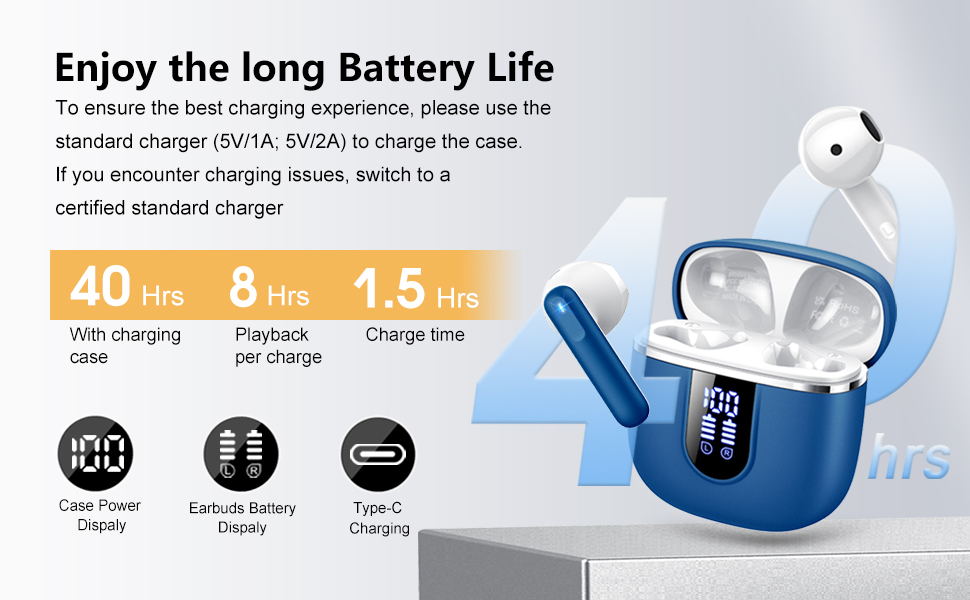
Image: Diagram illustrating the 40-hour total battery life, 8-hour single playback, and 1.5-hour charge time, along with the USB-C charging port and digital display.
The charging case is equipped with Over Current Protection (OCP) technology to prevent damage from prolonged high current. If the current exceeds the power limit, the power source will be cut off to protect the circuitry and device.

Image: Illustration explaining Over Current Protection (OCP) technology in the charging case.
2. Suporavimas su „Bluetooth“ įrenginiu
- Atidarykite įkrovimo dėklą. Ausinės automatiškai įsijungs susiejimo režimu.
- Savo įrenginyje (išmaniajame telefone, planšetiniame kompiuteryje, nešiojamajame kompiuteryje) įjunkite „Bluetooth“.
- Ieškokite "H97" in the list of available Bluetooth devices and select it to connect.
- Prijungus išgirsite garsinį patvirtinimą ir ausinės bus paruoštos naudoti.
The H97 earbuds feature Bluetooth 5.4 for a more stable connection, longer transmission range, lower power consumption, and reduced latency.

Image: Visual representation of Bluetooth 5.4 technology, highlighting benefits like stable connection, longer range, lower power consumption, and lower latency.
3. Ausinių dėvėjimas
Gently insert the earbuds into your ears, ensuring a comfortable and secure fit. The rounded tips are designed for in-ear comfort. Adjust them until the sound quality is optimal and they feel stable.

Image: Diagram showing the recommended angle for inserting the earbud into the ear for a secure fit.
Naudojimo instrukcijos
Palieskite valdiklius
The H97 earbuds feature sensitive touch sensors for easy control of various functions:
| Veiksmas | Funkcija |
|---|---|
| Double tap the left/right MFB button | Leisti / pristabdyti muziką |
| One tap the left/right MFB button | Atsiliepti / Baigti skambutį |
| Long press the right/left MFB button for 2s | Kitas/ankstesnis takelis |
| One tap the left/right MFB button (during call) | Volume Up/Down (specific mapping not detailed, typical for single tap) |
| Triple tap MFB button | Activate Voice Assistant (common function) |

Image: Visual guide to the smart touch controls on the earbuds for playback and call management.
Garso funkcijos
The H97 earbuds deliver a high-quality audio experience:
- Hi-Fi stereo garsas: Featuring 13mm diameter speakers with crystal clear treble, vibrant mid-range, and powerful bass.
- 3D Bass Stereo: Enhanced bass for an immersive listening experience.
- Aiškūs skambučiai: Equipped with 4 ENC (Environmental Noise Cancelling) microphones to filter out background noise and suppress wind noise, ensuring clear communication.

Image: Diagram illustrating the 13mm speaker driver and triple-layer composite diaphragm for enhanced bass and sound quality.

Image: Illustration detailing the 4-microphone design for crystal-clear calls, including feedback and talk mics, and anti-wind noise features.
Suderinamumas
The Cillso H97 Wireless Earbuds are compatible with a wide range of Bluetooth-enabled devices, including:
- Išmanieji telefonai („Android“, „iOS“)
- Tabletės
- Nešiojamieji kompiuteriai
- Desktop Computers (with Bluetooth adapter)

Image: Icons representing compatibility with phones, tablets, laptops, and desktops, shown alongside the earbuds and a smartphone playing music.
Priežiūra
Valymas ir priežiūra
The H97 earbuds are IP7 waterproof, offering protection against water, sweat, and rain. However, proper care is still recommended:
- Wipe the earbuds and charging case with a soft, dry cloth after each use, especially after workouts.
- Nenaudokite abrazyvinių valiklių ar tirpiklių.
- Prieš prijungdami įkrovimo laidą, įsitikinkite, kad įkrovimo prievadas yra sausas.
- Kai nenaudojate, laikykite ausines įkrovimo dėkle, kad apsaugotumėte ir liktų įkrautos.

Image: A person wearing the earbuds with water splashing, illustrating the IPX7 waterproof feature, along with icons for dust prevention, sweatproof, and nano material.
Geriausia įkrovimo praktika
- Always use the provided USB-C cable or a certified standard charger (5V/1A or 5V/2A) to charge the case.
- If you encounter charging issues, try switching to a different certified standard charger.
- Do not expose the charging case or earbuds to extreme temperatures.
Trikčių šalinimas
Bendros problemos ir sprendimai
| Problema | Galimas sprendimas |
|---|---|
| Ausinės nesusijungia arba neprisijungia |
|
| Veikia tik viena ausinė |
|
| Mažas garsumas arba prasta garso kokybė |
|
| Įkrovimo dėklas neįkraunamas |
|
Specifikacijos
| Funkcija | Detalė |
|---|---|
| Modelio numeris | H97 |
| Prekės ženklas | Cillso |
| Bluetooth versija | 5.4 |
| Garso technologija | 3D Bass Stereo, Hi-Fi Stereo Sound |
| Garsiakalbio dydis | 13 mm skersmens |
| Mikrofonai | 4 ENC triukšmą slopinantys mikrofonai |
| Baterijos veikimo laikas (ausinės) | Iki 8 valandų (vienas įkrovimas) |
| Bendras žaidimo laikas | Iki 40 valandų (su įkrovimo dėklu) |
| Įkrovimo prievadas | USB-C |
| Įkrovimo įvestis | 5V/1A or 5V/2A recommended |
| Atsparumo vandeniui įvertinimas | IP7 |
| Suderinami įrenginiai | Smartphones, Tablets, Laptops, Bluetooth Devices |
| Dažnių diapazonas | 20 Hz–20 000 Hz |
| Ausinės forma | Suapvalinti galiukai |
| Gaminio matmenys | 0.79 x 0.79 x 0.79 inches (earbud dimensions, case dimensions are 48.9mm x 53.4mm) |
| Prekės svoris | 0.352 uncijos |

Image: Visual representation of the earbuds and charging case dimensions, emphasizing their lightweight and pocket-sized design.
Garantija ir palaikymas
Pateiktuose duomenyse nebuvo informacijos apie produkto garantiją ir klientų aptarnavimą. Žr. produkto pakuotę arba oficialią gamintojo informaciją. websvetainėje rasite informacijos apie garantiją ir kaip susisiekti su klientų aptarnavimo tarnyba.
Saugos informacija
- Neardykite ir nemodifikuokite ausinių ar įkrovimo dėklo.
- Laikykite gaminį atokiau nuo ekstremalių temperatūrų, tiesioginių saulės spindulių ir drėgmės.
- Stenkitės, kad gaminys nenumestų arba nepaveiktų stipraus smūgio.
- Laikyti vaikams ir naminiams gyvūnėliams nepasiekiamoje vietoje.
- Išmeskite gaminį atsakingai, laikydamiesi vietinių taisyklių.


