1. Įvadas ir pabaigaview
The AZZA CSAZ-570B Cove is an ATX mid-tower computer case designed for gaming and high-performance PC builds. It features a back-connect supported design, optimizing cable management and internal aesthetics. This manual provides essential information for setting up, operating, and maintaining your computer case.
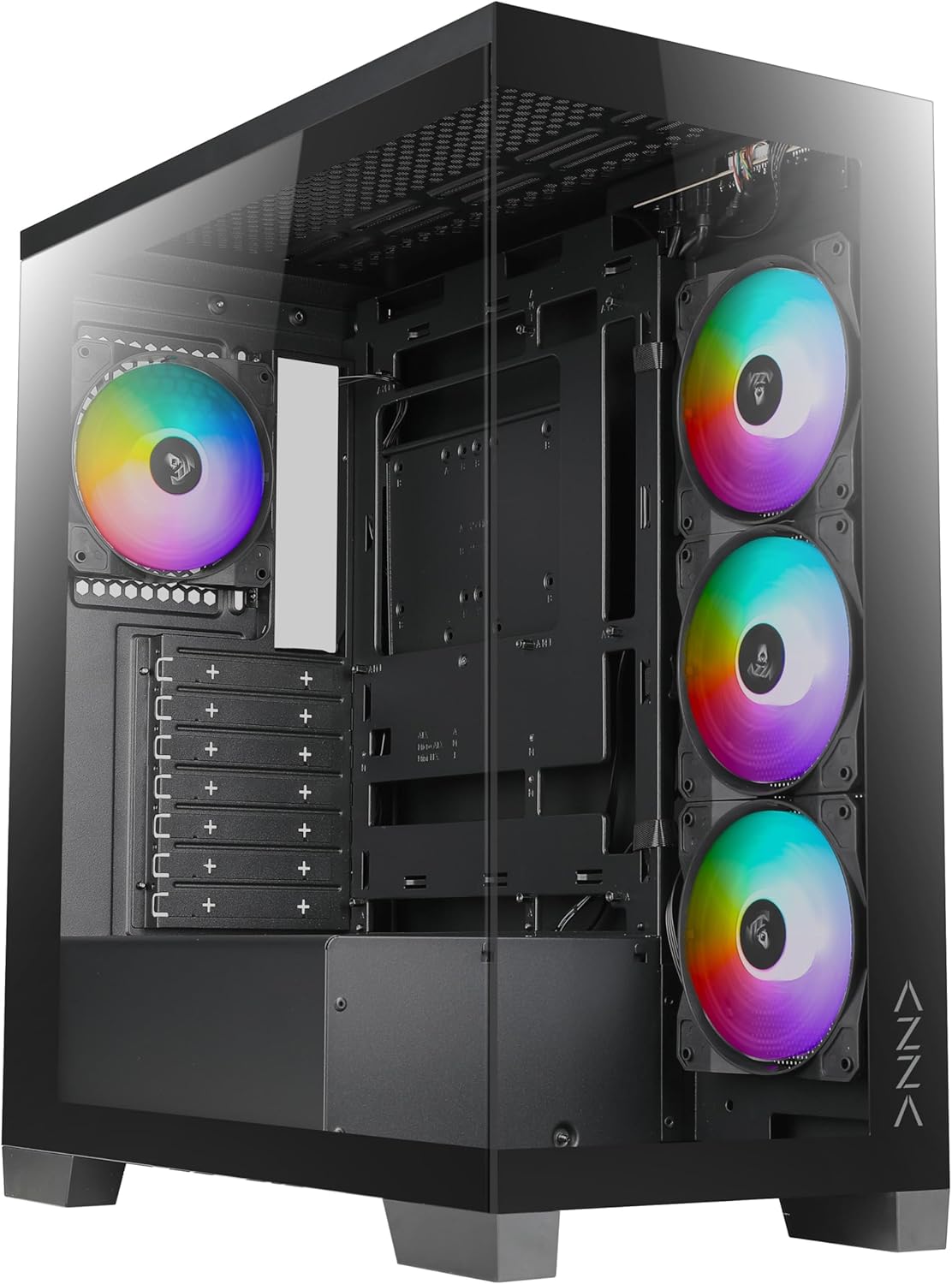
1 pav.: priekis view of the AZZA CSAZ-570B Cove computer case with RGB fans visible.
Pagrindinės funkcijos:
- Performance Optimized: Full mesh front panel with 4 x 120 mm pre-installed addressable RGB fans for excellent airflow.
- Multifaceted Airflow Support: Supports up to 10 x 120 mm fans, including direct GPU airflow with 2 x 120 mm fans above the PSU shroud.
- Pritaikomas apšvietimas: Controllable fan lighting via the top panel LED button, with motherboard RGB software synchronization support.
- Intuitive I/O: Top panel includes Power button, LED button, Combo HD Audio, 1 x USB 2.0, 1 x USB 3.0, and 1 x Type-C port.
- Back-Connect Supported: Designed to accommodate motherboards with back-mounted connectors for cleaner internal routing.
2. Sąranka ir diegimas
This section outlines the steps for installing components into your AZZA CSAZ-570B Cove computer case.
2.1 Pagrindinės plokštės montavimas
The case supports ATX (including back-connect supported), Micro ATX, and ITX motherboards. Ensure standoffs are correctly aligned for your motherboard form factor before installation.

Figure 2: Internal layout indicating motherboard support area (A), maximum CPU cooler height (B), and maximum GPU length (C).
- Sulygiuokite savo pagrindinę plokštę su iš anksto įdiegtomis pertraukomis.
- Secure the motherboard using appropriate screws.
- Connect all necessary power cables (24-pin ATX, CPU 8-pin) and data cables.
- For back-connect motherboards, route cables through the designated rear channels.
2.2 Cooling System Configuration
The CSAZ-570B offers extensive cooling options for optimal thermal performance.

Figure 3: Diagram illustrating fan mounting locations and sizes within the case.
Ventiliatoriaus palaikymas:
- Priekyje: 4 x 120mm (pre-installed ARGB fans)
- Į viršų: 3 x 120 mm arba 2 x 140 mm
- Galinis: 1x120mm
- Šonas (pagrindinės plokštės dėklas): 3x120mm
- Above PSU Shroud: 2 x 120mm (for direct GPU airflow)

Figure 4: Diagram showing radiator compatibility for the AZZA CSAZ-570B case.
Radiatoriaus palaikymas:
- Motherboard Side: Iki 360 mm
- Į viršų: Up to 280mm or 360mm
2.3 Saugojimo įrenginio įrengimas
The case provides flexible options for installing 2.5" SSDs and 3.5" HDDs.

5 pav. Vidinis view highlighting locations for SSD and HDD installation.
- Right Side Panel: Supports 2 x 2.5" SSDs or 1 x 3.5" HDD.
- Metalinis padėklas: Supports 1 x 2.5" SSD.
2.4 Maitinimo šaltinio įrengimas
The power supply mounts at the bottom of the case.
- Slide the power supply into the designated compartment at the bottom rear of the case.
- Pritvirtinkite maitinimo šaltinį varžtais nuo korpuso galo.
3. Naudojimo instrukcijos
This section details the functionality of the front I/O panel and lighting controls.
3.1 Priekinis įvesties / išvesties skydelis
The top panel provides convenient access to essential ports and controls.

6 pav. Iš arti view of the top I/O panel with labeled ports and buttons.
- Maitinimo mygtukas: Paspauskite, kad įjungtumėte arba išjungtumėte sistemą.
- LED mygtukas: Cycles through various pre-programmed ARGB lighting modes for the installed fans.
- Combo HD Audio: Skirta ausinėms ir mikrofonams prijungti.
- 1 USB 2.0 jungtys: Standartinis USB prievadas periferiniams įrenginiams.
- 1 USB 3.0 jungtys: High-speed USB port for data transfer.
- Type-C x 1: Reversible USB-C port for modern devices.
3.2 ARGB apšvietimo valdymas
Iš anksto įdiegtus ARGB ventiliatorius galima valdyti dviem būdais:
- LED mygtukas: Use the dedicated LED button on the top panel to cycle through different lighting effects and colors.
- Motherboard RGB Software: If your motherboard supports Addressable RGB (ARGB) synchronization, connect the case's ARGB cable to the motherboard's ARGB header. This allows you to control the fan lighting directly through your motherboard's software (e.g., ASUS Aura Sync, MSI Mystic Light Sync, Gigabyte RGB Fusion, ASRock Polychrome Sync). Ensure the LED button is not actively overriding the motherboard control.
4. Priežiūra
Regular maintenance helps ensure optimal performance and longevity of your computer case and its components.
- Dulkių valymas: Periodically clean dust filters (if present) and internal components using compressed air. Dust accumulation can impede airflow and lead to overheating.
- Ventiliatoriaus valymas: Gently clean fan blades to remove dust buildup, which can affect fan performance and noise levels.
- Kabelių valdymas: Ensure cables are neatly routed and secured to prevent interference with airflow and moving parts.
- Išorinis valymas: Išorinius paviršius nuvalykite minkšta, damp audinys. Venkite abrazyvinių valiklių.
5. Problemų sprendimas
This section provides general troubleshooting tips for common issues.
- Sistema neįsijungia:
- Check if the power supply is properly connected to the wall outlet and the motherboard.
- Įsitikinkite, kad maitinimo mygtuko laidas iš korpuso yra tinkamai prijungtas prie pagrindinės plokštės priekinio skydelio jungties.
- Patikrinkite, ar maitinimo jungiklis yra „ĮJUNGTA“ padėtyje.
- Ventiliatoriai nesisuka / RGB neveikia:
- Confirm fan power cables are securely connected to the motherboard or fan controller.
- Check ARGB cables for proper connection to the motherboard's ARGB header or the case's ARGB controller.
- If using motherboard software, ensure the software is running and configured correctly.
- Try cycling the LED button on the top panel to see if the lights respond.
- Neveikiantys USB prievadai:
- Ensure the USB 2.0, USB 3.0, and Type-C headers from the case are correctly plugged into the corresponding headers on your motherboard.
- Check device drivers for your motherboard's USB controllers.
6. Specifikacijos
Detailed technical specifications for the AZZA CSAZ-570B Cove computer case.
| Funkcija | Specifikacija |
|---|---|
| Modelio pavadinimas | CSAZ-570B |
| Atvejo tipas | Mid Tower |
| Spalva | Juoda |
| Medžiaga | Plastikas, Grūdintas stiklas |
| Gaminio matmenys (IxPxH) | 17.1 colio gylis x 9.1 colio plotis x 19.3 colio aukštis (435 mm x 230 mm x 490 mm) |
| Prekės svoris | 21.8 svaro |
| Pagrindinės plokštės suderinamumas | ATX (Back-connect supported), Micro ATX, ITX |
| Maksimalus procesoriaus aušintuvo aukštis | 170 mm |
| Maksimalus GPU ilgis | 400 mm |
| Maitinimo šaltinio tvirtinimo tipas | Apatinis kalnas |
| Iš anksto įdiegti ventiliatoriai | 4 x 120mm ARGB (Front) |
| Priekinės įvesties / išvesties prievadai | Power Button, LED Button, Combo HD Audio, 1x USB 2.0, 1x USB 3.0, 1x Type-C |
| Drive Bays | 2 x 2.5" SSD or 1 x 3.5" HDD (Right Side Panel), 1 x 2.5" SSD (Metal Tray) |
Figure 7: Product dimensions of the AZZA CSAZ-570B case.
7. Garantija ir palaikymas
For warranty information and technical support, please contact AZZA directly.
- Gamintojas: AZZA
- Pardavėjas: AZZA USA (via Amazon)
- Produktų apsaugos planai: Papildomus apsaugos planus galima įsigyti atskirai. Šie planai siūlo ilgesnę apsaugą nei standartinė gamintojo garantija.
- 3 metų apsaugos planas
- 4 metų apsaugos planas
- „Complete Protect“ (mėnesinė prenumerata)
- Grąžinimo politika: This product is eligible for a 30-day return policy (refund/replacement) from the date of purchase.
- Official AZZA Store: For further information and product updates, visit the AZZA Store on Amazon.


