1. Įvadas
Thank you for choosing the EvoFox Ronin Wired Mechanical Gaming Keyboard. This manual provides detailed instructions for setting up, operating, and maintaining your keyboard to ensure optimal performance and longevity. The EvoFox Ronin is designed for a superior typing and gaming experience, featuring advanced sound dampening, customizable switches, and dynamic RGB lighting.

Image 1.1: EvoFox Ronin Wired Mechanical Gaming Keyboard (Black)
Pagrindinės funkcijos:
- 9-Layer Gasket Structure: Advanced design for reduced noise, improved stability, and enhanced tactile feedback.
- Hot-Swappable Outemu Red Silent Switches: Customizable, durable, and smooth typing experience with included switch puller.
- RGB foninis apšvietimas kiekvienam klavišui: 21 effects and Audio Sync Mode for personalized and immersive lighting.
- Specialus garsumo reguliatorius: Convenient control over audio levels.
- Powerful Windows Software: Program keys, create macros, control backlighting, and manage profiles with onboard memory.
- Suderinamumas su keliomis platformomis: Easily switch between Windows and Mac modes.
- Detachable Braided USB-C Cable: Robust 1.5m cable with EMI ring for reliable connection and portability.
2. Pakuotės turinys
Prašome patikrinti, ar pakuotėje yra visi reikalingi daiktai:
- 1 x EvoFox Ronin Mechanical Gaming Keyboard
- 1 x raktų dangtelio ištraukiklis
- 4 x Outemu Red Switches (Spare)
- 1 x Vartotojo vadovas
3. Produktas baigtasview
3.1 Tarpiklio struktūra
The EvoFox Ronin features an advanced 9-layer gasket structure. This design incorporates silicone gaskets, a mounting plate, and multiple layers of vibration and sound dampening materials to provide a stable, quiet, and comfortable typing experience by minimizing unwanted noise and resonance.
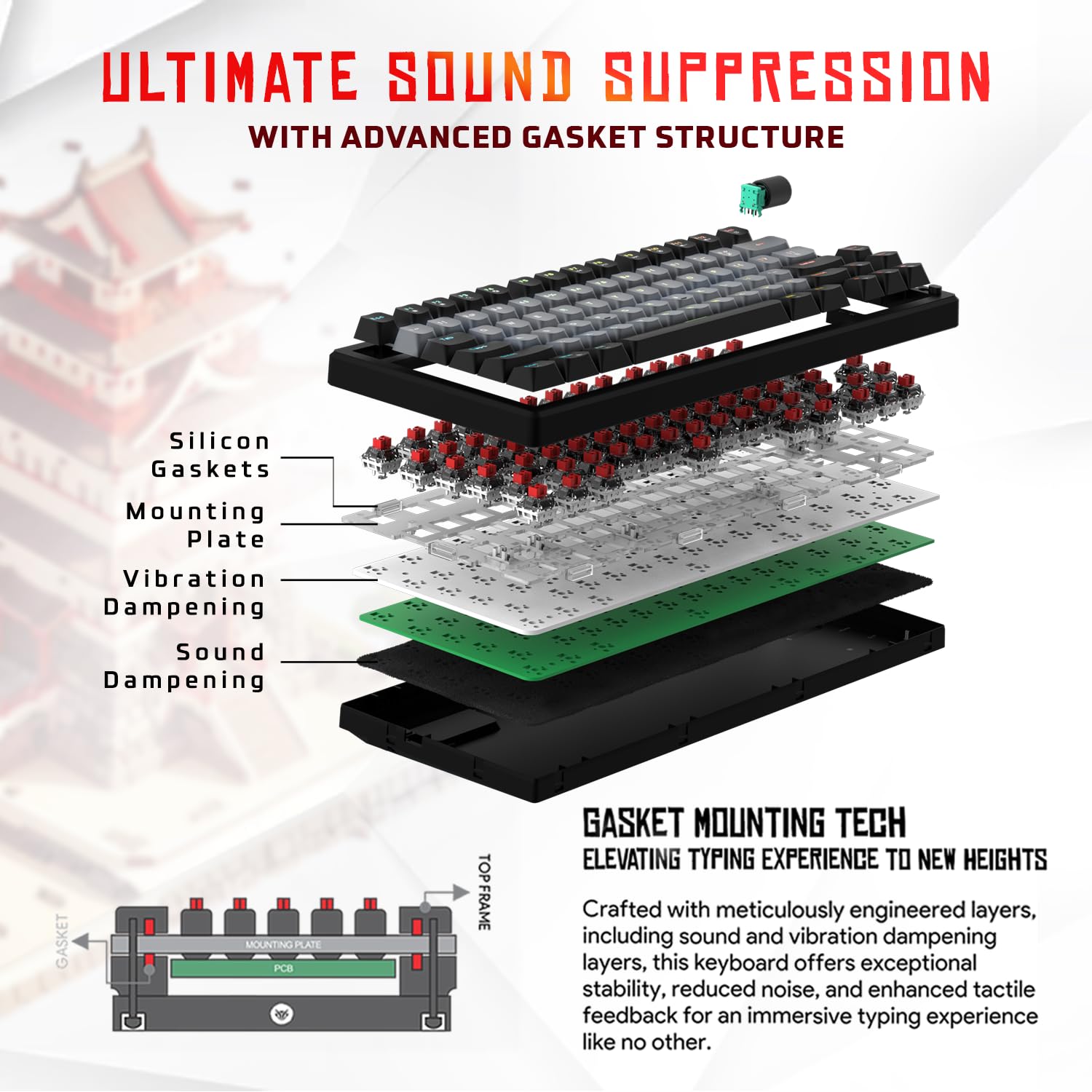
3.1 paveikslas: Išsklaidytas view of the 9-layer gasket structure, showing silicone gaskets, mounting plate, and dampening sluoksniai.
3.2 Outemu Red Silent Switches
The keyboard is equipped with Outemu Red Dust Proof Switches, known for their linear and silent operation. These switches are hot-swappable, allowing users to easily replace them with other compatible 3-pin mechanical switches without soldering, enabling full customization of the typing feel.

Image 3.2: Close-up of Outemu Red switches and the included switch puller, demonstrating hot-swappable functionality.
3.3 Per-Key RGB Backlighting
Each key on the EvoFox Ronin features individual RGB backlighting, offering 16 million colors and 21 pre-set lighting effects. The lighting can be customized directly on the keyboard or through the dedicated software, including an Audio Sync Mode that reacts to sound.

Image 3.3: The EvoFox Ronin keyboard showcasing its customizable per-key RGB backlighting.
3.4 Dedicated Volume Knob
A metal volume knob is integrated into the keyboard for quick and precise audio adjustments. Rotate to change volume, and press to mute/unmute.
3.5 Detachable USB-C Cable
The keyboard connects via a robust 1.5-meter braided USB-C cable, which is detachable for easy portability and storage. The cable includes an EMI ring to minimize signal interference.

Image 3.4: Features of the EvoFox Ronin, including the volume knob, detachable USB-C cable, and double-height adjustable legs.
4. Sąrankos instrukcijos
Follow these steps to set up your EvoFox Ronin keyboard:
- Išpakuokite klaviatūrą: Atsargiai išimkite klaviatūrą ir visus priedus iš pakuotės.
- Prijunkite USB-C laidą: Įkiškite pateikto laido USB-C galą į klaviatūros gale esantį prievadą.
- Prisijunkite prie kompiuterio: Prijunkite USB-A laido galą prie laisvo kompiuterio (asmeninio arba „Mac“) USB prievado.
- Tvarkyklės diegimas: Klaviatūra yra „plug-and-play“ tipo. Jūsų operacinė sistema turėtų automatiškai aptikti ir įdiegti reikiamus tvarkykles.
- Papildomos programinės įrangos diegimas: For advanced customization, download the dedicated Windows software from the official EvoFox websvetainę.
5. Naudojimo instrukcijos
5.1 Pagrindinės klavišų funkcijos
The EvoFox Ronin functions as a standard TKL (Tenkeyless) keyboard. All keys perform their labeled functions. The keyboard supports N-Key Rollover, ensuring every key press is registered accurately, even during rapid input.
5.2 Multimedijos ir funkciniai klavišai
Access multimedia and additional functions by pressing the Fn key in combination with the designated F-keys or other keys. Refer to the keycap legends for specific functions (e.g., Fn + F1 for media player, Fn + F2 for volume down).
5.3 RGB apšvietimo valdymas
You can control the RGB lighting directly from the keyboard:
- Keitimo efektai: Naudokite Fn + \| , kad galėtumėte perjungti 21 skirtingų apšvietimo efektų.
- Sureguliuokite ryškumą: Naudokite Fn + rodyklė aukštyn ryškumui padidinti ir Fn + rodyklė žemyn ryškumui sumažinti.
- Sureguliuokite greitį: Naudokite Fn + rodyklė kairėn sumažinti efekto greitį ir Fn + rodyklė dešinėn padidinti efekto greitį.
- Audio Sync Mode: Activate specific modes that react to audio input.
5.4 Programinės įrangos pritaikymas
The dedicated Windows software allows for comprehensive customization:
- Pagrindinis programavimas: Remap any key to a different function.
- Makrokomandų kūrimas: Įrašykite ir priskirkite sudėtingas klavišų sekas vienam klavišui.
- Backlighting Effects: Fine-tune RGB colors, effects, brightness, and speed.
- Profile Valdymas: Sukurkite ir išsaugokite kelis profesionalusfiles skirtingoms programoms ar žaidimams.
- Balsavimo rodiklis: Adjust the polling rate up to 1000Hz.

Image 5.1: Screenshot of the EvoFox Ronin's dedicated software, showing options for light settings, button settings, and macro management.
5.5 Cross-Platform Compatibility
The keyboard supports both Windows and Mac operating systems. Use the designated key combination (typically Fn + Win or similar, refer to keycap legends) to switch between modes, ensuring correct key mapping for your OS.
6. Priežiūra
6.1 Klaviatūros valymas
Norėdami išlaikyti klaviatūros išvaizdą ir funkcionalumą:
- Prieš valydami atjunkite klaviatūrą nuo kompiuterio.
- Dulkėms ir šiukšlėms pašalinti tarp klaviatūros dangtelių naudokite suslėgto oro balionėlį.
- Nuvalykite klavišų dangtelius ir klaviatūros paviršių minkšta, šiek tiek drėgna šluosteamp audiniu. Venkite per didelės drėgmės.
- Nenaudokite stiprių chemikalų ar abrazyvinių valiklių.
6.2 Jungiklių keitimas
The EvoFox Ronin features hot-swappable switches, allowing for easy replacement without soldering:
- Atjunkite klaviatūrą nuo kompiuterio.
- Norėdami švelniai nuimti norimą klavišo dangtelį, naudokite pridedamą klavišo dangtelio traukiklį.
- Use the included switch puller to carefully grip the top and bottom clips of the switch and pull it straight up.
- Align the pins of the new switch with the holes on the PCB and gently press it down until it clicks into place. Ensure the pins are not bent.
- Uždėkite klavišo dangtelį.

Image 6.1: A keycap being removed from the keyboard using a keycap puller.
7. Problemų sprendimas
If you encounter issues with your EvoFox Ronin keyboard, refer to the following common solutions:
- Klaviatūra nereaguoja:
- Įsitikinkite, kad USB-C laidas yra tvirtai prijungtas prie klaviatūros ir kompiuterio.
- Pabandykite prijungti klaviatūrą prie kito kompiuterio USB prievado.
- Išbandykite klaviatūrą kitame kompiuteryje, kad atmestumėte su kompiuteriu susijusią problemą.
- Iš naujo paleiskite kompiuterį.
- RGB apšvietimas neveikia / yra netinkamas:
- Check the on-board lighting controls (Fn key combinations) to ensure brightness is not set to zero or an effect is not disabled.
- Jei naudojate programinę įrangą, įsitikinkite, kad ji veikia ir ar įdiegtas tinkamas administratorius.file yra aktyvus.
- Reinstall the keyboard software if issues persist.
- Neregistruojami raktai:
- Įsitikinkite, kad po klaviatūros dangteliu ar jungikliu nėra jokių šiukšlių.
- If a specific key is not working, try replacing its switch (refer to Section 6.2).
- Check for bent pins on the switch if you recently replaced one.
- Software Issues (e.g., Antivirus Flagging):
- Ensure you download the software from the official EvoFox website to avoid unofficial versions.
- If your antivirus flags the software, you may need to add an exception for the software's executable file. Proceed with caution and only if you trust the source.
- Contact EvoFox support for the latest software version or assistance.
8. Specifikacijos
| Funkcija | Detalė |
|---|---|
| Prekės ženklas | EvoFox |
| Modelio pavadinimas | EvoFox Ronin TKL Wired |
| Klaviatūros aprašymas | Mechaninis |
| Ryšio technologija | USB-C (laidinis) |
| Jungikliai | Outemu Red Silent Dust Proof Switches (Hot-Swappable) |
| Foninis apšvietimas | Per-Key RGB (16 Million Colors, 21 Effects, Audio Sync Mode) |
| Apklausos rodiklis | Iki 1000Hz |
| Rakto apvertimas | N-Key Rollover (All Anti-Ghosting Keys) |
| Ypatingos savybės | Advanced Gasket Structure, Compact TKL Design, Multimedia Keys, Pro Mod Hotswap Module, Powerful Windows Software, Dedicated Volume Controller |
| Suderinami įrenginiai | Nešiojamasis kompiuteris, kompiuteris |
| Aparatinės įrangos platforma | PC/Mac/Linux/Unix |
| Kabelio ilgis | 1.5m Detachable Braided Type-C with EMI Ring |
| Medžiaga | Plastikiniai |
| Gaminio matmenys | 32 x 13.5 x 2.6 cm |
| Prekės svoris | 640 g |
| Kilmės šalis | Kinija |
9. Garantija ir palaikymas
The EvoFox Ronin Mechanical Gaming Keyboard comes with a standard manufacturer's warranty. Please refer to the warranty card included in your package for specific terms and conditions, including warranty period and coverage details.
For technical support, troubleshooting assistance, or warranty claims, please contact EvoFox customer support. You can find contact information on the official EvoFox website or through the manufacturer, Allied Electronics & Magnetics Private Limited.
Gamintojas: Allied Electronics & Magnetics Private Limited
Adresas: C-64/4, Okhla Phase - 2, New Delhi - 110020


