1. Įvadas
This manual provides detailed instructions for the Transformers TF-T07 Ear Hanging Wireless Headphones. Please read this manual carefully before using the product to ensure proper operation and to maximize your listening experience.
The TF-T07 headphones feature an ergonomic ear-hanging design, Bluetooth 5.4 connectivity, ultra-low latency for gaming, a high-quality microphone, and a sweatproof build, delivering clear audio with deep bass.
2. Pakuotės turinys
Atidarę pakuotę, patikrinkite, ar yra visi šie daiktai:
- Transformers TF-T07 Ear Hanging Wireless Headphones
- Įkrovimo laidas (C tipas)
- Įkrovimo dėklas
- Vartotojo vadovas (šis dokumentas)
3. Produktas baigtasview
The Transformers TF-T07 headphones are designed for comfort and high-fidelity audio. They feature an open-ear, ear-hanging design, providing a comfortable fit without entering the ear canal.

Image: The TF-T07 headphones in their charging case, highlighting the non-in-ear design for comfortable wear.
Pagrindinės funkcijos:
- "Bluetooth 5.4": Stabiliam ir efektyviam belaidžiam ryšiui.
- HD balsas: Enhanced call clarity.
- Žaidimo mažas delsos laikas: Minimized audio delay for gaming.
- Erdvinis garsas: Įtraukianti garso patirtis.
- Spalvingi žibintai: Integrated lighting feature.

Image: Visual representation of the TF-T07's main features, including Bluetooth 5.4 and low latency gaming.
4. Sąranka ir įkrovimas
4.1 Pradinis įkrovimas
Prieš pirmą kartą naudodami, visiškai įkraukite ausines ir įkrovimo dėklą.
- Prijunkite pridedamą C tipo įkrovimo laidą prie dėklo įkrovimo prievado.
- Kitą laido galą prijunkite prie USB maitinimo šaltinio (pvz., sieninio adapterio, kompiuterio USB prievado).
- The charging indicator lights on the case will show charging status.
- Pilnas įkrovimas paprastai trunka maždaug 2 valandas.
4.2 Ausinių dėvėjimas
The TF-T07 features an ergonomic ear-hanging design for a secure and comfortable fit.
- Identify the left (L) and right (R) headphones.
- Gently hook each headphone over your ear, ensuring the speaker portion is positioned correctly near your ear canal without entering it.
- Pritaikykite, kad priglustų patogiai ir patogiai.
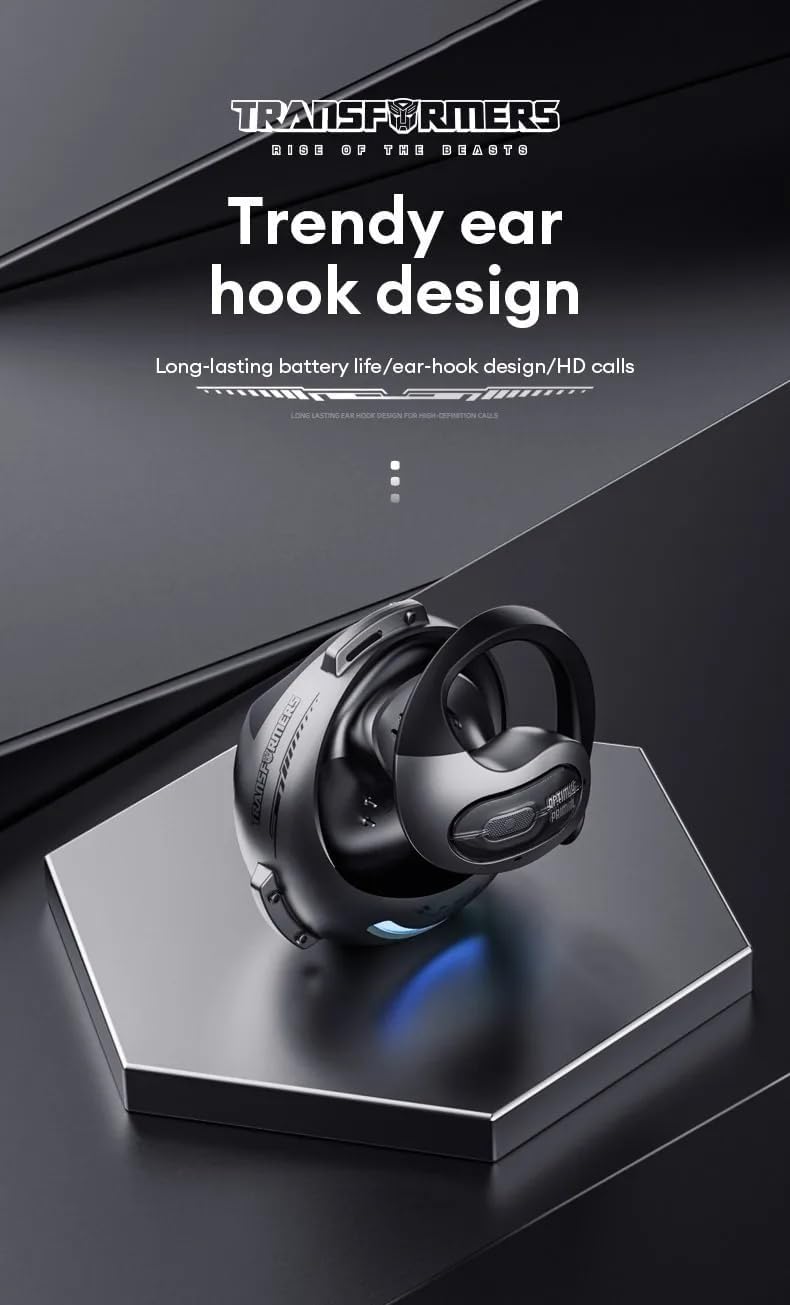
Image: Close-up of the TF-T07's ear hook design, emphasizing its ergonomic shape.
4.3 Bluetooth poravimas
Norėdami prijungti ausines prie įrenginio:
- Įsitikinkite, kad ausinės yra įkrautos.
- Open the charging case. The headphones will automatically enter pairing mode (indicated by flashing lights, refer to product specific light indicators if available).
- Savo įrenginyje (išmaniajame telefone, planšetiniame kompiuteryje, kompiuteryje) įjunkite „Bluetooth“.
- Ieškokite available Bluetooth devices and select "TF-T07" from the list.
- Once connected, the headphones will indicate successful pairing (e.g., a voice prompt or solid light).
- Ausinės automatiškai prisijungs prie paskutinio suporuoto įrenginio, kai bus išimtos iš dėklo, jei įrenginyje įjungtas „Bluetooth“.
5. Naudojimo instrukcijos
5.1 Pagrindiniai valdikliai
The TF-T07 headphones feature integrated controls for easy management of audio and calls. Specific touch or button functions may vary; refer to the quick start guide included in your package for precise details.
- Maitinimo įjungimas/išjungimas: Headphones power on automatically when removed from the case and power off when placed back in the case.
- Leisti / pristabdyti: Vieną kartą bakstelėkite bet kurią ausinę.
- Garsumo valdymas: Adjust volume directly on the headphones (specific gesture/button location not detailed in product info, assume standard controls).
- Kitas / ankstesnis takelis: Double tap or long press (refer to quick start guide).
- Atsiliepti / Baigti skambutį: Vienas bakstelėjimas įeinančio skambučio metu.
- Atmesti skambutį: Long press during an incoming call.
- Suaktyvinti „Voice Assistant“: Triple tap (refer to quick start guide).
5.2 Skambinimas ir skambučių priėmimas
The built-in high-quality microphone with DNS noise reduction ensures clear communication.

Image: The TF-T07 headphones are designed for high-definition calls, even in noisy environments.
5.3 Žaidimų patirtis
The TF-T07 headphones offer ultra-low latency, crucial for competitive gaming, ensuring audio synchronization with on-screen action.
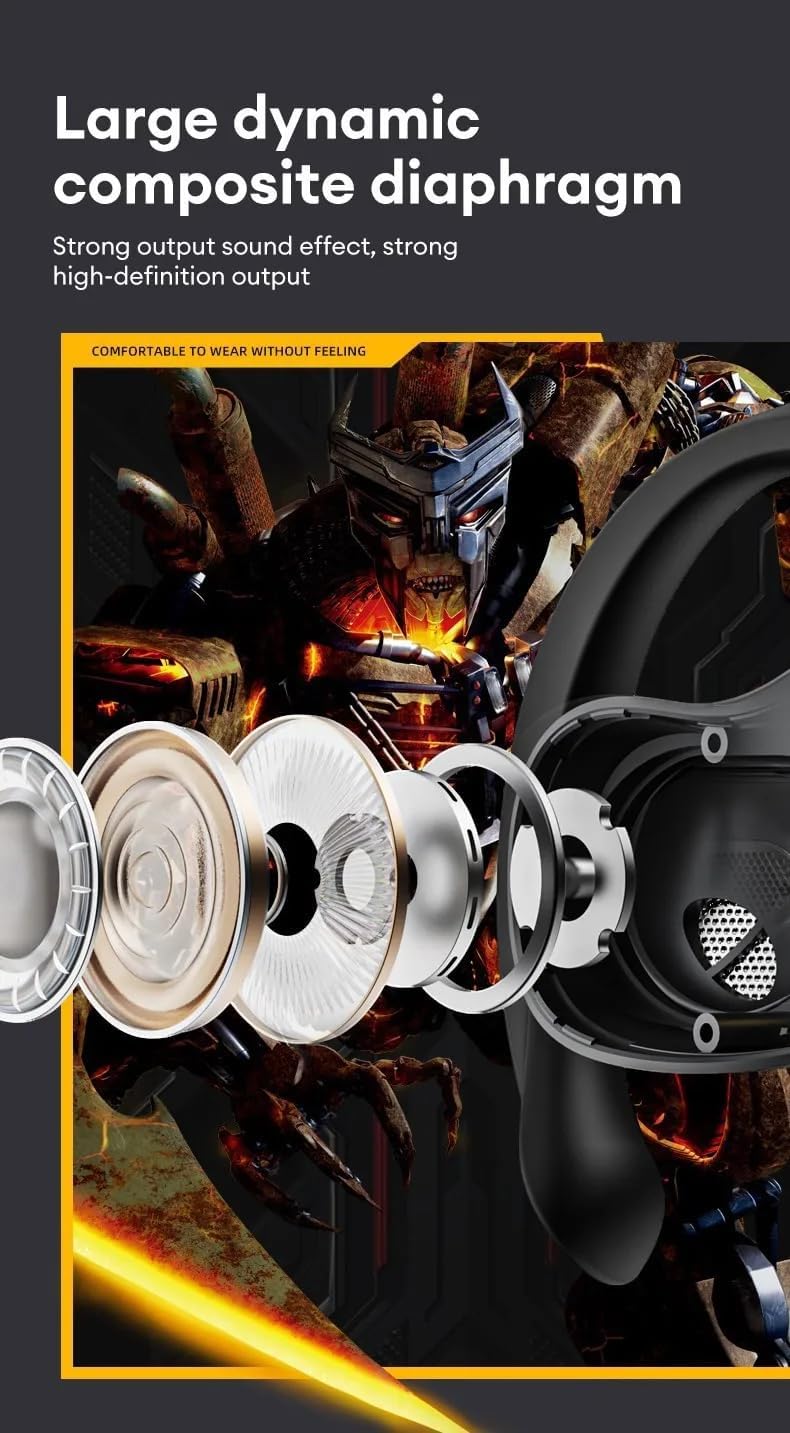
Image: Internal components of the TF-T07 headphones, highlighting the large dynamic composite diaphragm for strong sound output.

Image: The TF-T07 headphones provide a full spectrum listening experience with excellent sound transmission.
6. Priežiūra ir priežiūra
To ensure the longevity and optimal performance of your TF-T07 headphones, follow these care guidelines:
- Valymas: Ausinėms ir įkrovimo dėklui valyti naudokite minkštą, sausą, nepūkuotą šluostę. Nenaudokite abrazyvinių valiklių, alkoholio ar cheminių tirpiklių.
- Prakaitui atsparus dizainas: The headphones are designed to be sweatproof, making them suitable for workouts. However, avoid submerging them in water or exposing them to heavy rain. Dry them thoroughly after exposure to sweat.
- Saugykla: Kai nenaudojate, laikykite ausines įkrovimo dėkle, kad apsaugotumėte jas nuo dulkių ir pažeidimų. Laikykite vėsioje, sausoje vietoje, toliau nuo ekstremalių temperatūrų.
- Akumuliatoriaus priežiūra: Norėdami išsaugoti baterijos veikimo laiką, reguliariai kraukite ausines, net jei nenaudojate dažnai. Venkite ilgo visiško baterijos išsikrovimo.
7. Problemų sprendimas
If you encounter issues with your TF-T07 headphones, try the following solutions:
- Nėra galios:
- Įsitikinkite, kad ausinės ir įkrovimo dėklas yra visiškai įkrauti.
- Patikrinkite įkrovimo laidą ir maitinimo šaltinį.
- Nepavyksta sujungti:
- Įsitikinkite, kad jūsų įrenginyje įjungtas „Bluetooth“, o ausinės yra susiejimo režimu.
- Perkelkite ausines arčiau savo įrenginio (iki 10 metrų).
- Išjunkite „Bluetooth“ ryšį kituose netoliese esančiuose įrenginiuose, kad išvengtumėte trukdžių.
- Forget "TF-T07" from your device's Bluetooth list and try pairing again.
- Paleiskite įrenginį ir ausines iš naujo.
- Nėra garso arba mažas garsumas:
- Increase the volume on both your device and the headphones.
- Įsitikinkite, kad ausinės tinkamai prijungtos prie jūsų įrenginio.
- Check if the audio output is set to "TF-T07" on your device.
- Prasta garso kokybė:
- Priartėkite prie savo įrenginio, kad sumažintumėte trukdžius.
- Venkite kliūčių tarp ausinių ir įrenginio.
- Ensure the headphones are clean and free from debris.
If the issue persists, please refer to the warranty and support section.
8. Specifikacijos
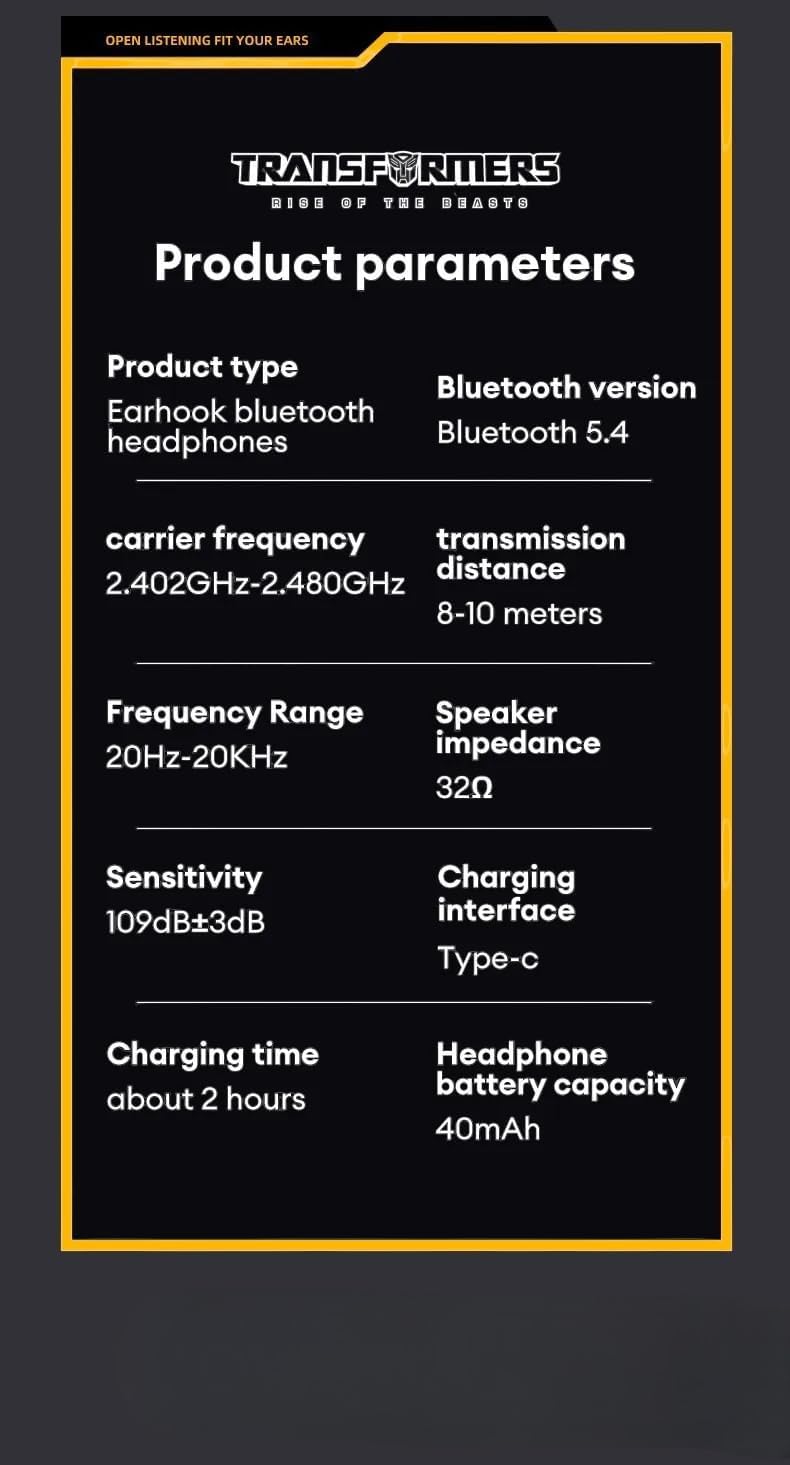
Image: Detailed product parameters for the TF-T07 headphones.
| Funkcija | Detalė |
|---|---|
| Produkto tipas | Earhook Bluetooth ausinės |
| Modelio pavadinimas | TF-T07 |
| Prekės ženklas | Transformatoriai |
| Ryšio technologija | Belaidis ryšys („Bluetooth 5.4“) |
| Bluetooth versija | Bluetooth 5.4 |
| Nešlio dažnis | 2.402 GHz–2.480 GHz |
| Perdavimo atstumas | 8-10 metrai |
| Dažnių diapazonas | 20Hz - 20KHz |
| Garsiakalbio varža | 32Ω |
| Jautrumas | 109 dB ± 3 dB |
| Įkrovimo sąsaja | C tipas |
| Įkrovimo laikas | Maždaug 2 val |
| Ausinių baterijos talpa | 40 mAh |
| Ypatingos savybės | Noise Isolation, Sweatproof Design, Ultra-Low Latency |
| Spalva | Pilka |
9. Informacija apie garantiją
The Transformers TF-T07 Ear Hanging Wireless Headphones come with a Manufacturer's Warranty of 6 mėnesiai nuo pirkimo datos.
Ši garantija taikoma medžiagų ir gamybos defektams, atsiradusiems įprasto naudojimo sąlygomis. Ji netaikoma žalai, atsiradusiai dėl netinkamo naudojimo, nelaimingų atsitikimų, neleistinų modifikacijų ar įprasto nusidėvėjimo.
Išsaugokite pirkimo įrodymą, kad galėtumėte kreiptis dėl garantijos.
10. Pagalba klientams
For further assistance, technical support, or warranty inquiries, please contact your retailer or the manufacturer's customer service department.
Please have your product model number (TF-T07) and proof of purchase ready when contacting support.


