1. Įvadas
This manual provides essential instructions for the safe and efficient use of your DALI IO-8 Wireless/Wired Hi-Fi Headphones. Please read this manual thoroughly before using the product and retain it for future reference. The DALI IO-8 headphones are designed to deliver a high-fidelity audio experience with advanced features such as Active Noise Cancellation (ANC), Bluetooth AptX Adaptive connectivity, and a long-lasting battery.
2. Produktas baigtasview
Susipažinkite su savo DALI IO-8 ausinių komponentais ir valdikliais.

2.1 paveikslas: Priekyje view DALI IO-8 ausinių demonstravimasasing the caramel and white color scheme and overall design.

2.2 paveikslas: Iš viršaus į apačią view of the DALI IO-8 headphones, highlighting the earcups and visible control buttons on the side.
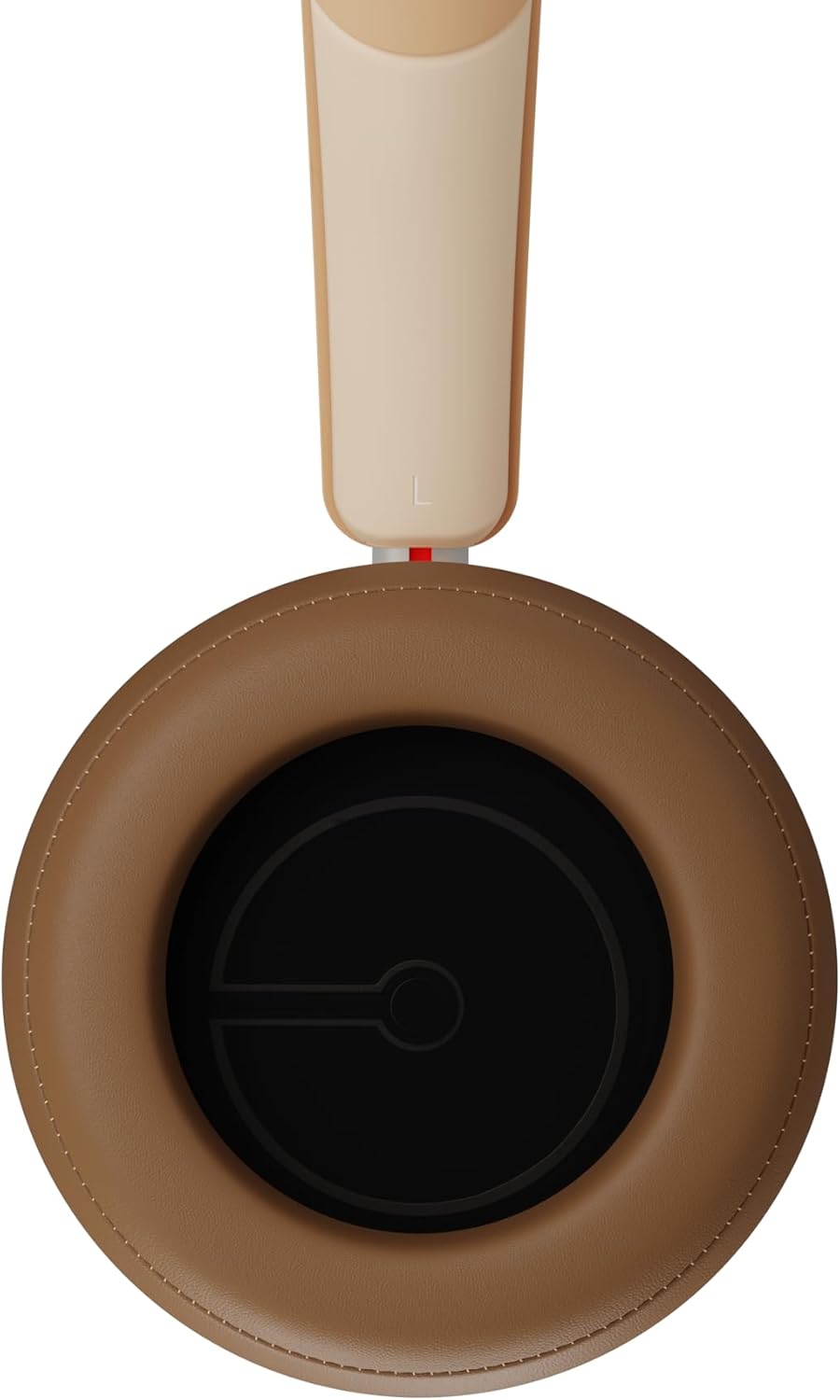
2.3 paveikslas: Interjeras view of a DALI IO-8 earcup, showing the soft padding and driver grille, designed for comfort and sound delivery.

2.4 paveikslas: Iš arti view of the DALI IO-8 earcup, showing the USB-C charging port and other control buttons.
2.1 Pakuotės turinys
- DALI IO-8 ausinės
- USB-C įkrovimo laidas
- 3.5 mm garso laidas
- Kelioninis dėklas (jei yra)
- Vartotojo vadovas (šis dokumentas)
2.2 Ausinių komponentai

2.5 paveikslas: Sprogo view illustrating the internal components of the DALI IO-8 headphones, including the 50mm driver, circuitry, and earcup structure.
- Headband (Adjustable)
- Earcups (Over-ear design with genuine leather)
- 50mm Driver (SMC Driver Technology)
- Control Buttons (Power, Volume, ANC, Multifunction)
- USB-C Port (Charging and Wired Audio)
- 3.5mm Audio Jack (Wired Audio)
- Microphones (for ANC and calls)
3. Sąranka
3.1 Ausinių įkrovimas
Before initial use, fully charge your DALI IO-8 headphones.
- Connect the supplied USB-C cable to the USB-C port on the headphone earcup.
- Kitą USB-C laido galą prijunkite prie suderinamo USB maitinimo šaltinio (pvz., kompiuterio USB prievado, USB sieninio adapterio).
- LED indikatorius rodys įkrovimo būseną. Pilnai įkrautas ausines galėsite klausytis iki 35 valandų su įjungtu ANC.
- Visiškai įkrovę atjunkite laidą.
3.2 Maitinimo įjungimas/išjungimas
- Norėdami įjungti: Press and hold the Power button for approximately 2 seconds until the LED indicator illuminates.
- Norėdami išjungti: Paspauskite ir palaikykite maitinimo mygtuką maždaug 3 sekundes, kol užges LED indikatorius.
3.3 Bluetooth poravimas
The DALI IO-8 supports Bluetooth AptX Adaptive for high-quality wireless audio.
- Įsitikinkite, kad ausinės yra išjungtos.
- Press and hold the Power button for approximately 5 seconds until the LED indicator flashes blue rapidly. This indicates pairing mode.
- Garso įrenginyje (išmaniajame telefone, planšetiniame kompiuteryje, kompiuteryje) įjunkite „Bluetooth“ ir ieškokite galimų įrenginių.
- Select "DALI IO-8" from the list of found devices.
- Once paired, the LED indicator will glow solid blue or flash slowly.
- Įjungus ausines, jos automatiškai bandys prisijungti prie paskutinio suporuoto įrenginio.
3.4 Laidinis ryšys
The DALI IO-8 can be used with a wired connection via the 3.5mm audio jack or USB-C.
- 3.5 mm garso kabelis: Connect one end of the supplied 3.5mm audio cable to the headphone's 3.5mm jack and the other end to your audio source's headphone output. The headphones can be used passively in this mode, or actively with ANC and amplification if powered on.
- USB-C garso jungtis: Connect the supplied USB-C cable to the headphone's USB-C port and the other end to a compatible USB audio output on your computer or device. This mode allows for digital audio transmission and charging simultaneously.
4. Ausinių valdymas
4.1 Aktyvus triukšmo slopinimas (ANC)
The DALI IO-8 features three distinct ANC modes and wind noise suppression.
- Press the dedicated ANC button to cycle through the available modes:
- ANC įjungta: Maksimalus triukšmo slopinimas.
- Skaidrumo režimas: Allows ambient sounds to pass through for situational awareness.
- ANC išjungta: Active noise cancellation is disabled.
- Wind noise suppression is automatically engaged in ANC modes to reduce interference from wind.
4.2 garso režimai
Customize your listening experience with two sound profiles.
- Press the Sound Mode button (if available, or refer to specific button on device) to switch between:
- Hi-Fi režimas: Delivers a balanced and neutral sound signature.
- Boso režimas: Enhances low-frequency response for a more impactful bass.
4.3 Playback and Volume Control
Use the control buttons on the earcup for media playback and volume adjustments.
- Pagarsink: Paspauskite mygtuką „+“.
- Patildyti: Paspauskite mygtuką „-“.
- Leisti / pristabdyti: Vieną kartą paspauskite daugiafunkcį mygtuką.
- Kitas takelis: Double-press the Multifunction button.
- Ankstesnis takelis: Triple-press the Multifunction button.
4.4 Skambučių valdymas
Manage phone calls when connected via Bluetooth.
- Atsiliepti / Baigti skambutį: Vieną kartą paspauskite daugiafunkcį mygtuką.
- Atmesti skambutį: Paspauskite ir 2 sekundes palaikykite daugiafunkcį mygtuką.
- Suaktyvinti „Voice Assistant“: Press and hold the Multifunction button for 2 seconds (when not on a call).
5. Priežiūra
5.1 Valymas
- Ausines nuvalykite minkštu, sausu, nepūkuotu skudurėliu.
- Nenaudokite abrazyvinių valiklių, tirpiklių ar cheminių purškiklių.
- Ausų kaušelius švelniai nuvalykite šiek tiek drėgnu skudurėliu.amp jei reikia, šluoste, tada nedelsdami nusausinkite.
- Įsitikinkite, kad į angas ar prievadus nepatenka drėgmės.
5.2 Saugykla
- Kai nenaudojate, laikykite ausines apsauginiame kelioniniame dėkle, kad išvengtumėte pažeidimų.
- Venkite ausinių laikymo ekstremaliose temperatūrose, drėgmėje ar tiesioginiuose saulės spinduliuose.
6. Problemų sprendimas
| Problema | Galima priežastis | Sprendimas |
|---|---|---|
| Nėra galios | Baterija išsikrovusi. | Įkraukite ausines naudodami pridedamą USB-C laidą. |
| Nepavyksta susieti per „Bluetooth“ | Ausinės neįjungtos susiejimo režimu; įrenginio „Bluetooth“ išjungtas; per toli nuo įrenginio. | Ensure headphones are in pairing mode (rapid blue LED flash). Turn on Bluetooth on your device. Move headphones closer to the device. Forget "DALI IO-8" on your device and re-pair. |
| Nėra garso | Volume too low; incorrect input source; headphones not connected. | Increase volume on headphones and source device. Check Bluetooth connection or wired cable. Ensure the correct audio output is selected on your device. |
| ANC neveikia efektyviai | ANC mode off; poor earcup seal. | Ensure ANC is enabled. Adjust headphones for a proper seal around your ears. |
7. Specifikacijos
| Funkcija | Detalė |
|---|---|
| Modelio pavadinimas | DALI IO-8 |
| Prekės ženklas | DALI |
| Ryšio technologija | Laidinis, belaidis („Bluetooth“) |
| Belaidžio ryšio technologija | Bluetooth (AptX Adaptive) |
| Triukšmo panaikinimas | Active Noise Suppression (ANC) with Wind Noise Suppression |
| Ausų išdėstymas | Virš ausies |
| Vairuotojo dydis | 50mm (SMC Driver Technology) |
| Varža | 25 omai |
| Ausinių lizdas | 3.5 mm |
| Baterijos veikimo laikas | Iki 35 valandų (su ANC) |
| Medžiagos | Genuine Leather (earcups) |
8. Saugos informacija
Please observe the following safety guidelines to ensure safe operation and prevent damage to your headphones or injury to yourself.
- Do not expose the headphones to water, rain, or moisture.
- Venkite ekstremalių temperatūrų.
- Do not disassemble, repair, or modify the headphones. This voids the warranty.
- Klausykitės vidutiniu garsumu, kad nepažeistumėte klausos.
- Laikyti vaikams nepasiekiamoje vietoje.
- Išmeskite gaminį atsakingai, laikydamiesi vietinių taisyklių.
9. Garantija ir palaikymas
DALI products are manufactured to high standards and are covered by a limited warranty. For specific warranty terms and conditions, please refer to the warranty card included with your product or visit the official DALI website. For technical support, troubleshooting assistance, or service inquiries, please contact your authorized DALI dealer or DALI customer support.

9.1 paveikslas: A person wearing the DALI IO-8 headphones, demonstrating their comfortable fit and use in a real-world environment.


