1. Įvadas ir pagrindinės savybės
The SmallRig RC 60C RGB LED Video Light is a compact and powerful lighting solution designed for professional photography and video production. Its portable design and versatile features make it suitable for various mobile content creation scenarios.
Pagrindinės funkcijos:
- Custom RGBCW Light Source: High brightness and color rendering index with a wide color temperature range of 2500K to 10000K.
- Integruota baterija: Features a 3400mAh (48.96 Wh) built-in battery supporting PD fast charging (with ≥65W charger), allowing a full charge in 2 hours and providing 45 minutes of full power output.
- Keli maitinimo parinktys: Can be powered by the built-in battery, external adapters, power banks, or battery handles (accessories may be sold separately).
- Professional Lighting Controls: Includes G/M adjustment, built-in color filters (ROSCO, LEE), HSI mode, RGBCW mode, and color selection for precise lighting control.
- Priedų suderinamumas: Compatible with a wide range of lighting accessories, including mini reflectors and parabolic softboxes. Note: A special adapter ring (ID: 4476) is required for Bowens mount accessories.
- Dvigubi valdymo metodai: Control the light directly via on-body controls with a 1.3-inch color screen or remotely using the SmallGoGo application.
- 12 Built-in Light Effects: Offers various creative lighting effects for diverse shooting needs.

Figure 1.1: SmallRig RC 60C RGB LED Video Light with its mini reflector and handle attached. This image showcases the compact design of the light, ready for use.
2. Pakuotės turinys
Please check the contents of your package upon receipt to ensure all items are present and undamaged. The contents vary depending on the edition purchased:
Lite Edition:
- 1 x SmallRig RC 60C RGB LED Video Light
- 1 x Mini Reflector
- 1 x 3m USB-C to USB-C PD Charging Cable
- 1 x Vartotojo vadovas
Powerbank Clamp Leidimas:
- 1 x SmallRig RC 60C RGB LED Video Light
- 1 x Mini Reflector
- 1 x montavimo kronšteinas
- 1 x rankena
- 1 x 3m USB-C to USB-C PD Charging Cable
- 1 x 0.2m USB-C to USB-C PD Charging Cable
- 1 x PowerBank Clamp
- 1 x saugojimo krepšys
- 1 x Vartotojo vadovas

Figure 2.1: Visual representation of the main components included in the Lite Edition package: the RC 60C light, mini reflector, charging cable, and user manual.
3. Sąranka
3.1 Pradinis įkrovimas
Before first use, fully charge the built-in battery. Connect the provided USB-C to USB-C PD charging cable to the light's USB-C port and to a PD fast charger (65W or higher recommended). A full charge typically takes approximately 2 hours.
3.2 Attaching the Mini Reflector
To attach the mini reflector, align the reflector with the front of the light. Push it gently onto the light's mount and rotate it clockwise until it locks securely into place. To remove, locate the release slider on the top of the light, slide it to unlock, and rotate the reflector counter-clockwise before pulling it off.
3.3 Šviestuvo montavimas
The RC 60C features a 1/4-inch thread on the bottom for tripod or stand installation. Securely screw the light onto a compatible tripod, light stand, or the included handle (if applicable for your edition).
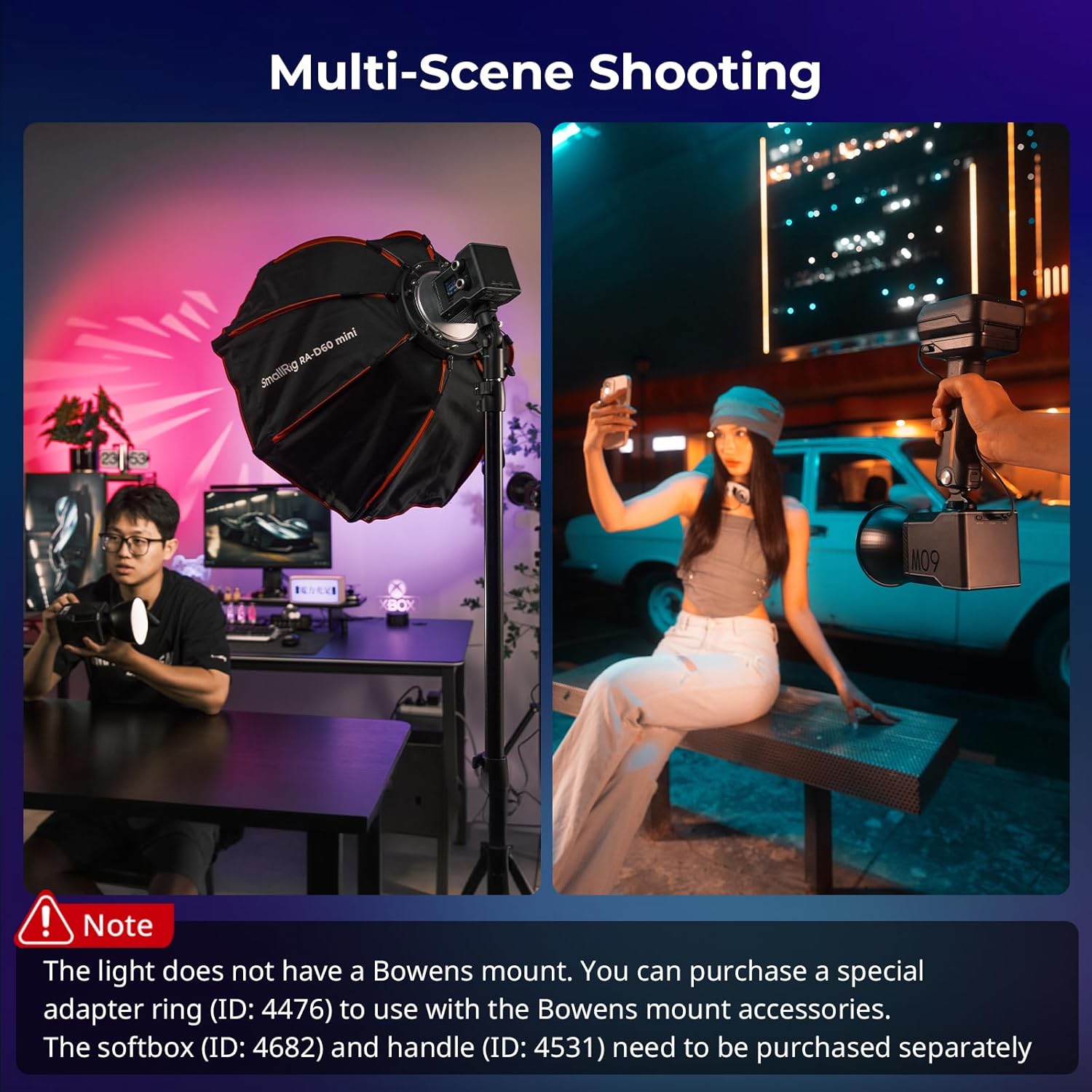
Figure 3.1: The SmallRig RC 60C can be used in various shooting environments, either mounted on a stand with a softbox or held handheld for mobile content creation.
4. Naudojimo instrukcijos
4.1 Įjungimas / išjungimas
Locate the power slide switch on the back of the light. Slide it to the 'ON' position to power on the device. Slide it to the 'OFF' position to power off.
4.2 Control Options: On-Body and App Control
The RC 60C offers two primary control methods:
- On-Body Control: Use the rotary knobs and buttons on the light's body to adjust settings. The 1.3-inch color screen displays current parameters. One rotary knob controls intensity (clickable for 20% increments), and the other is used for other parameters (clickable to switch between settings). A small button is used to change modes or reset settings.
- SmallGoGo App Control: Download the SmallGoGo application on your smartphone. Connect the light via Bluetooth to remotely manage various parameters, save presets, and access advanced features like color picking from images.

Figure 4.1: The RC 60C can be controlled directly using its physical knobs and screen, or remotely via the SmallGoGo mobile application for enhanced flexibility.
4.3 Spalvų temperatūros ir ryškumo reguliavimas
Use the rotary knobs to adjust the color temperature (CCT) between 2500K and 10000K and the brightness intensity. The screen will display the current values.
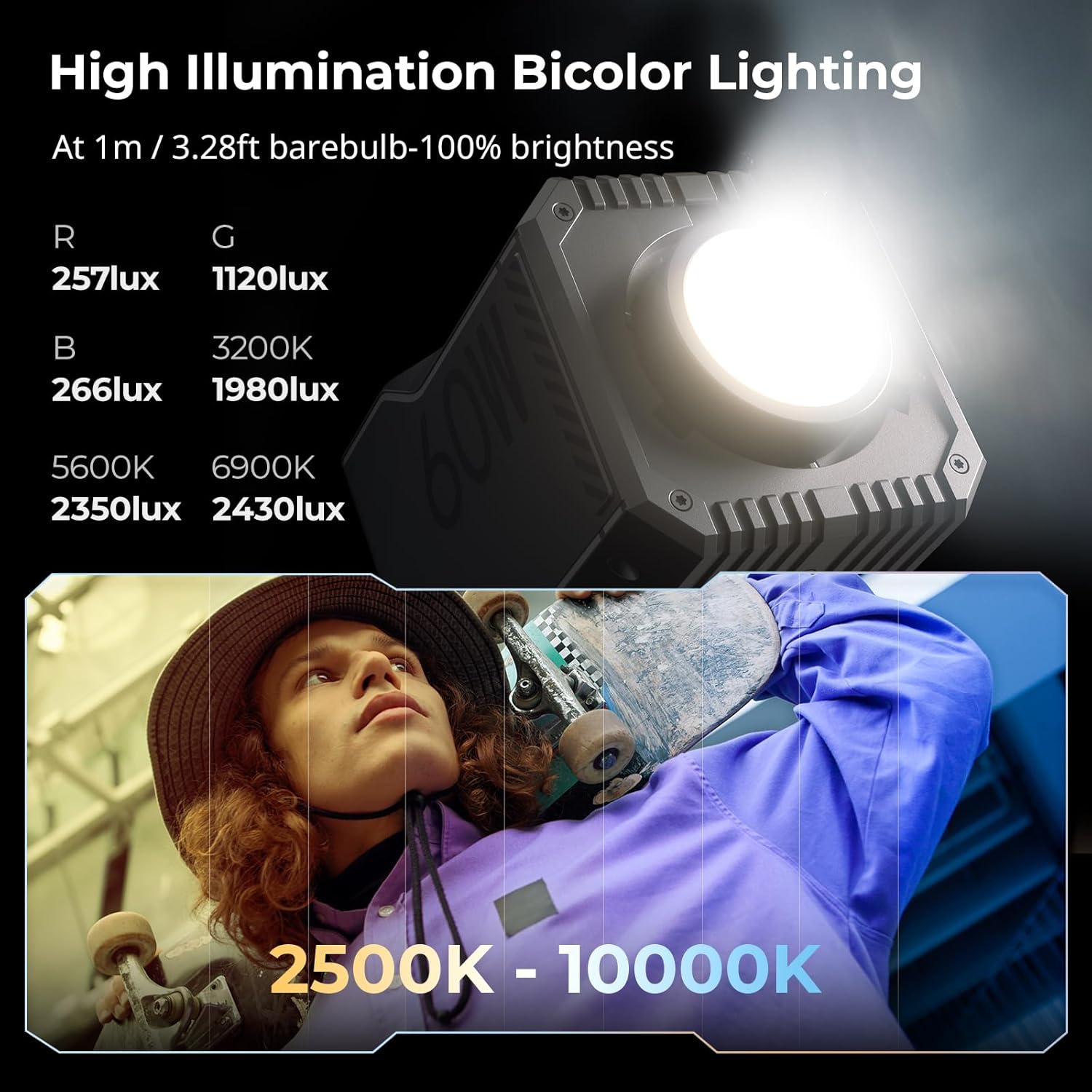
Figure 4.2: The light's high illumination capabilities are demonstrated with various lux readings at 1 meter for different color temperatures, ranging from 2500K to 10000K.
4.4 Professional Dimming and Color Features
The RC 60C offers advanced color control options:
- G/M Adjustment: Fine-tune green/magenta balance.
- HSI režimas: Adjust Hue, Saturation, and Intensity.
- RGBCW režimas: Direct control over Red, Green, Blue, Cold White, and Warm White LEDs.
- Spalvų filtrai: Access built-in ROSCO and LEE color filters for instant color changes.
- Customize Color (App Only): Upload an image to the SmallGoGo App and pick a color to replicate with the light.
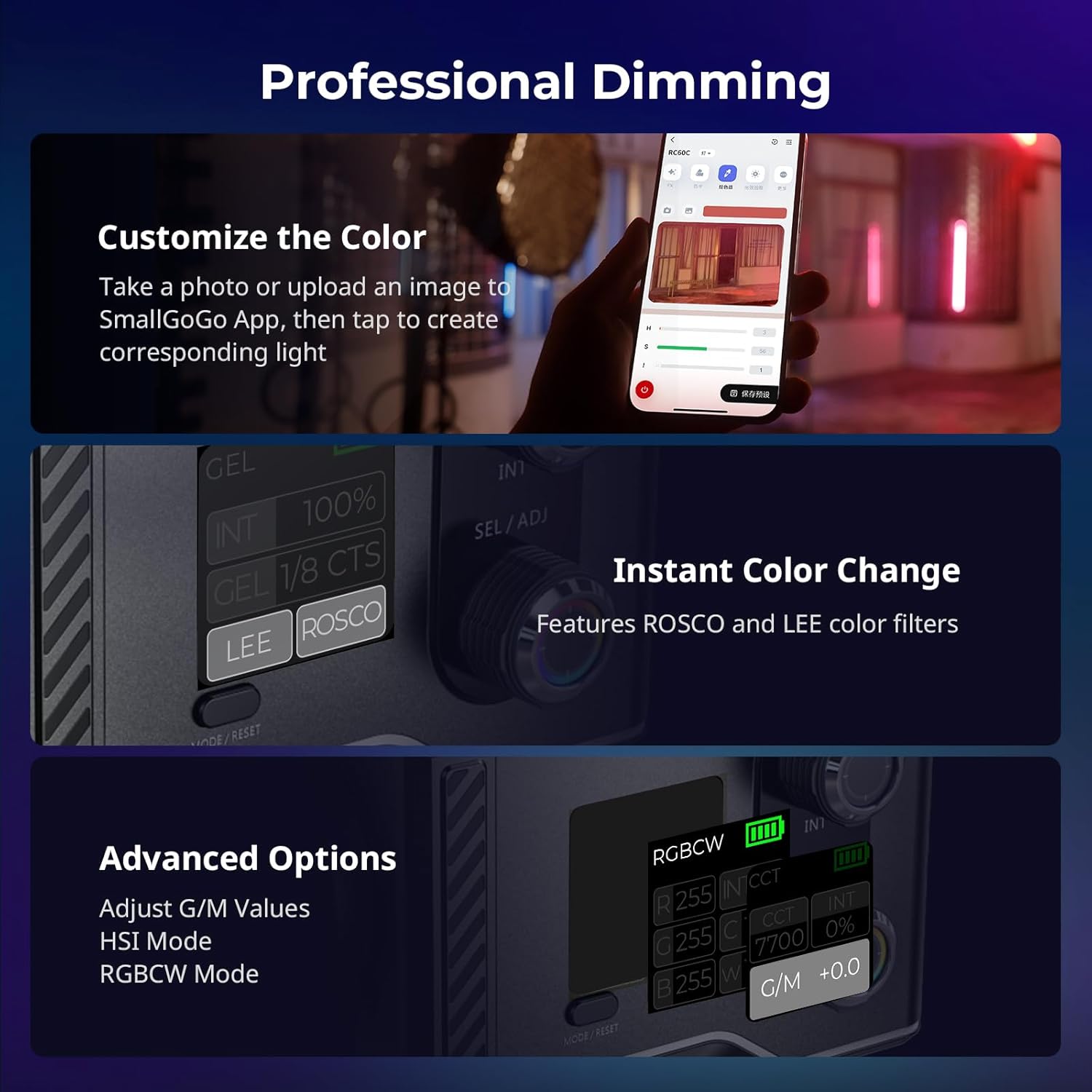
4.3 pav.: Viršutinė dalisview of the professional dimming and color features, including the ability to customize colors via the app, use instant color filters, and access advanced G/M, HSI, and RGBCW modes.
4.5 Šviesos efektai
The light includes 12 pre-programmed light effects for creative scenarios. These effects can be selected and adjusted via the on-body controls or the SmallGoGo app. Examples include Flash, Paparazzi, Lightning, Party, Faulty Bulb, TV, Flame, Fireworks, Breath, CCT Cycle, Color Cycle, and Police.

Figure 4.4: The light's excellent color performance is highlighted by high SSI, CRI, and TLCI values, alongside a visual representation of the 12 available light effects for diverse creative applications.
4.6 Multiple Power Options
In addition to the built-in battery, the RC 60C supports various external power sources:
- External Power Bank: Connect a compatible USB-C PD power bank for extended runtime.
- Maitinimo rankena: Use a SmallRig power handle (sold separately) for comfortable grip and additional battery life.
- External Adapter: For stable, continuous power, connect an external power adapter (sold separately).

Figure 4.5: This image illustrates the various ways to power the RC 60C, including its built-in battery, and options for external power banks, power handles, and AC adapters.
5. Priežiūra
- Valymas: Use a soft, dry cloth to clean the light's body. Do not use abrasive cleaners or solvents.
- Saugykla: Šviestuvą laikykite vėsioje, sausoje vietoje, apsaugotoje nuo tiesioginių saulės spindulių ir ekstremalių temperatūrų.
- Akumuliatoriaus priežiūra: For optimal battery life, avoid fully discharging the battery frequently. If storing for extended periods, charge the battery to approximately 50-70% every three months.
- Šilumos išsklaidymas: Ensure the light's ventilation openings are not obstructed during operation to prevent overheating. The internal fan will activate as needed to maintain optimal temperature.
6. Problemų sprendimas
| Problema | Galima priežastis | Sprendimas |
|---|---|---|
| Šviesa neįsijungia. | Išsikrovęs akumuliatorius arba išjungtas maitinimo jungiklis. | Charge the battery using a PD fast charger. Ensure the power slide switch is in the 'ON' position. |
| Šviesos srautas mažas. | Brightness setting is low or Eco mode is active. | Increase brightness using the rotary knob or app. Check if Eco mode is enabled (hold the echo mode button to disable). |
| Cannot connect to SmallGoGo App. | Bluetooth is off on device or light, or app needs restart. | Ensure Bluetooth is enabled on both the light and your smartphone. Restart the SmallGoGo app and try again. |
| Light overheats or fan is loud. | Obstructed ventilation or prolonged high power use. | Ensure ventilation openings are clear. Reduce brightness if operating at 100% for extended periods in high ambient temperatures. The fan noise is normal during operation. |
7. Specifikacijos
| Parametras | Vertė |
|---|---|
| Modelis | Lite (RC 60C) |
| Baterijos parametrai | 14.4 V / 3400 mAh / 48.96 Wh |
| Spalvų temperatūra (CCT) | 2500 K - 10000 K |
| Valdymo parinktys | On-body controls, SmallGoGo App |
| Medžiaga | PC (polikarbonatas) |
| Gaminio matmenys | 120 x 95 x 80 mm |
| Produkto svoris | 700 g |
| Illuminance (1m, barebulb, 100% brightness) | R: 257lux, G: 1120 lux, B: 266 lux, 3200K: 1980 lux, 5600K: 2350 lux, 6900K: 2430 lux |
8. Garantija ir palaikymas
SmallRig products typically come with a standard manufacturer's warranty. Please refer to the warranty card included in your product packaging or visit the official SmallRig websvetainėje, kurioje rasite išsamias garantijos sąlygas, taikomas jūsų regionui.
For technical support, troubleshooting assistance, or inquiries about accessories, please contact SmallRig customer service through their official websvetainėje arba kontaktinę informaciją, pateiktą jūsų produkto dokumentacijoje. Taip pat galite apsilankyti SmallRig Brand Store on Amazon daugiau informacijos ir produktų atnaujinimų.


