1. Įvadas
This manual provides detailed instructions for setting up, operating, and maintaining your Mercusys MR27BE BE3600 Dual-Band Wi-Fi 7 Router. The MR27BE is designed to deliver high-speed wireless connectivity with Wi-Fi 7 technology, featuring dual-band operation and multiple high-speed Ethernet ports for a robust home or small office network.
2. Pakuotės turinys
Patikrinkite, ar jūsų pakuotėje yra šie elementai:
- Mercusys MR27BE Wi-Fi 7 Router
- Maitinimo adapteris
- Ethernet kabelis
- Greito montavimo vadovas

This image displays the retail packaging for the Mercusys MR27BE BE3600 Dual Band Wi-Fi 7 Router, highlighting key features and branding.
3. Fizinis viršusview
3.1 Galinis skydelis
The rear panel of the MR27BE router features various ports and buttons for connectivity and control.
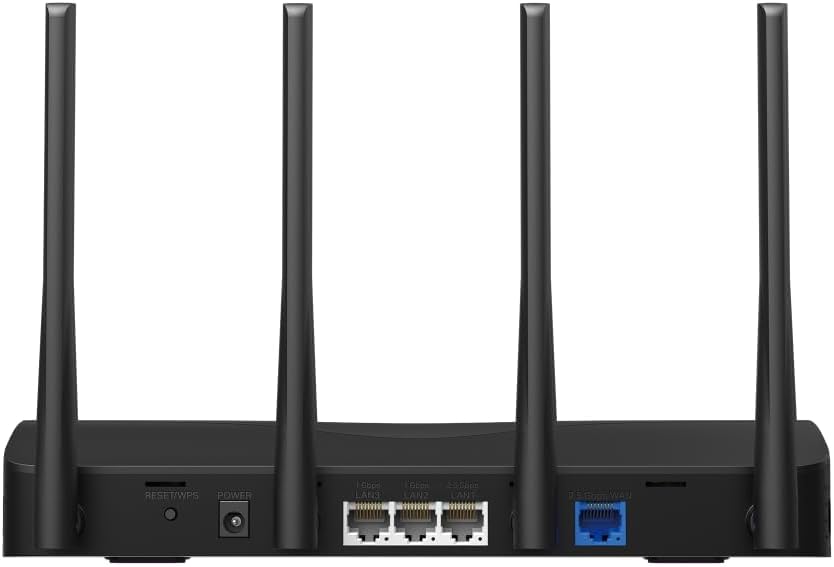
This image displays the rear panel of the MR27BE router, highlighting the 2.5 Gbps WAN port (blue), 2.5 Gbps LAN port, two 1 Gbps LAN ports, the Reset/WPS button, and the power input.
- Maitinimo prievadas: Prijunkite pridedamą maitinimo adapterį čia.
- Atstatyti / WPS mygtukas: Press and hold for 1 second to activate WPS. Press and hold for more than 5 seconds to factory reset the router.
- LAN Ports (1 Gbps): Two Gigabit Ethernet ports for connecting wired devices.
- LAN Port (2.5 Gbps): One 2.5 Gigabit Ethernet port for high-speed wired connections.
- WAN Port (2.5 Gbps): One 2.5 Gigabit Ethernet port for connecting to your modem or internet service provider's (ISP) network.
3.2 Pagrindinės savybės
The MR27BE router incorporates advanced features for enhanced network performance.

This graphic illustrates key features of the MR27BE, including its Wi-Fi 7 capabilities, the presence of 2x 2.5 Gbps ports and 2x Gigabit ports, four omni-directional high-gain antennas, EasyMesh compatibility, and easy app control.

This image demonstrates the speed performance of the MR27BE router, indicating up to 2880 Mbps on the 5 GHz band and 688 Mbps on the 2.4 GHz band, showcasing its Wi-Fi 7 capabilities.
4. Sąranka
4.1 Techninės įrangos prijungimas
- Išjungti: Disconnect the power from your modem (if applicable).
- Prijunkite WAN prievadą: Connect one end of the Ethernet cable to your modem's Ethernet port and the other end to the blue 2.5 Gbps WAN port on your MR27BE router.
- Prijunkite maitinimą: Connect the power adapter to the router's Power port and plug it into an electrical outlet.
- Maitinimas: Wait for the router to power on completely. The LED indicator should turn solid green.
- Prijungti įrenginius (nebūtina): For wired devices, connect an Ethernet cable from your computer or other device to one of the yellow LAN ports on the router.

This image shows the 2.5 Gbps ports of the MR27BE router in use, illustrating connections for 2.5 Gbps wired devices and multi-gig internet access, emphasizing high-performance networking.
4.2 Pradinė konfigūracija
You can configure your router using the MERCUSYS app or a web naršyklė.
Using the MERCUSYS App:
- Download the MERCUSYS app from the App Store or Google Play.
- Connect your smartphone to the router's default Wi-Fi network (SSID and password are on the label at the bottom of the router).
- Open the MERCUSYS app and follow the on-screen instructions to complete the setup.
Naudojant a Web Naršyklė:
- Connect your computer to the router via an Ethernet cable or the default Wi-Fi network.
- Atidarykite a web naršyklę ir įveskite
mwlogin.netor192.168.1.1į adreso juostą. - Kai būsite paraginti, sukurkite prisijungimo slaptažodį.
- Follow the Quick Setup wizard to configure your internet connection and Wi-Fi settings.
5. Maršrutizatoriaus valdymas
5.1 Įrenginių prijungimas
- Belaidžiai įrenginiai: Ieškokite your Wi-Fi network name (SSID) on your device and enter the Wi-Fi password you set during setup.
- Laidiniai įrenginiai: Prijunkite savo įrenginį Ethernet kabeliu prie bet kurio laisvo maršrutizatoriaus LAN prievado.
5.2 „EasyMesh“ suderinamumas
The MR27BE router supports EasyMesh, allowing you to create a seamless whole-home Wi-Fi network by adding compatible EasyMesh range extenders or other routers.

This diagram visually explains how the EasyMesh system, compatible with the MR27BE router, can expand Wi-Fi coverage throughout an entire home, ensuring seamless connections.
To set up an EasyMesh network, refer to the instructions provided with your EasyMesh compatible devices or the MERCUSYS app.
5.3 Advanced Settings (via Web Sąsaja)
Prisijunkite prie web sąsaja (mwlogin.net) to configure advanced settings such as:
- Svečių tinklas: Sukurkite atskirą „Wi-Fi“ tinklą svečiams.
- Tėvų kontrolė: Tvarkykite konkrečių įrenginių prieigą prie interneto.
- Tinklo sauga: Configure firewall rules and access control.
- Veikimo režimas: Switch between Router, Access Point, or Range Extender modes.
6. Priežiūra
6.1 Programinės aparatinės įrangos atnaujinimas
Regularly updating the router's firmware ensures optimal performance and security. You can check for updates via the MERCUSYS app or the web interface under System Tools > Firmware Upgrade.
6.2 Restarting the Router
If you experience network issues, a simple restart can often resolve them. You can restart the router via the MERCUSYS app, the web interface, or by unplugging and replugging the power adapter.
6.3 Gamyklinių parametrų atkūrimas
A factory reset will restore the router to its default settings. This can be done by pressing and holding the Reset/WPS button on the rear panel for more than 5 seconds until the LED blinks rapidly, or via the web interface under System Tools > Factory Defaults.
7. Problemų sprendimas
7.1 Nėra interneto prieigos
- Check all cable connections, especially the WAN port connection to your modem.
- Įsitikinkite, kad jūsų modemas veikia tinkamai.
- Iš naujo paleiskite ir modemą, ir maršrutizatorių.
- Patikrinkite interneto nustatymus maršrutizatoriuje web sąsaja.
7.2 „Wi-Fi“ signalo problemos
- Įsitikinkite, kad maršrutizatorius yra centrinėje vietoje, atokiau nuo kliūčių ir trukdžių šaltinių (pvz., mikrobangų krosnelių, belaidžių telefonų).
- Sureguliuokite maršrutizatoriaus antenas, kad užtikrintumėte optimalų aprėpties lygį.
- Consider using EasyMesh compatible devices to extend coverage in larger homes.
7.3 Pamiršote „Wi-Fi“ slaptažodį arba prisijungimo slaptažodį
- Numatytasis „Wi-Fi“ slaptažodis yra ant etiketės maršrutizatoriaus apačioje.
- If you changed it and forgot, you will need to perform a factory reset to restore default settings, then reconfigure the router.
8. Specifikacijos
| Modelio pavadinimas | MR27BE |
| bevielio ryšio standartas | 802.11be (Wi-Fi 7) |
| Dažnių juostos klasė | Dviejų juostų |
| WAN prievadas | 1 x 2.5 Gbps WAN prievadas |
| LAN prievadai | 1x 2.5 Gbps LAN Port, 2x 1 Gbps LAN Ports |
| Ypatinga funkcija | Suderinamas su „EasyMesh“. |
| Gaminio matmenys | 7.87 x 5.91 x 3.94 colio |
| Prekės svoris | 2.23 svaro |
| Įtraukti komponentai | MR27BE, Power Adapter, instruction manual |
9. Parama
For technical support, warranty information, or further assistance, please visit the official Mercusys website or contact Mercusys customer support.
- „Mercusys“ oficialus asmuo Websvetainė: www.mercusys.com
- Refer to the Quick Installation Guide for initial setup and contact details.


