1. Įvadas
Thank you for choosing the Sharkoon AK6 RGB ATX PC Case. This manual provides essential information for the proper installation, operation, and maintenance of your new PC case. Please read this guide thoroughly before beginning the assembly process to ensure optimal performance and longevity of your components.
2. Saugos informacija
- Always disconnect the power supply from the wall outlet before installing or removing any components inside the PC case.
- Atsargiai elkitės su grūdinto stiklo plokštėmis. Jos yra trapios ir gali sudužti, jei numestos arba patirtų smūgį.
- Avoid exposing the case to extreme temperatures, humidity, or direct sunlight.
- Smulkias dalis ir varžtus laikykite vaikams nepasiekiamoje vietoje.
- Ensure proper grounding to prevent electrostatic discharge (ESD) damage to sensitive electronic components.
3. Pakuotės turinys
Prašome patikrinti, ar pakuotėje yra visi reikalingi daiktai:
- Sharkoon AK6 RGB ATX kompiuterio dėklas
- Priedų dėžutė (kuriame yra varžtai, kabelių laikikliai ir kitos smulkios dalys)
- Vartotojo vadovas (šis dokumentas)
4. Produktas baigtasview
The Sharkoon AK6 RGB ATX PC Case is designed with a modern glass aesthetic, featuring seamless integration of tempered glass on the front and side panels. It includes four pre-installed 120mm addressable RGB PWM fans for optimal airflow and visual appeal. The case supports a wide range of components, including BTF motherboards, and offers ample space for high-performance hardware.

Figure 4.1: Front interior view of the Sharkoon AK6 RGB PC case, showcasing the pre-installed addressable RGB fans and the spacious main chamber.

4.2 pav.: Kampinis view of the Sharkoon AK6 RGB PC case, highlighting the tempered glass side panel and the top mesh for ventilation.

4.3 pav.: galinis view of the Sharkoon AK6 RGB PC case, showing the I/O shield cutout, rear exhaust fan mount, and expansion slots.
Priekinis I/O skydelis
The front I/O panel is located on the side of the case and includes:
- Maitinimo mygtukas
- Atkūrimo mygtukas
- 2 x USB Ports (Type-A)
- 1 x USB Type-C prievadas
- Audio Jacks (TRRS)
5. Sąranka ir diegimas
Follow these steps to install your components into the Sharkoon AK6 RGB PC Case.
5.1 Bylos parengimas
- Padėkite dėklą ant lygaus, stabilaus paviršiaus.
- Carefully remove the tempered glass side panel by unscrewing the thumb screws at the rear and gently pulling the panel away.
- Remove the rear metal side panel by unscrewing the thumb screws.
5.2 Pagrindinės plokštės montavimas
The AK6 RGB supports Mini-ITX, Micro-ATX, ATX, and BTF motherboards.
- Install the I/O shield into the cutout at the rear of the case (if not pre-installed on your motherboard).
- Align your motherboard with the standoffs inside the case. Ensure all standoffs match the motherboard's mounting holes.
- Pritvirtinkite pagrindinę plokštę atitinkamais varžtais iš priedų dėžutės.
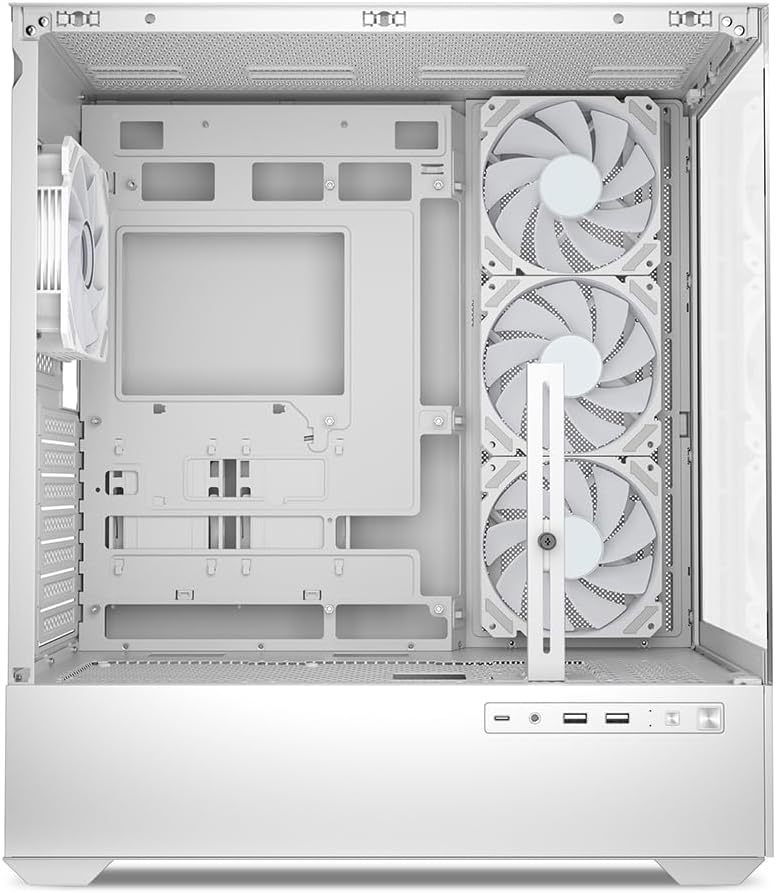
5.1 pav. Vidus view of the Sharkoon AK6 RGB PC case, illustrating the motherboard tray, cable management cutouts, and front fan mounting points.
5.3 Maitinimo šaltinio įrengimas
The case features a bottom-mount power supply design.
- Slide the power supply unit (PSU) into the dedicated compartment at the bottom rear of the case.
- Align the PSU with the screw holes at the rear of the case.
- Secure the PSU with the provided screws.
5.4 Saugojimo įrenginio įrengimas
The AK6 RGB supports up to two 3.5" HDDs or four 2.5" SSDs.
- 3.5 colio standiesiems diskams: Locate the drive cages beneath the PSU shroud. Slide the HDD into a drive tray and secure it with screws.
- 2.5 colio SSD diskams: SSDs can be mounted on the dedicated brackets behind the motherboard tray or on the 3.5" drive trays using adapter screws.
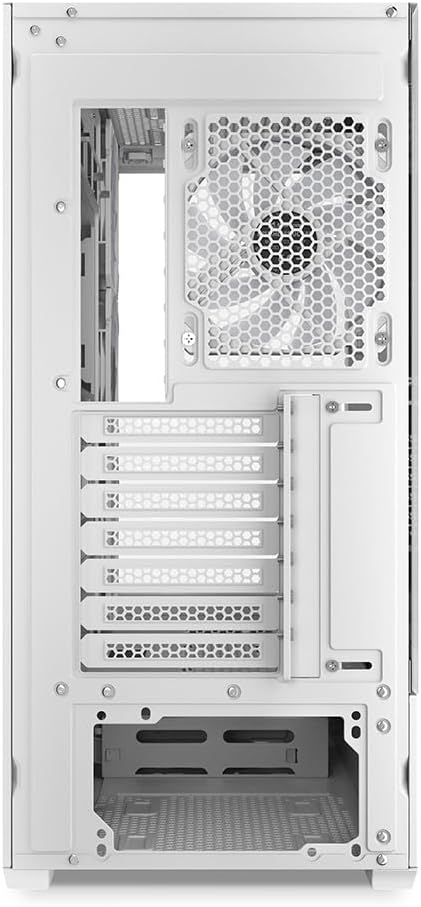
5.2 pav.: Galinis salonas view of the Sharkoon AK6 RGB PC case, detailing the drive cages for 3.5-inch HDDs and 2.5-inch SSDs, and the power supply shroud area.
5.5 Vaizdo plokštės ir išplėtimo plokštės įdiegimas
- Nuimkite reikiamus išplėtimo lizdų dangtelius korpuso gale.
- Įdėkite vaizdo plokštę arba kitas išplėtimo korteles į atitinkamus PCIe lizdus pagrindinėje plokštėje.
- Secure the cards with screws. The case includes a rubberized graphics card support for larger cards.
5.6 CPU Cooler and Radiator Installation
The case supports CPU coolers up to 17 cm in height and allows for extensive liquid cooling setups.
- Įdiekite procesoriaus aušintuvą pagal gamintojo instrukcijas.
- For liquid cooling, the case can accommodate a 360mm radiator at the top and an additional 280mm radiator.
5.7 Kabelių valdymas
Kabelių išdėstymui ir tvirtinimui naudokite laidų tvarkymo angas ir tvirtinimo taškus už pagrindinės plokštės dėklo. Tai pagerina oro srautą ir vizualiai pagerina vaizdą.
6. Naudojimo instrukcijos
6.1 Įjungimas
After all components are installed and cables are connected, replace the side panels. Connect the power cable to your PSU and a wall outlet, then press the power button on the front I/O panel to start your system.
6.2 RGB ventiliatoriaus valdymas
The AK6 RGB comes with four pre-installed addressable RGB PWM fans. These fans are connected to an RGB controller which also provides connections for up to four LED elements and four PWM fans. The RGB lighting can typically be controlled via your motherboard's RGB software (if compatible) or through a dedicated button on the case (if present and connected).
6.3 Airflow Optimization
The case is designed for ideal airflow, with three inverted fans drawing air from the side into the case. The top and rear fan mounts allow for additional exhaust fans. Ensure proper fan orientation for optimal cooling performance.

6.1 pav. Pvzample of a fully assembled system within the Sharkoon AK6 RGB PC case, featuring various components and active RGB lighting.
7. Priežiūra
Reguliarus techninis aptarnavimas padeda užtikrinti kompiuterio komponentų ilgaamžiškumą ir našumą.
- Dulkių filtrai: Periodically clean the removable dust filters (e.g., on the top and bottom) to maintain optimal airflow and prevent dust buildup inside the case. Use compressed air or a soft brush.
- Stiklo plokštės: Clean tempered glass panels with a soft, lint-free cloth and a glass cleaner. Avoid abrasive materials that could scratch the surface.
- Vidaus valymas: Dulkėms nuo vidinių komponentų ir ventiliatorių pašalinti naudokite suslėgtą orą. Prieš valydami įsitikinkite, kad sistema išjungta ir atjungta nuo elektros tinklo.
8. Problemų sprendimas
If you encounter issues with your PC case, refer to the following common troubleshooting steps:
- Nėra galios: Ensure the power supply is properly connected to the wall outlet and the motherboard. Check all internal power cables (24-pin ATX, 8-pin CPU, PCIe power).
- Ventiliatoriai nesisuka / RGB neveikia: Verify that all fan and RGB cables are correctly connected to the motherboard or the included RGB controller. Check your motherboard's BIOS/UEFI settings or RGB software for fan speed and lighting control.
- Front I/O Ports Not Functioning: Confirm that the front panel connectors (USB, audio, power/reset switches) are correctly plugged into the corresponding headers on your motherboard.
- Perkaitimas: Ensure all fans are spinning correctly and oriented for proper airflow. Clean dust filters and internal components. Verify CPU cooler installation.
For further assistance, please contact Sharkoon support.
9. Specifikacijos
| Funkcija | Specifikacija |
|---|---|
| Prekės ženklas | Šarkoonas |
| Modelio pavadinimas | AK6 RGB |
| Modelio numeris | C-AK6W |
| Atvejo tipas | ATX bokštas |
| Spalva | Baltas |
| Medžiaga | Grūdintas stiklas |
| Pagrindinės plokštės suderinamumas | Mini ITX, Micro ATX, ATX, BTF |
| Maitinimo šaltinio tvirtinimo tipas | Apatinis kalnas |
| Aušinimo būdas | Oras |
| Iš anksto įdiegti ventiliatoriai | 4 x 120mm Addressable RGB PWM Fans |
| Maksimalus procesoriaus aušintuvo aukštis | 17 cm |
| Maksimalus vaizdo plokštės ilgis | 41 cm (with rubberized support) |
| Maksimalus PSU ilgis | 23.5 cm |
| Radiatoriaus palaikymas | Top: up to 360mm, Additional: up to 280mm |
| Drive Bays | 2 x 3.5" HDD or 4 x 2.5" SSD |
| Priekinės įvesties / išvesties prievadai | 2 x USB Type-A, 1 x USB Type-C, Audio (TRRS) |
| Prekės svoris | 6.1 kilogramo |
| Ypatingos savybės | RGB Lighting, Unique Glass Appearance, BTF Motherboard Support |
10. Garantija
Sharkoon products are manufactured to high quality standards. For detailed warranty information, please refer to the warranty card included with your product or visit the official Sharkoon webGarantija paprastai taikoma medžiagų ir gamybos defektams, atsiradusiems įprasto naudojimo sąlygomis.
11. Parama
If you require technical assistance or have questions regarding your Sharkoon AK6 RGB ATX PC Case, please visit the official Sharkoon website for support resources, FAQs, and contact information. You may also find updated drivers or software for the RGB controller there.
Websvetainė: www.sharkoon.com


