1. Svarbios saugos instrukcijos
Prieš naudodami šį gaminį, perskaitykite ir supraskite visas saugos instrukcijas. Išsaugokite šias instrukcijas ateičiai.
- Maitinimo šaltinis: Naudokite tik nurodytą maitinimo adapterį arba baterijas. Įsitikinkite, kad įtampatage atitinka įrenginio reikalavimus.
- Vanduo ir drėgmė: Do not expose the unit to rain, moisture, or dripping water. Do not place objects filled with liquids on the unit.
- Vėdinimas: Užtikrinkite tinkamą vėdinimą. Neužblokuokite jokių ventiliacijos angų.
- Šiluma: Laikykite įrenginį atokiau nuo šilumos šaltinių, tokių kaip radiatoriai, šildytuvai, viryklės ar kiti šilumą skleidžiantys prietaisai.
- Valymas: Valykite tik sausa šluoste. Nenaudokite skystų valiklių ar aerozolinių valiklių.
- Aptarnavimas: Nemėginkite patys aptarnauti šio gaminio. Visą techninę priežiūrą patikėkite kvalifikuotam aptarnavimo personalui.
- Lazerio sauga: This unit contains a laser component. Do not open the CD compartment while a disc is playing. Avoid direct exposure to the laser beam.
2. Pakuotės turinys
Patikrinkite, ar pakuotėje yra visi reikalingi daiktai:
- G Keni Portable CD and Cassette Player Boombox Combo
- Kintamosios srovės maitinimo laidas
- Nuotolinio valdymo pultas
- Vartotojo vadovas (šis dokumentas)
3. Produktas baigtasview
The G Keni BT-9224MU is a versatile audio system combining a CD player, cassette player/recorder, AM/FM radio, Bluetooth speaker, and USB playback. It features dual 3W speakers for stereo sound and can be powered by AC or batteries for portability.
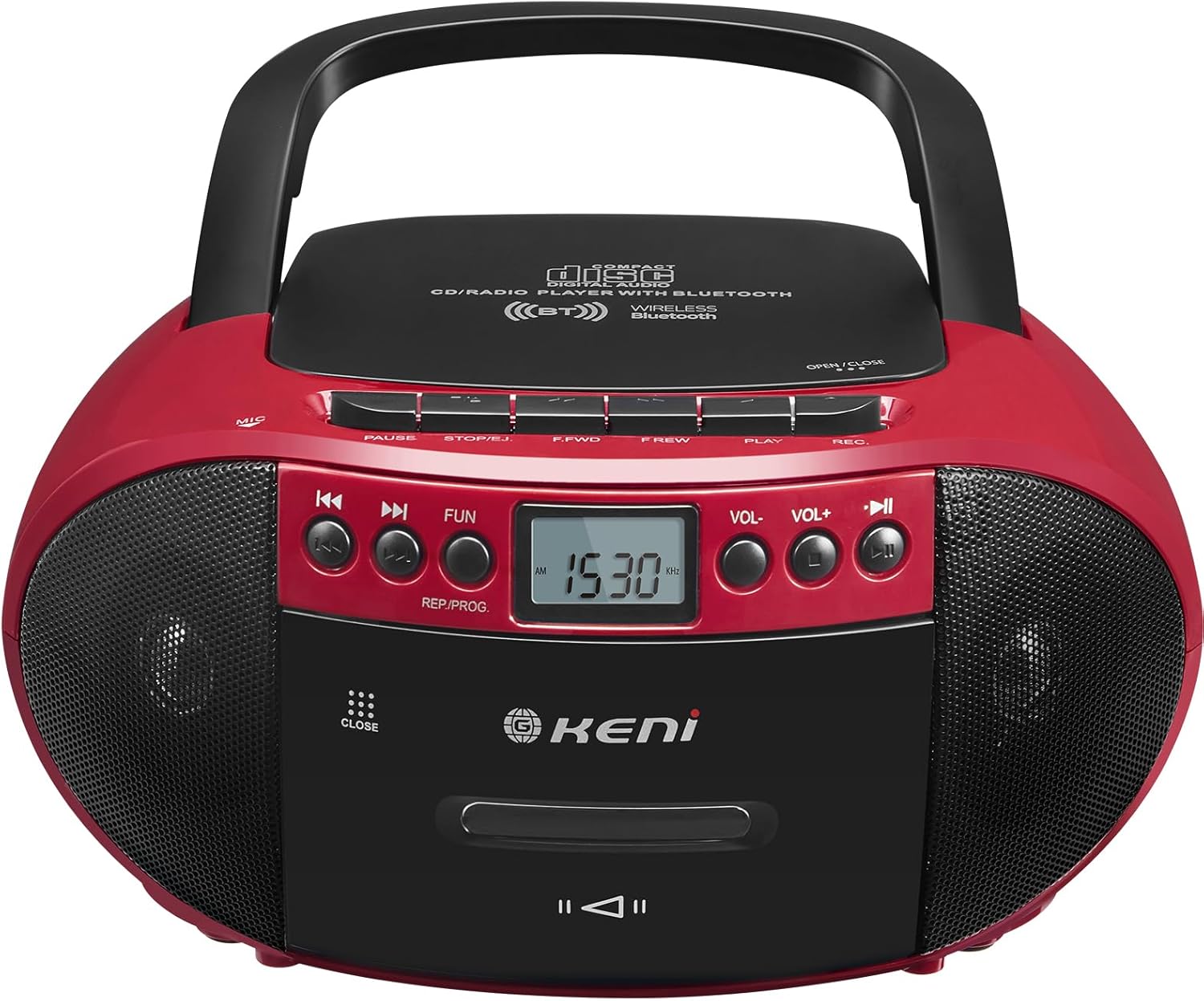
3.1 pav.: priekis view of the G Keni BT-9224MU Boombox.

Figure 3.2: The boombox highlighting its five playback modes: CD Player, Cassette Player, FM/AM Radio, USB Input, and Bluetooth.
4. Sąranka
4.1 Įrenginio maitinimas
„Boombox“ gali būti maitinamas kintamosios srovės šaltiniu arba baterijomis.
4.1.1 Kintamosios srovės maitinimo prijungimas
- Suraskite kintamosios srovės maitinimo įvesties lizdą įrenginio gale.
- Connect the supplied AC power cord to the jack.
- Plug the other end of the AC power cord into a standard wall outlet (100-240V, 50/60Hz).
4.1.2 Akumuliatoriaus įdėjimas
Nešiojamam naudojimui reikalingos 6 x „C“ dydžio baterijos (nepridedamos).
- Atidarykite baterijos skyriaus dangtį, esantį įrenginio apačioje.
- Insert 6 'C' size batteries, ensuring correct polarity (+/-) as indicated inside the compartment.
- Saugiai uždarykite akumuliatoriaus skyriaus dangtelį.

Figure 4.1: Illustrations of AC power connection and battery installation.
4.2 Antenos reguliavimas
For optimal FM radio reception, extend the telescopic antenna. For AM reception, the unit has a built-in ferrite bar antenna, so repositioning the unit may improve reception.
5. Naudojimo instrukcijos
5.1 Bendrieji valdikliai
- Įjungimo mygtukas: Įjungia arba išjungia įrenginį.
- FUNKCIJOS / REŽIMO mygtukas: Switches between CD/USB/Bluetooth, Cassette, and AM/FM Radio modes.
- GARSUMO +/- mygtukai: Reguliuoja garso išvesties lygį.
- PLAY/PAUSE mygtukas: Starts or pauses playback in CD, USB, or Bluetooth modes.
- STOP/EJECT mygtukas: Stops playback and opens the CD lid or cassette door.
- SKIP/SEARCH Buttons (◀◀ / ▶▶): Skips tracks/files or fast forwards/rewinds.
5.2 CD grotuvo valdymas
The unit supports CD, CD-R, CD-RW, and MP3 discs.
- Svarbu: Before first use, remove the laser lens protector paper plate from the CD compartment.
- Paspauskite FUNKCIJA/REŽIMAS mygtuką, norėdami pasirinkti CD režimą.
- Paspauskite STOP/IŠMESTI mygtuką, kad atidarytumėte CD skyriaus dangtelį.
- Padėkite kompaktinį diską ant ašies etikete į viršų.
- Uždarykite CD skyriaus dangtelį. Įrenginys nuskaitys diską.
- Paspauskite PALEISTI / PAUZĖ mygtuką, norėdami pradėti atkūrimą.
- Naudokite PRALEISTI / PAIEŠKA mygtukus, kad galėtumėte naršyti takelius.

Figure 5.1: Inserting a CD into the boombox, with the remote control visible.
5.3 Cassette Player & Recorder Operation
The unit allows playback and recording of standard audio cassettes.
5.3.1 Kasetės atkūrimas
- Paspauskite FUNKCIJA/REŽIMAS mygtuką, kad pasirinktumėte kasetės režimą.
- Paspauskite STOP/IŠMESTI mygtuką, kad atidarytumėte kasetės dureles.
- Įdėkite kasetę atviru kraštu į viršų.
- Uždarykite kasetės dureles.
- Paspauskite ŽAISTI button (usually indicated by a triangle) to start playback.
- Naudokite FAST FORWARD (F.FWD) ir REWIND (F.REW) mygtukai juostai naršyti.
- Paspauskite STOP/IŠMESTI button to stop playback and open the door.

Figure 5.2: A cassette tape being inserted into the boombox.
5.3.2 Kasečių įrašymas
The unit can record from the radio, CD, or via its built-in microphone.
- Įdėkite tuščią kasetę į kasečių skyrių.
- Select the desired source for recording (CD, Radio, or ensure no other source is playing for voice recording).
- Paspauskite ĮRAŠYTI (REC) button (usually red) to begin recording. The PLAY button will also engage automatically.
- Norėdami sustabdyti įrašymą, paspauskite STOP/IŠMESTI mygtuką.
5.4 AM/FM radijo veikimas
Enjoy local radio broadcasts with the built-in tuner.
- Paspauskite FUNKCIJA/REŽIMAS mygtuką, kad pasirinktumėte AM arba FM radijo režimą.
- Extend the telescopic antenna for FM reception. Adjust its position for best signal.
- Naudokite TUNINGAS knob or buttons (if available) to scan for stations. The LCD screen will display the frequency.
- Sureguliuokite TOMAS iki jūsų norimo lygio.

Figure 5.3: The boombox being used to listen to AM/FM radio outdoors.
5.5 Bluetooth veikimas
Prijunkite „Bluetooth“ įrenginius, kad galėtumėte transliuoti garsą belaidžiu būdu.
- Paspauskite FUNKCIJA/REŽIMAS button to select Bluetooth mode. The unit will enter pairing mode, indicated by a flashing Bluetooth icon or audible prompt.
- Savo mobiliajame įrenginyje įjunkite Bluetooth ir ieškokite galimų įrenginių.
- Select "G Keni BT-9224MU" (or similar name) from the list to pair.
- Once paired, you can play audio from your device through the boombox.

Figure 5.4: A smartphone streaming music to the boombox via Bluetooth 5.1.
5.6 USB atkūrimas
Play MP3/WMA audio files tiesiai iš USB atmintinės.
- Įdėkite USB atmintinę į įrenginio USB prievadą.
- Paspauskite FUNKCIJA/REŽIMAS button to select USB mode. The unit will automatically detect and begin playing compatible audio files.
- Naudokite PALEISTI / PAUZĖ ir PRALEISTI / PAIEŠKA mygtukai, skirti valdyti atkūrimą.
5.7 Nuotolinio valdymo pulto naudojimas
The included remote control provides convenient operation for certain functions.
- The remote control can operate functions for CD, Bluetooth, and USB playback.
- It cannot control cassette and radio playback.
- Ensure the remote control has working batteries and is pointed towards the front of the boombox.
5.8 Headphone Usage
Connect headphones to the 3.5mm headphone jack for private listening. When headphones are connected, the main speakers will be muted.
6. Priežiūra
6.1 Įrenginio valymas
- Nuvalykite įrenginio išorę minkštu, sausu skudurėliu.
- Nenaudokite abrazyvinių valiklių, vaško ar tirpiklių, nes jie gali pažeisti apdailą.
6.2 CD objektyvo priežiūra
- A dirty CD lens can cause skipping or playback errors. Use a specialized CD lens cleaning kit if necessary.
- Venkite tiesiogiai liesti objektyvo.
6.3 Kasetės galvutės valymas
- Over time, cassette heads can accumulate dust and oxide, affecting sound quality. Use a cassette head cleaning tape or a cotton swab with isopropyl alcohol to gently clean the heads and pinch rollers.
7. Problemų sprendimas
If you encounter issues with your G Keni BT-9224MU, refer to the following common problems and solutions:
| Problema | Galima priežastis | Sprendimas |
|---|---|---|
| Nėra galios | Neprijungtas kintamosios srovės laidas; Baterijos išsikrovusios arba neteisingai įdėtos. | Patikrinkite kintamosios srovės laido jungtį; Pakeiskite baterijas arba įsitikinkite, kad jos tinkamai sujungtos. |
| CD negroja / praleidžia garsą | Disc is dirty or scratched; Laser lens is dirty; Disc inserted incorrectly. | Clean the disc; Clean the laser lens; Re-insert disc with label side up. Ensure laser lens protector was removed. |
| Cassette not playing / Poor sound | Tape is tangled or damaged; Cassette heads are dirty. | Check tape condition; Clean cassette heads and pinch rollers. |
| Prastas radijo priėmimas | Antena neištiesta / nesureguliuota; silpnas signalas. | Extend and adjust FM antenna; Reposition the unit for AM reception. |
| Bluetooth neprisijungia | Unit not in Bluetooth mode; Device not in pairing mode; Too far from unit. | Ensure unit is in Bluetooth mode; Put device in pairing mode; Move device closer to the unit. |
| Nuotolinio valdymo pultas neveikia | Išsikrovusios baterijos; kliūtis tarp nuotolinio valdymo pulto ir įrenginio. | Replace remote batteries; Remove any obstructions. Note: Remote does not control cassette or radio. |
8. Specifikacijos
| Funkcija | Specifikacija |
|---|---|
| Modelio numeris | BT-9224MU |
| Maitinimo šaltinis | AC 100-240V ~ 50/60Hz / 6 x 'C' size batteries (DC 9V) |
| Garsiakalbio išėjimo galia | 3 Watts (per speaker, total 6W) |
| Ryšys | Bluetooth 5.1, USB, Auxiliary, AM/FM Radio |
| Suderinami diskų tipai | CD, CD-R, CD-RW, MP3 |
| Garso išvesties režimas | Stereo |
| Gaminio matmenys | 10 x 8.8 x 5 colio (25.4 x 22.35 x 12.7 cm) |
| Prekės svoris | 2.64 svaro (1.2 kg) |
| Medžiaga | Plastikiniai |
| Įtraukti komponentai | AC Cord, Remote Control |
9. Garantija ir palaikymas
9.1 Informacija apie garantiją
This G Keni product is covered by a 12 mėnesių garantinis aptarnavimas nuo įsigijimo datos. Ši garantija taikoma gamybos defektams ir gedimams įprasto naudojimo sąlygomis.
9.2 Pagalba klientams
For any questions, technical assistance, or warranty claims, please contact G Keni customer service. We are committed to providing support and ensuring customer satisfaction.
Please refer to the detailed user manual included in your package or visit the official G Keni websvetainę, kurioje rasite naujausią pagalbos informaciją.