1. Įvadas
This manual provides detailed instructions for the setup, operation, maintenance, and troubleshooting of your Gustard X26III DAC Network Bridge and Streaming device. Please read this manual thoroughly before using the product to ensure optimal performance and longevity.
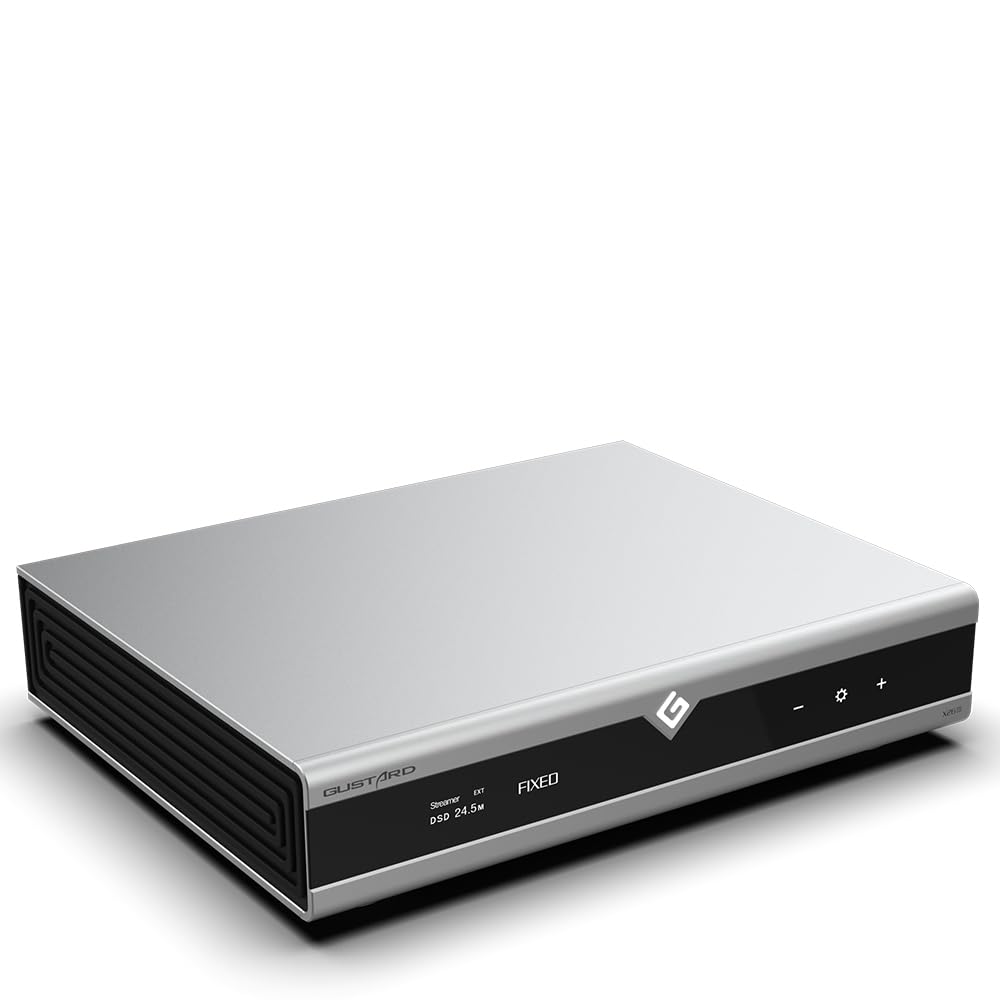
1.1 vaizdas: priekis view of the Gustard X26III DAC Network Bridge and Streaming device, showcasing its sleek silver design and front panel display.
2. Pagrindinės savybės
- Dual ES9039SPRO DAC Chips: Utilizes two ESS flagship ES9039SPRO chips for Digital-to-Analog Conversion, with one chip dedicated to each left and right channel. Features independent power supply and grounding for enhanced sound performance.
- DSP Digital Filter: Incorporates a high-performance digital filter solution based on the Analog Device SHARC digital audio-specific DSP platform. This filter reduces audio in-band aliasing noise, upscales, and noise shapes the digital audio stream signal using a high-precision floating-point 64-bit operation.
- FPGA Programmable Logic Chip: Features exclusive technologies including self-constructed logic functions, clock management, 2nd PLL digital shaping, DOP demodulation, and PCM/DSD depop switch, contributing to superior sound quality.
- GCLK-02 Clock Module: A high-performance clock frequency synthesizer employing advanced PLL (Phase Locked Loop) technology for stable and accurate clock signals. Supports both local and external 10MHz clock sources, reducing dependence on front-end audio equipment clock performance.
- Hybrid IV Conversion Circuit: Independent parallel circuit design fully meets the high current requirements of the ES9039SPRO chips.
- Network Bridge and Streaming: Supports Roon, Airplay, UPnP, NAA, and Spotify protocols with 100/1000Mbps LAN speed.
- Fully Balanced Design: Features a fully balanced design with complete four outputs.
- Dual High-Capacity Toroidal-Core Power Transformers: Isolated power supplies for digital and analog sections.

2.1 paveikslėlis: Viršutinis taškasview of the Gustard X26III's key features, including its dual ES9039SPRO DACs, GCLK-02 clock, and network streaming support.
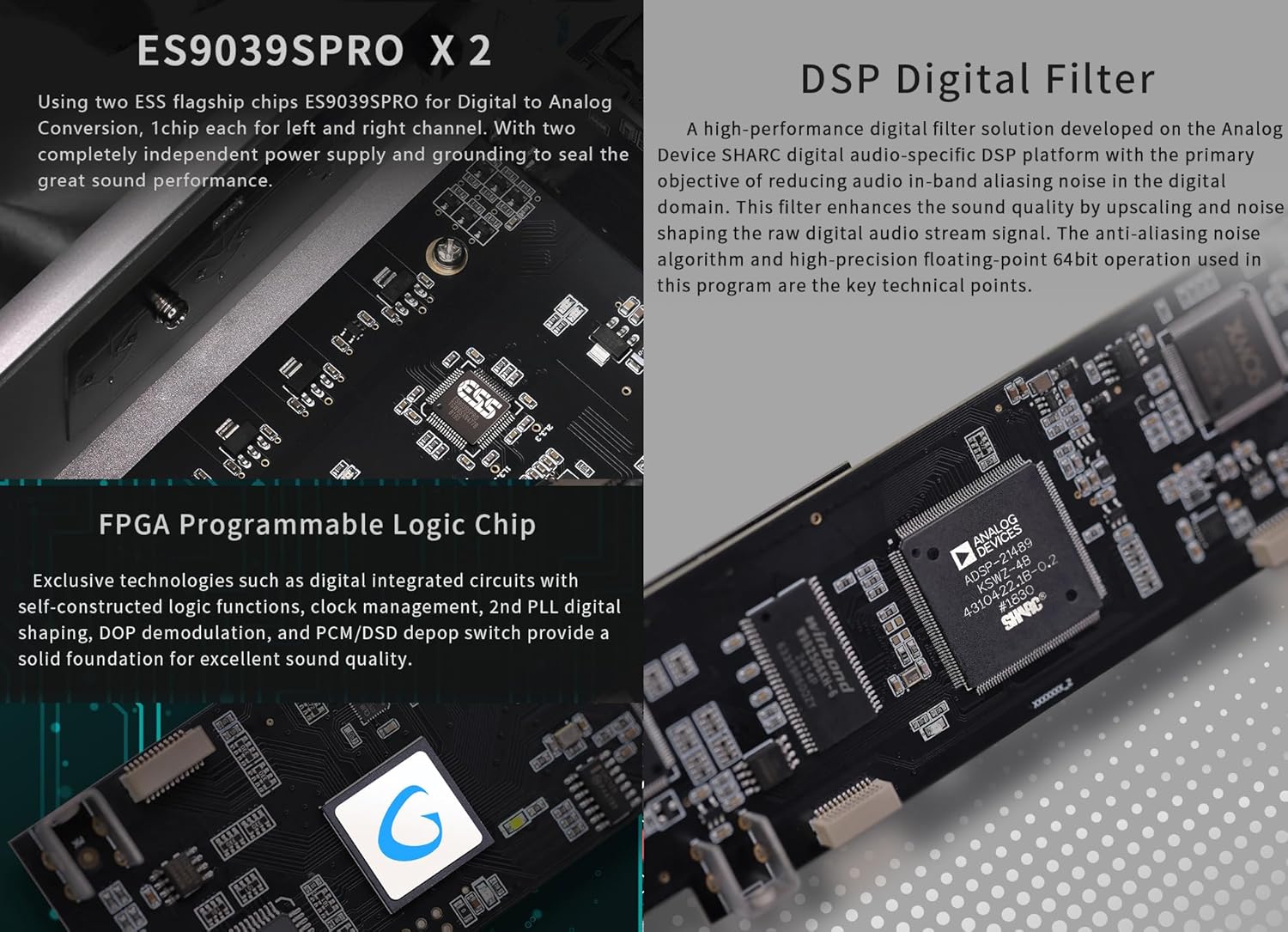
2.2 pav.: Išsamus view of the internal components, specifically highlighting the dual ES9039SPRO DAC chips and the DSP digital filter implementation.

Image 2.3: A closer look at the GCLK-02 clock module and the hybrid IV conversion circuit, demonstrating the precision engineering.
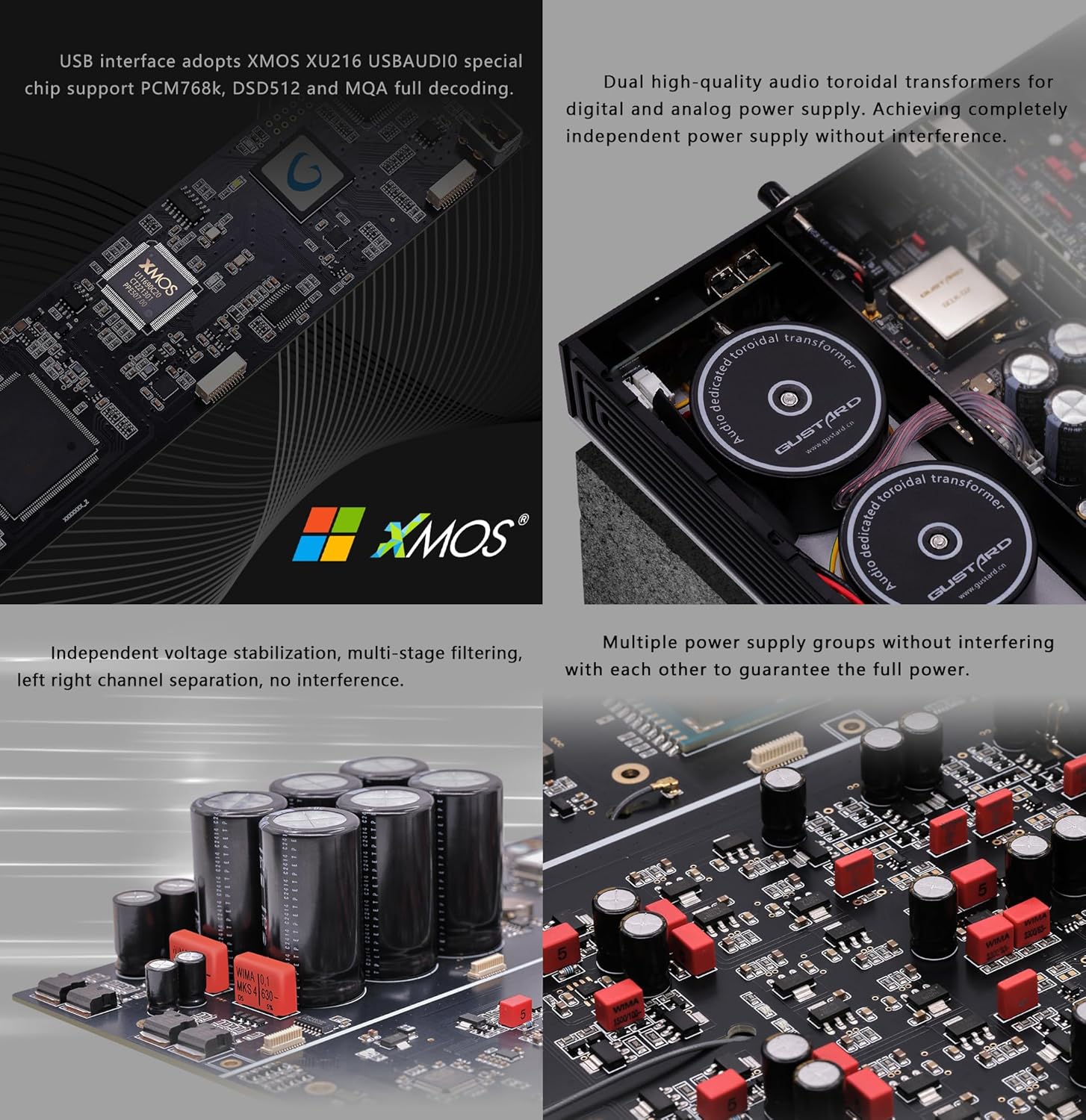
2.4 pav.: Vidinis view illustrating the USB interface, dual toroidal transformers for isolated power, and multiple power supply groups.
3. Pakuotės turinys
Išpakuodami įsitikinkite, kad yra visi daiktai:
- Gustard X26III DAC Network Bridge and Streaming Unit
- Nuotolinio valdymo pultelis
- Maitinimo kabelis
- USB kabelis
- Vartotojo vadovas (šis dokumentas)
4. Sąrankos vadovas
Follow these steps to set up your Gustard X26III device:
4.1 Maitinimo jungtis
- Įsitikinkite, kad ttagGaliniame skydelyje esantis jungiklis nustatytas į tinkamą tūrįtage jūsų regionui (115 V arba 230 V).
- Connect the provided power cable to the AC power input on the rear panel of the X26III and then to a suitable wall outlet.
4.2 Garso jungtys
The X26III offers both RCA and XLR analog outputs.
- RCA išvestis: Connect RCA cables from the 'Line out RCA' ports on the X26III to the analog input of your ampkeltuvas arba išankstinisampgyvesnis.
- XLR išvestis: Connect XLR cables from the 'Line out XLR' ports on the X26III to the balanced analog input of your ampkeltuvas arba išankstinisamplifier. Ensure correct pin configuration (American Standard: 1 ground, 2 hot, 3 cold).
4.3 Digital Input Connections
Connect your digital audio sources to the appropriate input ports:
- USB įvestis: Connect a USB cable from your computer or digital audio player to the 'USB input' port.
- AES įvestis: Connect an AES/EBU cable to the 'AES input' port.
- Koaksialinė įvestis: Connect a coaxial S/PDIF cable to the 'Coaxial input' port.
- Optinė įvestis: Connect an optical TOSLINK cable to the 'Optical input' port.
- I²S Input: Connect an I²S cable to the 'I²S input' port. Refer to section 5.4 for I²S line sequence adjustment.
4.4 Tinklo jungtis
For streaming functionalities, connect an Ethernet cable to the 'LAN' port on the rear panel.
4.5 External Clock Connection
If using an external 10MHz clock, connect it to the '10M clock (BNC)' input on the rear panel.
4.6 Pradinis įjungimas
After all connections are made, press the power switch on the rear panel to turn on the device. The front display will illuminate.

4.1 pav.: Išsamus view of the front control panel and the rear panel connections, including power, audio outputs, and digital inputs.

Image 4.2: Diagram illustrating the I²S-H High-Specification Signal Input and its various connection modes for compatibility.
5. Naudojimo instrukcijos
5.1 Valdymo skydas baigtasview
The front panel features a display screen, standby switch, remote control receiver, and touch panel controls for navigation.
- Budėjimo jungiklis: Toggles the device between active and standby modes.
- Ekranas: Rodo dabartinę įvestį, sample rate, volume, and filter settings.
- Nuotolinio valdymo imtuvas: Priima signalus iš pridedamo nuotolinio valdymo pulto.
- Jutiklinis skydelis: Allows direct control of settings and input selection.
5.2 Pagrindinės operacijos
- Maitinimo įjungimas/išjungimas: Use the standby switch on the front panel or the remote control to turn the unit on or off.
- Įvesties pasirinkimas: Use the input selection buttons on the front panel or remote to cycle through available digital inputs (USB, AES, Coaxial, Optical, I²S, LAN).
- Garsumo valdymas: The analog outputs (RCA and XLR) have a fixed output level (2.5Vrms for RCA, 5.1Vrms for XLR). Volume control should be managed by your connected ampkeltuvas arba išankstinisampgyvesnis.
5.3 Tinklo transliacija
The X26III supports various network protocols for streaming audio:
- Palaikomi protokolai: Roon, Airplay, UPnP, NAA, Spotify.
- Konfigūracija: Network protocols can be configured via a web interface. Access the configuration web page by entering the device's IP address or "//x26.local" in a web browser on a PC connected to the same network. This interface allows you to enable or disable specific protocols and perform online firmware upgrades.

Image 5.1: Illustration of supported network streaming protocols (Roon, Airplay, UPnP, NAA, Spotify) and a screenshot of the web- pagrįsta valdymo sąsaja.
5.4 Digital Filter Settings
The X26III offers various digital filter options for PCM and DSD playback, as well as a NOS (Non-Oversampling) mode.
- PCM filtrai: VIVID, GENTLE, COMPOSITE.
- DSD Filters: 47K, 50K, 60K, 70K.
- NOS Mode: ENABLE/DISABLE.
These settings can typically be adjusted via the front panel controls or the remote control. Refer to the on-screen menu for specific navigation.
5.5 I²S Line Sequence Adjustment
The I²S input supports different line sequence modes to ensure compatibility with various devices. Refer to the diagrams in Image 4.2 and the device's menu to select the correct mode (Mode 1, Mode 2, Mode 3, or Mode 4) for your source device.
6. Priežiūra
To ensure the longevity and optimal performance of your Gustard X26III, follow these maintenance guidelines:
- Valymas: Use a soft, dry cloth to clean the exterior of the device. Avoid using abrasive cleaners, solvents, or chemical sprays, as these can damage the finish.
- Vėdinimas: Ensure the device has adequate ventilation. Do not block the ventilation slots. Avoid placing the unit in enclosed spaces or on soft surfaces that may impede airflow.
- Aplinka: Operate the device in a clean, dry environment, away from direct sunlight, heat sources, and excessive moisture.
- Tvarkymas: Elkitės su įrenginiu atsargiai. Venkite jo numesti ir stipriai sutrenkti.
7. Problemų sprendimas
If you encounter issues with your Gustard X26III, refer to the following common problems and solutions:
- Nėra galios:
- Check if the power cable is securely connected to both the device and the wall outlet.
- Verify that the rear panel voltagJungiklis nustatytas teisingai (115 V / 230 V).
- Įsitikinkite, kad maitinimo lizdas veikia.
- Check the fuse on the rear panel. If blown, replace with a fuse of the same type and rating.
- Nėra garso išvesties:
- Confirm that the correct input source is selected on the X26III.
- Verify that the audio cables (RCA/XLR) are correctly connected to your ampLilier/pre-ampgyvesnis.
- Užtikrinkite savo ampLilier/pre-ampĮrenginys įjungtas ir nustatytas teisingas įėjimas.
- Patikrinkite garsumo lygį savo ampLilier/pre-ampgyvesnis.
- If using a USB input, ensure the correct drivers are installed on your computer (if required).
- Tinklo transliacijos problemos:
- Įsitikinkite, kad Ethernet kabelis yra tvirtai prijungtas prie LAN prievado.
- Verify that your network router is functioning correctly.
- Check the network configuration via the web interface (//x26.local) to ensure protocols like Roon, Airplay, UPnP, NAA, or Spotify are enabled.
- Restart the X26III and your network router.
- Ekranas neveikia:
- If the unit has power but the display is blank, try cycling the power.
- Jei problema išlieka, susisiekite su klientų aptarnavimo tarnyba.
Jei problema išlieka ir išbandžius šiuos sprendimus, kreipkitės į klientų aptarnavimo tarnybą.
8. Specifikacijos
8.1 Skaitmeninė įvestis
- LAN palaikymo protokolai: Roon, Airplay, UPnP, NAA, Spotify (Configurable via web page, upgradable online)
- LAN greitis: 100/1000 Mbps
- 10M laikrodis (BNC): Įėjimo varža 50 omų, 0 dBm–20 dBm, CMOS stačiakampė banga 0.2 V–3.3 V, sinusinė banga 0.5 V–3.3 V
- USB sąsaja: Supports PCM768K, DSD512, MQA full decoding (via XMOS XU216 USB AUDIO chip)
8.2 Analoginė išvestis
- Dažnio atsakas: 20–20 kHz / +/- 0.3 dB
- Dinaminis diapazonas: 128 dB
- Signalo ir triukšmo santykis: >127dB
- Kanalo skerspjūvis: 132 dB @ 10 kHz
- THD+N: <=0.0001 % esant 1 kHz
- IMD: ≈0.001% @ -1dbfs
- RCA išvesties lygis: 2.5 Vrms (fiksuotas tūris)
- RCA išėjimo varža: 100Ω
- XLR išėjimo lygis: 5.1 Vrms (fiksuotas tūris)
- XLR išėjimo varža: 100Ω
- XLR sąsajos apibrėžimas: American Standard (1 ground, 2 hot, 3 cold)
8.3 Other Parameters
- Kintamosios srovės maitinimas: AC115V/230V 50/60Hz (Manual Switch)
- Energijos suvartojimas: <25W
- Dimensions (excluding protrusions): W330mm * D260mm * H65mm
- Pakuotės matmenys: L420 * P360 * A175 mm
- Svoris su pakuote: 10 kg (apie 22.05 svaro)
- Prekės modelio numeris: GUSTARD X26III
- Gamintojas: GUSTARDAS
- Ryšio technologija: Ethernet, XLR, RCA, BNC
- Suderinami įrenginiai: Smartphone, Tablet, Personal Computer, Ampkeltuvas, pranešėjas
- Garso išvesties režimas: Stereo
- Kanalų skaičius: 2

Image 8.1: A summary of the technical specifications for the Gustard X26III, including digital input capabilities, analog output performance, and general device parameters.
9. Garantija ir palaikymas
Gustard products are designed for reliability and performance. While specific warranty details may vary by region and retailer, the manufacturer generally provides support for quality restoration for more than one year, covering repair and shipping costs for eligible issues.
For technical assistance, troubleshooting, or warranty inquiries, please contact your authorized dealer or the manufacturer's customer support. Support is typically available 24/7 to answer any questions you may have.
Daugiau informacijos galite rasti adresu KGUSS Store.

