1. Įvadas
This manual provides detailed instructions for the FREEWOLF M68 60% Wireless Gaming Keyboard. Please read this manual carefully before using the product to ensure proper operation and longevity.

Figure 1: FREEWOLF M68 Wireless Gaming Keyboard (Shimmer color variant)
2. Produktas baigtasview
Pagrindinės funkcijos:
- Trijų režimų ryšys: Supports wired (USB-C), 2.4GHz wireless, and Bluetooth 5.0 connections.
- Kelių įrenginių suderinamumas: Connects to Windows, Mac, Linux, PC, Laptop, iPad, iOS, and Android devices.
- Kompaktiškas 60 % išdėstymas: Features 67 keys, optimizing desktop space.
- PBT klavišų dangteliai: Durable Polybutylene Terephthalate keycaps with clear legends.
- Vaivorykštės LED foninis apšvietimas: Offers constant and breathing modes with adjustable brightness and speed.
- Ilgai veikianti baterija: Built-in 2000mAH battery provides extended usage.
- Ergonomiškas dizainas: Double leg braces allow for three adjustable typing angles.
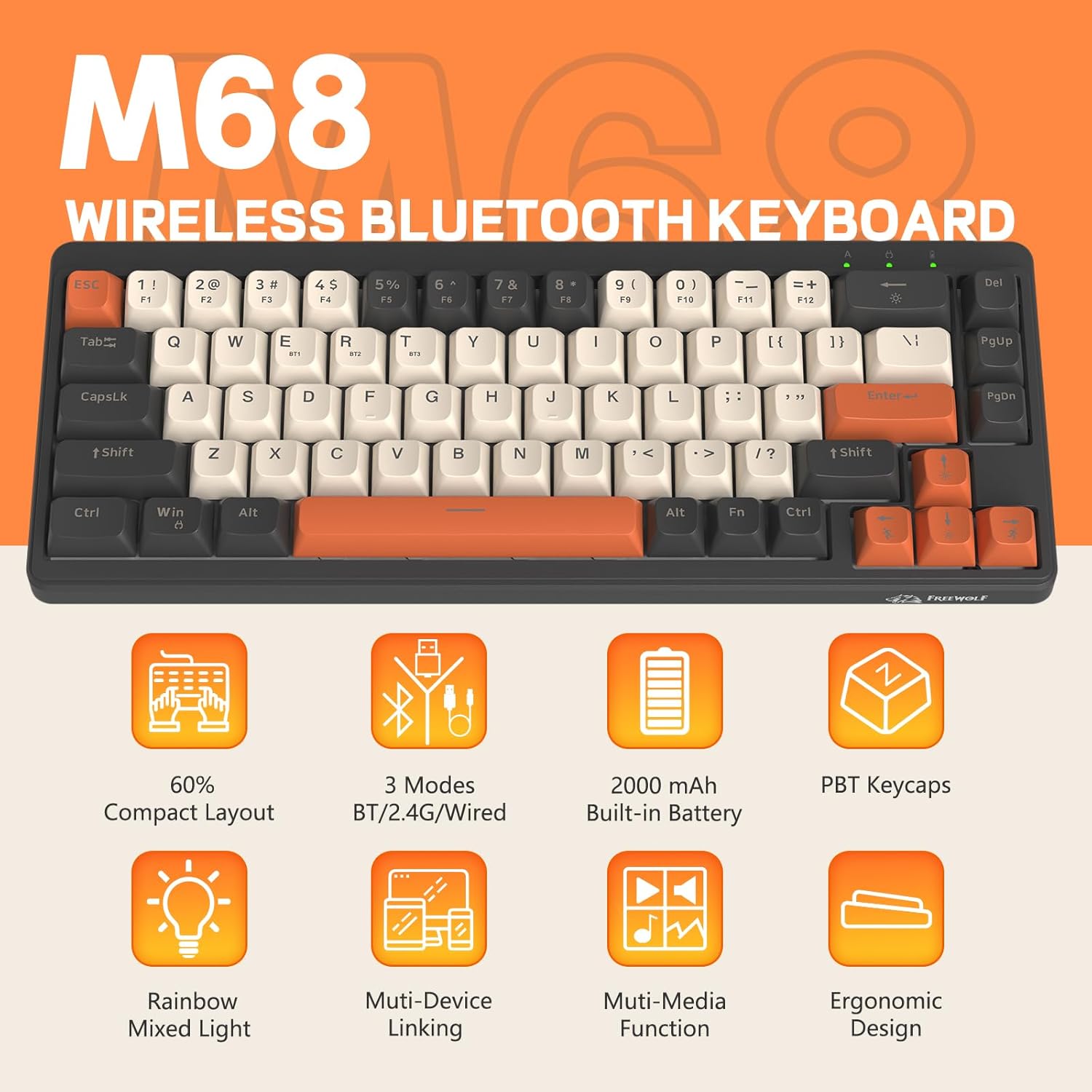
2 pav. Baigtaview of FREEWOLF M68 key features.
3. Sąranka ir prijungimas
3.1. Tri-Mode Connection Overview
The M68 keyboard supports three connection methods: wired via USB-C, 2.4GHz wireless via a USB receiver, and Bluetooth 5.0. You can switch between these modes using the dedicated switch on the keyboard.

3 pav. Išsamus view of the 3-mode connection options.
3.2. Laidinis ryšys
- Raskite USB-C prievadą klaviatūroje.
- Prijunkite pateiktą USB-C laidą prie klaviatūros, o kitą galą – prie kompiuterio USB prievado.
- Ensure the mode switch on the keyboard is set to the wired (USB) position.
- Jūsų sistema automatiškai atpažins klaviatūrą.
3.3. 2.4 GHz belaidis ryšys
- Locate the 2.4GHz USB receiver (often stored in a compartment on the keyboard).
- Prijunkite USB imtuvą prie laisvo kompiuterio USB prievado.
- Set the mode switch on the keyboard to the 2.4GHz wireless position.
- Klaviatūra turėtų prisijungti automatiškai. Jei ne, paspauskite FN + R. pradėti poravimą.
3.4. „Bluetooth“ ryšys
The M68 can connect to up to three Bluetooth devices simultaneously.
- Set the mode switch on the keyboard to the Bluetooth position.
- To enter pairing mode for a specific channel (BT1, BT2, or BT3), press and hold FN + Q (BT1 atveju), FN + W (skirta BT2) arba FN + E (for BT3) until the corresponding indicator light flashes rapidly.
- On your device (PC, laptop, tablet, phone), open Bluetooth settings and search for "FREEWOLF M68".
- Pasirinkite klaviatūrą, kurią norite susieti. Prijungus indikatoriaus lemputė ims šviesti nuolat.
- Norėdami perjungti susietus „Bluetooth“ įrenginius, paspauskite FN + Q/W/E trumpai.
4. Operacija
4.1. Apšvietimo valdymas
The M68 features customizable rainbow LED backlighting.
- FN + Grįžimo klavišas: Toggle backlight on/off or switch between constant and breathing modes.
- FN + rodyklė kairėn: Sumažinkite foninio apšvietimo greitį.
- FN + rodyklė dešinėn: Padidinkite foninio apšvietimo greitį.
- FN + rodyklė aukštyn: Padidinkite foninio apšvietimo ryškumą.
- FN + rodyklė žemyn: Sumažinkite foninio apšvietimo ryškumą.

Figure 4: Backlight adjustment key combinations.
4.2. Ergonomiškas reguliavimas
The keyboard includes double leg braces on the back to adjust the typing angle for comfort.
- Flip the keyboard over to access the leg braces.
- Sureguliuokite dutage leg braces to achieve your preferred typing angle (flat, one stage, or two stages).

Figure 5: Ergonomic angle adjustments.
4.3. Baterijos valdymas
The keyboard has a built-in 2000mAH rechargeable battery.
- Įkrovimas: Connect the keyboard via the USB-C cable to a power source (computer USB port or wall adapter). The charging indicator will show status.
- Baterijos veikimo laikas: Up to 60 hours with backlight on, and up to 200 hours with backlight off.
- Energijos taupymas: The keyboard will enter sleep mode after a period of inactivity to conserve battery. Press any key to wake it up.

Figure 6: Battery capacity information.
5. Priežiūra
- Valymas: Use a soft, dry cloth to clean the keyboard surface. For keycaps, you may use a slightly damp audiniu. Venkite per didelės drėgmės.
- Klaviatūros dangtelio nuėmimas: If necessary, use a keycap puller to carefully remove PBT keycaps for deeper cleaning or replacement.
- Saugykla: Klaviatūrą laikykite vėsioje, sausoje vietoje, apsaugotoje nuo tiesioginių saulės spindulių ir ekstremalių temperatūrų.
- Venkite skysčių: Do not expose the keyboard to liquids to prevent damage to internal components.
6. Problemų sprendimas
| Problema | Galima priežastis | Sprendimas |
|---|---|---|
| Klaviatūra nereaguoja (laidinė) | Loose cable connection, incorrect mode. | Ensure USB-C cable is securely connected. Check if the mode switch is set to wired. Try a different USB port. |
| Klaviatūra nereaguoja (2.4 GHz) | USB receiver not connected, incorrect mode, pairing issue. | Ensure USB receiver is plugged in. Set mode switch to 2.4GHz. Re-pair by pressing FN + R.. Try a different USB port for the receiver. |
| Klaviatūra nereaguoja („Bluetooth“) | Not paired, incorrect mode, device Bluetooth off. | Ensure device Bluetooth is on. Set mode switch to Bluetooth. Enter pairing mode (FN + Q/W/E) and re-pair. Forget the device on your system and re-pair. |
| Foninis apšvietimas neveikia arba užstringa | Backlight off, low battery, software glitch. | Paspauskite FN + Backspace to toggle. Charge the keyboard. Try resetting the keyboard (refer to advanced functions if available, or disconnect/reconnect). |
| Raktai neregistruojami arba įvedami du kartus | Dust/debris under keycap, switch issue. | Carefully remove keycap and clean. If issue persists, contact support. |
7. Specifikacijos
| Modelis | M68 |
| Prekės ženklas | LAISVAS VILKAS |
| Ryšys | Wired (USB-C), 2.4GHz Wireless, Bluetooth 5.0 |
| Raktų išdėstymas | 60 % (67 klavišai) |
| Keycap medžiaga | PBT (polibutileno tereftalatas) |
| Foninis apšvietimas | Rainbow LED (RGB) |
| Baterijos talpa | 2000 mAH |
| Suderinami įrenginiai | Laptop, PC, Tablet (Windows, Mac, Linux, iOS, Android) |
| Gaminio matmenys | 32.51 x 12.5 x 3.99 cm |
| Svoris | 600 g |
| Ypatingos savybės | Ergonomic (adjustable angles), Backlit |
8. Garantija ir palaikymas
For warranty information, technical support, or customer service inquiries, please refer to the contact information provided with your purchase or visit the official FREEWOLF websvetainę.
Prašome išsaugoti pirkimo įrodymą bet kokiems garantiniams reikalavimams.


